Apple HomeView Hands-On Review: Is the $300 Smart Home Hub Worth It?

Apple launches the $300 HomeView home hub; reviewers say the first generation has muddled positioning and recommend skipping it for the second.
Apple unveils the new home hub HomeView, featuring a seven-inch touchscreen, A18 chip, and $300 pricing, competing with the Google Nest Hub Max and Amazon Echo Hub. After a day of hands-on time, the reviewer concludes the first generation is a skip. The desktop and wall-mounted versions cost the same, but the wall-mounted version lacks a woofer and doesn't include a mounting adapter, costing an extra $60 to $130. Running an all-new system with no App Store and no third-party native apps, it relies only on CarPlay casting and AirPlay. Facial recognition account switching is the standout feature, but it depends on a single camera with no infrared, and voice recognition isn't supported.
Apple has finally filled in the most conspicuous missing piece in its smart home ecosystem. At a small home-focused event, Apple refreshed the HomePod Mini 2 (new colors, a glowing top screen that displays album art) and the Apple TV 4K (adding far-field microphones and a new remote with a speaker), while also unveiling an entirely new home hub device — the HomeView.
The name once again caught everyone off guard, but the product positioning is clear: a touchscreen device that sits in your home as a dashboard or hub, going head-to-head with the Google Nest Hub Max and Amazon Echo Hub. After a full day of in-depth hands-on time, a YouTube reviewer reached a rather blunt conclusion — for most people, the first-generation HomeView is a skip.
Hardware Design and Pricing: Same Price, Different Treatment
The HomeView features a seven-inch square touchscreen mounted on a base that matches the body color, with a built-in speaker and a top-mounted camera. The screen can be tilted up and down slightly on a small arm, and the body is primarily metal. Some see echoes of the iMac G4's design here, especially the retro feel of that semicircular base.
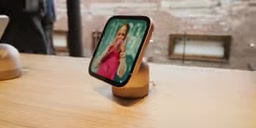
On pricing, the HomeView costs $300, higher than the Google Nest Hub Max at $229 and the Amazon Echo Hub at $179. That price gap alone isn't necessarily a dealbreaker, but the details that follow are puzzling.
The HomeView comes in two versions: a desktop version with a metal base and a wall-mounted version, both priced exactly the same. The problem is that the speaker system is split between the screen portion and the base portion — the screen houses dual speakers, while the base conceals a woofer for fuller sound. The wall-mounted version has no base, so naturally no woofer, and its audio quality is inherently a notch weaker. More baffling still, the wall-mounted version doesn't include a mounting adapter by default; users need to buy one separately: a USB-C wall adapter for $60, an AC adapter for $80, or a PoE adapter for $130.
In other words, the wall-mounted version costs the same but has worse audio, requires extra spending on installation, and comes in only two colors — silver and gray. The reviewer put it bluntly: "Why are they the same price? I can't figure it out."
Software Experience: A Hybrid of Apple Watch and iPhone
The HomeView runs on an A18 chip and a brand-new operating system — probably called HomeView OS, though Apple hasn't officially named it. It's not iOS, and it's not iPadOS, but using it feels familiar at every turn.
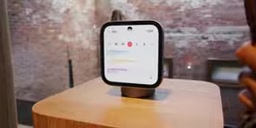
Watch face customization is lifted straight from the Apple Watch: complications, modular watch faces, the whole thing — it's essentially a "giant Apple Watch." Swiping up from the bottom opens an app drawer where you can customize widgets, with logic that again resembles the iPhone home screen. But there's one key limitation: there's no App Store, and no support for any third-party native apps.
That said, the HomeView supports the CarPlay standard, and apps that comply with it can cast content from an iPhone to the screen. Third-party services like Spotify and SoundCloud can't run natively, but they can play through AirPlay or CarPlay casting. Additionally, like the HomePod, you can tap an iPhone to hand off music, Safari links, or even FaceTime calls to the HomeView to continue there.
The CarPlay standard was originally designed for in-car scenarios, defining a casting protocol between an iPhone and an external display that lets compliant apps render their interfaces on a non-phone screen. The HomeView borrows this mechanism, effectively running third-party apps inside a "virtual head unit" environment. AirPlay, meanwhile, is Apple's wireless streaming protocol — it only transmits audio and video content, not an interactive interface, so apps like Spotify cast via AirPlay can't be directly controlled on the HomeView screen. Together, the two form the entirety of the HomeView's channels for accessing external content without an App Store, which also explains why it can only "play" third-party services rather than "run them natively."
Quick Account Switching: The Smartest Feature, But With Two Major Flaws
The HomeView's core selling point is automatically switching personal account environments based on who walks up to the device.

The top camera identifies who's approaching via facial recognition, and once recognized, automatically pulls up that user's personal information — messages, calendar, and so on. If no one is recognized, the device remains usable; it just won't display personal data (basic functions like timers, weather, and music playback are unaffected). This feature supports up to six people, and for multi-person households it genuinely solves a long-standing pain point.
But there are two notable limitations:
- It's not full Face ID. It relies solely on a single 12MP Center Stage camera, with no infrared or depth sensor. The system supplements this by checking whether a nearby iPhone or Apple Watch was recently unlocked, as a second identity confirmation. In theory, photo spoofing would be hard to pull off, but recognition performance in low light is questionable.
- No voice recognition. This means that when you're sitting on the couch, out of the camera's view, you can't get personalized responses via voice. By comparison, the Google Nest Hub Max's Voice Match, while not always accurate, at least offers that interaction method.
Center Stage is a camera feature Apple introduced on the iPad and select external displays, using a wide-angle lens and automatic cropping algorithms to keep the user centered in the frame. The 12MP camera atop the HomeView is based on this hardware, but it lacks the dot projector and infrared lens that Face ID requires. Full Face ID builds a depth map of the face by projecting tens of thousands of invisible dots, enabling it to work in complete darkness and resist photo attacks; the HomeView, by contrast, relies only on ordinary RGB images for facial comparison, and in low light, increased image noise makes feature extraction harder, degrading both recognition rate and security. Apple's use of a "nearby unlocked iPhone or Apple Watch" as auxiliary verification essentially shifts the security burden onto the trusted device the user carries.
Screen, Audio, and Those "Boomerang" Design Choices
The screen itself is decent: an LCD panel with a peak brightness of 500 nits, able to dim down to 0.3 nits, and True Tone support. Low brightness matters especially for bedroom scenarios — this "overpriced alarm clock" won't be harsh on the eyes at night. The reviewer judged the refresh rate to be 60Hz.

One telling detail is the thick black bezels. Back when Apple was promoting the iMac, it deliberately switched the bezels to white, emphasizing that it was a "friendly family computer" suited to any spot in the home. Now the HomeView has gone back to black bezels, and the reviewer couldn't help but remark: "Think about it."
On audio, the base's woofer delivers acceptable low-frequency performance, but the maximum volume is on the low side. The upside is that even at higher volumes there's no noticeable distortion. The device has no built-in battery and becomes completely unusable once unplugged, but at least it uses a USB-C port, which in theory improves portability.
Who Exactly Is This Product For?
After spending a full day using the HomeView, the reviewer still couldn't pin down its ideal user profile.
For casual users who don't care about price, just want a device that fits into the Apple ecosystem, and value iPhone integration, it might be fine. But for enthusiasts already building out a smart home, Apple's ecosystem still lags far behind Amazon and even Google, and "that screen in the kitchen" isn't all that different in value across the three platforms.
Apple is indeed playing catch-up: partnering with LG to launch Apple-compliant doorbells, thermostats, and security cameras, with the HomeView serving as the hub for these devices. But the problem is that once the novelty wears off, this device is likely to become just another LCD screen with a speaker in the corner — occasionally asking for music, setting a timer, or having Siri look something up. It doesn't do any of that badly, but it doesn't offer unique value sufficient to justify the extra price.
The first-generation product feels more like a necessary placeholder. The reviewer's stance: wait for the second generation — maybe then it'll be more worth it.
Background Notes
True Tone is Apple's adaptive color temperature technology, which uses an ambient light sensor to detect the color temperature of surrounding light and dynamically adjusts the screen's white balance so displayed content looks more natural under different lighting. For a device like the HomeView that often sits in bedrooms and kitchens, True Tone paired with a minimum brightness of 0.3 nits can significantly reduce eye strain when checking the time at night or looking at the alarm. A peak brightness of 500 nits is sufficient for indoor scenarios, but if placed on a kitchen counter near a window with strong daytime light, screen content may appear somewhat dim. A 60Hz refresh rate isn't as smooth as 120Hz ProMotion when swiping through touch interactions, but for a home hub focused mainly on information display with infrequent interaction, this trade-off has limited impact on the daily experience.
One-line Summary
Apple launches the $300 HomeView home hub, and reviewers find the first generation's positioning muddled, recommending you skip it and wait for the second.
Paragraph Summary
Apple unveils the new home hub HomeView, featuring a seven-inch touchscreen, A18 chip, and $300 pricing, taking on the Google Nest Hub Max and Amazon Echo Hub. After a day of hands-on time, the reviewer concludes the first generation is a skip. On hardware, the desktop and wall-mounted versions cost the same, but the wall-mounted version lacks a woofer, doesn't include a mounting adapter, and requires an extra $60 to $130. On software, the HomeView runs an all-new system with no App Store and no third-party native apps, relying only on CarPlay casting and AirPlay playback. Facial recognition for automatic account switching is the standout feature, supporting up to six people, but it depends on a single camera with no infrared, raising questions about low-light performance, and it doesn't support voice recognition. The reviewer finds its positioning muddled, with no clear ideal user base.
Related articles

WorkBuddy Full Tutorial: Build an AI Office Automation Agent from Scratch
A complete WorkBuddy tutorial: installation, three working modes, multimodal picture book video practice, expert team agent building, and workflow configuration for low-cost AI office automation.

WorkBuddy Agent Complete Guide: From Beginner to Automation in 7 Days
Based on Bilibili's 256-episode WorkBuddy masterclass, this systematically breaks down Tencent's AI office workbench core capabilities: Agent principles, Skill encapsulation, cross-platform connectors, scheduled automation, knowledge bases, and zero-code development, with learning path recommendations.

8 AI Accounts, 7 Failed: An Honest Review of Using AI to Get Work Done
Only 1 of 8 AI-run Bilibili accounts succeeded. We break down the real difference between "performing AI" and "using AI to get work done."