200KB Minimalist CI/CD Tool: A Lightweight Deployment Solution for Indie Developers to Ditch Jenkins

A 200KB Python/Flask CI/CD tool that gives indie developers automated deployment without Jenkins overhead.
This article introduces a 200KB minimalist CI/CD deployment tool built with Python and Flask, designed specifically for indie developers on low-spec servers. It eliminates the need for resource-heavy Jenkins or network-dependent GitHub Actions by using an event-driven Webhook listener that automatically deploys code on every git push — fully transparent, decentralized, and set up in under five minutes.
The Deployment Pain Every Indie Developer Knows
For every indie developer, writing code has never been the most painful part — deployment is.
Picture this: you've stayed up late fixing an incredibly tricky bug, pushed it to GitHub with a satisfied sigh, and then the real ordeal begins. Open an SSH terminal, authenticate, navigate to the project directory, pull the latest code, manually resolve any conflicts, then restart the service.
For developers who commit twenty-plus times a day, this ritual repeats endlessly — just to confirm whether "that bug is actually fixed." Hours dissolve into this mindless repetition. That frustration is exactly what drove one indie developer to hand-craft a minimalist CI/CD deployment tool.
What is CI/CD? CI/CD (Continuous Integration / Continuous Delivery) is a cornerstone practice in modern software engineering. Continuous Integration means developers frequently merge code into the main branch, with each merge automatically triggering builds and tests. Continuous Delivery extends this by automatically deploying tested code to production. Rooted in the agile movement, the goal is to shorten the cycle from code commit to live deployment while reducing human error — the tool introduced here is a minimalist implementation of these ideas tailored for individual developers.

Why Not Just Use Jenkins or GitHub Actions?
When faced with deployment friction, the natural instinct is: why not just use Jenkins or GitHub Actions?
The honest answer: they're enterprise-grade weapons, and for indie developers, the barrier and overhead are simply too high.
Jenkins: Resource Consumption Is a Deal-Breaker
Installing Jenkins requires setting up a specific Java environment — not exactly a low bar. The real killer, though, is resource consumption. Indie developers typically run a single, modest server, and Jenkins can devour memory just by firing up the JVM (Java Virtual Machine), potentially grinding the entire machine to a halt.
Here's why: to guarantee cross-platform compatibility and runtime optimization, the JVM pre-allocates a large chunk of heap memory at startup — by default, roughly one-quarter of physical RAM. On a 1GB server, that's already 256MB or more. Add Jenkins' ongoing overhead from loading plugins, scheduling jobs, and rendering the Web UI, and you're looking at 512MB–1GB of RAM usage. For a low-spec personal VPS, this is essentially a knockout blow before your actual services even get a chance to run.
GitHub Actions: Platform Lock-In and Network Constraints
GitHub Actions is GitHub's built-in automation workflow platform. Configuration files are stored as YAML in the .github/workflows/ directory, and it's genuinely powerful. However, it comes with significant platform lock-in and non-trivial migration costs.
Its Runners (execution nodes) come in two flavors — GitHub-hosted and self-hosted. GitHub-hosted Runners mean your entire build process depends on GitHub's servers, which for developers in China means unstable network access and a constant risk of timeouts or failures. Self-hosted Runners can solve the network problem, but setting one up is no less complex than the approach described in this article, and you're still tethered to the GitHub platform.
The bottom line: high resource consumption and strong network dependencies make mainstream CI/CD solutions a poor fit for small server setups.
Three Core Design Goals of the 200KB Minimalist Tool
Built in direct response to these pain points, this tool was designed around three core goals — the key differentiators from heavyweight CI/CD solutions.
Goal 1: Extreme Lightness
The tool is built on Python and Flask, with all files totaling just over 200KB. Flask is an ultra-lightweight micro web framework in the Python ecosystem — its core library is only a few hundred KB, and startup memory usage typically stays under 30MB. That's a world apart from Jenkins and its hundreds of megabytes.
The tool operates in a fully event-driven mode — it sleeps silently until an external event (an HTTP request from a Webhook) wakes it up to execute the deployment logic, then immediately returns to standby. Resource usage stays minimal, making it comfortable on virtually any low-spec server, permanently solving the "runs out of memory on startup" problem.
Goal 2: Decentralized and Highly Extensible
This is the tool's most elegant design decision. The core is architected as a decentralized listener — the main program can live anywhere on the server without polluting your project's code directory.
Whether you're running one project on a single server or juggling a dozen projects across multiple machines, it adapts cleanly without interference.
Goal 3: Fully Transparent Code — No Black Boxes

The tool provides the core listener and only ships the deployment execution script as a template. Developers retain full rights to inspect and modify it. No platform lock-in, no new syntax to learn, no repository pollution, no dependency on any specific network environment — this is what truly owning your deployment pipeline looks like.
Build a Fully Automated CI/CD Pipeline in Five Minutes
The entire workflow is designed to be remarkably simple — you can go from zero to automated deployment in under five minutes. The underlying mechanism is: local git push → GitHub receives the push and sends an HTTP callback to your server via Webhook → the server's listener picks up the signal and runs the deployment script. Webhooks are an HTTP-based event notification mechanism with near-zero overhead compared to polling, making them a natural fit for this lightweight deployment model.
Step 1: Clone the Project and Install Dependencies
SSH into your server and clone the tool into your home directory to keep things tidy. Dependencies are minimal — run the install script and you're done in seconds.
Step 2: Register the Projects You Want to Monitor
Open the main program and find the project registry — this is the most critical configuration step:
- The key name on the left must exactly match your GitHub repository name
- Enter the absolute path to the project on your server (absolute paths only)
- Specify the branch name to monitor
- Add more projects below as needed

Step 3: Write and Authorize the Deployment Script
Create a deployment script inside your project directory. The core logic follows the classic "three-step code sync" pattern:
- Force-navigate to the project directory (absolute path)
- Discard all local changes and hard-pull the latest code from GitHub
- Kill the old process and restart the service
The key command in step two is typically git fetch origin combined with git reset --hard origin/<branch>. The git reset --hard command forces the working tree, staging area, and HEAD pointer to all align to the specified commit, discarding any uncommitted local changes. In a production server context, this is both reasonable and safe — the server's code should always mirror the remote repository, and any changes should be managed through version control.
Once the script is created, don't forget to run chmod +x to grant execute permissions — skip this step and the script simply won't run.
Steps 4 & 5: Run in the Background and Configure the Webhook
Return to the main program directory and launch the listener as a background process. It will silently await push signals on port 5050. Finally, go to your GitHub repository's Settings page, configure a Webhook, and enter your server's public IP and port as the callback URL. Once you refresh the page and see a green checkmark, your fully automated deployment pipeline is live.
Five Common Pitfalls and How to Fix Them
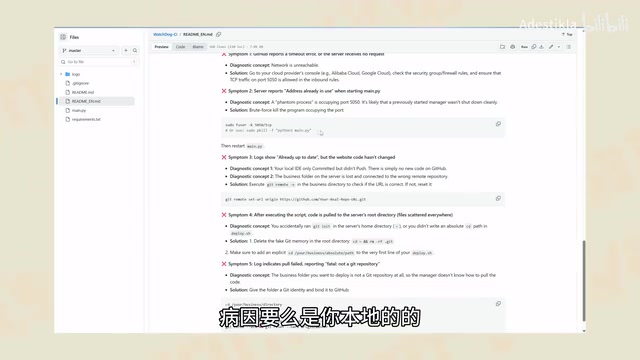
Here are the most common issues you'll encounter during setup and how to resolve them:
- GitHub reports a timeout, server is unresponsive: This is almost always a network firewall issue or a blocked port. Pay special attention: cloud servers (such as Alibaba Cloud ECS or Tencent Cloud CVMAd) have a Security Group layer managed by the cloud provider, sitting above the OS-level firewall. By default, only ports like 22, 80, and 443 are open. Even if your program is listening on port 5050, incoming traffic gets blocked by the Security Group before it ever reaches the OS. You'll need to log into your cloud provider's console and manually add an inbound TCP rule for port 5050.
- Server startup fails with a port-in-use error: A "ghost process" from a previous test run is likely still occupying port 5050. Force-kill the offending process and restart.
- Logs show success, but the website code hasn't updated: Check whether you only ran
git addlocally without completing thecommitandpush. Also verify that the remote address bound to the server repository is correct. - Code gets pulled into the server's root directory: The deployment script is missing the absolute-path
cdcommand. Delete the incorrectly generated folder, add the correct path to the script, and re-trigger the deployment. - The project folder isn't a Git repository: Navigate into the project directory and run
git init, bind the remote address, and complete the initial pull to initialize it.
Closing Thoughts: Give Your Time Back to Real Creation
The value of this 200KB minimalist CI/CD tool is, at its core, a workflow declutter for indie developers. It doesn't chase enterprise-grade complexity — it precisely addresses the core pain points of individual developers: limited server resources, frequent iteration cycles, and a distaste for black-box tools.
As the tool's author put it: "We got into development to create things, not to waste time on meaningless, repetitive deployments."
Beyond Jenkins and GitHub Actions, this open-source, transparent, event-driven, and genuinely lightweight automated deployment solution fills a real gap for individual developers. If you're maintaining a personal blog, an indie project, or a small API service, it's well worth a serious look.
Key Takeaways
Related articles

DeepCell: One-Click AI Generation of Documents, Spreadsheets, and Slides
DeepCell tops Product Hunt with one-click generation of documents, spreadsheets, and slides, using the .deepcell format for linked updates, designed for System 2 tasks like modeling and sales reviews.

Doneas: 15-Minute Daily Accountability Calls That Keep Indie Developers From Procrastinating
Doneas is a daily accountability tool for indie developers: plan tasks on Monday, join a 15-minute call with five builders each day, and log deliveries on a public progress page. This article analyzes its core mechanics, effectiveness, and potential issues around retention and matching.

Fastlane 2.0: Fully Automated AI Ad Campaigns, From Creative to Optimization
Fastlane 2.0 is an AI ad automation tool: enter your website and it learns your brand, generates video and image ads, and runs and optimizes them on Meta, TikTok, Instagram, and YouTube.