4.1MB Native Mac Screen Recorder LeanTake: Zero-Wait Export
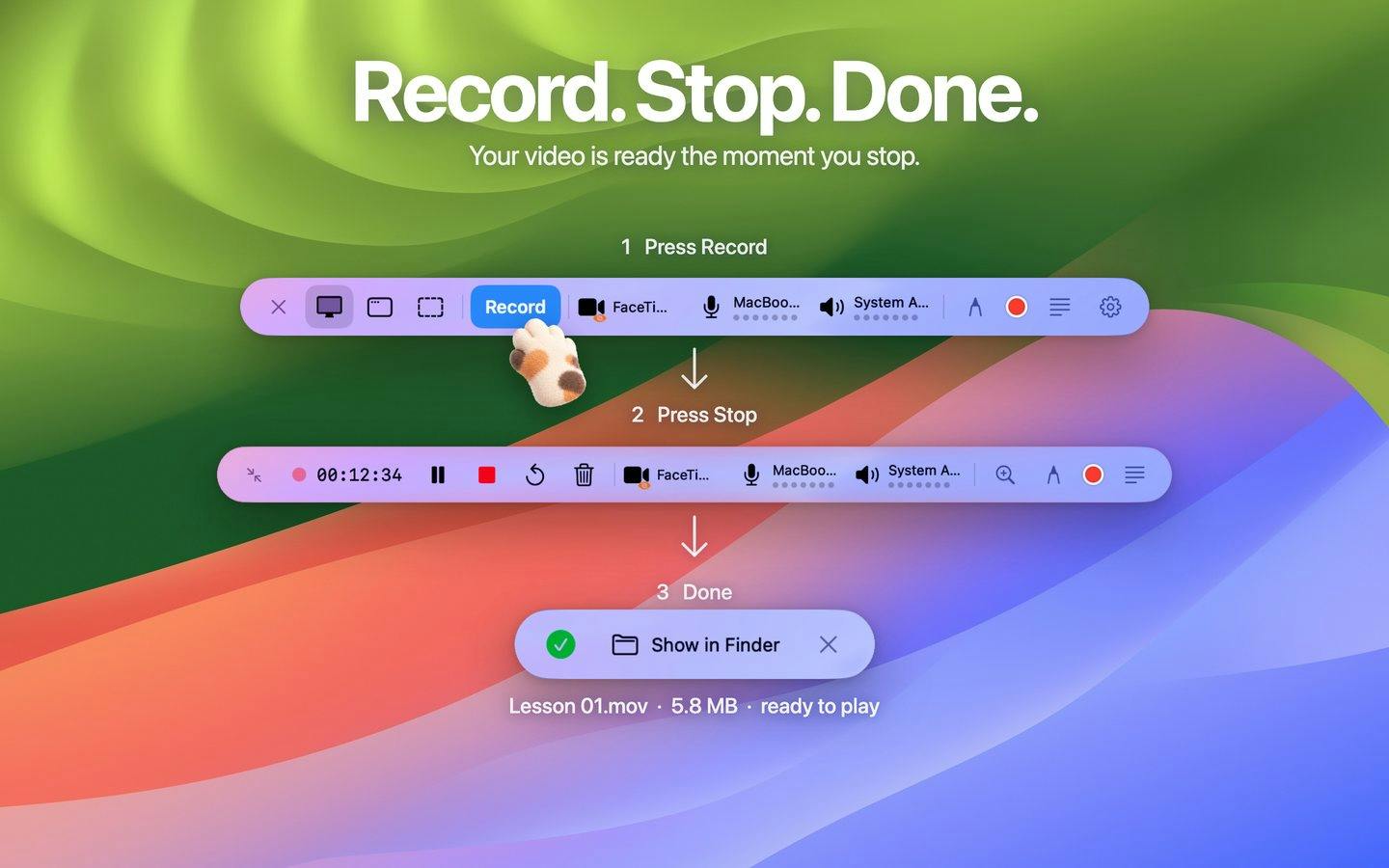
LeanTake delivers zero-wait Mac screen recording in a 4.1 MB package with real-time hardware encoding and presentation tools.
LeanTake is a lightweight screen recorder for macOS 15+ and Apple Silicon with an installer of just 4.1 MB, written in pure Swift and built on Apple's ScreenCaptureKit. Its core selling point is real-time hardware encoding: video is encoded synchronously during recording, so a usable mov file is generated the moment you press stop, eliminating the traditional "record then transcode" wait. It also offers presentation features like a 12-color real-time pen, area magnifier, 9 kinds of 3D cat paw cursors, and an invisible teleprompter excluded from the footage. The free version is available permanently with no watermark or login, while Pro is a $14.99 one-time purchase. It forgoes Intel Macs and older systems to focus on the Apple Silicon ecosystem, and has gained some attention on Product Hunt.
Why Mac Users Need a Lighter Screen Recording Solution
Mac's built-in screen recording is buried deep and offers few options, while third-party tools tend to be bloated—often with installers over a hundred MB, and after recording you still have to wait for a progress bar to slowly render. A tool called LeanTake appeared on Product Hunt, shrinking its installer to 4.1 MB and promoting "zero-wait export" as its selling point. According to its Product Hunt page, it's written entirely in Swift, built on Apple's ScreenCaptureKit framework, and optimized specifically for macOS 15+ and Apple Silicon.
What does that size mean? It's smaller than the icon asset bundle of many Mac apps. For a screen recording tool, being lightweight is itself a product statement: takes up no space, doesn't hog resources, ready to use whenever you open it.
ScreenCaptureKit is the screen capture framework Apple introduced in macOS 12.3, replacing older interfaces like CGWindowListCreateImage. It provides window-level, application-level, and display-level capture capabilities, supports high resolution, HDR, and synchronized audio capture, and allows developers to precisely specify which windows to include or exclude—this is exactly the technical foundation for LeanTake's "invisible teleprompter" feature. Compared to older approaches, ScreenCaptureKit is scheduled at the system level, has lower performance overhead, and can connect directly to the hardware encoding pipeline. However, some of its advanced features (such as certain filter configurations) require newer system versions, which is one reason LeanTake requires macOS 15+.
Real-Time Hardware Encoding: Press Stop and Your Video Is Ready
The core technical design of LeanTake is real-time hardware encoding. The workflow of traditional screen recording software is "record first, transcode later"—after stopping the recording, you have to wait for the software to re-encode the raw data into a mov file, and this time grows linearly with recording length. LeanTake leverages macOS's hardware encoding capabilities to complete encoding synchronously during recording, so the moment you stop recording, a usable mov file has already been generated.
This difference isn't very noticeable for short recordings, but when recording tutorials, demos, or long meeting notes, the time saved by "zero-wait export" could be enough for a cup of coffee. For content creators and developers, this instantly-available experience fits more naturally into a "record and publish right away" workflow.
Hardware encoding refers to using a dedicated video encoding unit in the chip (such as the media engine in Apple Silicon) rather than general-purpose CPU cores to perform video compression. Apple's VideoToolbox framework encapsulates these capabilities, allowing developers to feed captured raw frames directly into the hardware encoder and output H.264 or HEVC bitstreams in real time. The advantages of hardware encoding are low power consumption, low latency, and no CPU compute usage, making it suitable for long recordings without affecting foreground application performance. Traditional "record then transcode" software workflows often save a lossless intermediate file first and then encode it all at once, with time cost growing linearly with video length; real-time hardware encoding moves this step forward into the recording process, so the file is ready when you stop—this is exactly the principle behind "zero-wait export."
More Than Screen Recording: Clever Presentation Features
Beyond recording, LeanTake adds a set of presentation-oriented interactive features, showing that the product team has given special thought to the "explainer video" scenario:
- 12-color real-time pen: annotate directly on screen while recording, ideal for teaching and product demos
- Area magnifier: zoom in on local screen details, useful when explaining code or small text
- 9 kinds of 3D cat paw cursors: make the cursor more noticeable in videos, with a touch of personal flair
- Invisible teleprompter: the teleprompter window is excluded from the recorded footage—viewers can't see the script, only the recorder can
The teleprompter's "window exclusion" is a thoughtful detail—it requires the screen recorder to precisely control the capture range rather than simply recording the full screen. This shows that LeanTake has done targeted development on ScreenCaptureKit's window-level capture capabilities.
Window-level capture is fundamentally different from full-screen recording: the former captures only the content of a specified window and can precisely exclude other interface elements (such as a teleprompter, notification pop-ups, or desktop icons). ScreenCaptureKit uses SCContentFilter to let developers define the capture range by window, application, or display, and supports setting an exclusion list in the stream configuration. LeanTake's invisible teleprompter leverages exactly this mechanism, filtering the teleprompter window out of the capture source so viewers never see the script in the final video. This capability is highly valuable for teaching and presentation scenarios, and it also requires developers to have a deep understanding of the framework's filtering logic rather than simply calling a full-screen recording API.
Pricing and Positioning: Free to Use, One-Time Purchase for Pro
According to its Product Hunt page, LeanTake's free version is available permanently, with no watermark and no login required. The Pro version is priced at $14.99 as a one-time purchase. This pricing strategy seems restrained in a tool market flooded with subscriptions, and it aligns with the expectations of users of lightweight tools—no account binding, no subscriptions, pay once to unlock advanced features.
Based on Product Hunt's categories, LeanTake is classified under Mac, Productivity, and Developer Tools, indicating that its target users lean toward developers and productivity tool enthusiasts. With 83 votes, 3 comments, and a ranking of 10th, it's a moderately popular new product on Product Hunt, though not quite a breakout hit—future word of mouth will depend on the actual user experience.
The Trade-offs of a Lightweight Screen Recorder
LeanTake's approach is clear: don't try to be an all-in-one editor, just make the "record—export" chain as short as possible, then differentiate with presentation interactions. The 4.1 MB size and real-time hardware encoding are its technical moat, while free + one-time purchase is its customer acquisition strategy.
One thing to note: being optimized specifically for macOS 15+ and Apple Silicon means it has given up on Intel Macs and users of older systems. This is a pragmatic choice for a small team focusing its resources, but it also limits the potential user pool. For Mac users who regularly need to record screen explanations and are fed up with "record and wait for export," LeanTake is worth trying out in their toolkit.
Related articles

Prospero: A Lightweight Native AI Coding Tool Built with ImGui
Prospero is a bloat-free native AI coding tool built with ImGui, emphasizing lightweight design, high performance, and low dependencies. This article analyzes its design philosophy, technical choices, and the divergence between platformization and toolization in AI coding tools.

WebRTC Abused: New Variant of Credit Card Skimming Scripts on Shopping Sites
Security researchers found skimming scripts on popular shopping sites using WebRTC data channels to exfiltrate credit card data. This article analyzes the technical原理, differences from traditional Magecart attacks, and defense strategies for e-commerce platforms in third-party script governance and CSP policies.

Single GB10 Card Hits 101 tok/s: Inkling 2 Mini Performance Tested on vLLM
A developer shared on Hacker News running Inkling 2 Mini with vLLM on a single GB10 at 101 tok/s. This article analyzes the technical context, the significance of vLLM with small models on single cards, and caveats for interpreting tok/s metrics.