4 .NET Chat Image Generation Wiring Mistakes and How to Fix Them

Breaking down four silent-failure wiring mistakes in .NET chat pipeline image generation and how to catch them with offline tests.
Based on hands-on experience with Microsoft.Extensions.AI 10.10, this article analyzes four common wiring mistakes when integrating image generation into a chat pipeline: reversed middleware order preventing the generator from being called, misusing HostedImageGenerationTool as a feature toggle, failing to control historical image data pushed back into the context window, and looking for generated images in the wrong place. Each mistake comes with a silent runtime failure; the article provides an offline testing strategy that asserts generator call counts and image lookup results to catch problems without an API key. It ends with a pre-launch checklist emphasizing that when there are no compile-time warnings, you need protocol-level tests.
When integrating image generation into a chat pipeline, the code compiles fine but fails silently at runtime: the user asks for an image, the assistant replies with text but no image, and no exception is thrown. Based on hands-on experience with Microsoft.Extensions.AI 10.10, this article breaks down four common wiring mistakes, their runtime symptoms, and how to catch them with offline tests.
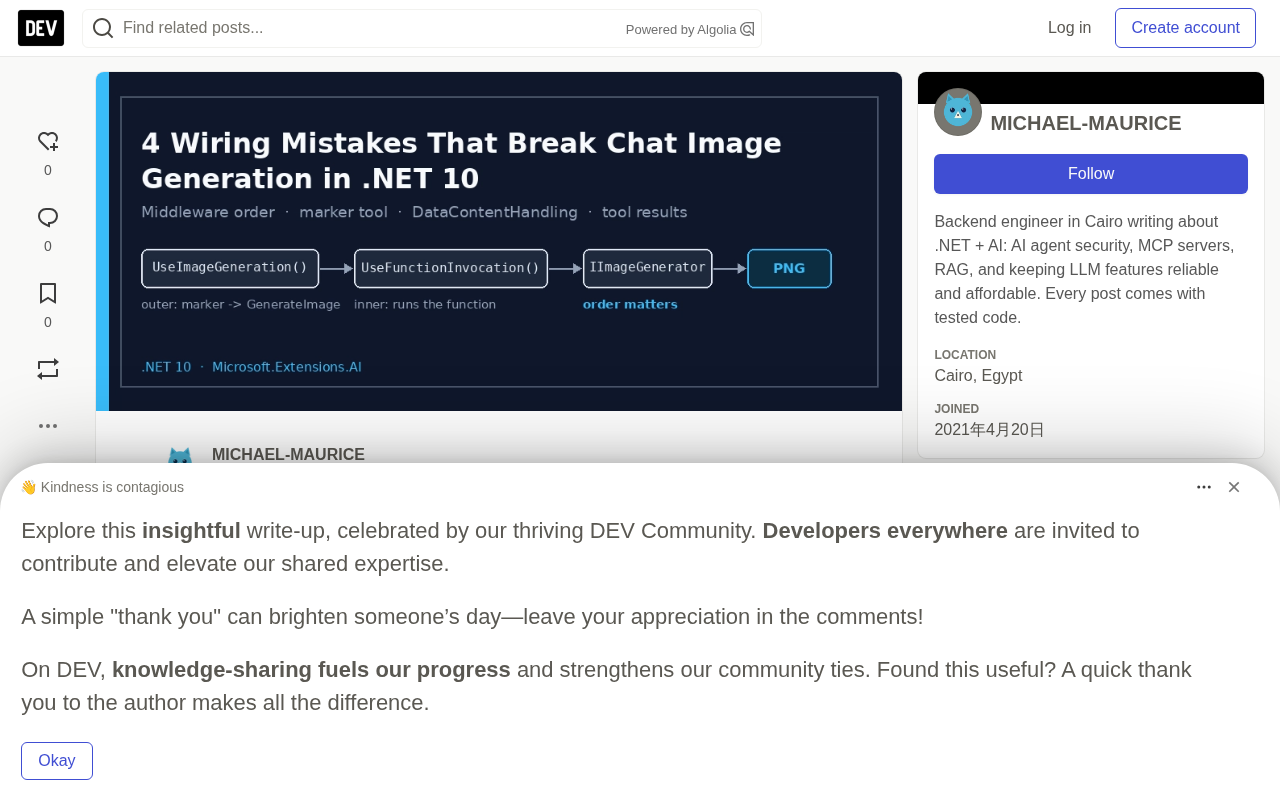
Core Components at a Glance
The API design is simple, consisting of three parts:
IImageGenerator: performs the actual generation (takes a prompt, outputs image bytes or a URI).HostedImageGenerationTool: placed inChatOptions.Tools, it marks "image generation is allowed in this conversation."UseImageGeneration(): adds theImageGeneratingChatClientmiddleware, which replaces the marker with real functions the model can call:GenerateImage,EditImage, andGetImagesForEdit.
Each component has a way of being wired up that compiles but fails at runtime. Let's break them down one by one.
ChatClientBuilder builds IChatClient using a pipeline pattern: each Use call wraps the middleware around the current client. So the first Use adds the outermost middleware, and later additions sit closer to the underlying model. Understanding this is key to diagnosing middleware ordering issues: the image middleware must be added before the function invocation middleware so that it converts markers into executable functions first, then passes them down to the inner function invoker.
Mistake 1: Reversed Middleware Order Causes Empty Replies
The initial problem: entering "generate a teal hexagon" produced an empty text reply, no image, and a generator call count of 0.
In ChatClientBuilder, the first Use is the outermost layer. The image middleware must sit outside the function invocation middleware because it is responsible for converting markers into functions like GenerateImage, so that the underlying function invoker can see the real functions and execute them.
Wrong order: function invocation outside, image middleware inside. In this case the function invoker receives no executable functions, the generator is called 0 times, and the response contains only ImageGenerationToolCallContent (the model requested an image but no one answered).
Correct order: image middleware outside, function invocation inside.
// Wrong
IChatClient broken = new ChatClientBuilder(model)
    .UseFunctionInvocation()
    .UseImageGeneration(imageGenerator)
    .Build();

// Correct
IChatClient chat = new ChatClientBuilder(model)
    .UseImageGeneration(imageGenerator)
    .UseFunctionInvocation()
    .Build();
How to catch it: the test must assert that the generator was actually called. A test that only checks "no exception" will pass with the wrong pipeline.
Mistake 2: Misusing the Marker as a Feature Toggle
HostedImageGenerationTool doesn't generate anything—it isn't even an AIFunction. It is a marker named image_generation that can carry default ImageGenerationOptions. Two consequences:
- It is a permission switch. If half your traffic is ordinary Q&A, don't attach it to every request.
- Its options are the gate that limits what the model can request. For example, use
Countand size limits to prevent the model from accepting "generate 20 variants" and overwhelming your disk and your bill.
static ChatOptions CreateOptions(bool allowImages, int requestedCount)
{
    var options = new ChatOptions { Instructions = "You are a helpful assistant." };
    if (!allowImages) return options;

    options.Tools = [
        new HostedImageGenerationTool
        {
            Options = new ImageGenerationOptions
            {
                MediaType = "image/png",
                Count = Math.Clamp(requestedCount, 1, 4), // determined by your CDN bill, not the model
                ResponseFormat = ImageGenerationResponseFormat.Data,
            },
        },
    ];
    return options;
}
How to catch it: when the marker is not attached, the generator call count stays 0 in the test.
HostedImageGenerationTool is essentially an AITool-derived class, but it contains no executable logic—it only carries ImageGenerationOptions metadata. The middleware scans ChatOptions.Tools for this marker and, if present, injects function definitions like GenerateImage. So its presence directly determines whether the model can see image generation capabilities, which makes it an implicit permission switch rather than an ordinary feature tool.
Mistake 3: Pushing Image Pixels Back Into the Context Window
Images are huge compared to tokens. By the third turn of a conversation, you should not be sending every previous PNG to the model as raw bytes. The DataContentHandling setting on ImageGeneratingChatClient solves this:
AllImages(default): all images in history reach the model as short text placeholders with image IDs (containingmeai_image:), not as bytes.GeneratedImages: only replaces images generated by the pipeline; user-uploaded images still pass through, suitable for scenarios where the model needs to see reference images.None: everything passes through, only suitable for truly multimodal models with a generous budget.
When setting it explicitly, you must build the layers manually:
IChatClient functionLayer = new ChatClientBuilder(model)
    .UseFunctionInvocation()
    .Build();

IChatClient chat = new ImageGeneratingChatClient(
    functionLayer,
    imageGenerator,
    ImageGeneratingChatClient.DataContentHandling.AllImages);
The order is the same as in Mistake 1, just written from the inside out.
The placeholders aren't decorative. EditImage relies on the imageId to locate the image, so if a chat history reducer or summarizer drops the placeholder lines, edit operations in subsequent turns will lose their target. Make sure your history trimming logic preserves these placeholders.
How to catch it: send a user message containing a PNG DataContent, capture the inner client, and assert that it receives text containing meai_image: and no DataContent.
DataContentHandling is a constructor parameter of ImageGeneratingChatClient that controls the replacement strategy for DataContent in history messages. In AllImages mode, all images (including user-uploaded ones) are replaced with meai_image: placeholder text accompanied by an image ID; GeneratedImages only replaces images generated by the pipeline; None preserves the raw bytes. The image ID in the placeholder is used by subsequent EditImage calls to locate the original image—if the placeholder is lost during history trimming, editing will have no target to find.
Mistake 4: Looking for Images in the Wrong Place
The most insidious mistake: the image was there all along. After a successful generation, the response contents are:
ImageGenerationToolCallContentImageGenerationToolResultContentTextContent(the assistant's "Your image is ready" reply)
There is no DataContent item at the top level. The middleware rewrites the function call and result into image-specific content types, and the PNG lives inside the result's Outputs. If your mapper grabs DataContent from the last message, it will find nothing, and the UI will show "image is ready" with no image.
Correct mapping:
static IEnumerable<DataContent> FindImages(ChatResponse response)
{
    foreach (var content in response.Messages.SelectMany(m => m.Contents))
    {
        if (content is ImageGenerationToolResultContent result)
        {
            foreach (var image in (result.Outputs ?? []).OfType<DataContent>())
                yield return image;
        }
    }
    // The full implementation also includes media type checks, top-level DataContent for multimodal models, saving to disk, and base64 previews
}
How to catch it: a unit test asserting that FindImages returns at least one image.
Offline Testing: Verify the Protocol Without an API Key
Test the protocol, not the pixels. Use an offline IChatClient (emits a GenerateImage call based on keywords) and an offline IImageGenerator (returns deterministic PNG bytes). The core test is short:
[Fact]
public async Task Generate_turn_runs_the_generator_and_returns_an_image()
{
    using var model = new OfflineImageAwareChatClient(); // emits GenerateImage, no API key needed
    using var generator = new OfflineImageGenerator();   // same prompt, same bytes
    using IChatClient chat = new ChatClientBuilder(model)
        .UseImageGeneration(generator)
        .UseFunctionInvocation()
        .Build();

    var response = await chat.GetResponseAsync(
        "generate an image of a teal hexagon",
        CreateOptions(allowImages: true, requestedCount: 1));

    Assert.Equal(1, generator.CallCount);   // catches Mistake 1
    Assert.Single(FindImages(response));     // catches Mistake 4
}
Swap the two Use lines and the first assertion fails; break the mapper and the second assertion fails. Two companion tests cover the rest: the generator count is 0 without the marker (Mistake 2), and under AllImages a passed-in PNG reaches the inner client as a placeholder (Mistake 3).
Pre-Launch Checklist
-
UseImageGeneration()comes beforeUseFunctionInvocation()in the builder. - Tests assert that the generator is called, not just that there are no exceptions.
-
HostedImageGenerationToolis attached only where images are permitted, andCountand sizes are clamped server-side. -
DataContentHandlingstays atAllImagesunless there's a reason not to. - The history reducer preserves
meai_image:placeholders. - The mapper reads
ImageGenerationToolResultContent.Outputs. - MEAI001 is suppressed uniformly in the project file with a comment, rather than scattered across pragmas.
- Provider keys are stored in user-secrets or a key vault, never in
appsettings.json.
What these mistakes have in common is that they produce no compile-time warnings and fail silently at runtime, so a "no exception" test can't catch them. Verifying protocol-level behavior with offline tests surfaces the problems early, without an API key. The complete runnable project includes 61 offline tests, and all code snippets are implemented in the repository.
(This article was compiled based on a technical blog post; see the original link for the complete project.)
Related articles

Chain of Thought Isn't Just for AI: How Humans Can Use CoT to Improve Thinking Quality
Chain of Thought isn't just a prompt trick for large models. Starting from a Hacker News discussion, this article analyzes why CoT works for human thinking too, breaks down actionable ways to transfer it, and highlights the key differences between human CoT and machine CoT.
Cloudflare Teams Up with OpenAI: Closi…
Cloudflare Teams Up with OpenAI: Closing the Loop from Vulnerability Discovery to Defense with AI
Cloudflare uses OpenAI Daybreak to investigate security vulnerabilities and generate reviewable remediation plans, while developers use Codex to boost coding efficiency and quality.

Orca Multi-Agent Orchestration in Practice: A Guide to Parallel Collaboration with Claude and Codex
Orca is Stable AI's free open-source agent workbench supporting 34 agents like Claude Code and Codex in parallel. Learn its Git worktree isolation, multi-model orchestration, and mobile management.