Orca Multi-Agent Orchestration in Practice: A Guide to Parallel Collaboration with Claude and Codex

Orca is Stable AI's free open-source multi-agent workbench that isolates parallel tasks with Git worktree and supports orchestration and remote scheduling.
The article introduces Orca, a free open-source Agent workbench from Stable AI, addressing the pain points of cluttered windows and repository conflicts when using multiple AI coding assistants. It presents three design principles: preserving agents' native terminals and your own subscriptions, using Git worktree to give each agent an independent working directory for conflict-free parallelism, and running agents on remote machines with the phone as just a remote control. It also covers a cost-optimization division of labor—expensive models decompose and review, cheap models code, Codex runs tests—demonstrates the full workflow from installation and new workspaces to orchestration, mobile push, and SSH remote management, and notes that it suits heavy multi-agent users while single-agent users see limited benefit and should watch disk usage.
Why You Need a Multi-Agent Orchestration Tool
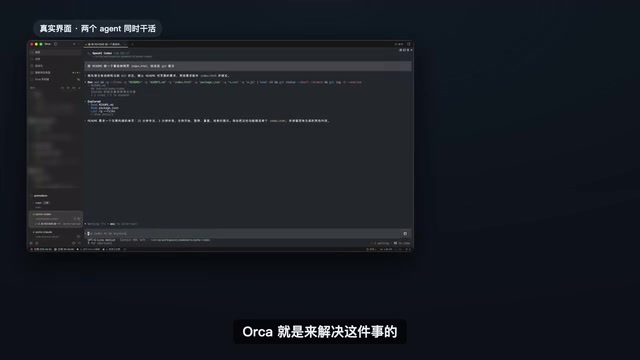
Juggling several terminal windows for Claude Code, Codex, and Kimi is probably a scene every developer who leans heavily on AI coding assistants knows well. Once the windows pile up, you're eyeballing everything to figure out who's working, who's waiting on your reply, and who's already finished. Worse still, when multiple agents edit the same repository, file conflicts turn into a disaster.
Orca was built to solve exactly this problem. It's an open-source Agent workbench from Stable AI, free to use, launched in March of this year. According to figures cited by a Bilibili creator in a video, it has already accumulated over 90,000 stars on GitHub and shipped more than 900 version iterations in 7 months.
Three Core Design Principles
Orca's approach can be summed up in three keywords:
- Native, unchanged: Each agent runs its own native command-line interface, uses your own subscription account, and keeps all its shortcuts, slash commands, and plugins exactly as they are. Orca doesn't wrap agents in a second layer, so the day an agent ships an official update, you can use the new features that same day.
- Parallel without conflict: Each agent gets its own working directory, powered under the hood by Git worktree—one repository branches out into multiple working directories, each pulling its own independent branch, merged back together at the end.
- Take it with you: Agents can run on a remote machine while your phone acts only as a remote control. You step away, and the tasks over there keep running.
Supported Agents and Cost-Optimization Strategies
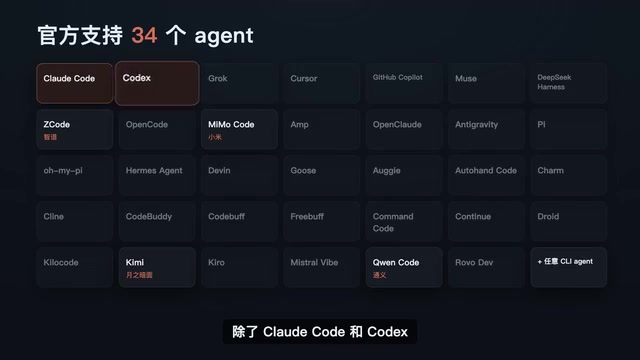
The official supported list includes 34 agents. Beyond Claude Code, Codex, and Kimi, there are Alibaba's Qwen Code, Zhipu's GLM, Xiaomi's models, and more. The creator's criterion in the video is refreshingly direct: if it runs in a terminal, it runs in Orca.
Expensive Models Think, Cheap Models Do
The video mentions a notable case: a developer on X posted in August (viewed over 40,000 times) sharing his division-of-labor scheme—the most expensive model didn't write a single line of code, doing only two things: breaking down requirements into tasks at the start, and accepting and reviewing the work others submitted at the end. The coding in between was done by Kimi and GLM, while Codex ran tests and fixed bugs. The work got delivered just the same, but the most expensive quota was saved.
Broken into four steps:
- Use the strongest model for requirement breakdown and architecture design, producing a task list
- Assign the coding tasks on the list to GLM or Kimi—they're cheap and good enough
- Codex takes over running tests and fixing bugs
- The work goes back to the strong model for final review
The creator's conclusion: having a strong model design and decompose upfront is far more reliable than having a weak model hit a wall and then ask a strong model for help. Another overseas user called Orca the most underrated Agent development environment, on the grounds that you can switch between Claude and Codex at will without leaving the app.
The word "quota" appears repeatedly throughout, referring to the usage limits each AI coding service provides under its subscription plan (usually billed by token count, request count, or time window). Claude Code, Codex, Kimi, and other agents mostly use monthly subscription plans—beyond the plan you either get rate-limited or pay per use. So "spending the most expensive quota on decomposition and review" is essentially a cost-allocation strategy: high-value decisions go to expensive models, repetitive coding goes to lower-unit-price models. Each vendor's quota system is independent and can't be transferred between them, which is one thing you need to plan for in advance when mixing multiple agents.
Hands-On: From Installation to Parallel Development
Installation is simple—download from the official site or a one-line Homebrew command, and Windows and Linux are covered too. Open a project, create a new workspace, pick an agent (say Claude Code), and what you see is its original terminal interface. Open another workspace and pick Codex, send the same requirement to both agents at once, and each modifies its own copy without interfering.
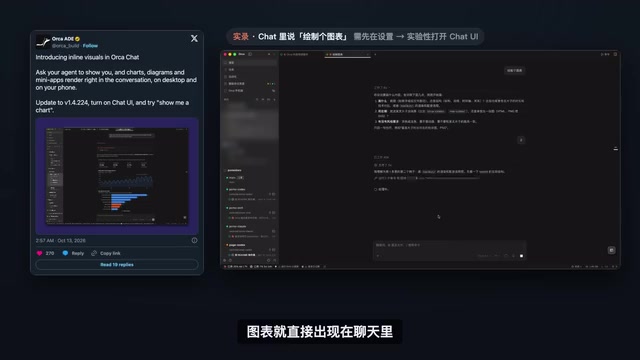
When both are done, Orca notifies you. Open the diff comparison, write an annotation directly on any line you're not happy with, send it back to the agent to revise, and merge the better version.
How the Orchestration Feature Works
There's a dedicated orchestration page in settings. Once the orchestration skill is installed, the agent uses Orca to assign work to others. In the video demo, Claude acts as coordinator to build a Pomodoro timer webpage: it first defines the interfaces, breaks the requirement into several tasks, and dispatches its own workers—page-writing to Kimi, test-writing to Codex. Each worker gets an independent terminal, the sidebar shows at a glance who's working, workers report back automatically when done, and when unsure they ask the coordinator first. Finally Claude collects the results, runs tests, and does the final review.
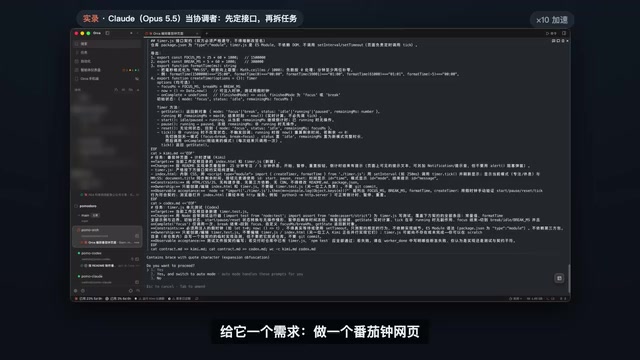
The "orchestration skill" here can be understood as a set of instructions and tool definitions installed into the agent's context, telling the agent how to call the dispatch, query, and report interfaces Orca exposes. The message flow between coordinator and workers resembles a lightweight multi-agent collaboration protocol: the coordinator handles planning and scheduling, while workers only receive tasks, execute them, and return results to the coordinator—workers don't communicate directly with each other by default. The advantage of this star topology is clear responsibility and traceable state; the downside is that it places high demands on the coordinator's own context length and judgment, and decomposing tasks too finely or too coarsely will hurt overall efficiency.
Remote and Mobile Management
Orca has a mobile app that works after pairing once with your computer. It goes through the official built-in relay, so you don't have to wrestle with networking yourself. When an agent finishes, your phone gets a push notification, and you can reply "continue" by typing or by voice. You can also view which files changed, commit directly, and switch accounts to check quota. If you want agents to run on a more powerful machine, connect via SSH, or make Orca on that machine act as a server—your phone manages it all the same.
Technical Foundation: Git Worktree and Orchestration Flow
Orca's underlying conflict-free mechanism is Git worktree. One repository branches into multiple working directories, each checking out an independent branch, so agents modify their own copies and merge back at the end. The orchestration flow model resembles a loop—one orchestration contains several tasks, tasks can have sequential dependencies, each task is dispatched to a terminal, and the agent there is the worker. When a worker finishes, it sends a completion message, and the coordinator receives it and decides the next step. In remote mode, the agent always runs on the machine you specify, and the phone is just a remote control.
Git worktree is a built-in command available since Git 2.5, allowing multiple independent working directories to be checked out on the same repository object store, each directory able to be on a different branch. Compared with copying the repository outright, worktree shares the underlying commit and object storage, taking almost no extra disk space and avoiding multiple .git directories fighting each other; compared with frequently switching branches in the same directory, it gives parallel changes true physical isolation. The cost is that each worktree still needs its dependencies installed and environment variables configured separately, which is why there's the space reminder that "each additional workspace means another copy of code and dependencies." When merging, if multiple branches modify the same region of the same file, conflicts still need manual resolution—worktree solves isolation, not automatic merging.
Who Should Use It, and Who Can Wait
Orca is especially handy for these groups:
- Developers who often run several agents at once
- Teams used to assigning models by task and wanting to spend expensive quota where it matters most
- People who often leave the computer but don't want agents to stop and wait
If you normally use just one agent, Orca's advantages are less obvious. Also note that each additional workspace means another copy of code and dependencies, so leave enough disk space.
Back to that line: expensive models think, cheap models do, you make the call, and Orca handles the rest of the scheduling.
Related articles

Python 3.15 New Feature: Is the sentinel Type Better Than None?
Python 3.15 adds the sentinel type, using named unique sentinel objects to replace None and bare object(), resolving confusion among missing values, explicit emptiness, and invalid input while avoiding type hint failures.

Deep Learning's Three Architectures and the Universal Approximation Theorem: A Complete Guide to MLPs, CNNs, and Transformers
Explaining the inductive bias differences among MLP, CNN, and Transformer, the existence meaning of the Universal Approximation Theorem (UAT), and the role of Taylor expansion in approximation analysis, while clearing up common misconceptions.

GitLab Emergency Patch Release: Analysis of Critical Security Fixes
GitLab releases critical patch 19.5.1, sparking 355 points of discussion on Hacker News. This article analyzes the background, upgrade steps for self-hosted instances, and verification points to help DevOps teams respond quickly to security updates.