5 CSS Generator Tools That Beat Asking ChatGPT
5 visual CSS generators that outperform ChatGPT for hard-to-describe styling effects.
The article introduces five visual CSS generators for effects that are hard to write by hand or describe to an AI: Mesher for mesh gradients, Fuel for SVG textures and noise, CSSGenerators.com by Temani Afif for effects like zigzag borders and speech bubbles, Easing Wizard for spring and bounce curves via the `linear()` function, and Dice Bear for seed-based SVG avatar generation. The core argument is that for visually complex effects, purpose-built tools beat prompt-engineering an AI every time.
Some CSS effects are a pain to write by hand — and they're equally awkward to describe to an AI. Think mesh gradients, spring easing curves, or jagged borders: the kind of thing that's hard to put into words precisely. Instead of wrestling with prompts, just use a dedicated visual generator. Here are five sites that get you high-quality CSS code fast, and in many cases they're more reliable than asking ChatGPT.
Mesher: Mesh Gradients Made Easy
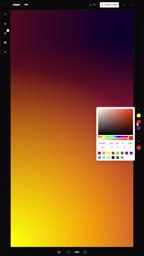
Mesh gradients are hugely popular in design, but CSS doesn't natively support them. The workaround is stacking a bunch of radial gradients on top of each other — manually positioning and tweaking them is a real slog.
Mesher takes the pain away. It offers ready-made mesh gradient effects, some with noise textures, some animated. All the parameters are adjustable via a built-in color picker, and when you're happy with the result, you just export the code. For developers who want a great-looking background fast, this is far more efficient than trying to describe a pile of gradient coordinates to an AI.
Fuel: SVG Textures and Patterns
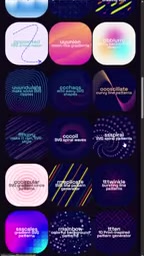
If you found a gradient you liked in Mesher but wished it had a noise texture, Fuel fills that gap. It bundles several generators in one place: grainy gradients, blob shapes, noise textures, wave patterns, holographic patterns, and more — all SVG-based.
The advantage of SVG is that it scales without losing quality, keeps file sizes manageable, and can be woven into page designs in flexible, creative ways. Fuel's controls make it easy to dial in exactly the effect you want, without ever having to hand-write complex SVG paths.
CSSGenerators.com: The Swiss Army Knife of CSS Effects
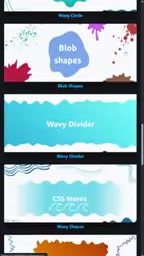
Built by well-known CSS developer Temani Afif, this site covers an impressive range of effects: ribbons, zigzag borders, scalloped edges, gradient shadows, speech bubbles, torn-paper borders, and more.
Figuring out how to implement any one of these from scratch can eat up a surprising amount of time. Coming from Temani Afif, the generated CSS is quality-assured — he's known in the CSS community for elegant, modern implementations, and the output is clean and reliable.
Easing Wizard: Spring and Bounce Animation Curves
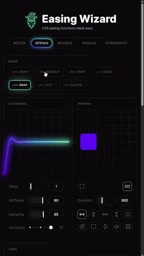
This is one the author uses almost every day. There are plenty of generators out there for basic easing curves, but Easing Wizard stands out for its more interesting advanced curves: spring effects with overshoot, damping controls for different bounce feels, and presets like drops, glides, elastic, and snappy.
The key detail is that spring and bounce curves here are generated using CSS's linear() function — an incredibly useful feature that you absolutely do not want to write by hand. Imagine describing to an AI "I want it to bounce, but not too much" and hoping for the best. The advantage of visual drag-and-drop controls is obvious.
linear() is a relatively new addition to CSS animation (broadly supported across major browsers since 2023). It lets developers define arbitrary easing curves by specifying a series of interpolation points. Traditional cubic-bezier() can only describe smooth cubic Bézier curves — it can't simulate overshoot or multi-bounce non-monotonic motion. linear() accepts any number of stop points, so it can theoretically approximate any curve shape. The tradeoff is that writing it by hand means listing dozens or even hundreds of values, and something like linear(0, 0.02, 0.15 15%, 1.2 50%, 0.98 60%, 1.0) grows unwieldy fast with even moderately complex spring effects — readability and maintainability go out the window. This is exactly where visual tools shine most: drag a few control points, and let the tool handle all the number crunching.
Dice Bear: URL-Based Avatar Generation
The last tool is completely different from the others, but equally useful. Dice Bear generates avatars via URL — you pass in a string as a seed, and it always returns the same SVG avatar for that seed.
It comes with multiple avatar styles, and you can cycle through different seeds to get different looks. The biggest win is the variety of styles on offer — there's almost always one that fits your site's visual identity. For use cases where you need default avatars for users but don't want to manage image assets, this deterministic generation approach is a huge time-saver.
Seed-based deterministic generation is the core mechanism here: the same input string always returns exactly the same result, no matter when you request it. The common approach is to use a user's ID, username, or hashed email as the seed, so every user gets a unique but stable default avatar — no images to store in a database or object storage. Since the output is SVG, avatars stay sharp at any resolution and are easy to style further with CSS. For early-stage products or backend-focused developers, this zero-storage, zero-maintenance approach can save a significant amount of infrastructure overhead.
Wrapping Up
These five tools cover some of the most common but hardest-to-write CSS needs: background gradients, SVG textures, complex border effects, animation easing curves, and avatar generation. What they all have in common: they take effects that are hard to describe in words and tedious to write by hand, hand them off to a visual interface, and export ready-to-use code. Compared to going back and forth with an AI to tune your prompts, a dedicated generator usually gets you to the right result faster and more precisely.
Related articles

Deep Dive into MCP: The Hidden Performance Traps Behind AI Agent Tool Calls
How MCP (Model Context Protocol) powers AI Agent tool calls — and the JSON-RPC overhead, SSE multiplexing tradeoffs, and real engineering decisions that come with it.

AI-Powered Lead Automation: Breaking Down the Workflow That Goes from Form Submission to Deal in 27 Seconds
A YouTube video demos an N8N + Airtable AI lead automation workflow: scoring, CRM entry, personalized reply, and alerts in 27 seconds, with 24-hour follow-up.

Build an AI Content Repurposing Factory with n8n (No Code): Turn One Long Video into 10 Formats in One Click
Build an AI content repurposing workflow with n8n: paste a YouTube link and auto-generate Twitter, LinkedIn posts and more. Five-step pipeline breakdown, modular design, and deployment tips.