5 MCP Servers Worth Adding to Claude Code

5 top MCP servers for Claude Code with honest breakdowns of cost, privacy risks, and a "keep it lean" philosophy.
This article introduces MCP (Model Context Protocol) and covers the 5 most useful MCP servers to add to Claude Code: Perplexity for real-time search (pay-per-query), Playwright for browser automation (with persistent login sessions), Firecrawl for clean web scraping (free with rate limits), Higgsfield for 30+ image/video models (credit-based), and Chrome DevTools for frontend debugging (opt-out Google telemetry required). It highlights privacy risks from browser tools and pay-per-call cost models, recommending a lean, on-demand approach.
MCP: The "USB-C Port" for AI Tools
If you're using Claude Code, MCP (Model Context Protocol) is worth your time to understand. The best way to describe it is as the USB-C port of the AI world. With a single command, you can plug external tools directly into Claude Code — turning it from a "chatbot" into a hands-on engineering partner that can actually get things done.
This article is based on hands-on testing shared by a YouTube creator, and covers 5 MCP servers most worth adding. They span high-value use cases including web search, browser automation, web scraping, multimodal generation, and frontend debugging. Just as importantly, the article calls out the cost and privacy trade-offs behind each tool — something many newcomers tend to overlook.
MCP (Model Context Protocol) is an open protocol standard introduced by Anthropic in late 2024, designed to standardize how AI models communicate with external tools and data sources. Before MCP, every AI application that wanted to integrate external capabilities — like search, databases, or file systems — required developers to write custom integration code for each tool, which was expensive to maintain. MCP's core idea mirrors the philosophy behind USB-C: define a unified "port" specification so that any compliant "device" (i.e., an MCP server) can be plugged in and used immediately. Architecturally, MCP uses a client-server model: Claude Code acts as the client, communicating with various MCP servers through a standardized protocol, while each server encapsulates specific tool capabilities and exposes them as interfaces. This decoupled design means the community can freely develop and publish new MCP servers, and users can connect to them with a single configuration command — no need to understand the underlying implementation.
Breaking Down the 5 Core MCP Servers
1. Perplexity: Real-Time Web Search for Claude
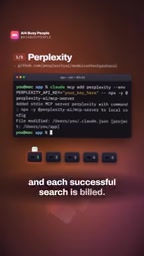
Perplexity's MCP server gives Claude real-time internet search capabilities, bridging the gap created by large model knowledge cutoff dates. One thing to keep in mind: it requires an API key, and every successful search query is billed. This makes it well-suited for tasks that genuinely need up-to-date information — not for casual, high-frequency use.
2. Playwright: Let Claude Control a Real Browser
Playwright allows Claude to drive a real browser and automatically complete interactive tasks like filling out forms. One key detail: login sessions completed within it are saved by default. This means automated workflows can reuse authenticated sessions across runs, boosting efficiency — but it also introduces privacy considerations worth being aware of.
Playwright itself is an open-source browser automation framework developed by Microsoft, supporting Chromium, Firefox, and WebKit. It's widely used for end-to-end testing and web scraping. When wrapped as an MCP server, Claude gains more than just the ability to "open a webpage" — it gets full browser control: clicking buttons, filling forms, taking screenshots, executing JavaScript, and monitoring network requests, all triggered by natural language instructions. The reason login sessions persist is that Playwright uses a persistent browser context by default, storing cookies and session data to local disk rather than memory. In automated testing scenarios, this is a feature (avoiding repeated logins), but in AI-driven autonomous operation scenarios, extra caution is warranted — any model or process that can interact with this MCP server can theoretically access those saved credentials.
3. Firecrawl: Turn Web Pages into Clean Text
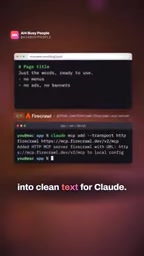
Firecrawl scrapes messy web page content and converts it into structured, clean plain text that Claude can directly understand and work with. One user-friendly aspect: the scraping functionality works even without an API key — it's just rate-limited. For lightweight scraping needs, the barrier to entry here is very low.
4. Higgsfield: Access 30+ Image and Video Models
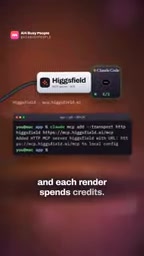
Higgsfield brings over 30 image and video generation models into Claude Code, enabling multimodal creation directly within the coding environment. The cost is equally clear — every render consumes credits. For creators who need to generate images or videos frequently, this tool directly ties productivity to expenditure.
5. Chrome DevTools: Page Inspection and Debugging
The Chrome DevTools server lets Claude inspect and debug a page, making it extremely useful for frontend development and troubleshooting. One important caveat: it collects usage statistics for Google by default, though you can manually opt out. It's worth confirming this setting before enabling it.
Privacy and Cost: Don't Let Your Tools "See" You
The two browser-based servers — Playwright and Chrome DevTools — share a common privacy risk: they can see every page they open, including any website you're logged into within them. In other words, once you log into your email, an admin panel, or any other sensitive account inside an automated browser, that information falls within the tool's visible range.
From a cost perspective, these 5 tools fall into two categories: Perplexity and Higgsfield are pay-per-call; Firecrawl and the two browser tools are relatively more cost-controlled. Understanding this distinction helps you plan your budget and avoid surprise bills.
One deeper security concept worth adding here: prompt injection attacks. When Claude accesses external web pages via Playwright or Firecrawl, the content of those pages is fed into the model's context window. Malicious websites can embed invisible text instructions in their pages (e.g., white text on a white background) in an attempt to override the user's original instructions and trick the model into performing unintended actions — such as sending data from a logged-in account to a third-party address. This type of attack has real documented cases in autonomous AI agent scenarios. Therefore, when using browser-type MCP tools, it's recommended to follow the principle of least privilege: only enable these servers when needed, and remove them immediately after use. Also avoid logging into high-privilege accounts (such as production admin panels or financial systems) in automated browsers.
Stay Lean: A Use-It-and-Remove-It Philosophy

The author's core recommendation comes down to four words: keep it lean. MCP's power lies in how easily you can add tools with a single command — but that also means it's easy to accumulate a pile of servers you're not using, which slows down your environment and introduces unnecessary risk.
The practical approach: only add servers you'll actually use this week, and remove the extras whenever with a single command. Start small, keep only the tools you're actively using, and make one change at a time. This lightweight, on-demand philosophy is more sustainable and more secure than loading up with tools all at once.
For developers just getting started with MCP, this list is a great starting point: begin with Firecrawl — the lowest barrier, no API key required — to get a feel for things, then gradually introduce paid tools based on actual needs, continuously evaluating the balance between cost and privacy.
Related articles

Chain of Thought Isn't Just for AI: How Humans Can Use CoT to Improve Thinking Quality
Chain of Thought isn't just a prompt trick for large models. Starting from a Hacker News discussion, this article analyzes why CoT works for human thinking too, breaks down actionable ways to transfer it, and highlights the key differences between human CoT and machine CoT.
Cloudflare Teams Up with OpenAI: Closi…
Cloudflare Teams Up with OpenAI: Closing the Loop from Vulnerability Discovery to Defense with AI
Cloudflare uses OpenAI Daybreak to investigate security vulnerabilities and generate reviewable remediation plans, while developers use Codex to boost coding efficiency and quality.

Orca Multi-Agent Orchestration in Practice: A Guide to Parallel Collaboration with Claude and Codex
Orca is Stable AI's free open-source agent workbench supporting 34 agents like Claude Code and Codex in parallel. Learn its Git worktree isolation, multi-model orchestration, and mobile management.