64GB Laptop Running LLMs: Only 46.7GB Actually Usable

ASUS ProArt 16's nominal 64GB gives only 46.7GB for models; the 9,000 yuan gap buys a higher model-size ceiling.
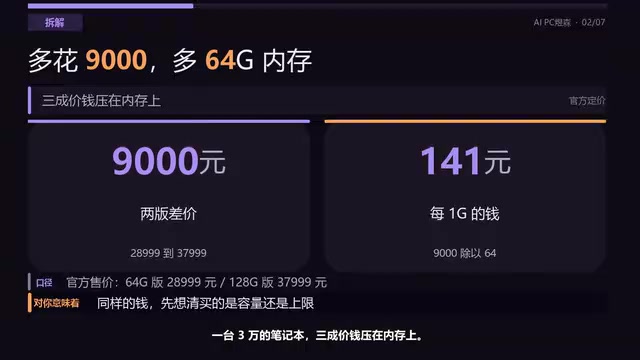
Bilibili creator "AIPC Yusen" tested the ASUS ProArt 16 and found that a laptop with a nominal 64GB of memory has only 46.7GB actually usable for local LLMs—about 73%—with the difference taken by Windows, background programs, and GPU reservations. The 64GB and 128GB versions differ by 9,000 yuan, corresponding to an official model ceiling rising from a tested 27B parameters to 120B, but the premium is only worth it if you clearly need 100B-scale models. Running a 27B model on battery draws about 86W, giving just over an hour of life, so it is positioned as a mobile workstation rather than an all-day portable. The creator offers a three-step self-check: check available memory in Task Manager, verify the model file size, and if it does not fit, switch to a smaller model or go to the cloud—stressing that nominal specs are marketing language while available memory is engineering reality.
Title
64GB Laptop Running LLMs: Only 46.7GB Actually Usable
Meta Description
ASUS ProArt 16 hands-on: Of a nominal 64GB of memory, only 46.7GB is usable for models; the official 128GB version tops out at 120 billion parameters. This article breaks down the 9,000 yuan memory price gap, the truth about unified memory overhead, and battery life, and offers a three-step self-check to help you decide how much memory you need for local LLMs.
Article Content
When buying a laptop to run local LLMs, the memory number on the box is often not all you can actually use. A hands-on test of the ASUS ProArt 16 by Bilibili creator "AIPC Yusen" reached a counterintuitive conclusion: a new machine with a nominal 64GB of memory can actually allocate only 46.7GB to models. Where did the missing 17GB go? This is an accounting question every would-be AI PC buyer should work out clearly.
Nominal memory is not the same as memory available to models
A newly released ASUS ProArt 16 is priced at 28,999 yuan for the 64GB version and 37,999 yuan for the 128GB version. The 9,000 yuan gap corresponds exactly to the extra 64GB, or about 141 yuan per GB. Media testing showed that the 64GB version has 46.7GB available for running models, roughly 73% of the nominal figure.
This is not because the memory is faulty or secretly occupied; rather, Windows, background programs, GPU reservations, and other components first carve out a portion of the unified memory pool. The advantage of unified memory is that the CPU and GPU share a single block, so models and the system do not have to shuttle data back and forth; the cost is that the total is fixed, and the model can use only what remains after the system takes its share. The creator stressed that this ratio is not a universal formula—how much each machine reserves depends on the OS, drivers, and usage patterns. There is no magic rule of "30% off"; on your own machine, just open Task Manager to see the real usable figure.
Unified Memory Architecture (UMA) is the premise for understanding this machine's memory allocation logic. In a traditional laptop, the CPU uses system memory (DDR) and the discrete GPU uses its own VRAM (GDDR/HBM); the two are physically separate, so running a model on the GPU requires copying the full weights into VRAM, and insufficient VRAM causes an immediate error. Unified memory lets the CPU and GPU share the same high-bandwidth memory pool, so the GPU can directly address system memory, eliminating data-copying overhead and allowing models to occupy far more capacity than traditional VRAM. Apple's M-series chips, AMD's APUs, and some Qualcomm PC chips all use this design. The cost is that total memory is fixed and divided among all subsystems: the OS kernel, drivers, the integrated GPU's framebuffer reservation, and background services all take a slice from the same pool first, leaving only the remainder for models. The gap between nominal capacity and model-usable capacity is therefore an inherent overhead of unified memory architecture, not a manufacturer shortchanging you.
The 9,000 yuan gap buys a higher model-size ceiling
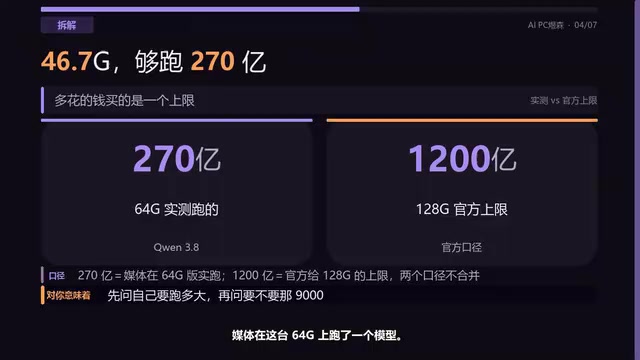
In media testing, the 64GB version successfully ran a Qwen 3.8 model with 27 billion parameters, while the official upper limit for the 128GB version is 120 billion parameters—more than four times as many. The creator was clear about the distinction: 27 billion is a tested, working result, while 120 billion is the official nominal ceiling; the two must not be conflated.
This means the 9,000 yuan is not buying "more GB" but whether you can reach the 120-billion-parameter threshold. If you only work with models under 30 billion parameters day to day, the 64GB version is entirely sufficient; only when you clearly need 100-billion-plus scale does the premium make sense.
The phrases "27 billion parameters" and "120 billion parameters" that recur throughout refer to the parameter count of large language models—the number of learnable weights in the model's neural network, usually expressed in B (billion). Parameter count determines a model's capability ceiling and directly determines the memory needed to load it: in the common FP16 (half-precision) format, each parameter takes 2 bytes, so 27 billion parameters need about 54GB and 120 billion parameters need about 240GB; with INT4 quantization (about 0.5 bytes per parameter), the same model's footprint can be compressed to roughly a quarter. This is why the same 64GB machine can run a 27-billion-parameter model but falls far short of 120 billion—the latter exceeds available memory even with heavy quantization. It is worth distinguishing that parameter scale is not the same as actual capability; a small model may outperform a large one on specific tasks, so model selection should be based on task requirements rather than parameter numbers.
The truth about a mobile workstation's battery life
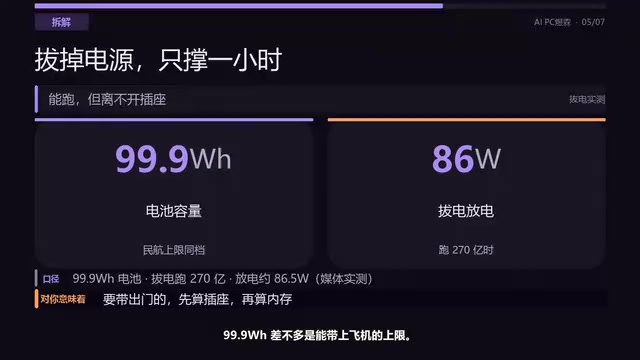
This machine has a 99.9Wh battery, close to the civil aviation carry-on limit. When running a 27-billion-parameter model on battery power, discharge power is about 86W; 99.9 divided by 86 gives just over an hour of battery life. The creator's judgment was blunt: it is a workstation that can be moved, not a machine you can carry around all day. The good on-paper numbers assume the charger stays plugged in; off power, both compute and time are discounted. By contrast, a battery-less mini PC delivers full performance as soon as it is plugged in, consistently.
Watt-hours (Wh) is the unit of battery energy; a larger number means the battery stores more electrical energy. Civil aviation rules limit carry-on lithium batteries to 100Wh (airline approval can extend this to 160Wh), and this machine's 99.9Wh is designed right up against that limit to pack in the largest battery allowed. But battery capacity only determines "how much energy can be stored"; actual battery life also depends on discharge power: running a large model puts the CPU/GPU at full load, drawing far more power than light tasks like web browsing. The 86W discharge power cited means the battery is outputting at near full load; 99.9Wh ÷ 86W ≈ 1.16 hours, a hard ceiling set by the laws of physics, regardless of vendor optimization. By comparison, a mini PC has no battery constraint and can sustain full compute output while plugged in, which explains why, with the same configuration, a desktop form factor offers a more consistent experience in continuous inference scenarios.
A three-step check of your own machine's real ceiling
The creator offered a practical self-check method: first, open Task Manager's Performance tab, click Memory, and look at the "Available" line—that is the real number you can give to models, not the nominal figure printed on the box; second, check the model file size—however large the file is, that is how much it will occupy once loaded, plus extra space for context; third, if it does not fit, switch to a smaller model or hand the heavy lifting to the cloud, keeping only private tasks local—do not replace an entire machine for a model you will never use.

Who should buy it, and who should not bother
The creator's conclusion breaks into three cases: for models under 30 billion parameters, the 64GB version is enough; only if you need 100-billion-plus is the extra 9,000 yuan for 128GB worth it; and the most common case is the third—you simply do not need a model this large, so you need not even look at this machine. Check your own device's available memory first, then talk about what to buy; the order cannot be reversed. This logic holds for anyone planning to run local LLMs on a laptop: nominal specs are marketing language, while available memory is engineering reality.
Related articles

REA: Reverse Engineering Any Software with AI Agents
REA is an MCP server and skill pack for AI coding agents like Claude Code and Cursor that reverse engineers JavaScript, Electron, binaries, Android apps, and firmware. This article covers its workflow, supported platforms, local analysis benefits, limitations, and lawful use.

The Five Permission Levels of AI Agents: From ChatGPT Q&A to Fully Autonomous Agents
Break down AI agent permissions into five levels: from ChatGPT pure conversation, project documents, MCP connectors, Computer Use automated clicking, to unattended agents—analyzing capability boundaries, prompt injection risks, and approval fatigue level by level, with three practical rules: read-only by default, manual confirmation for irreversible operations, and per-project isolation.
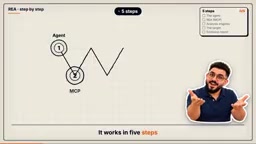
REA: Five-Step Reverse Engineering of Any App with AI Agents
REA is an open-source tool that lets AI agents like ClaudeCode connect to and drive reverse engineering tools such as Ghidra and IDA via MCP, completing analysis of binaries, Electron apps, .NET programs, or websites in five steps with evidence-backed reports—all running locally.