8 Free Claude Code Commands That Make AI Agents Speak Plain English

OpenSteps uses slash commands to translate agents' engineering jargon into judgeable plain-English conclusions.
The article introduces a free, open-source command pack called OpenSteps, which claims that after a one-command install, it adds a set of slash commands prefixed with "OS" to agents like Claude Code. It targets the common agent flaw of "correct process, failed communication": tasks get done, but conclusions are buried in logs, making it hard for users to judge whether they're truly complete. Core commands include done or not, check work, step by step, what could go wrong, ask simple, and big picture. The commands work across Claude Code, Cursor, Codex, and Gemini CLI, and are most valuable to the vibe coding crowd. The article also notes that while the video title claims 8 commands, the narration only clearly explains a few, so the original information is incomplete.
Claude Code is excellent at getting work done, but its responses often come back as a full screen of engineering jargon, leaving many developers who code "by feel" completely lost. Someone on YouTube created a free command pack called OpenSteps for exactly this problem, claiming that a single install can switch the agent from "engineer-speak" to "plain English mode."
According to the video, OpenSteps is free and open source, installs with just one command, and gives you a set of slash commands prefixed with "OS" once installed.
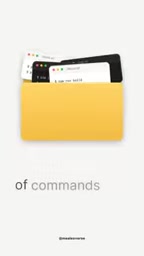
What problem does OpenSteps solve?
Agent tools share a common flaw: "the process is correct, but the communication fails." They can finish running tests and complete code changes, yet bury the conclusion in a long log, forcing users to figure out for themselves whether the task is actually done. OpenSteps' approach isn't to improve model capabilities but to add a translation and verification layer on top of the output, compressing technical conclusions into decision-ready information.
The value of this command set lies in reducing review costs—you don't need to understand what the agent did, you just need to know whether the result is usable and whether you should hit confirm for the next step.
Slash Commands are an interaction mechanism built into agent tools like Claude Code and Cursor: when a user types a command name starting with / in the chat box, the tool loads a preset prompt template or performs a specific action. They are essentially a wrapper and reuse mechanism for natural language instructions, solidifying a long string of repeatedly typed prompts into a short name for team-wide standardization and consistent reproducibility. The set of commands OpenSteps releases with the "OS" prefix is distributed through exactly this mechanism: installation actually writes the corresponding command definition files into the tool's configuration directory, so no changes to the model itself are needed, and the commands can be migrated and reused across different tools.
Vibe coding was coined by Andrej Karpathy in early 2025, referring to developers who barely read code line by line, instead describing intent in natural language, having AI generate and modify code, and judging usability by runtime results and intuition. This mode shifts attention from syntax details to result acceptance, making it especially sensitive to "whether the output is decision-ready": if the agent only returns verbose logs, users lose their only reliable basis for judgment. The value of commands like OpenSteps is built precisely on the acceptance needs of vibe coding.
A look at the core commands
The commands listed in the video each have their own role, with a few being high-frequency essentials.
Result verdict: done or not
This command gives a straightforward "yes/no" answer to "is the task really complete," no longer fobbing you off with vague wording. It's ideal for quickly confirming status when wrapping up a long task.
Anti-self-deception: check work
The most common flaw in agents is confidently declaring "done" when it actually isn't. check work specifically catches this kind of self-deceiving conclusion, essentially adding a review checkpoint to the output.
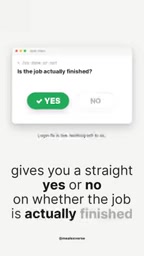
Task breakdown: step by step
It breaks down only the steps that genuinely require your personal involvement, filtering out the parts that can be automated. This one is especially useful for those who don't want to be overwhelmed by a lengthy to-do list.
Risk pre-check: what could go wrong
Run a safety check before executing high-risk actions like deployments or payments to surface potential problems in advance. This kind of pre-check is a low-cost, high-reward step in automated workflows.
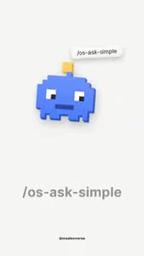
Question simplification: ask simple
Agents sometimes throw out a pile of vague follow-up questions. This command organizes the chaotic questions into a few clear options and gives a recommendation, reducing back-and-forth.
Global view: big picture
Summarizes the entire project state into a single file, useful for picking up a project across sessions or syncing progress with others.

It's worth noting that while the video title claims 8 commands, the narration only fully explains the ones above, with duplicate numbering and slips of the tongue (such as calling the prefix WSS)—the original information itself isn't complete.
Agent "false completion" is a typical failure mode of LLM agents: the model tends to give optimistic conclusions that match user expectations, even when tests haven't passed or changes haven't actually taken effect. It stems from a training preference for "helpful answers," not intentional deception, so it often looks normal at the log level. The industry typically mitigates this with two approaches—first, introducing an independent review step where another prompt or model re-examines the original evidence; second, requiring conclusions to come with verifiable evidence (such as test output or diff summaries). The combination of check work and done or not is close to the first, lightweight approach.
Cross-tool compatibility and target users
The video mentions that a single install works across Claude Code, Cursor, Codex, and Gemini CLI. This means it's more of a universal wrapper at the prompt/command layer rather than a plugin tied to a single platform.
For the "vibe coding" crowd—users who rely on conversation-driven development and don't read code line by line—these commands have the greatest practical significance: they turn unreadable engineering output into judgeable conclusions. But for senior engineers who need fine-grained debugging, it's more of a time-saving aid than a replacement for reading logs.
Claude Code, Cursor, Codex, and Gemini CLI belong to different vendors, but all provide a similar agent loop: reading repository files, executing terminal commands, modifying code, and returning results. Their differences lie mainly in model capabilities, context management, and permission models, while their interaction layer—"accepting natural language or slash commands"—is highly convergent. This is precisely the premise for prompt/command-layer wrappers to be cross-platform: as long as the same command definition is placed in each tool's directory according to its conventions, behavior is largely consistent; but when tool-specific capabilities are involved (such as particular sub-agents or hook mechanisms), cross-platform consistency suffers.
Usage recommendations
Prioritize using check work and done or not together to form a minimal "conclusion + review" loop; always run what could go wrong before high-risk operations; use big picture to generate a status summary when handing off across sessions. The open-source command pack is easy to modify yourself, so you can adjust wording and check items to fit your team's habits.
One-line Summary
OpenSteps uses a set of slash commands to translate agents' engineering jargon output into judgeable plain-English conclusions.
Paragraph Summary
The article introduces a free, open-source command pack called OpenSteps, which claims that after a one-command install, it adds a set of slash commands prefixed with "OS" to agents like Claude Code. It targets the common agent flaw of "correct process, failed communication": tasks get done, but conclusions are buried in logs, making it hard for users to judge whether they're truly complete. Core commands include done or not (directly answers whether it's done), check work (verifies false completion claims), step by step (breaks down only steps requiring human involvement), what could go wrong (pre-check before high-risk operations), ask simple (organizes vague questions into options), and big picture (summarizes project status into a single file). The commands work across Claude Code, Cursor, Codex, and Gemini CLI, and are most valuable to the vibe coding crowd. The article also notes that while the video title claims 8 commands, the narration only clearly explains a few, with duplicate numbering and slips of the tongue—the original information is not complete.
Related articles

AI Tools Quietly Altering Settings: Postman Silently Installs Plugin, Codex Sharing Option Auto-Resets
AI Daily reports: Postman silently installs a Mac plugin and self-approves startup hooks, logged as auto-existing upgrade; Hacker News developers say Codex data-sharing opt-out flips back. Plus Simon Willison's raw float weight experiment with QEN 3.8-27B.

AI Learns to Rewrite AI: MIT's "Weightspace Programming" Redraws the Path to Recursive Self-Improvement
MIT team proposes weightspace programming: GPT-6 Astra reads and edits AI model weights directly. Math scores jump several-fold, hand-written networks beat trained models. Eight experiments analyzed, plus Anthropic's same-day warning and the real boundaries of recursive self-improvement.

Running Qwen 3.8 on a Laptop to Read Raw Weights: 46 Minutes Per Answer
Simon Willison reproduced weight space programming with Qwen 3.8 27B on a laptop: a 17GB model file, 46 minutes per answer, 43,506 reasoning tokens, Pong over an hour, Freeway failed. Suited for interpretability researchers.