8 Free Claude Code Skills That Make AI Coding Tools More Usable

Open Steps releases 8 free AI coding skills to solve the last-mile problem of AI "pretending to be done."
Open Steps has released 8 free skills compatible with mainstream AI coding tools including Claude Code, Cursor, Codex, and Gemini, aimed at solving the pain points of insufficient task transparency and verifiability in AI coding. Core skills include: Done or Not, which forces AI to verify task completion with evidence; Check Work, which independently reviews another AI session for missed work; Step-by-Step, which converts technical instructions into simple steps; and What's Next and Big Picture for project navigation. These skills work as predefined instruction templates, can be installed all at once, and lower the barrier to building workflows—but actual results vary by underlying model and tool version, so it's recommended to validate with small tasks first.
AI coding tools can already write code and fix bugs, but have you ever run into this situation: the AI confidently declares "task complete," but when you run it, everything breaks? Or it asks you to change some setting but gives you a vague, ambiguous description? Recently, a project called Open Steps released 8 free skills specifically designed to solve these "last mile" problems. These skills work not only with Claude Code but also with mainstream AI coding tools like Cursor, Codex, and Gemini.
Why Are These Skills Needed?
The core pain point of current AI coding tools isn't the ability to generate code—it's the transparency and verifiability of the task process. AI often treats "complete" as the end of the conversation, but there's a huge gap between "it says it's done" and "it's actually done." Open Steps' skills are essentially a set of predefined instruction templates that guide AI to follow more rigorous processes in specific scenarios.
According to the YouTube channel introduction, all 8 skills can be installed at once, lowering the barrier to entry. Below, we break down the most representative ones.
Workflow mechanics of AI coding tools: Current mainstream AI coding tools (like Claude Code and Cursor) are essentially conversation-based code generators that constrain behavior through system prompts and a few examples. So-called "skills" are typically predefined instruction templates or prompt fragments that get injected into the conversation context in specific scenarios, guiding the AI to follow more structured processes. These skills don't change the underlying model's capabilities—instead, by changing how prompts are presented, they force the AI to output verifiable evidence, checklists, or step-by-step guidance at the "completion" stage, thereby compensating for the lack of rigor in the model's spontaneous behavior.
Core Skills Breakdown
Done or Not: Let Evidence Speak
This is the most closely watched skill. By default, after completing work, AI simply replies "done." Done or Not forces the AI to check its own work, give a clear "yes" or "no," and attach evidence of what was actually completed.

The value of this mechanism is that it turns "self-assessment" into a structured process. The AI can no longer be vague—it must produce verifiable results. The screenshot shows that the skill lists specific completed items and evidence, letting developers judge at a glance whether the task was truly accomplished.

Self-assessment and evidence chains: AI's "self-assessment" tends to be superficial because it leans toward outputting affirmative answers that match user expectations. The core of the Done or Not skill is introducing the concept of an "evidence chain": when the AI claims completion, it must attach verifiable artifacts (such as modified file snippets, run logs, screenshots, or specific command output). This draws on the "Definition of Done" practice in software engineering, transforming vague completion status into a checklist of inspectable items, thereby reducing the developer's verification cost.
Check Work: Independently Review Another AI Session
The Check Work skill goes further: it can independently review the work output of another AI session, specifically catching parts that were missed or never truly completed. This is like adding a "code review" step to AI coding—except the reviewer is also an AI.
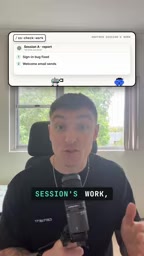
In practice, this skill is suited for final checks after multi-turn conversations. When you've had the AI make multiple changes in a long session, Check Work helps you confirm which changes actually took effect and which were just verbal promises.
AI code review and context isolation: The Check Work skill leverages the context isolation of independent sessions, letting one AI instance review another AI instance's work record. This "AI reviews AI" pattern is similar to cross-checking in pair programming, but the reviewer doesn't share the original session's memory, so it can more objectively spot omissions. However, its effectiveness is limited by whether the reviewer can access complete work logs and code changes—in practice, you need to ensure session records can be exported or shared.
Step-by-Step: Translating Technical Instructions into Plain Language
When AI needs you to do something on your end—like connecting an API, modifying environment variables, or adjusting a setting—it often gives overly technical descriptions. The Step-by-Step skill converts these instructions into simple steps that anyone can follow.
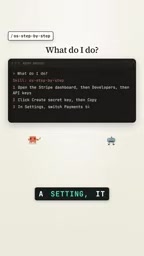
This skill is especially friendly to non-professional developers. The instructions in the screenshot are clear and straightforward, eliminating the communication cost of repeatedly asking "how exactly do I do this step?"
What's Next and Big Picture: Project Navigation
Two other noteworthy skills are What's Next and Big Picture. The former tells you what to do next, while the latter provides a panoramic overview of the entire project. In complex projects, developers can easily get lost in details and lose direction—these two skills provide navigation from the dimensions of "next action" and "overall progress" respectively.
The Value of Cross-Tool Compatibility
A key feature of these skills is cross-tool compatibility. According to the source, they can be used on multiple platforms including Claude, Cursor, Codex, and Gemini. This means developers don't have to be locked into a single tool ecosystem—the same workflow can migrate across different AI coding assistants.
From an industry trend perspective, AI coding tools are shifting from "single-point capability competition" to "workflow ecosystem competition." Whoever provides more complete auxiliary skills and process standards will be better able to retain professional developers. The emergence of open-source skill libraries like Open Steps lowers the barrier to building such workflows.
Cross-platform migration of prompt templates: Different AI coding tools support system prompts and skill injection in different ways, but the core is always constraining model behavior through natural language instructions. Open Steps' skills exist as generic prompt templates, so they can adapt to multiple platforms. This compatibility reduces developers' migration costs, but it also means skill effectiveness varies depending on the underlying model's comprehension ability and the tool's execution environment—for example, some tools may not support automatically reading files or running commands, limiting the evidence verification step.
Usage Recommendations and Limitations
All 8 skills are free and can be installed at once. For developers who use AI coding tools daily, Done or Not and Check Work are the most worth trying first, because they directly target the high-frequency pain point of "AI pretending to be done."
One additional note: the original source's introduction to these 8 skills is fairly brief, and the specific implementation details and applicable boundaries of some skills remain unclear. Also, actual results may vary depending on the underlying model and tool version. It's recommended to validate effectiveness with small tasks after installation before gradually integrating them into your daily workflow.
If you're often left skeptical by AI's "completed" claims, this free skill set is worth ten minutes of your time.
One-line Summary
Open Steps releases 8 free AI coding skills to solve the last-mile problem of AI "pretending to be done."
Paragraph Summary
Open Steps has released 8 free skills compatible with mainstream AI coding tools including Claude Code, Cursor, Codex, and Gemini, aimed at solving the pain points of insufficient task transparency and verifiability in AI coding. Core skills include: Done or Not, which forces AI to verify task completion with evidence; Check Work, which independently reviews another AI session for missed work; Step-by-Step, which converts technical instructions into simple steps; and What's Next and Big Picture for project navigation. These skills work as predefined instruction templates, can be installed all at once, and lower the barrier to building workflows—but actual results vary by underlying model and tool version, so it's recommended to validate with small tasks first.
Related articles

Is the Agent Harness Dead? Cursor's Early Engineer Breaks Down the Real Architecture of AI Coding Agents
Cursor early engineer Jediah breaks down the real architecture of the agent harness: why "the harness is dead" is only half right, how the data flywheel lets the harness obsolete itself, and how Grokbot, software factories, and primitive design open new frontiers for agents.
Python Visitor Pattern and Better Alternatives Explained
A deep dive into Python's visitor pattern and four alternatives: method pattern, pattern matching, dictionary mapping, and functools.singledispatch. Choose the best decoupling design by change frequency.

357 Days of Deep Experience: Why Omarchy Made Me Stop Distro-Hopping
A 357-day deep dive into Omarchy: 59-second install, out-of-the-box audio and GPU support, the Quattro QuickShell rewrite migration pains, and why Arch users should try it.