8 Local LLMs Tested on Raspberry Pi 5: Only 3 Actually Usable

Only 3 of 8 local LLMs tested on Raspberry Pi 5 are actually usable: Gemma 2B, Gemma 4B, and Granite.
A systematic benchmark of 8 small local LLMs on a Raspberry Pi 5 with 8GB RAM applied two objective filters: chat use requires ≥5 tokens/sec and <10s first response; background use requires passing all four practical tasks (summarization, file classification, JSON conversion, tool calling) and 30 minutes of stable operation. Only Gemma 2B, Gemma 4B, and Granite passed everything. A key finding: using 2 CPU threads is 18–38% faster than 4 due to memory bandwidth constraints, and summarization is where small models fail most often.
Running large language models on edge devices is no longer just a fantasy. A Raspberry Pi 5 with 8GB of RAM can physically run several small local models — but there's a big difference between "can run" and "actually usable." One blogger put 8 popular local models through their paces on a Raspberry Pi 5, using objective speed and task-completion benchmarks to filter the field. Only 3 made the cut.
What "Usable" Actually Means
The evaluation didn't rely on subjective impressions. Instead, it established two sets of objective criteria. For chat use cases, a model must generate at least 5 tokens per second — roughly the minimum speed at which a human can comfortably read a response — and must begin answering short questions within 10 seconds.
For background tasks, speed is less critical, but the model must pass all test tasks and run continuously for 30 minutes without causing the Raspberry Pi to overheat or throttle. If a model fails both the chat threshold and the background task requirements, it's deemed "not usable on Raspberry Pi."
The hardware setup was a Raspberry Pi 5 with 8GB RAM, an active cooler, and two SSDs: the OS lives on the first SSD and boots from it; models are stored on the second. All models ran via llama.cpp (the same engine underlying LM Studio and Ollama), with llama-bench used to measure prompt processing and response generation speed. Unless noted otherwise, all models used Q4_K_M 4-bit quantization.
The 8 Contenders
The lineup is sorted by model file size, spanning a wide parameter range — from sub-1B micro models all the way up to 8B parameters — covering nearly all the recently released popular small models.
Two entries are special cases. Bonsai has a relatively large parameter count, but each weight is only 1 bit, making the entire model file just over 1GB. LFM2.5, on the other hand, has the largest file on the list, but thanks to its Mixture-of-Experts (MoE) architecture, only about 1.5B parameters are activated per token, keeping generation speed relatively fast.

Q4_K_M 4-bit quantization compresses model weights from their original 16-bit or 32-bit floating-point values down to 4-bit integers, reducing model size by roughly 75% while incurring relatively limited quality loss. The "K_M" suffix indicates a mixed-precision strategy: higher precision is retained for more sensitive layers, while more aggressive compression is applied elsewhere — making it one of the best-balanced quantization schemes available. Bonsai's 1-bit quantization takes things to the extreme: each weight is represented by a single bit, achieving maximum compression at the cost of more noticeable quality degradation. This is why the evaluation specifically flags Bonsai as an exception that warrants separate scrutiny.
Speed Results: Two Threads Is Faster Than Four
The generation speed tests produced some counterintuitive findings. The fastest model was the smallest-parameter Qwen3.5 (~0.8B), approaching 15 tokens per second. Second place went to the largest-file LFM2.5, exceeding 10 tokens per second — because it activates so few parameters per token. MiniCPM5 and Gemma 2B came in around 7 tokens per second, while Bonsai and Granite were just above the threshold. Gemma 4B and the 4B Qwen3.5 landed at only about 3.5 tokens per second, falling below the 5 tokens/second usability cutoff.
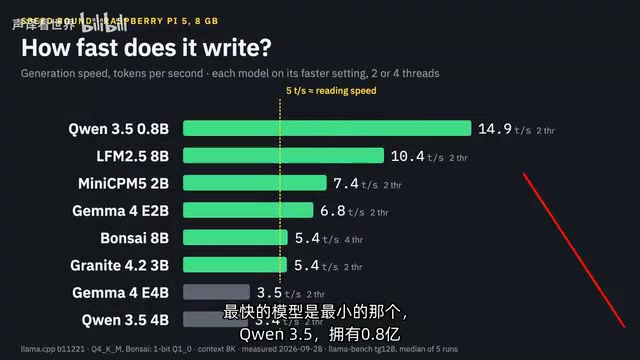
A surprising finding: most of these numbers were measured using two CPU cores rather than four. With two threads, model generation speed was 18–38% faster (Bonsai being the exception, requiring all four cores). The blogger concluded this is because generation on the Raspberry Pi is memory-bandwidth-bound rather than compute-bound. The practical takeaway is straightforward — stick with two threads.
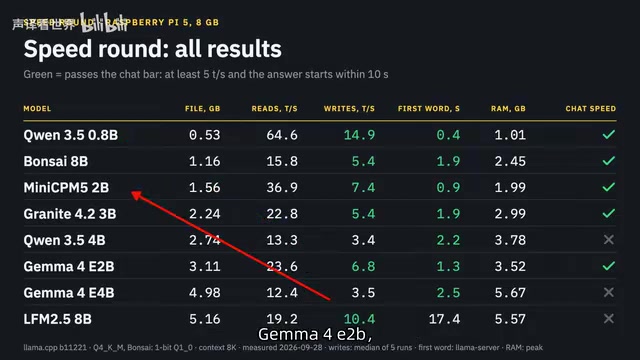
As for time-to-first-token, all models except LFM2.5 began outputting within 2.5 seconds. LFM2.5 always performs reasoning first, so the first word doesn't appear until 17 seconds in. Across the speed dimension, 5 of the 8 models passed the chat threshold; Gemma 4B and 4B Qwen3.5 were too slow, and LFM2.5 spent too long on reasoning.
Memory bandwidth bottleneck is the key to understanding this counterintuitive result. During the generation phase of LLM inference (outputting tokens one by one), each token requires loading the entire model's weights from RAM into CPU cache — an operation heavily dependent on memory read speed. The CPU cores on a Raspberry Pi 5 share a single memory bus. Enabling more cores doesn't widen that channel; it introduces additional inter-core coordination overhead. As a result, two cores focused on reading memory outperform four cores competing for the same bandwidth. This phenomenon is common in consumer-hardware local LLM inference and is one of the fundamental reasons why GPUs (with their extremely high memory bandwidth) far outperform CPUs for LLM inference.
Four Tasks: Fast but Wrong Is Worse Than Useless
Speed is just the entry ticket. A fast model that gives wrong answers is worse than a slow model that gets things right — especially for background tasks. The evaluation used 4 practical tasks with no partial credit: answers are either useful or they aren't.
Task 1 · Summarization: Condense an 800-word article into three key points. Four of the eight models failed here: 4B Qwen3.5 wrote content that wasn't in the article, LFM2.5 altered facts, Bonsai added non-existent information, and MiniCPM5 missed the main points. Summarization turned out to be the most failure-prone task for small models.
Task 2 · File Classification: Sort 20 files in a downloads folder into 6 folders — a typical home server task. Most models handled this well. Only 0.8B Qwen3.5 lost 8 files, and LFM2.5 forgot two files after spending 5 minutes thinking.
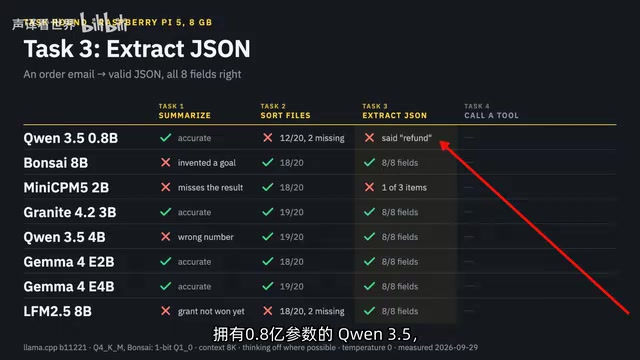
Task 3 · Convert to JSON: Transform an order email into valid JSON. Surprisingly, every model produced syntactically valid JSON — but the two smallest models (0.8B Qwen3.5 and MiniCPM5) got the content wrong.
Task 4 · Tool Calling: Move three files consecutively using a function. Without reliable tool calling, you can't build agents around a model. MiniCPM5 failed here — it claimed to move files but did nothing. LFM2.5 tried to place files into a folder that didn't exist.
It's worth noting that the evaluation deliberately excluded coding tests: at these speeds, generating even a simple function takes too long to be practical.
Tool Calling (Function Calling) refers to a model's ability to recognize when an external function needs to be invoked and to generate a correctly formatted call instruction, rather than just outputting natural language. This is a foundational capability for building AI agents: agents need models to call file operations, API requests, or database queries like tools. If a model can't reliably generate valid function calls — like MiniCPM5, which "claimed to call but did nothing" — any automation pipeline built around it becomes untrustworthy. For local AI applications on edge devices — such as home server file management or scheduled task triggers — tool calling capability is often more critical than pure chat quality.
The Final Usable List
Only three models passed all four tasks: Granite (3B), Gemma 2B, and Gemma 4B. Bonsai and 4B Qwen3.5 stumbled only on the summarization task — they can be trusted to organize files, but not to write summaries.
The combined conclusions:
- Chat + background all-rounder: Gemma 2B and 3B Granite — fast enough and passed all tasks.
- Background tasks only: Gemma 4B is the most well-rounded, but too slow for chat.
- Conditionally usable: Bonsai and 4B Qwen3.5 — fine for file organization and tool calling if you don't need summarization.
If you could only keep one model on a Raspberry Pi, the blogger's pick is Gemma 2B — it passed all tests and is the fastest among the qualifiers.
The real value of this evaluation isn't any specific ranking, but the reusable filtering logic it provides: apply a speed threshold first to assess chat usability, then validate output quality with practical tasks, and finally distinguish between "chat" and "background agent" use cases. For anyone looking to deploy local AI on edge devices, this approach is far more reliable than chasing raw parameter counts.
Related articles

Chain of Thought Isn't Just for AI: How Humans Can Use CoT to Improve Thinking Quality
Chain of Thought isn't just a prompt trick for large models. Starting from a Hacker News discussion, this article analyzes why CoT works for human thinking too, breaks down actionable ways to transfer it, and highlights the key differences between human CoT and machine CoT.
Cloudflare Teams Up with OpenAI: Closi…
Cloudflare Teams Up with OpenAI: Closing the Loop from Vulnerability Discovery to Defense with AI
Cloudflare uses OpenAI Daybreak to investigate security vulnerabilities and generate reviewable remediation plans, while developers use Codex to boost coding efficiency and quality.

Orca Multi-Agent Orchestration in Practice: A Guide to Parallel Collaboration with Claude and Codex
Orca is Stable AI's free open-source agent workbench supporting 34 agents like Claude Code and Codex in parallel. Learn its Git worktree isolation, multi-model orchestration, and mobile management.