9 Free AI Skills Tested: Double the Power of ChatGPT and Claude

9 free AI skills covering research, video, design, and dev — customize them to truly unlock agent potential.
This article walks through 9 free AI skills tested by a creator, functioning as reusable "workflow recipe cards" compatible with ChatGPT Work, Codex, Claude Code, and more. Skills covered include Last 30 Days for real-time research reports, Humanizer for removing AI writing patterns, Remotion and HyperFrames for code-driven video animation, NVIDIA's SkillSpecter for scanning third-party skill security risks, Claude Video for true video understanding, and three full-stack development toolkits — Superpowers, Gstack, and Impeccable. The core message: downloaded skills are just a starting point; continuous customization to fit your workflow is what truly amplifies agent capability.
AI Skills are becoming one of the most powerful ways to amplify what AI agents can do. Think of them as "workflow recipe cards" — they teach AI to perform specific tasks in a repeatable, reusable way. Some skills are just a set of instructions; others include scripts, reference materials, or tools the AI needs to complete a task. Better yet, most of these skills work across all major agent tools — from ChatGPT Work and Codex, to Claude Code and Claude Cowork, and even Grok, Hermes, OpenClaw, and more.
This article breaks down 9 free skills that one creator tested and shared, covering information research, removing AI writing patterns, video analysis, animation creation, and a full website and app development workflow — complete with installation instructions and real-world use cases.
Installing Skills: Almost Zero Barrier to Entry
All of these skills are hosted on GitHub (a cloud platform for storing code). The installation process is surprisingly simple: copy the skill's GitHub link, open your tool of choice (like the Work tab in ChatGPT), type something like "install this skill from GitHub using its setup instructions," paste the link, and hit send. The tool takes about a minute to finish installing.
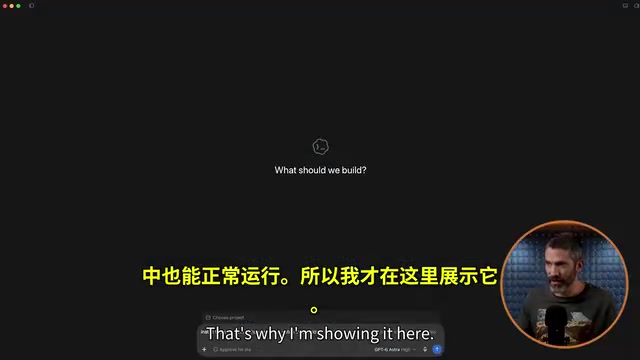
Invoking skills is equally flexible. In Work, you can find and call them using the @ symbol. In tools like Remotion, you don't even need a slash or @ — just mention the name in your prompt and the AI will use it automatically. Some tools will even automatically figure out which skill to call based on context, no name-dropping required.

Information Research: Last 30 Days Captures Real-Time Public Opinion
The first recommended skill is called Last 30 Days. It's designed to find what people are actually saying about a topic right now — not through ordinary web search, but by pulling from sources like YouTube transcripts, Reddit, and Polymarket. It then scores and filters results, synthesizing a concise report.
The creator used it to research a new tool called Jev (an AI tool from TypeSafe) and got back a digestible report within five minutes: it cited 14 Reddit posts, 13 Hacker News stories, and GitHub data. The "unconventional perspectives" section was especially valuable — for example, it flagged that Jev claims "zero hallucinations," but that doesn't mean it never makes mistakes, a nuance that most related posts had glossed over.
The creator also demonstrated a key concept here: skills are a starting point, not a finish line. He built on this skill by having Codex run it, then populate a website with the extra information in a specified format — and finally packaged the whole workflow into an expanded new skill. When you customize skills around your own setup and preferences, they perform significantly better.
Video Animation: Remotion and HyperFrames Each Shine in Different Areas
Next up are two skill-powered tools for creating videos with code — Remotion and HyperFrames. They teach agents to create motion graphics, data visualizations, map animations, captions, and more.
The two take different approaches: Remotion builds video using React, while HyperFrames uses HTML and Web animations. The creator tested both with the same prompt and found that for standard motion graphics with animated icons, Remotion performed better. But for a 15-second map animation of a Utah national parks road trip, HyperFrames actually produced more polished aesthetics and smoother camera movement — even though Remotion has a dedicated Remotion Maps skill built in. The Remotion version's spinning at the beginning and end felt a bit disorienting, while HyperFrames' zooming and perspective transitions were much smoother.

The takeaway is clear: install both, experiment with different use cases, and discover where each one excels.
Remotion is an open-source framework that renders React components into video frames. Its core idea is to declaratively describe each frame in a video as a React component driven by a timeline, with Node.js capturing screenshots frame-by-frame and compositing them into an MP4. The advantage of this approach is that video logic can be expressed in a full programming language (conditional logic, data binding, external APIs); the downside is dependency on the React ecosystem and render speeds constrained by CPU. HyperFrames, on the other hand, is built on the browser's native Web Animations API and Canvas, generating lighter HTML animations — closer in nature to "interactive dynamic pages" than traditional video files. This divide reflects two mainstream paths in the "video as code" space: one prioritizing engineering rigor and data-driven workflows (Remotion), the other prioritizing render performance and visual fluidity (HyperFrames). Understanding this underlying difference can help you make more informed choices in real projects.
Security First: Scan for Risks with SkillSpecter
Downloading skills from third parties carries real security risks. Skills can contain instructions, scripts, and tools — and a malicious or poorly built skill could leak API keys, expose sensitive data, or cause an agent to perform actions you never intended.
NVIDIA offers a security scanner called SkillSpecter. The creator installed it as a callable skill in Claude Cowork and uses it to scan any new skill before installing it. The reports are thorough, though he notes it sometimes flags relatively minor issues that require judgment calls on the user's end — and conversely, a "clean" result isn't an absolute guarantee of safety. But as an extra layer of defense when downloading skills from others, it's genuinely useful.
The security risk with skills fundamentally comes from their "executability" — unlike regular prompts, skills typically contain system-level instructions, callable external tools (such as network requests or file read/write access), and sometimes embedded scripts. This means a malicious skill can quietly exfiltrate data through an agent's tool-calling permissions without the user ever knowing. This type of attack is a variant of what security researchers call "Prompt Injection" — where an attacker hides malicious instructions inside a skill definition to hijack the model's subsequent behavior. NVIDIA developed SkillSpecter precisely because this threat is gaining serious industry attention: as "agent app store" ecosystems expand rapidly, supply chain attacks targeting the skill/plugin layer have become a new frontier in AI security. Interpreting scan reports does require some technical background. For non-technical users, prioritizing skills from reputable organizations or high-star open-source community projects is a solid first filter, on top of SkillSpecter.
Removing AI Writing Patterns: Humanizer Eliminates "AI Voice"
Humanizer tackles the ubiquitous problem of "AI slop." The more you use AI-generated content, the more you start recognizing its telltale patterns.
The creator had Claude write three tweets about Jev using default settings — the result was packed with AI-isms: the classic "it's not this, it's that" contrast structure, deliberate closing punchlines, virtually every line reeking of machine-generated text. After rewriting with Humanizer, the output listed specific changes made at the bottom, and the results read noticeably more like something a real person wrote. The creator emphasized that tweets were just a convenient demo — this skill is even more valuable for long-form writing, and it makes a great starting point to further refine with your own voice and examples.
Video Understanding: Claude Video Lets AI Actually "Watch" Footage
Claude Video gives ChatGPT and Claude the ability to "watch" videos — and despite the name, it works in Codex too. It supports both links and local files. During installation, it asks whether you want to add an API key (like an OpenAI key) to generate transcripts from audio when a video has no captions — skipping this feature keeps it completely free.
The creator dropped in a link to an Instagram video of campfire cooking where the description only listed ingredients with no steps. The skill had to actually "see" the footage to extract the full recipe — and it accurately reconstructed the entire thing, including timing details like "five minutes per side" that only appeared on screen. By comparison, dropping the same link directly into ChatGPT hit a wall with "unable to view this video"; even uploading the file didn't auto-generate a transcript without repeated prompting. This skill has all those steps built in, runs more consistently and smoothly, and will even automatically download and process video when it can't view it directly.
Development Power Tools: Superpowers, Gstack, and Impeccable
For anyone building websites or apps with AI, the final three skill sets cover the entire development workflow.
Superpowers is a collection of skills that enhance every stage of development — brainstorming, planning, implementing features, testing, and debugging. Once installed, it's often invoked automatically, functioning like a development handbook the agent consults throughout the project.
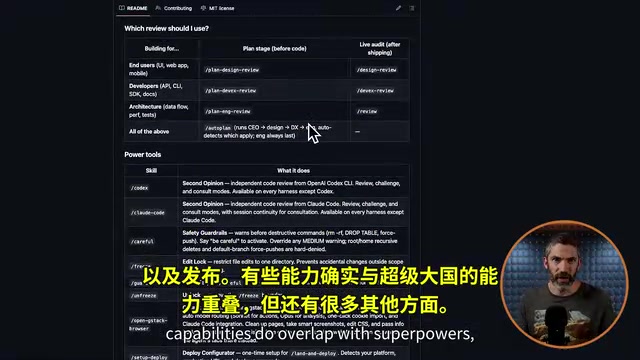
Gstack was built and is maintained by Y Combinator CEO Garry Tan. It's also a large collection of skills and tools for challenging product ideas, reviewing technical approaches, design, code review, browser testing, bug fixing, deployment, and more. It overlaps with Superpowers in some areas but covers different ground in others — the creator uses both.
Impeccable is specifically aimed at "AI design slop." Just as you start recognizing AI-generated text patterns the more you see them, the same thing happens with AI-generated design. It currently has 24 commands for critiquing designs, elevating bland visuals, adding purposeful animations, adjusting typography and layout, and more. The creator had ChatGPT quickly scaffold a Utah national parks passport website, then used the Boulder command to strengthen typography, added a deep forest green color palette, and scaled up images. He then used Delight to add a stamp-into-passport animation, and finally ran Critique for a full site review covering design, functionality, and desktop/mobile responsiveness — generating a long list of actionable fixes. He called it "the easiest way to level up your design quality."
Gstack was led by Y Combinator's current CEO Garry Tan, and its design philosophy is deeply influenced by YC's internal "product review culture" — emphasizing structured challenges to product assumptions before writing any code, and building in critical feedback loops at every development stage. This contrasts sharply with the "do whatever the user says" mode of typical AI coding assistants: Gstack actively questions whether requirements make sense and reviews the tradeoffs in technical decisions, functioning more like a co-founder involved in early decision-making than a pure executor. The "AI design slop" problem that Impeccable targets is fundamentally about large models tending to generate "statistically average" visual solutions in design tasks — safe, characterless, lacking hierarchy. Its 24 commands (like Boulder, Delight, and Critique) translate the specific operational language of professional designers into reusable workflows, effectively packaging "opinionated design review" into a repeatable process and partially compensating for general-purpose models' shortcomings in design taste.
Closing Thoughts: Skills Are a Starting Point — Customization Is the Key
These 9 skills span a complete workflow from information research and content creation to software development. The creator's advice is refreshingly practical: pick the skills that align with your daily work, test them on real tasks, and start customizing from there.
The through-line of the entire piece is this — don't treat downloaded skills as finished products set in stone. They're your starting point, something you can continue to build on and refine until they fit your specific setup and preferences, and that's when they really start to unlock their full potential. GitHub repository links for all the skills, along with a resource covering 12 free skills usable in regular chat, can be found in the original video description.
Related articles

Cursor Can Now Control Your Computer: AI Agents Can Drive Desktop Apps for Testing
Cursor adds desktop control: AI agents can drive desktop apps like the iOS Simulator to test their own features. We analyze the impact on dev workflows, possible technical approaches, and reliability concerns.

Vibecoding a Custom Inference Engine: High Hopes, Harsh Reality
A Reddit developer shares the real experience of vibecoding a custom inference engine: running GGUF Q4 models in the browser with WebGL2 and GLSL, only to fall into tokenizer debugging hell. This article analyzes the engineering challenges of browser-side LLM inference and why cloning llama.cpp is the more rational choice.

How High Are Anthropic's Early Investor Paper Returns Ahead of IPO?
Anthropic's early investor paper returns draw attention ahead of IPO. This article analyzes sources of book gains, capital structure, pre-IPO games and risks, and implications for the AI startup ecosystem.