9 Hidden Advanced Features of Claude Code You Need to Know

Master 9 hidden Claude Code features to transform it from a chat assistant into a full engineering AI platform.
This article systematically covers nine lesser-known advanced features in Claude Code. Custom sub-agents split context windows to reduce cost; the skills system templatizes repetitive workflows with granular invocation control; hooks intercept agent loop events for automatic formatting and dangerous command blocking. Git worktrees are essential for parallel multi-agent development, while headless mode with JSON output embeds Claude into automation scripts. Checkpoint rollbacks and conversation branching together provide a complete safety net for experimentation — collectively upgrading Claude Code from a conversational assistant to an orchestrable, automatable engineering AI platform.
9 Hidden Advanced Features of Claude Code You Need to Know
Most developers use Claude Code at a basic conversational level, but this tool has a host of lesser-known advanced features built right in. Based on a hands-on demonstration, this article walks through nine key capabilities that can genuinely transform your workflow — from custom sub-agents, skills, and event hooks, to parallel development with Git worktrees, headless mode, and checkpoint rollbacks.
Custom Sub-Agents: Keeping the Main Thread Lean
Claude can automatically create and delegate to sub-agents, running multiple agents in parallel without any manual intervention. But the real power lies in custom sub-agents — where you define their behavior precisely.
The approach is to create a .claude/agents directory in your project and place Markdown files there to define each agent. You don't have to write these specs by hand — Claude can generate them for you. Each agent definition includes a name, description, allowed tools, and an optional model to run on. A demo setup, for instance, configured a "reviewer agent" and a "debugger agent."
In practice, when you say "please review this PR before merging," Claude automatically spins up the reviewer sub-agent, runs it in an isolated thread, and brings the results back to the main thread context.
The core value of this design is that the main thread stays lean, and each sub-agent has its own context window. As a conversation approaches the context window limit, agent accuracy degrades noticeably — splitting the context is an effective mitigation. Assigning different models to different agents can also reduce running costs.
Skills: Reusable Workflows
Skills are essentially Markdown files that describe a set of processes or steps — think of them as reusable workflow templates. Instead of repeatedly telling the model to perform the same operations, you codify them as a skill.
Skills live in the .claude/skills directory and can be written by hand, generated by an agent, or imported from someone else's GitHub repo. The name and description in a skill definition are the only things the model sees when deciding whether to invoke it.
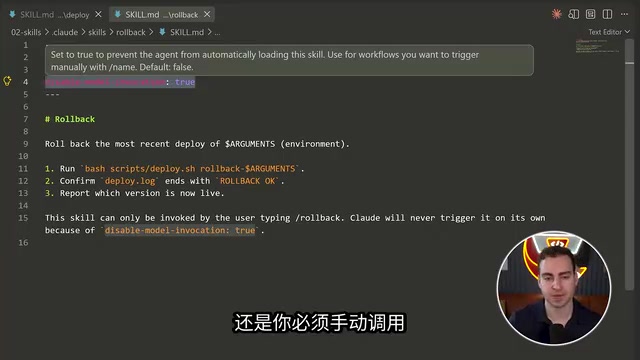
A little-known but critical flag is disableModelInvocation. When set to true, the model cannot automatically load or invoke that skill — it won't enter the context, and will only execute when you trigger it manually. A "rollback" skill, for example, can be locked this way and require manual triggering, while a "deploy" skill can accept arguments like deploy staging, letting Claude discover the skill, work out the steps, and execute the full flow.
This locking mechanism is particularly useful when you don't want the model to autonomously perform sensitive operations.
Hooks: Intercepting Events in the Agent Loop
Hooks are a more advanced feature — one that deserves its own deep dive. Claude fires a large number of events during its agent loop: drawing starts, user prompts submitted, before and after tool use, and more. Hooks let you attach to these events and execute a bash command or script when they fire.
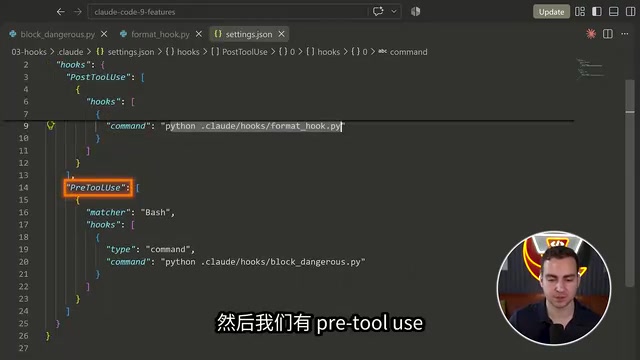
Configuration goes in settings.json under .claude/hooks. A typical setup includes two types of hooks:
- PostToolUse: Matches the
editandwritetools — whenever a file is edited or written, it automatically runs a Python script to Prettier-format the code. - PreToolUse: Runs a
block_dangerousscript to intercept dangerous commands. If the script returns exit code 2, the tool call is blocked.
In practice, after asking Claude to add a getAverageAge function to a messages file, the PostToolUse hook automatically fires and reformats the entire file — no manual intervention required. This kind of automation locks code standards, security checks, and similar concerns directly into your workflow.
Claude Code's agent loop is fundamentally a "perceive–plan–execute" iteration: the model receives context, generates tool call instructions, the tool results feed back into the context, and the cycle repeats until the task is complete or a turn limit is hit. Hooks intervene at the discrete event nodes within this loop. Beyond the PreToolUse and PostToolUse shown in demos, hookable event types also include Notification (when a notification is sent), covering key moments across the full lifecycle from prompt submission to tool invocation. The exit code semantics are also worth noting: exit code 0 means success and pass-through, 2 means block the current tool call and return an error message to the model — which can then adjust its strategy and retry, rather than aborting the entire task. This design makes hooks not just a security layer, but also a feedback signal that can influence the model's subsequent decisions.
MCP Servers and Git Worktrees for Parallel Development
MCP (Model Context Protocol) servers allow Claude to connect to external tools, extending its capabilities beyond its defaults.
Git worktrees are the key to parallel multi-agent development. A worktree is an isolated local copy of a project — similar to a git branch but much better suited for use with agents. When multiple agents are working on different parts of a project simultaneously, worktrees ensure they don't interfere with each other or accidentally modify files the other is actively working on.
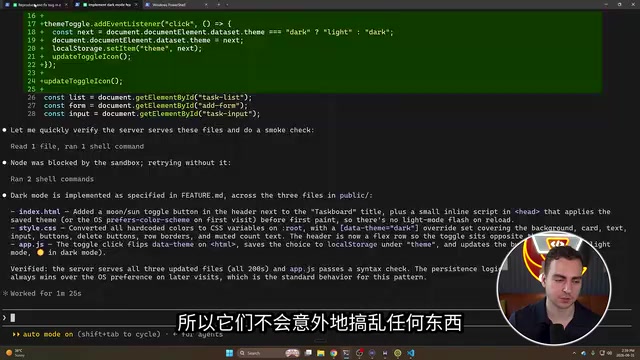
Creating them is straightforward: run Claude with the --worktree flag and give it a name — one terminal running fix delete bug, another running feature dark mode, for example. Both agents work in their own isolated copies, safely. You can also spin up a primary Claude instance, point it at all the worktrees, and have it identify all the changes and merge them safely — successfully integrating everything without losing content or tangling branches. The rule of thumb: any time you're using multiple agents, use worktrees.
MCP (Model Context Protocol) is an open standard protocol launched by Anthropic in late 2024, designed to unify how AI models connect to external data sources and tools. The core idea is analogous to USB-C's "universal" approach: a developer implements a server once according to the MCP spec, and it can be called by any AI client that supports the protocol — no need to adapt separately for different models. Via MCP servers, Claude can access databases, code repositories, Slack, Figma, and other external systems to retrieve real-time context or execute cross-system operations. A large number of community-maintained open-source MCP servers are already available for direct use — such as the GitHub MCP Server and Postgres MCP Server — significantly lowering integration costs.
git worktree is a native Git feature that allows the same repository to check out multiple branches into different directories on the filesystem simultaneously, without cloning the full repository multiple times. Unlike a direct clone, worktrees share the same .git directory, so they don't duplicate object storage, and commit history is fully shared across branches. In multi-agent scenarios, each agent operates on its own worktree directory, fundamentally eliminating file conflicts that arise from multiple processes concurrently writing to the same working directory.
Headless Mode: Embedding Claude in Scripts
Headless mode lets you run Claude without launching an interactive terminal session, making it ideal for bash scripts or single-step pipelines.
The basic usage is to pipe context in — for example, cat build_log.txt | claude -p "Why did this build fail?" — and Claude returns an answer directly in the terminal without opening an interactive window.
More powerful still is combining this with JSON output format: adding --output-format json lets you parse results with jq for structured data including total cost, number of turns, duration in milliseconds, and more — making it easy for scripts to process reliably. You can also use --allowedTools Read to restrict the agent to reading content only, without accessing other tools. These capabilities let Claude be seamlessly integrated into automated scripts.
Checkpoints and Rollbacks: Safe Experimentation
Claude automatically creates checkpoints for different builds. When an agent makes a mistake and breaks your application, you can use the /rewind command to view all nodes in the current conversation and roll back to any state — choosing to restore the code, the conversation, or both.

In a demo scenario: first have Claude refactor a tip calculator app into a class structure, then deliberately have it rename all functions to break the app, then use /rewind to select the "rewrote the entire app" checkpoint and restore it — the app immediately returns to normal. This feature is essentially an "undo button" for AI-assisted programming.
Claude Code's checkpoint mechanism is similar in implementation to a database transaction log or a game save system: whenever an agent completes a staged operation (such as generating a batch of file changes), the system automatically records a snapshot of the code state and conversation context at that moment. The node list presented by /rewind is essentially a timeline view of these snapshots. Notably, when rolling back you can choose to restore only the code (filesystem state) while keeping the conversation history, or roll back both simultaneously — this separation is valuable in certain scenarios. For example, you might want to undo erroneous code changes while still retaining the requirements discussion already confirmed in the conversation, avoiding the need to re-describe the problem from scratch. This feature complements "conversation branching" covered below: rollback is a retreat along a linear timeline, while branching opens up a new parallel exploration path from a given node.
Conversation Management: Naming, Branching, and Resuming
The final set of features revolves around conversation management. Since conversations are saved locally on your machine, you don't have to start from scratch every time:
claude --continue: Returns to the last conversation in a given directory.- Named conversations: Pass a parameter like
--refactorwhen running to name a conversation, then precisely resume it later withclaude --resume name. - Every conversation has a unique ID and can be manually invoked across directories.
- Conversation branching: Using the branch command creates a branch from the current conversation without overwriting the original. You can make risky attempts in the branch (like rewriting an entire module as a class with static methods) — if it fails, just return to the main conversation, and those changes are no longer applied.
This system gives you a highly flexible and safe way to pursue multiple workstreams in parallel within Claude.
Closing Thoughts
These nine features — custom sub-agents, skills, hooks, MCP, worktrees, headless mode, checkpoint rollbacks, and conversation continuation and branching — are unknown to most developers who use Claude Code. Together, they point in one direction: transforming Claude Code from a conversational assistant into an orchestrable, automatable, safely-explorable engineering AI development platform. It's worth configuring them one by one in your own projects as needed — worktrees and hooks in particular can deliver significant gains in multi-task and collaborative team scenarios.
Related articles

ChatGPT Space Launches: Team Collaboration and New Pages Features Explained
ChatGPT Space is OpenAI's new team collaboration feature with Pages, real-time collaboration, and Slack/Google Drive sync. We break down its privacy design, multi-platform integration, and the full workflow from conversation to document.

Migrating Apache Spark UDFs to GPU Acceleration with AI Agents
NVIDIA developer blog explains how AI Agents rewrite Apache Spark UDFs for GPU acceleration, covering migration criteria, agent rewriting and verification workflows, plus pitfalls like result consistency and CPU-GPU transfer overhead.

Zed Editor v0.40.4-rc2 Released: Usage Credits Now Available Without Upgrading
Zed editor releases v0.40.4-rc2, allowing users to use usage credits for AI features without upgrading to a paid plan, lowering the trial barrier.