ChatGPT Space Launches: Team Collaboration and New Pages Features Explained

ChatGPT Space introduces Pages, turning conversations into collaborative, updatable team workspaces.
OpenAI's newly released ChatGPT Space is redefining team-AI collaboration. Its core Pages feature automatically organizes project plans, drafts, dashboards, and visualizations from conversations into editable, shareable pages. Space supports real-time collaboration with private chat histories—colleagues see only pages and edits, not original conversations. Pages also sync with Slack and Google Drive for dynamic updates. The demo extends from script to Storyboard and character visuals, with self-updating interactive components. ChatGPT is evolving from a conversational assistant into a collaborative, updatable team workspace.
OpenAI's newly released ChatGPT Space feature is redefining how teams collaborate with AI. Judging from the leaked official demo video, Space is not just a chat interface—it's a workspace that integrates Pages, real-time collaboration, and cross-platform data synchronization.
Pages: Turning Conversations into Collaborative Documents
The core of Space is the Pages feature. It allows users to consolidate project plans, drafts, dashboards, and visualizations from ChatGPT conversations into a single page. Users can edit the page directly, or ask ChatGPT questions and have it make changes on their behalf.
In the demo, the team used a single instruction to have ChatGPT automatically organize all materials for a Space launch event—priorities, decisions made, and to-dos—into a page. The page content supports direct editing and can be shared with team members in real time.

On the relationship between ChatGPT Pages and conversational documents
ChatGPT Pages is essentially a "conversational document" format. What sets it apart from traditional online documents is that the content isn't written word by word by a human—it's automatically extracted, structured, and continuously iterated through natural language interaction between the user and the AI. Users can either edit directly on the page with WYSIWYG functionality, or instruct the model to reorganize content, with both editing methods sharing the same underlying data.
From a product standpoint, Pages is closer to block-based documents like Notion and Coda, where each paragraph, list, table, and dashboard is an independently addressable module, allowing the model to precisely modify one block without affecting others. This also explains why ChatGPT in the demo could automatically organize "priorities, decisions made, and to-dos" into a clearly structured page—it's essentially performing a conversion from unstructured conversation to structured document.
Real-Time Collaboration and Privacy Boundaries
Space emphasizes real-time team collaboration. In the demo, a user shares a page with marketing colleague Vic, who can instantly open the page and update content, or even add their own review comments.
What's notably interesting is the privacy design. According to the demo, each user's chat history remains private—colleagues can only see page content and editing activity, but cannot view each other's original conversations. This means team members can collaborate without exposing their full context.

On the "private conversations, shared pages" privacy model
This design is commonly known in the industry as "context isolation." In traditional multi-user chat or shared documents, collaboration typically means fully shared context. Space, however, decouples the collaboration layer (page content and editing records) from the private context (individual chat history with ChatGPT), allowing each member to retain their own questions, trial-and-error, and reasoning processes.
The technical implication is this: pages are the shared "fact layer," while conversations are the private "process layer." Member Vic can see the final results and others' edits, but cannot trace back the other person's prompts or intermediate reasoning. This model is especially important for enterprise scenarios—it lowers the psychological barrier for members who might otherwise hesitate to use AI out of concern about exposing their thought process or sensitive information, and it's also more likely to pass data isolation compliance reviews.
Multi-Platform Data Synchronization and Dynamic Updates
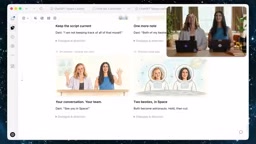
Another highlight of Space is its integration with external tools. In the demo, a user asks ChatGPT to ensure the script stays in sync with the latest updates in Slack and Google Drive. ChatGPT can retrieve information from these platforms and automatically update the page.
On the integration mechanism with Slack and Google Drive
Space's synchronization with Slack and Google Drive typically requires users to complete OAuth authorization, allowing ChatGPT to read content from specified channels or folders via official APIs. In the demo, "ensuring the script stays in sync with the latest updates" means the page is not a one-time snapshot, but rather establishes a reference relationship that can be re-fetched.
Two points deserve attention: first, the scope of synchronization depends on the granularity of authorization—the model can only read data within resources the user has explicitly permitted. Second, dynamic updates often rely on manual triggers or scheduled refreshes rather than unconditional real-time push. Enterprises should pay attention to permission inheritance when external platform content enters a page—if the page is shared, whether the original content from Slack or Drive should also be visible is a boundary that must be clarified in advance for practical deployment.
The Complete Pipeline from Conversation to Storyboard
The demo also showcased Pages' extensibility: users can further transform a script into a Storyboard, and even generate character visuals. Pages support interactive components like dashboards, checklists, tables, and images, and have self-updating capabilities.
The entire workflow demonstrates the direction of ChatGPT's evolution from a conversational assistant to a team workspace: converging fragmented conversations, files, decisions, and tasks into a collaborative, updatable, and interactive shared page.
To get started, users simply need to ask ChatGPT to turn a conversation into a page and share it with their team.
On Storyboards and interactive components
A Storyboard was originally a creative tool used in film, television, and advertising to arrange visuals, dialogue, and action in shot order. In this context, it refers to automatically breaking down a text script into a visualized sequence of storyboard panels, with character visuals or scene illustrations generated for each panel. This step is essentially a transformation from "text assets" to "visual assets."
The dashboards, checklists, tables, and images that pages support give Pages characteristics of a lightweight application. The so-called "self-updating capability" means these components can be bound to data sources or synchronization rules, automatically refreshing their display when source data changes without manual re-entry. This makes Pages no longer just a static deliverable, but closer to a collaborative dashboard that evolves alongside a project.
One-line Summary
ChatGPT Space introduces Pages, turning conversations into collaborative, updatable team workspaces.
Paragraph Summary
OpenAI's newly released ChatGPT Space feature is redefining how teams collaborate with AI. Its core Pages feature can automatically organize project plans, drafts, dashboards, and visualizations from conversations into editable, shareable pages. Space supports real-time team collaboration, allowing members to view and modify content simultaneously, while each user's chat history remains private—colleagues can only see pages and editing activity, not the original conversations. Pages can also sync with external tools like Slack and Google Drive to keep content dynamically updated. The demo further showcased an extensible pipeline from script to Storyboard and even character visuals, with pages supporting interactive components like dashboards, checklists, tables, and images with self-updating capabilities. Overall, ChatGPT is evolving from a conversational assistant into a collaborative, updatable, and interactive team workspace, where users can turn a conversation into a page and share it with a single instruction.
Related articles

The Chaotic Aesthetics of Apple's HomeView Ad: A Marketing Code Only Parents Can Read
Apple's HomeView smart display ad ditches minimalist style for chaotic family mornings to win over parents. We analyze why it confuses most viewers but resonates instantly with families — and the trade-offs and risks of Apple's targeted marketing.

Cerebras CEO Pushes Back on AI Doomerism: Stop Spreading Panic
Cerebras CEO Andrew Feldman publicly pushes back on AI doomerism at TechCrunch Disrupt, arguing excessive risk focus drowns out AI's real opportunities.

Retooling in Minutes: Industrial Next Redefines Factory Robot Flexibility
Industrial Next aims to let factory robots retool in minutes instead of weeks, automating complex delicate tasks and advancing flexible manufacturing and small-batch production.