9-Step Process for Consistently Delivering High-Quality Products with AI

AI coding success depends on defining scope and completion standards, not writing better prompts.
This article presents a 9-step methodology for consistently shipping software products with AI. The author argues that the three failure modes of AI coding (wrong direction, wrong details, poor quality) stem not from model limitations, but from insufficient information and constraints. The solution spans three phases — defining direction, implementation, and delivery — with key practices including writing persistent rules into an `agents.md` file, validating direction early with demos, breaking tasks to prevent scope creep, and manually verifying results against the original spec. Tools and models should be decoupled, with no lock-in to any single Agent, because the reusable workflow itself is the real asset.
Why Can AI Write Code But Still Fail to Deliver Good Products?
Many people have experienced this scenario: the code AI generates looks fine, but you don't feel confident using it, shipping it, or even building on top of it. After years of hard-won lessons, one content creator reached a core conclusion — the key to AI-assisted programming has shifted away from "how good your prompts are" to two entirely different things: what the scope is, and what it means to be done.
For the past few years, industry discussion around AI coding has fixated on prompt engineering. But what actually separates people who can consistently ship products with AI from those who can't isn't prompt skill — it's the ability to clearly define task boundaries and completion criteria. This insight forms the backbone of the entire methodology.
Three Types of Gaps That Cause AI Delivery Failures
Consider a familiar scenario: you ask AI to build a "document conversion tool" that converts PDFs to Markdown. You just say "build me a document conversion tool" — code will definitely get generated, but three types of gaps will emerge.
Wrong direction: In your mind, you just want to cleanly convert a few PDFs you have on hand. But AI delivers a full document management platform with cloud sync, version history, and collaborative workspaces. Lots of features — none of what you actually needed.
Wrong details: The direction is right — it does convert PDFs to Markdown — but tables are completely misaligned, formatting is lost, and anything with slightly complex layout falls apart. The features are all there, but it's frustrating to actually use.
Poor quality: The formatting is correct, but throw in a 50-page document and it freezes. Small files work fine; real-world files cause it to crash.
These three gaps aren't accidental — they're inevitable. And their root cause isn't the model; it's three missing pieces of information: you didn't clearly state what you wanted ("clean" has a specific shape, but you didn't write it out, so the model had to guess based on probability); you didn't make rules persistent (constraints like "preserve table structure" need to be repeated every single turn — AI forgets what it agreed to last round); and you never defined what "done" means (AI writes the code and hands it back to you, transferring all verification responsibility to your side).
In other words, what looks like insufficient model capability is fundamentally insufficient information and constraints on your end — and all three of those gaps live in the process, not in the model.
Tools and Models: Decouple Your Decisions, Don't Lock Into a Single Agent
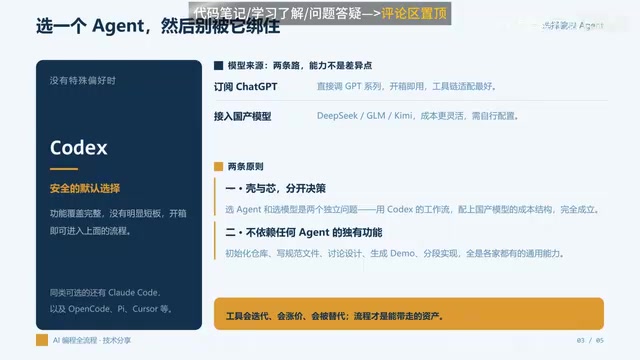
When choosing a coding agent, the default recommendation is to start with Codex — it's safe, fully featured, and has no obvious weaknesses, letting you jump straight into the workflow we'll discuss. Other viable options include Claude Code, OpenCode, Cursor, and similar tools.
More importantly, two principles apply:
Principle 1: Decide on tools and models separately. Choosing an Agent and choosing a model are two independent decisions. You can absolutely use Codex's workflow with a Chinese model (like DeepSeekAd, GLM, or Kimi) — this is completely valid from an engineering standpoint. The differences are mainly in cost and configuration, not in "who's smarter," since most development tasks are well within current model capabilities.
Principle 2: Don't rely on any single Agent's proprietary features. Reading a repository, writing rule files, discussing design, generating demos, implementing in stages — every step is a capability all major tools share. Avoiding lock-in on proprietary features isn't pedantry; it's insurance. Tools will iterate, raise prices, and get replaced. What's best today may not be tomorrow. But the overall development workflow is the asset you actually take with you.
Codex is a cloud-based code execution Agent from OpenAI that can run code in a sandbox environment, read and write files, execute terminal commands, and complete complex development tasks through multi-turn conversations. Unlike the earlier Codex model that only handled code completion, the current version is more like a development assistant capable of autonomous planning and step-by-step execution. Claude Code is Anthropic's equivalent product, known for its strong long-context understanding and ability to follow complex instructions. Cursor is a code editor with deep AI integration, with its strength being real-time awareness of your local codebase. All of these tools allow you to swap out the underlying language model — which is precisely the engineering foundation for the "decouple tools from models" principle. The Agent handles execution environment and workflow orchestration; the model handles language understanding and code generation. These are two independently replaceable layers.
The Nine-Step Process: Define Direction, Implementation, and Delivery
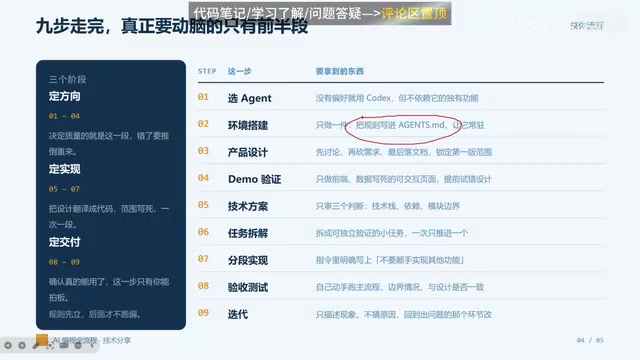
The development workflow breaks down into nine steps across three phases:
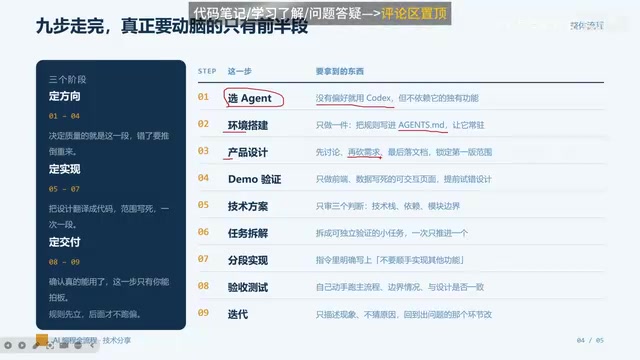
Define Direction (Steps 1–4) — Determines Quality
- Choose your Agent: No strong preference? Start with Codex.
- Environment setup: Do one thing — write your rules into an
agents.mdfile to make them persistent. For example: "Run tests before delivering any changes" or "Include detailed code comments." Write it once and it automatically applies every turn, no need to repeat yourself. - Product design: First discuss what you're building, organize your requirements into a document, and lock down the scope of the first version.
- Demo validation: Have it build a simple frontend demo first. The goal is to fail fast, not to build a product — just see roughly what it looks like and confirm basic interactivity.
Get this phase wrong and everything that follows needs to be thrown out. This is the part that matters most.
Define Implementation (Steps 5–7) — Determines Speed
- Technical plan: Lock in the tech stack and key dependencies. Everything else can wait.
- Task breakdown: Break the work into independently verifiable small tasks. Otherwise when something goes wrong, you won't know which part failed.
- Incremental implementation: Explicitly tell the AI "don't implement other features along the way." Agents have a strong tendency to "while I'm at it" extra things — and out-of-scope changes are the hardest to review and the most likely to introduce hidden bugs.
Define Delivery (Steps 8–9) — Only You Can Sign Off
- Acceptance testing: Run the flow yourself, test edge cases, and check every item against the design document.
- Iteration: Have AI fix issues based on your acceptance results. If AI starts going off track, pull it back to scope.
agents.md (or similarly named rule files like .cursorrules in Cursor or CLAUDE.md in Claude Code) is the persistent constraint layer in an AI coding workflow. Because most AI Agents don't have memory across sessions — every new conversation starts from zero — developers need to write project-level constraints (code style, testing requirements, tech stack restrictions, prohibited behaviors) into a fixed file. The Agent reads it automatically before executing each task, making rules "persistent" throughout the project's lifecycle rather than requiring the developer to repeat them every turn. This mechanism is essentially compensating for AI's inherent limitations — finite context windows and no persistent memory — by converting verbal agreements into versioned engineering artifacts.
Live Demo: Building a txt-to-Markdown Tool from Scratch
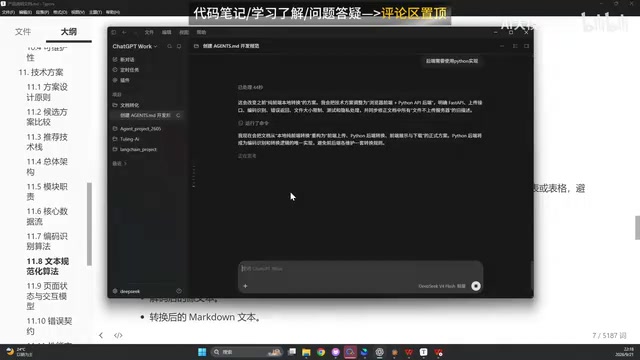
The walkthrough uses a real project to thread through the entire workflow. Start by creating a project folder, adding it to Codex, then having it create agents.md with rules (detailed comments, tests must pass before delivery).
Next comes product design — throw the requirement "I want to build a document conversion tool" at AI and have it think through what the first small version should include. AI suggests file upload, conversion settings, core conversion logic, progress tracking, result preview, and error/edge case handling, while proactively listing items "not recommended for version one." To keep it minimal and viable, the scope gets narrowed further to "only support txt to Markdown conversion."
Then have AI generate a product spec document and an HTML validation page, and based on that document, decide on the technical approach. This is where a classic "scope creep" moment emerges — AI autonomously adds a desktop application and uses Node.js. The correction is immediate: "no desktop app for now" and "backend must be implemented in Python," with a third rule added to agents.md: "develop according to the product spec document, don't implement additional features along the way."
The final result is a Python backend built with FastAPI. The complete workflow — create a new txt file, write content, convert, download the Markdown — runs through successfully in testing.
FastAPI is a high-performance Python web framework designed specifically for building APIs. It automatically generates interface documentation from Python type annotations, has clean syntax, starts up quickly, and is well-suited as a backend choice in AI-generated code — the model has extensive training data coverage on it, which means generated code quality is relatively stable with a lower error rate. In AI-assisted development, choosing mainstream frameworks with good documentation, active communities, and high model familiarity — rather than obscure or overly new tech stacks — significantly reduces the probability of AI hallucinating or generating incorrect dependencies. This is one reason why the technical planning phase requires human review and sign-off.
Can the Process Be Simplified? Distinguish "Format" from "Control Mechanism"
For the pushback that "this process is too heavy," the guiding principle is: anything you can skip is a matter of expression form; anything you can't skip is a control mechanism.
Three things that absolutely cannot be skipped: environment setup (without persistent rules you'll repeat yourself every turn), manual acceptance testing (only you know what product you actually want), discussing design with AI (this eliminates the intent gap between you and the AI — skipping it is gambling), and task breakdown (larger changes mean dramatically less controllability).
Things that can be simplified depending on context: the product spec document (can be skipped if your scope is crystal clear in your head — its core job is to lock down scope), demo validation (depends on backend complexity — the heavier the backend, the earlier you should surface direction errors), and the technical plan (can be skipped for small projects, but don't skip it when architecture choices are involved).
Notice that everything you can skip is about "what format to write things in or how to confirm them" — not a single one is about "whether to confirm at all." Not one control mechanism is removed.
The whole methodology comes down to one closing observation:
An Agent can verify that code matches its own understanding — but it cannot verify that its understanding matches your expectations.
So the step of "clearly defining what done looks like, and manually verifying it yourself" can never be bypassed.
Related articles

Chain of Thought Isn't Just for AI: How Humans Can Use CoT to Improve Thinking Quality
Chain of Thought isn't just a prompt trick for large models. Starting from a Hacker News discussion, this article analyzes why CoT works for human thinking too, breaks down actionable ways to transfer it, and highlights the key differences between human CoT and machine CoT.
Cloudflare Teams Up with OpenAI: Closi…
Cloudflare Teams Up with OpenAI: Closing the Loop from Vulnerability Discovery to Defense with AI
Cloudflare uses OpenAI Daybreak to investigate security vulnerabilities and generate reviewable remediation plans, while developers use Codex to boost coding efficiency and quality.

Orca Multi-Agent Orchestration in Practice: A Guide to Parallel Collaboration with Claude and Codex
Orca is Stable AI's free open-source agent workbench supporting 34 agents like Claude Code and Codex in parallel. Learn its Git worktree isolation, multi-model orchestration, and mobile management.