90% of Agents Just Chat — They Don't Actually Work: The Three-Layer Architecture and Production Rules of Real Agents

Real Agents need three-layer architecture and built-in error-correction loops — not just an LLM wrapper.
Most "Agents" on the market are still chatbots that understand instructions but can't complete a full execution loop. A truly deployable Agent requires all three layers: perception (multimodal input), decision (task decomposition and planning), and execution (safe tool calling). Task decomposition is the most overlooked yet critical step. Since first attempts rarely succeed, the real core of an Agent is a built-in "execute → validate → reflect → correct → remember" loop. Production deployment also demands 7 practical safeguards and 3 ironclad rules — especially human veto rights and circuit breakers on critical paths.
Why Most Agents Are Just "Wrapper Chatbots"
The vast majority of so-called "action-capable" Agents on the market are little more than chatbots dressed up in a shell. They understand what you say, but can't complete the full loop from comprehension to execution — understanding an instruction is one thing; actually getting the job done is another.
The key question for judging whether an Agent can truly "get things done" is whether it has a complete execution chain. A genuinely deployable Agent doesn't just understand instructions — it plans its own steps, calls tools on its own, and can self-correct when something goes wrong. This coordination is like the human nervous system: remove any one layer and the whole thing breaks down.
In other words, wrapping a large language model with a few APIs doesn't make something an Agent. It might be able to "say" things, but it can't "do" things — and it certainly can't "save itself" when it makes a mistake.
The Three Layers of a Real Agent: Perception, Decision, Execution
A capable Agent must simultaneously possess three layers of ability — none of which can be omitted:
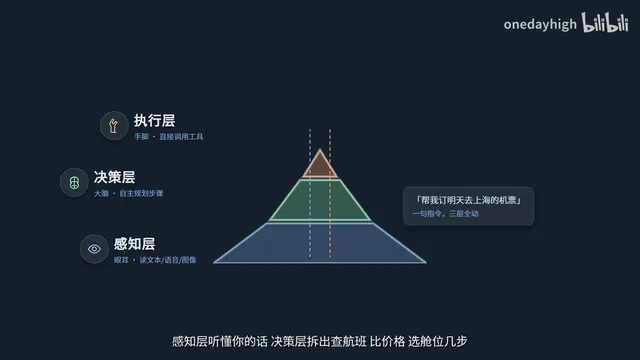
- Perception Layer: Like eyes and ears — reads and understands text, voice, and images;
- Decision Layer: Like a brain — plans steps on its own, breaks down tasks, and sequences execution;
- Execution Layer: Like hands and feet — directly calls tools and turns actions into real outcomes.
Take "Book me a flight to Shanghai tomorrow" as an example: the perception layer first understands your request; the decision layer breaks it into sub-steps — search for flights, compare prices, select a seat class; the execution layer actually calls the booking API and completes the order step by step. All three layers must operate in sync for a real task loop to be completed.
The most commonly overlooked step here is task decomposition. When faced with a vague, high-level request, a reliable Agent doesn't charge straight ahead — it first breaks the goal into multiple concrete sub-tasks, validates the feasibility of each one, and then arranges them in execution order. Many Agents "go off the rails" precisely because they skip this step and dive in head-first.
The decision layer typically relies on planning algorithms to implement task decomposition and ordering. Current mainstream approaches include the ReAct (Reasoning + Acting) framework — which prompts the model to "think before it acts" at each step by explicitly externalizing its reasoning process — and the Plan-and-Execute pattern, which generates a complete plan upfront before executing it step by step. The core difference lies in whether mid-course plan revision is allowed: ReAct can re-reason at every step based on the latest results, offering greater flexibility at higher computational cost; Plan-and-Execute is more efficient but has weaker fault tolerance when unexpected situations arise. Understanding this design trade-off helps you judge whether a given Agent framework suits your specific use case.
Calling Real Tools Safely and in a Controlled Manner
Being able to decompose tasks isn't enough — a capable Agent must be able to call real tools safely and in a controlled manner. Writing code, running commands, querying documentation: none of these are just words. They leave verifiable results in the runtime environment.
Many "all talk, no action" Agents that users encounter get stuck precisely at the tool-calling stage. They can describe what needs to be done, but can't actually execute it — or they make frequent errors when calling tools: wrong parameters, insufficient permissions, incorrect results. These are all standard challenges in real-world deployment.
Error-Correction Loops: The Core of a Real Agent Isn't Never Making Mistakes
In practice, an Agent's first attempt at execution almost never gets everything right. If you let it barrel down a single path without correction, failure is guaranteed. Some deployed Agents crash three times and simply exit — with no idea how to recover. This is the classic symptom of a missing error-correction mechanism.

The core of a truly capable Agent isn't "never making mistakes" — it's having a built-in error-correction loop: after execution, it validates the result on its own; if something's wrong, it reflects on where the error occurred, corrects the parameters, and reruns, until it gets a result that meets requirements.
Going further, lessons from that reflection get written into memory — short-term memory holds the current context, while long-term memory stores historical lessons so the same mistake isn't made twice. This cycle of "execute → validate → reflect → correct → remember" is the true core of a deployable Agent.
The memory mechanism mentioned here has a clear engineering structure. Short-term memory is typically the model's context window, which stores conversation history and intermediate results from the current session and is cleared when the session ends. Long-term memory requires external storage — a common approach is a vector database (such as Chroma or Pinecone), which converts historical experiences into vectors for storage and retrieves relevant excerpts via semantic search to inject into the context when needed. It's worth noting that the quality of long-term memory directly determines the upper bound of an Agent's ability to "avoid repeating mistakes" — if the written reflections are too vague, it becomes very hard to retrieve genuinely useful historical lessons during retrieval. Therefore, experience summaries generated during the reflection phase need to be specific enough, ideally including the failure cause, the correction method, and the applicable conditions.
A Real Production Scenario: Parcel Sorting
Abstract architectures are easier to understand through concrete scenarios. Take parcel sorting as an example:
- Perception: The Agent scans packages on a conveyor belt with a camera and identifies which shipping labels are damaged;
- Decision: It determines that the package cannot proceed through normal sorting and needs to be redirected for manual review;
- Execution: A robotic arm diverts the package into a re-inspection slot and automatically files a work order.

The key to this workflow: what can't be handled gets passed to a human, critical actions have human backup, and every step is traceable. This is what doing real work in a production environment looks like — not a demo in a lab.
Seven Frontline Tips and Three Ironclad Rules
To truly deploy an Agent into a production environment, here's a practical checklist worth following:
- Never give the Agent full high-risk permissions;
- Task decomposition granularity must not be too coarse;
- Add execution timeout and interruption mechanisms;
- Validate parameters before tool calls;
- Keep complete logs for every step of execution;
- Result validation rules must be quantifiable;
- Always preserve the human right of final veto.

On top of these, there are three ironclad rules: don't pile on too many tools — the more tools an Agent has, the more likely it is to pick the wrong one; if a single Agent is sufficient, don't rush to go multi-Agent — avoid over-engineering; add circuit breakers on critical paths — consecutive failures should trigger a halt and alert, not a forced push-through.
The Circuit Breaker mechanism is borrowed from distributed systems design: when a service or operation fails consecutively beyond a threshold, the system proactively "breaks" that path and triggers an alert, rather than retrying indefinitely until resources are exhausted or cascading failures occur. This mechanism is especially critical in Agent scenarios — an Agent without circuit breaking can fall into an infinite loop when a tool call fails, continuously consuming tokens and API quota, and may even repeatedly execute erroneous actions with side effects (such as sending emails or writing to a database). A sensible circuit-breaking strategy typically includes: setting a maximum retry count per task, a timeout limit per step, and a degraded behavior upon circuit breaker activation (stop execution and notify a human).
Evaluation Criteria and Getting Started
To summarize, an Agent that can truly get work done and be placed in a production environment should meet five criteria: it can decompose complex tasks, it can call tools safely, it can self-correct on errors, every step leaves a traceable log, and it doesn't overstep its permissions while being capable of making key decisions on behalf of humans. Use these five criteria to distinguish genuinely useful Agents from pure hype.
Where should you start? The best approach is to begin with a real, small requirement. Even writing a minimal loop of five to eight lines with a framework and running through the "decompose → call → validate" flow yourself once is worth more than reading ten explainers.
Agents won't replace developers — but the winners of tomorrow will be the ones who know how to harness them.
Related articles

How Big Can Stars Really Get? The Physical Limits of the Largest Stars
Red supergiants are the largest stars by volume, with radii up to 2,000 times the Sun, engulfing the inner solar system. But there is no precise upper limit on stellar size—models predict up to 15,000 solar radii. The most massive blue stars are far smaller than red supergiants—biggest and heaviest are two different things.

Apple HomeView Smart Display Full Feature Breakdown: Wall-Mount or Desktop, $299
Apple launches HomeView, a $299 smart display with wall-mount and desktop options, 12MP camera for facial recognition, smart home control, music playback, and recipe step-by-step cooking. Full breakdown of watch faces, apps, privacy, and cooking integration.

Where Did the Promised New Studio Go? Craft Computing Answers After Five Years
Craft Computing's host responds to viewer questions: the new studio promised five years ago was shelved as construction costs soared from $30,000 to $75,000, and was replaced by a 168-square-foot garage conversion.