Apple HomeView Smart Display Full Feature Breakdown: Wall-Mount or Desktop, $299

Apple launches the $299 smart home display HomeView, integrating HomeKit, Siri, and facial recognition as a family info and entertainment hub.
Apple unveiled HomeView, a $299 smart home display that supports wall-mounting and an aluminum base. It features multiple watch faces, a smart home control center for HomeKit devices, Siri with personal context, CarPlay streaming app compatibility, Apple Music and HomePod intercom, 12MP camera facial recognition for privacy, and recipe sending from Safari. Positioned as a family information hub and entertainment terminal to compete with existing smart displays.
Apple officially unveiled its new smart home display, HomeView, at the Welcome Home event in New York, priced at $299. The device can be wall-mounted or placed on an aluminum speaker base with an adjustable display, making it convenient for kitchen counters or nightstands. Here's a detailed breakdown of HomeView's features.
Diverse Watch Faces and a Smart Home Control Hub
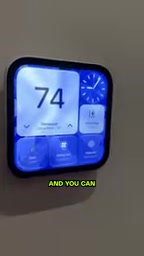
HomeView offers a variety of watch faces that users can switch between based on preference and context. The most central one is the smart home view, which connects directly to Apple's Home app, letting users customize widgets to control various devices — thermostats, door locks, ceiling fans, lights, and climate control systems are all covered. Swiping left or right also brings up live feeds from HomeKit security cameras, along with controls for speakers and TVs.
Swiping down from the top of the screen brings up Siri AI, allowing users to control smart home devices by voice or ask general knowledge questions. Siri also integrates personal context, so you can ask things like "How long until my friend arrives at my place from the airport?" — questions that involve personal schedules.
Other watch face types include a lava lamp-style dynamic display, a Snoopy theme, a minimalist clock interface, and a photo face. There's also a widget face that shows weather, to-dos, clock info, and more. Most app interfaces look very familiar because they're Apple's native Home app.
About HomeKit and the Thread/Matter Protocol
The Home app that HomeView deeply integrates with relies on Apple's HomeKit smart home framework. HomeKit itself is a software protocol and certification system that allows third-party devices (like lights, locks, and thermostats) to be controlled by Apple devices through a unified interface. In recent years, Apple has partnered with Amazon, Google, and others to launch the Matter standard, pushing devices to connect via underlying protocols like Thread or Wi-Fi, enabling cross-ecosystem interoperability between brands. As a home hub screen, HomeView's value largely depends on how many Matter/HomeKit devices it can support and whether it can serve as a Thread border router. Apple didn't detail at the event whether HomeView has a built-in Thread radio — if it does, it could enhance home network coverage and stability; otherwise, its contribution to the smart home leans more toward the interaction layer than the connectivity layer.
App Expansion and Multi-Device Integration
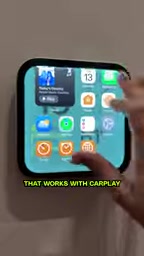
Swiping up from the bottom of the screen accesses other apps, but only those HomeView supports. Apple says any app that's CarPlay-compatible and supports audio/video streaming will appear here, provided the developer offers support.
Users can play Apple Music directly on HomeView. The device also has a built-in intercom feature that can call other HomePods, HomePod minis, or HomeView devices in the home, or broadcast messages to all devices. HomeView supports a calendar interface, but user identity must be verified first before it displays.
What CarPlay App Compatibility Means
Apple's mention that "CarPlay-compatible apps supporting audio/video streaming" can appear on HomeView is actually a clever developer strategy. CarPlay apps are designed for car screens, typically featuring clean interfaces, large buttons, and voice-first interaction logic — which closely mirrors how smart home displays are used in kitchens, bedrooms, and similar settings. If developers have already adapted their apps for CarPlay, they only need minor adjustments to bring them to HomeView, quickly expanding the app ecosystem. But this also means HomeView's initial app library won't be as rich as an iPad's — it'll lean more toward audio, podcast, and navigation tools rather than general productivity software. For users, HomeView isn't a tablet — it's a terminal focused on home control and lightweight entertainment.
Privacy Protection and Guest Mode

Each HomeView comes equipped with a 12-megapixel camera for facial recognition to verify user identity. This means only authenticated users can see their calendar schedules and text messages. Any operation involving security or personal information requires facial recognition or authentication via iPhone.
For family members or guests without an iPad or iPhone, HomeView also provides a corresponding interface — they can control the thermostat, ask general knowledge questions, and play music, but cannot access private information.
Facial Recognition and On-Device Processing
HomeView's 12-megapixel camera is used for facial recognition, and its underlying technology is likely similar to Face ID or the face recognition in Photo Booth. However, Apple emphasizes that the verification process happens on-device rather than being uploaded to the cloud. This aligns with Apple's longstanding privacy approach: biometric data is stored in the Secure Enclave and used only for local unlocking and identity confirmation. For a smart home display, this means sensitive information like family members' calendars and messages won't face cloud leak risks just because the device is connected to the internet. That said, it also introduces a limitation: facial recognition requires each family member to be pre-enrolled, otherwise they can only use the device as a guest. Apple hasn't said whether the enrollment process is shared with iPhone or must be set up separately on HomeView — this will affect the initial experience for multi-user households.
Cooking Integration: The Most Anticipated Feature
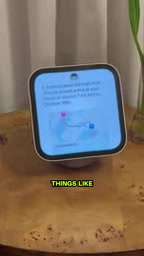
HomeView has a very practical cooking integration feature: users can send recipes from the Safari browser to HomeView and then follow along step by step. This means no more carefully propping up an iPad next to the stove while cooking. The presenter at the event said this might be the feature he personally would use most frequently, and it represents the direction of HomeView's future development.
From an overall design perspective, HomeView positions itself not just as a smart home control screen, but as a family information-sharing hub and entertainment terminal. Its $299 price point puts it in direct competition with smart display products on the market, while its deep Apple ecosystem integration — including HomeKit, Siri personal context, CarPlay app compatibility, and HomePod integration — forms its core competitive advantage.
How Safari Recipe Sending Works
Sending a recipe from Safari to HomeView seems simple, but behind it requires a cross-device content parsing and syncing mechanism. Recipes on web pages often contain a lot of distracting information (ads, comments, story build-ups), and HomeView needs to automatically extract the ingredient list and steps, converting them into step-by-step cards. This feature relies on Apple's SharePlay or Handoff frameworks, and possibly machine learning models to identify structured data. If well executed, it could become HomeView's core selling point that differentiates it from other smart displays. There are already some third-party apps that can parse recipes, but Apple's system-level integration means users only need one click while browsing on iPhone or Mac to push content to the kitchen screen — no additional apps required.
One-line Summary
Apple launches the $299 smart home display HomeView, integrating HomeKit, Siri, and facial recognition as a family info and entertainment hub.
Paragraph Summary
Apple unveiled its new smart home display HomeView in New York, priced at $299, supporting both wall-mount and aluminum base installation. The device features multiple watch faces, with the core being a smart home control center that lets users customize widgets to control HomeKit devices like thermostats, locks, and lights, and view security camera feeds. Swiping down from the top summons Siri with personal context Q&A. App expansion supports CarPlay streaming apps, Apple Music, and HomePod intercom broadcasting. Each device has a 12MP camera for facial recognition to protect privacy, with restricted guest mode. Cooking integration allows sending recipes from Safari and following along step by step. Overall positioned as a family information hub and entertainment terminal, directly competing with existing smart display products.
Related articles

Chain of Thought Isn't Just for AI: How Humans Can Use CoT to Improve Thinking Quality
Chain of Thought isn't just a prompt trick for large models. Starting from a Hacker News discussion, this article analyzes why CoT works for human thinking too, breaks down actionable ways to transfer it, and highlights the key differences between human CoT and machine CoT.
Cloudflare Teams Up with OpenAI: Closi…
Cloudflare Teams Up with OpenAI: Closing the Loop from Vulnerability Discovery to Defense with AI
Cloudflare uses OpenAI Daybreak to investigate security vulnerabilities and generate reviewable remediation plans, while developers use Codex to boost coding efficiency and quality.

Orca Multi-Agent Orchestration in Practice: A Guide to Parallel Collaboration with Claude and Codex
Orca is Stable AI's free open-source agent workbench supporting 34 agents like Claude Code and Codex in parallel. Learn its Git worktree isolation, multi-model orchestration, and mobile management.