A Guide to Choosing a Programming Monitor in the AI Agent Era: In-Depth Review of the BenQ RD280U

How the BenQ RD280U programming monitor addresses the new screen-time challenges of working with AI Agents.
As AI Agents like Codex and Claude Code democratize coding, everyone spends more time reviewing AI-generated content on screen. This article reviews the BenQ RD280U programming monitor, exploring how its 3:2 aspect ratio, code syntax color optimization, Moonhalo ambient lighting, and KVM multi-device support make it an ideal companion for the AI collaboration era.
When Coding Is No Longer Exclusive to Programmers
Just a few months ago, many creators without technical backgrounds thought "dealing with code is probably never going to be part of my life." But with the launch of AI Agents like Codex and Claude Code, the barrier to "writing code" has been fundamentally restructured.
It's worth explaining what an AI Agent is here. Unlike traditional chatbots, Agents have the ability to autonomously plan and execute multi-step tasks. Codex is a code-generation agent from OpenAI that can autonomously complete the entire workflow—from understanding requirements to writing and testing code—in an isolated sandbox environment. Claude Code is a command-line programming assistant from Anthropic that can directly read and write files and execute commands in the terminal. What they have in common: users only need to describe "what they want," and the Agent autonomously breaks down tasks and implements them step by step.
Previously, an idea would at most become a document handed off to someone who could code. Now, you just communicate in natural language and let the Agent quietly deliver the entire project.
Here's a practical example: say you want to build a "psychological age test" mini-program. The workflow could be—first use Claude to generate a set of test questions, then hand those questions to Claude Code or Codex to create a runnable exe program. If you want to deploy it to a website, you can have AI handle further polish and design, ultimately outputting an H5 page. Additionally, supporting graphics, PPTs, animations, posters, and layouts for videos can now all be handled by Agents.
The key point: throughout the entire process, users don't need to master specialized technical skills or learn much jargon. They just need to converse with AI in natural language to be a "competent supervisor."
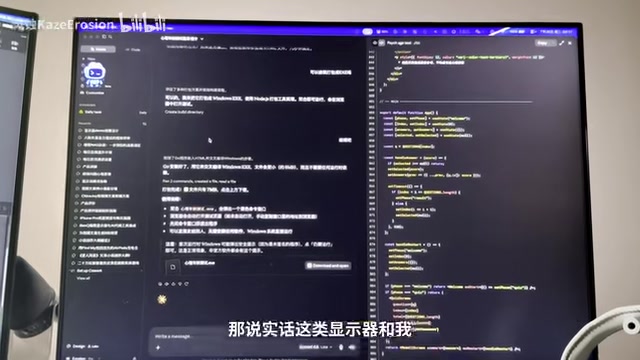
The Overlooked Pain Point: Screen Time Has Actually Increased
But here's something counterintuitive. When AI can generate a massive chunk of code in one go, humans actually need to see everything at a glance and review line by line even more than before.
Agents have transformed "reading code and reviewing content" from a programmer-exclusive activity into a daily routine for an increasing number of ordinary creators. When everyone can direct Agents to build things, it also means everyone may spend large amounts of time staring at screens—checking whether questions are correct, whether code makes sense, whether generated content meets requirements.
In other words, the screen has become our primary interface for collaborating with AI. Since so much time is spent on the screen, the screen itself deserves serious consideration. Against this backdrop, this article reviews the BenQ RD280U—a monitor positioned specifically for "focused programming."
3:2 Aspect Ratio: See 7 More Lines of Code Per Screen
The most immediately noticeable feature of the RD280U is its aspect ratio. It uses 3:2 rather than the common 16:9. At the same size, it can display approximately 18.5% more content than a 16:9 screen, which translates to roughly 7 extra lines of code.
The 3:2 ratio wasn't invented by BenQ—Microsoft's Surface series first brought this ratio into the mainstream, drawing design inspiration from the proportions of traditional A4 paper. Compared to 16:9 widescreen designs that better suit horizontal content like film and gaming, the "squarer" 3:2 form factor naturally fits vertical content consumption scenarios like document reading and code writing. In recent years, more and more productivity laptops have adopted 3:2 or 16:10 ratios, reflecting this trend.
This difference is very noticeable when reviewing code: you can see more content on a single screen, significantly reducing the number of times you need to scroll with a mouse or trackpad, directly impacting workflow smoothness.
It's equally useful for people who write a lot—with reference materials on the left and your draft on the right, you can see more content and stay more focused on the writing itself.
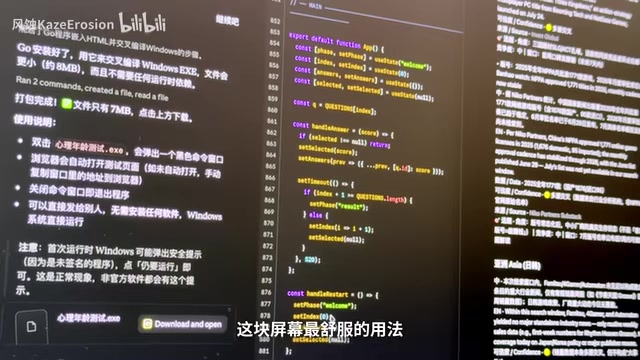
Side-by-Side Split Screen: The Best Posture for AI Agent Collaboration
If you work with Agents daily, the most comfortable way to use this screen is side-by-side split: Codex's conversation window on the left, its real-time generated code on the right. AI outputs large chunks of content at once, and the "squarer" 3:2 screen lets you avoid constant scrolling back and forth, making the rhythm of chatting and reviewing much smoother.
Panel Optimization: Designed Specifically for "Reading Code"
Anti-Reflection Coating Reduces Distractions
The RD280U features an anti-reflection coating. Whether it's daytime near a window or nighttime under overhead lights, these common office light sources are unlikely to produce vision-disrupting reflections on the screen.
Code Syntax Highlighting Color Optimization
This is what sets it apart from ordinary monitors. Unlike other brands that simply adjust brightness or contrast, the RD280U has been specifically optimized for code syntax highlighting colors, making the color distinction between comments and code clearer so you're less likely to "lose your place" during long viewing sessions.
This is especially important during Code Review—when a full page of code is thrown at you, that first-glance color differentiation is crucial. The more vivid the color scheme, the easier it is to spot whether key parameters are correct and what changes were made. Whether you use a light theme during the day or switch to dark mode at night, the screen adjusts code colors to their most distinguishable state, with one-click switching through BenQ's Display Pilot 2 software. The software also includes built-in MacBook mode and e-book mode to meet different needs.
Below the screen is a set of dedicated programming shortcut keys, paired with customizable buttons and LED indicators, allowing quick switching between modes without digging through lengthy OSD menus—a genuinely praiseworthy design choice.
Smart Halo and Eye Care: Alleviating Prolonged Eye Strain
On the back of the monitor is a Moonhalo smart light ring, inheriting BenQ's technical expertise from their monitor light bar products. It projects a ring of ambient light behind the screen.
The principle is this: when the screen itself is bright but the surrounding environment is very dark, your eyes become extremely fatigued from constantly adjusting. This ring of light supplements ambient brightness, and its color temperature, brightness, and lighting can all be adjusted in Display Pilot 2, or set to automatically sync with screen brightness.
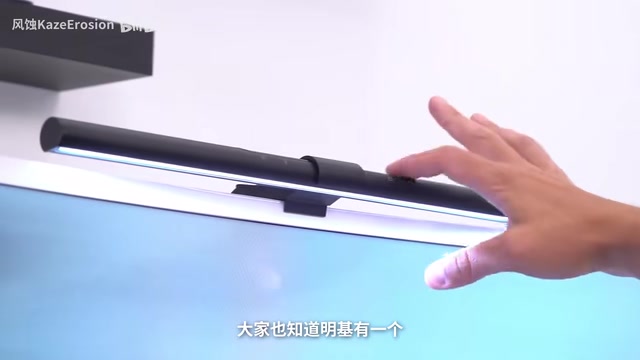
Below the screen is also a light sensor that monitors ambient brightness in real time and automatically adjusts screen brightness—brighter during the day, dimmer at night.
There's also an "Owl Mode" designed specifically for late-night intensive work. It activates automatically based on ambient light, and in this mode the screen can go below its normal minimum brightness limit—one level dimmer than the standard lowest setting—reducing the eye strain from prolonged use.
On the hardware level, hardware blue light filtering, flicker-free, and other eye care standards are all covered (Eyesafe 2.0). Users who have long used OLED panels should particularly appreciate the importance of these specifications.
Multi-Device Collaboration: KVM Switching and Multi-Screen Extension
In terms of connectivity, the RD280U supports KVM (one-key switching of keyboard, mouse, and video), allowing two machines to share peripherals without re-plugging cables. KVM stands for Keyboard-Video-Mouse, a technology originally widely used in data centers and server rooms, allowing operations staff to manage multiple servers with a single set of peripherals. Now this functionality has trickled down to desktop monitors—for users who simultaneously use a company desktop and a personal laptop, one press of the switch button lets you seamlessly jump between two devices without the hassle of repeatedly plugging and unplugging cables.
One USB-C port supports 90W power delivery, so a laptop needs just a single cable for display, data, and charging.
It also supports MST (Multi-Stream Transport), allowing a single Type-C cable to daisy-chain multiple monitors for multi-screen expansion. MST is a technology defined in the DisplayPort standard that allows multiple monitors to be daisy-chained via a single cable, with each monitor independently displaying different content without needing a separate connection to the host. For users switching between multiple devices, this dramatically reduces desktop cable clutter.
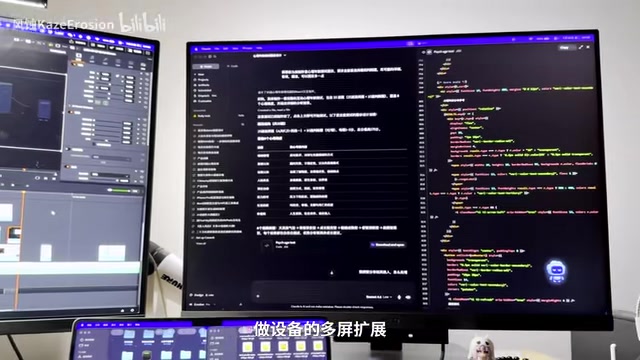
As for the stand, height, tilt, and swivel are all adjustable, making it easy to position the screen optimally and reduce neck and shoulder strain.
Conclusion: This Screen Is No Longer Just for Programmers
Overall, the RD280U is a programming monitor that excels in its vertical niche:
- 3:2 aspect ratio provides greater vertical display range
- Anti-reflection + programming color modes make code easier to read
- Shortcut keys and smart halo address fatigue from prolonged use
- KVM and multi-screen expansion solve multi-device collaboration efficiency
These details combined are precisely what give it its positioning as a "professional programming monitor."
But what's more worth considering is this: in an era of rapidly evolving AI Agents and large language models, this type of monitor has long ceased to belong exclusively to programmers. When AI enables everyone to become a creator—a "supervisor" directing Agents—the screen becomes our primary interface for collaborating with AI. From this perspective, a monitor that's been carefully optimized for "staring at a screen for extended periods" should no longer be a niche need for the few.
Related articles

OpenAI Partners with Shield: How the Astra Agent Revolutionizes IT Troubleshooting
OpenAI and Shield launch the Astra agent, which autonomously logs into computers and legacy systems to fix IT issues in real time, 35-40% faster than traditional models, with humans involved only when judgment is needed.

iPhone Duo Battery Life Tested: One Charge a Day Is Unavoidable, and the Large Screen Is the Culprit
iPhone Duo battery test: heavy use needs at least one charge a day, and about 30% remains after 6.5 hours of screen-on time. How often the large screen is unfolded is key; a MagSafe battery pack helps, and long-term degradation is also worth watching.

Kimi K3.1 Pro Open-Sourced: 2.8 Trillion Parameters Close In on Opus
Moonshot releases the open-source MoE model Kimi K3.1 Pro, with 2.8T total parameters and 104B activated, trailing Opus 5.5 by under 1 point on Terminal Bench 4.0.