A New Tool for Bilibili Comment Management: Open-Source Plugin 'Bilibili Partner' Gets an Update

Open-source plugin 'Bilibili Partner' upgraded to auto-guard comment sections with permission tables for fine-grained interaction control.
'Bilibili Partner' is an open-source Bilibili interaction management plugin that recently upgraded from a simple 'watch Bilibili' tool to an assistant that manages your comment section. It supports scheduled checks for new comments and auto-replies to handleable questions, forwarding uncertain ones to the user to avoid AI misanswers. The update introduces a permission table mechanism for fine-grained control over interaction levels—e.g., interacting only with your own people, or distinguishing owner from group members in group chats, potentially only checking descriptions or not downloading videos for group members to save resources. The plugin is open-source and easy to deploy: add it in DSS and restart. The article sees this as a pragmatic path for AI-assisted content operations: not replacing creators but enhancing interaction management efficiency through permission tables and intelligent forwarding, with continuous community improvement and a promising future.
In Bilibili content creation, the comment section is often the main battleground for creator-fan interaction, but when messages pile up, being unable to reply to them all becomes the norm. Recently, an open-source plugin called "Bilibili Partner" received an update—it not only helps you guard the comment section but can also automatically handle interactions based on a permission table.
From 'Watching Bilibili' to 'Guarding the Comment Section': Feature Upgrade
According to a Bilibili UP host, this plugin started as a small tool that could "watch Bilibili" and has now evolved into an assistant that manages your comment section for you. When comment volume explodes and you can't reply to them all, the plugin can periodically check new comments and automatically answer questions it can handle.
For comments it's unsure about, the plugin won't rush to reply but will instead forward them to you, letting you decide how to respond. This "I'll handle this one; I'll forward the ones I'm not sure about" design ensures timely interaction while avoiding the risks of AI misanswers.
The "AI auto-reply" capability the plugin relies on typically involves a large language model (LLM) or a rule-based dialogue engine, but the original design of "forwarding the ones it's not sure about" actually involves a key technical concept—the Confidence Threshold. When the model's confidence in recognizing the intent of a comment or generating an answer falls below a preset threshold, the system abandons automatic replies and instead marks the comment as "pending manual handling." This not only reduces the risk of AI misanswers but also lets creators retain final decision-making authority in interactions. The confidence threshold can be flexibly adjusted for different scenarios: the higher the threshold, the more "cautious" the plugin and the more frequently it forwards comments to you; the lower the threshold, the more aggressively it auto-replies, but the probability of misanswers rises accordingly. Understanding this mechanism helps you reasonably configure the plugin's "boldness" based on your account style and fan base characteristics.
Permission Table: Setting Boundaries for Interaction
The updated plugin introduces a permission table mechanism that allows fine-grained control over the degree of interaction with different parties. For example, you can set it to "interact only with your own people and leave everyone else alone," ensuring the plugin's behavior aligns with your social boundaries.
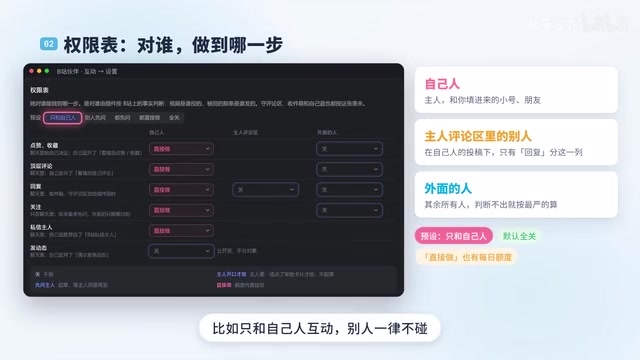
In group chat scenarios, the plugin can identify who is calling it. For the owner, it will carefully review video content; for group members, it may only check the description, or even not look at all and not download anything. This differentiated treatment allows the plugin to save resources in busy group chats and avoid unnecessary operations.

The permission table mechanism is typically implemented technically through Role-Based Access Control (RBAC). The plugin defines a set of role tags for each interaction party (such as owner, group member, stranger, etc.), and each role corresponds to a set of allowed operations (e.g., "view video content," "view description only," "no download"). When a message or comment is received, the plugin first identifies the sender's role, then consults the table to decide which actions to perform, or even whether to respond at all. The advantage of this design is its strong extensibility: when adding new roles or adjusting permissions in the future, you only need to modify the configuration table without changing the core logic. For creators, the RBAC model means you can manage the AI assistant's "social boundaries" as finely as managing team permissions, ensuring interaction efficiency while avoiding boundary-crossing behavior.
Open Source and Ease of Use
As an open-source plugin, its installation process is not complicated. Add the plugin in DSS (possibly referring to some kind of management panel), fill in the name, and restart for it to take effect. This low-barrier deployment method allows more creators to get started quickly.

According to the UP host, this is not the end—the next version of the plugin will begin to "benefit the world," hinting at more powerful features to be released. For creators troubled by comment sections, this is undoubtedly a tool worth watching.
The DSS mentioned in the article, in the context of the open-source community, typically refers to a Docker-based service management panel (such as Docker Compose or some self-hosted management platform), rather than a specific product. Such panels allow users to deploy containerized applications through a standardized process of "add plugin—name—restart," greatly lowering the operational barrier for non-professional developers. The open-source plugin's choice to adapt to DSS means it tends to embrace the containerized deployment ecosystem: the plugin itself may be packaged as a Docker image, so users don't need to worry about underlying dependencies and runtime environments—they just configure parameters in the panel and start it. This design also makes it easy for community members to fork the code, modify it themselves, and rebuild the image, thereby continuously iterating features. For creators unfamiliar with the command line, the DSS panel provides a graphical interface, making "installing a plugin" as intuitive as installing a mobile app.
Conclusion
The update to "Bilibili Partner" demonstrates a pragmatic path for AI-assisted content operations: not replacing creators, but helping them manage interactions more efficiently through permission tables and intelligent forwarding. Its open-source nature also means it can be continuously improved by the community, with a promising future.
One-line Summary
Open-source plugin "Bilibili Partner" upgrades to automatically guard the comment section and introduces a permission table for fine-grained control of interaction boundaries.
Paragraph Summary
"Bilibili Partner" is an open-source Bilibili interaction management plugin that has recently upgraded from a simple "watching Bilibili" tool to an assistant that manages your comment section. It supports periodic checking of new comments and automatically answers questions it can handle, while forwarding comments it's unsure about to the user to avoid AI misanswers. The update introduces a permission table mechanism for fine-grained control over interaction with different parties—for example, interacting only with your own people, or distinguishing the owner from group members in group chats, potentially only checking descriptions or even not downloading videos for group members to save resources. The plugin is open-source and easy to deploy: add it in DSS and restart for it to take effect. The article believes this demonstrates a pragmatic path for AI-assisted content operations: not replacing creators, but improving interaction management efficiency through permission tables and intelligent forwarding, with continuous community improvement and a promising future.
Related articles

Abnormal Error Rate Spike in Claude Mythos 5.2 and Fable 5.2
Claude Mythos 5.2 and Claude Fable 5.2 show an abnormal spike in request error rates, marked as investigating on the official status page. This article covers the incident overview, practical impact on developers, and recommended responses.

ReAct Runtime Context Trimming: Why Claude Code Acts at 70%
A deep dive into ReAct runtime context trimming: why Claude Code compresses at ~70% usage, why tool calls dominate, why messages must be dropped in pairs, and why codebases don't need RAG.

AI Agent vs LLM: How Cursor and Claude Code Actually Work
An in-depth analysis of the essential difference between AI Agents and LLMs: LLMs generate code suggestions, while Agents modify files and run tests via tool calls. Using a Spring Boot bug fix as an example, it breaks down the workflows, permission control, and verification mechanisms of Cursor and Claude Code.