AI Agent vs LLM: How Cursor and Claude Code Actually Work

Coding Agents execute real actions through model, context, tools, and feedback loops, but results still require developer verification.
Using a Spring Boot registration API's invalid email handling as an example, the article breaks down the essential difference between LLMs and coding Agents: LLMs only generate code suggestions, while Agents execute file edits and test commands through authorized tools. An Agent consists of four building blocks: model task interpretation, context providing relevant code, tools executing real actions, and feedback guiding the next step; its operation relies on tool-calling boundaries and permission control. In large codebases, the Agent builds focused context through search and symbol lookup, and selection quality determines effectiveness. After finding relevant files, the Agent proposes a minimal patch and runs tests, but successful tool execution does not equal correct software—developers must review the diff, run focused tests, and confirm behavior. Giving an Agent repository access is a trust decision that should follow least privilege and retain human approval for risky operations. Cursor and Claude Code share similar underlying patterns; when choosing a tool, compare permissions, context quality, and test integration rather than just model names.
AI models can suggest code for you, but AI Agents can directly modify files and run tests. Where does the real difference lie? This article uses a Spring Boot bug fix example to break down how coding agents like Cursor and Claude Code understand repositories, issue tool calls, and verify results.
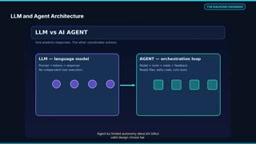
The fundamental difference between LLMs and Agents on coding requests
When faced with a coding request, LLMs and Agents behave very differently. An LLM generates useful text or code suggestions based on the prompt and available context, but it does not automatically change the repository. An Agent executes authorized tools, connecting the model's decisions to permitted file operations and test commands. However, successful tool execution does not equal correct software behavior—the developer must still verify the result.
Take the invalid email handling in a Spring Boot registration API as an example. A plain chat response can suggest using the @Email annotation and a valid email format, but you have to check the project yourself. A coding Agent with approved tools can identify the relevant DTO, controller, and tests, and propose a patch. This doesn't mean the Agent won't make mistakes—it means the workflow becomes more actionable.
The four building blocks of a coding Agent
A coding Agent works through the collaboration of four parts:
- Model interprets the task: Understands the user request and proposes the next step, but cannot blindly treat its output as fact to execute.
- Context provides relevant code: Relevant source files, project conventions, and failing tests form the basis for decisions.
- Tools execute real actions: Reading files, searching, applying patches, or running tests all execute at runtime.
- Feedback guides the next step: Based on actual output, the Agent can correct its approach.
The key distinction in this architecture is that generating answers and executing real operations are separate steps. An Agent is not an independent entity with magical intelligence—it is usually a combination of a model plus surrounding orchestration. Giving an Agent limited autonomy is a perfectly reasonable design choice.
The Agent loop and the boundaries of tool calling
The Agent loop can be simply understood as: interpret task → choose action → execute tool → obtain observation results. If a test fails, the Agent can use the error as new context; if the output is satisfactory, the workflow can stop. In real systems, maximum steps, timeouts, and approval gates control this loop. An Agent's speed matters less than whether each step is based on evidence.
When the model issues a structured tool request to read a file, the actual file is not opened inside the model. The host application or Agent runtime checks permissions and executes the operation, then returns the file contents or error message as a result to the model's context. Login, permission checks, and secure execution are critical at this boundary.
Tool Calling / Function Calling is the core mechanism for how large models interact with external systems. The model does not directly execute code; instead, it outputs structured JSON describing the tool name and parameters it wants to call, for example {"name": "read_file", "arguments": {"path": "src/main/java/..."}}. The host application parses this request, then actually executes file reading, searching, or running tests, and returns the result as a new message to the model. This design decouples "decision" from "execution," allowing permission checks, audit logs, and human approval to be inserted before execution—this is the foundation of coding Agent security.
Context selection in large codebases
In a large Java repository, the model does not automatically remember all classes. Search, symbol lookup, and relevant file retrieval together build focused context. For the registration validation bug, the controller, request DTO, global exception handler, and existing tests would be useful files. Unrelated configuration and hundreds of files flooding in at once would make the context noisy. Selection quality is crucial.
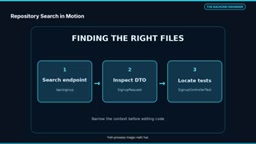
This process is not magic. The Agent must examine search results and decide the next relevant file. Before fixing the registration bug, the Agent needs to identify team-specific locations: search the registration endpoint to locate the route and controller method, check the annotations and validation path of the email field in the request DTO, and locate existing tests to understand the project's testing patterns and add relevant regression cases.
Safe minimal code changes and verification
After finding the relevant files, the next challenge is a safe minimal code change. The developer's task is to reject invalid emails and return a clear client error. The Agent will first inspect the code, then propose a minimal patch and apply it in an allowed environment. But you must review the diff: Has the existing endpoint contract changed? Are validation dependencies available? Has business logic been accidentally affected? A modified file is not proof of completion.
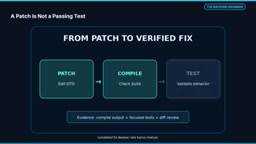
In the example, the email field recorded in the registration request has @NotBlank and @Email annotations, and the @Valid annotation on the controller parameter triggers request validation. But this is not a patch ready for production—you need to check validation dependencies, imports, exception responses, and integration tests against the existing application.
After the patch is applied, compile and run focused tests in sequence. If compilation fails, the precise error log becomes the input for the next step; if tests fail, investigate the relevant assertions and changed behavior. Green tests are a helpful signal but do not guarantee complete correctness. Developers should review the final diff, edge cases, and security implications. Four quick checks are needed before production code is accepted: compile the application to detect syntax and dependency issues; run focused tests to execute regression cases targeting the changed behavior; review the final diff for unintended modifications, security issues, and API contract changes; and confirm that the expected behavior matches the actual requirements.
@Valid and Bean Validation are a key combination for declarative validation in Spring Boot. @Valid on a controller method parameter triggers cascading validation of the request body; constraint annotations like @NotBlank and @Email are declared on DTO fields and executed by implementations such as Hibernate Validator. When validation fails, Spring throws MethodArgumentNotValidException, returns a 400 status code by default, and the error response structure can be customized via @ControllerAdvice. Understanding this chain helps determine whether the Agent's patch truly integrates with the project's exception handling conventions, rather than merely adding annotations.
Permission control and security boundaries
Giving an Agent repository access is a trust decision. Starting with read-only exploration is safer. File permissions, shell commands, and package installation should remain under controlled permissions. Malicious instructions may be embedded in repository files or web pages, so do not treat tool output as trusted system instructions. Do not expose secrets or production credentials, and irreversible operations must retain human approval.
Some boundaries in a secure coding workflow are non-negotiable: use least privilege; be cautious about access to shared files and commands; risk operations, deployments, destructive commands, and secret access must be reviewed by humans; treat tool output as unverified content and do not let repository comments or external text become higher-priority instructions.
Common patterns of Cursor and Claude Code
Cursor and Claude Code are examples of coding Agent workflows. Interfaces and available integrations may differ, but the underlying pattern is similar: task, context, model decision, authorized tool execution, and feedback.
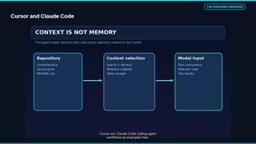
When choosing a tool, don't just compare model names. Permissions, context quality, diff review, test integration, and team workflow are more useful comparison points. Specific product features change over time.
Not every coding problem requires a full Agent workflow. Multi-step tasks, code-based search, repetitive refactoring, and test investigation are suited for controlled automation. Explanations and simple concept clarifications may not need repository access—a chat model is sufficient. Humans remain accountable; ownership of key decisions and final software quality rests with the developer. Deciding whether to launch an Agent based on task complexity and the trade-off with required human review is where the practical difference lies.
Key takeaways
LLMs generate responses—models produce text and code suggestions but do not perform file operations themselves. Repository context guides decisions—relevant files and failing tests make the Agent's next step better. Tools execute real actions—the Agent runtime runs file edits and test commands within controlled permissions. Developers verify results—tests, diff review, and human judgment determine final quality. AI Agents don't just suggest code; they take action through tools, but final verification remains the developer's responsibility.
One-line Summary
Coding Agents perform real actions through a loop of model, context, tools, and feedback, but results still require developer verification.
Paragraph Summary
Using the invalid email handling in a Spring Boot registration API as an example, the article breaks down the essential difference between LLMs and coding Agents: LLMs only generate code suggestions, while Agents execute file edits and test commands through authorized tools. An Agent consists of four building blocks: the model interprets the task, context provides relevant code, tools execute real actions, and feedback guides the next step. Its operation depends on tool-calling boundaries and permission control. In large codebases, the Agent builds focused context through search and symbol lookup, and selection quality determines effectiveness. After finding relevant files, the Agent proposes a minimal patch and runs tests, but successful tool execution does not equal correct software—developers must review the diff, run focused tests, and confirm behavior. Giving an Agent repository access is a trust decision that should follow the principle of least privilege and retain human approval for risky operations. Cursor and Claude Code share similar underlying patterns; when choosing a tool, compare permissions, context quality, and test integration rather than just model names.
Related articles

Abnormal Error Rate Spike in Claude Mythos 5.2 and Fable 5.2
Claude Mythos 5.2 and Claude Fable 5.2 show an abnormal spike in request error rates, marked as investigating on the official status page. This article covers the incident overview, practical impact on developers, and recommended responses.

ReAct Runtime Context Trimming: Why Claude Code Acts at 70%
A deep dive into ReAct runtime context trimming: why Claude Code compresses at ~70% usage, why tool calls dominate, why messages must be dropped in pairs, and why codebases don't need RAG.

Metacognitive Calibration: The True Value of Human Reviewers in Human-AI Collaboration
A study on AI-assisted accounting proposes a trait theory of reviewer value: human reviewers' core value is metacognitive calibration, not activity or seniority.