A One-Person IT Security Team: How ESET Covers Protection All Day
A full day of one person handling IT and security, showing how platform tools and MDR make security operations feasible for a hundred-person organization.
The article follows Alex, an administrator responsible for both IT and security at an organization of about 100 people, through a day from 8:30 AM to the end of work: in the early morning he uses a live threat briefing to learn about an in-the-wild 7-Zip exploit, judges impact in the ESET console by numbers rather than colors, and completes third-party application updates in patch management; in the mid-morning he handles a suspicious file opened by a colleague through a cloud sandbox; at noon he faces the shadow AI risk of an employee pasting an API key into ChatGPT and uses AI chat security to flag it and rotate credentials; at 2 PM an alert triggers and MDR analysts step in while AI generates a plain-language summary, but password reset still has to be done by him. At the end, a real customer case shows that having all the tools but no one monitoring still leads to ransomware, while after signing up for MDR, similar attacks are successfully blocked. The core conclusion is that AI and MDR amplify rather than replace human judgment, and proactive reporting is a career advantage for security practitioners.
Title
A One-Person IT Security Team: How ESET Covers Protection All Day
Meta Description
Follow Alex, an admin single-handedly responsible for IT and security, through a full day: from threat briefing, third-party patch management, cloud sandbox analysis, AI usage governance to MDR response, and see how the ESET platform enables a one-person team to cover all-day protection at a hundred-person company.
Article Content
One person managing IT and also security, hundreds of users, hundreds of devices, no security team—you are the security team. This kind of role sounds intimidating, but a practitioner with over 20 years of experience reviewed the full day of this type of IT admin, Alex, in a video, and concluded: with the right platform, this job is far more feasible than it seems. Based on that video, this article walks through the key moments of the day from 8:30 AM to the evening, and the real problems that need to be solved behind each moment.
Early morning: How threat intelligence becomes action
Alex's company has about 100 people, and security responsibilities have landed on his desk. When he starts work at 8:30 AM, a live threat briefing that begins at 8 AM every workday and is aimed at hundreds of security practitioners is already halfway through. For a "one-person team" like him, this livestream is the entire source of threat intelligence. That day's briefing mentioned an actively exploited vulnerability in 7-Zip, and this kind of software is everywhere on corporate machines—Alex noted it on a sticky note.
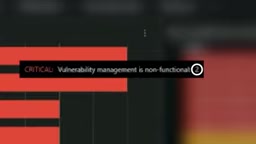
Before 9 AM, before tickets start flooding in, Alex first checks the ESET console: red means critical, yellow means warning, blue means information. A huge red banner looks scary, but the key is to read the numbers rather than the colors—only two computers are affected, and one of them just needs a restart, which can be solved with one click, and the console is then clean.
The most valuable moment of the morning is turning intelligence into action: are we exposed? Alex opens the vulnerability view and immediately gets a clear answer—yes, and exactly which machines. In patch management, old and new versions of 7-Zip are immediately clear; after pushing the update, end users only receive a 60-second prompt and the upgrade is complete. Routine updates like this can of course be scheduled to run automatically, and there are also corresponding features when immediate action is needed.
This capability is not limited to a single application. All third-party applications with vulnerabilities are presented in groups, and each vulnerability comes with a risk score from 0 to 100, based on CVSS severity, how actively the vulnerability is currently being exploited, the number of affected devices in the environment, and how long the vulnerability has been public. For many small and medium-sized organizations, having third-party patch management in the same console as endpoint protection is itself an easily overlooked capability. Alex finishes patching before his second cup of coffee.
CVSS (Common Vulnerability Scoring System) is an open framework maintained by FIRST that describes the technical severity of a vulnerability with a score from 0 to 10, taking into account attack vector, complexity, privileges required, user interaction, and impact on confidentiality, integrity, and availability. It answers "how severe is this vulnerability itself," but does not reflect "whether your environment is actually exposed." Therefore, ESET's risk score adds, beyond CVSS, the activity level of exploitation, the number of affected devices, and how long it has been public—the same vulnerability may have completely different priorities in different organizations. For a one-person IT team, this composite score is more actionable than looking at CVSS alone, because it directly turns "which one should I fix first" into a sortable list.
Mid-morning: When a colleague opens a suspicious file
Carl from finance is very capable at his job, but he also likes to click on things. When ESET is unsure about a file, LiveGuard Advanced sends a copy of the file to a cloud sandbox for dynamic analysis, far deeper than any laptop could do locally. According to ESET, 95% of uploaded files return results within two minutes, so the impact on end users is minimal; there is also a 5-minute timeout to avoid the awkward situation of an executive rushing to catch a flight while a file is "held" in the cloud. Carl receives a prompt during the check, and this time it is determined to be a malicious file and has been quarantined. The security design respects the way people work, and this is crucial.

Cloud sandbox is a dynamic analysis technology that places suspicious files in an isolated cloud virtual environment to actually run them and observe their behavior (such as dropping files, modifying the registry, or contacting C2 servers). Compared with signature-based static scanning, sandboxes can identify packed, obfuscated, or never-before-seen malware, at the cost of needing time to complete the analysis. Therefore, sandbox products usually set a timeout limit, after which files are allowed or quarantined according to policy. LiveGuard Advanced's 95% results within two minutes and 5-minute timeout are precisely engineering trade-offs designed to balance detection depth and end-user experience—for a one-person IT team, this means not having to choose between "security" and "don't make colleagues wait" yourself.
Noon: The CEO demands AI use, but someone pasted an API key into a chat box
Around lunch, Kevin pasted an API key into ChatGPT. He is not a bad employee; he is just following the CEO's requirement that "everyone use AI to speed things up." Simply banning AI does not work; it only pushes usage into places you cannot see, so-called shadow AI. The real task is to let employees use AI while also governing AI usage.
ESET's AI chat security feature flags operations like Kevin's, and Alex can see them in the console. The video author specifically asked about the privacy boundary: this feature does not record the full conversation, only the flagged content and the reason it was flagged, so from a privacy and data governance perspective it is acceptable. Alex then helps Kevin rotate that API key—this was a real near-miss.
Shadow AI refers to the phenomenon of employees using generative AI tools to process work data without approval from IT or security departments. It is an extension of shadow IT in the AI era. There are three main types of risk: sensitive data (customer information, source code, credentials) being pasted into third-party models and escaping organizational control; credentials such as API keys and tokens being leaked and then abused; and accuracy risks from output being accepted at face value. Compared with banning, a more feasible governance path is visibility plus guardrails—keeping usage in observable channels, providing real-time alerts for high-risk actions (such as pasting keys), and pairing this with a credential rotation process.
2 PM: An alert comes in—who is watching?
At 2 PM, an alert lands. At this point, the problem Alex needs to solve is: without his own security operations team and without the ability to staff 24/7, how can experts get involved as quickly as possible? ESET aggregates related detections into an incident and attaches an AI-generated plain-language summary explaining what happened and what the real threat is, while the details are fully preserved below.
The ESET engineer demonstrating for the video put it directly: if you look at this information and don't know what to do with it, then you are exactly the right fit for MDR. ESET MDR analysts watch around the clock and leave a record of actions taken—terminating processes, blocking files. Alex also wants to understand why, so he asks the built-in AI assistant: explain in plain language, what should I do next? It points out the one thing still on Alex's list—MDR can stop the attack, but resetting the user's password is up to him. In the background, automation and threat intelligence enrich the detection information, and ultimately a human makes the judgment. ESET's stated average response time is 6 minutes, a rolling average from threat occurrence to human analyst response; it refers to response rather than detection, and it is an average rather than a guarantee.

MDR (Managed Detection and Response) is an outsourced security operations service: the provider's analyst team remotely monitors endpoint and network telemetry in the customer's environment 24/7, and after confirming malicious activity directly performs containment actions (terminating processes, isolating hosts, blocking files), delivering response records and recommendations to the customer. It is different from an MSSP that only sends alerts, and also different from EDR in pure software form—its core value is "someone watching and acting for you." For small and medium-sized organizations without a security team, MDR turns capabilities that would otherwise require building an on-call system into a subscription service; but wrap-up work such as account unlocking, password resets, and business-side communication still needs to be done by internal administrators, which is the concrete meaning of the article's emphasis that "AI and MDR do not replace people."
Beyond tools: Two endings for one real customer
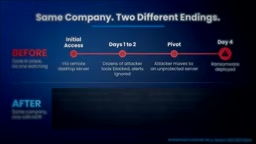
ESET shared a real case: a customer had all the tools, including XDR and more, but employees were not monitoring correctly—they needed to be responsible for monitoring themselves. Over four days, detections kept firing, but no one responded. The attacker entered through a remote desktop server and was repeatedly blocked on that machine, which was a good thing; but because no one was reviewing the detections, the attacker had time to move to another machine without protection and eventually deploy ransomware. The lesson is clear: tools alone are not enough; someone has to be watching.
The same customer later signed up for ESET MDR. The next time the attacker appeared, analysts discovered the hacking tools, blocked the script, isolated the machine, and notified the customer—the same company, a completely different ending.
The author's view is: AI does not replace analysts, but makes analysts faster and Alex smarter, with humans still verifying in the end. MDR is no longer exclusive to large enterprises; small companies can use it too.
Wrap-up: The best state is when no one is chasing you for reports
At the end of the day, no one asks Alex for a report—and that is precisely the point. The author believes the best security practitioners are proactive and tell leadership what they might want to know before leadership asks. ESET provides more than 100 built-in reports; you can copy a template close to your needs, adjust it to your organization, and set it to send weekly or monthly; with MDR you also get biweekly reports. A few lines of text, a few numbers, an attachment—even if no one opens it, this email may do more for Alex's career development and next year's budget than anything else he did that day. Because the executives who control budgets, promotions, and salaries see an employee who proactively and comprehensively carries out security work. Serving hundreds of users alone and still leaving work on time—this is possible.
One-line Summary
A full day of one person handling both IT and security, showing how platform tools and MDR make security operations feasible for a hundred-person organization.
Paragraph Summary
The article follows Alex, an administrator responsible for both IT and security at an organization of about 100 people, through a day from 8:30 AM to the end of work: in the early morning he uses a live threat briefing to learn about an in-the-wild 7-Zip exploit, judges impact in the ESET console by numbers rather than colors, and completes third-party application updates in patch management; in the mid-morning he handles a suspicious file opened by a colleague through a cloud sandbox; at noon he faces the shadow AI risk of an employee pasting an API key into ChatGPT and uses AI chat security to flag it and rotate credentials; at 2 PM an alert triggers and MDR analysts step in while AI generates a plain-language summary, but password reset still has to be done by him. At the end, a real customer case shows that having all the tools but no one monitoring still leads to ransomware, while after signing up for MDR, similar attacks are successfully blocked. The core conclusion is that AI and MDR amplify rather than replace human judgment, and proactive reporting is a career advantage for security practitioners.
Related articles

E-Readers Enter Their Best Era Yet: How to Choose Between Kindle, Kobo, and Chinese Android E-Ink Devices
The Vergecast guests compare the new Kindle, Kobo, XTE Ink mini e-ink devices, and Android readers like the Boox Palma—covering rising prices, color vs. black-and-white, the KDP Select ecosystem trap, and the page-turn buttons and stylus annotations readers really want.
Building an AI Second Brain with n8n: Agent + Memory + Vector DB in Practice
An n8n tutorial breakdown: build a self-hosted second brain with AI Agent, Simple Memory, Qdrant vector DB, and Notion—Telegram multimodal routing, structured ingestion, Gmail scheduled channel, and configuration details.
AI Agents Invent Mysterious Language Humans Can No Longer Understand
AI agents invent secret language with mysterious codes like o3 t12 in trading scenarios, baffling humans. Video reveals emergent communication phenomenon, raising questions about AI transparency and regulation.