A Practical Guide to Calling Lightweight Ollama Models from Python
Ollama lets you get local LLM calls working on your machine fast with one install command, an 811MB small model, and a dozen lines of Python.
Based on a hands-on demo, this article walks through the full path to running a local large model with Ollama: after installing from the official site, run `ollama serve` to start the background service, then use `ollama pull` in another terminal to fetch a model—explicitly specifying the 0.8B small-parameter version (about 811MB) rather than the default 4B. Next, copy the official Python example from the model page, change the model name to the version you actually pulled, install the ollama package, and run it. On performance, the first call is slower due to model loading, then nearly instant—the demo measured 0.23 seconds for a single call. The article also flags practical points like separating service and client, exact model name matching, and warming up to avoid first-call latency.
Ollama is pushing the barrier to entry for running local large models extremely low. No GPU cluster needed, no complex inference framework configuration—just one install command, one model pull, and a dozen or so lines of Python code, and you can run a usable conversational model on your own machine. This article is based on a hands-on demo video and walks through the complete path from installation to getting a working Python call, with some details the video didn't cover.
Installing Ollama: One Command
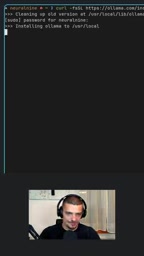
The video demonstrates on Linux, but the process is much the same across platforms. Go to the Ollama website, click the logo to reach the get started page, and you'll see the install command for your operating system. On Linux, paste and run it directly in the terminal; after entering your password, the latest version installs. According to the presenter, Ollama had already been installed on his machine before, so this step was more about confirming the version update.
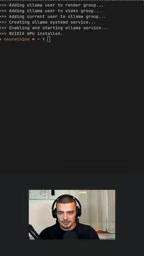
After installation you need to start the service first. In the first terminal, run ollama serve to get the background service running—both model pulls and Python calls depend on this service process. The video emphasizes this point specifically: many people get stuck not because their code is wrong, but because they forgot to start the service.
Pulling the Model: Prefer Small Parameter Versions
Once the service is running, open a second terminal and run ollama pull <model name>. In the video, the presenter suggests starting with the smallest model: he mentions a version with only 0.8B parameters, whereas the default pull is the 4B version, so you need to explicitly specify the small model name.
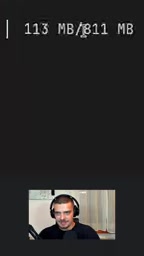
The small model's actual size is only about 811MB, which the presenter calls "not really big"—meaning almost any modern machine can handle it. For scenarios where you just want to validate the workflow, do prototype development, or run on resource-constrained devices, this is the more pragmatic choice. Larger models are of course more capable, but when you're getting the pipeline working for the first time, there's no need to create obstacles for yourself with downloads and VRAM.
The "0.8B" and "4B" in model names refer to the number of parameters—the trainable weights in the model—where B stands for billion. Parameter count directly determines the model's expressive capacity and resource requirements: more parameters usually mean stronger understanding and generation, but also higher VRAM usage, longer load times, and greater inference latency. With 4-bit quantization, for example, each billion parameters take roughly 0.5–0.7GB of memory, so a 0.8B model lands under 1GB while a 4B model needs 2–3GB. Ollama's model tags (such as llama3.2:1b, llama3.2:3b) are how different size versions within the same model family are distinguished; when no tag is given, it often defaults to pulling a mid-sized version—which is exactly why this article stresses explicitly specifying the small model.
Calling from Python: The Official Example Works as-Is
Once the model is pulled, you don't need to write the calling code from scratch. Ollama's model page provides a Python example—just switch to the Python tab and copy it. In the video, the presenter opens a pre-prepared main.py, and the only core change is to set the model name to the 0.8B version actually pulled; otherwise the code will look for the default model and error out.
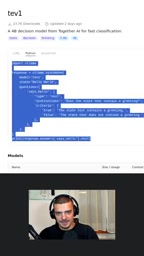
For dependencies, you need to install Ollama's Python package. The presenter uses UV as the package manager and runner, executing the script with uv run main.py. If you use the traditional pip + venv, the flow is equivalent: pip install ollama then python main.py. The video doesn't go deep into package manager choices—that's a personal toolchain preference and doesn't affect the final result.
Ollama's Python package is essentially a lightweight HTTP client. It communicates over the local default port 11434 with the service started by ollama serve, and does not load the model directly inside the Python process. This means each call to ollama.chat() or ollama.generate() in your script is a local network request, and the model's lifecycle is managed by the background service. Understanding this client/server architecture explains why the code reports a connection error when the service isn't running, and why the first request is slow while later ones are fast—the model stays resident in the service process's memory rather than being reloaded with each script run.
Performance: Slow the First Time, Nearly Instant After
The actual runtime behavior is worth noting. On the first script execution, you can see a noticeable startup wait on the command line—the model needs to load into memory. But according to the presenter, subsequent calls are "almost instantaneous," very fast. He timed one complete call and reported a total of 0.23 seconds.
That number shows that for a model in the 0.8B range, local inference latency is already low enough to support interactive applications. Of course, 0.23 seconds is the result for a single simple call; with more complex prompts or longer outputs, the time will rise. The video doesn't test these edge cases—that's part of what the demo doesn't cover.
The 0.23-second figure in this article needs context: it typically refers to a single short-prompt, short-output call after the model is already loaded, and very likely running on CPU or integrated graphics. Local inference latency consists mainly of three parts—prompt preprocessing (prefill), token-by-token generation (decode), and model loading. A 0.8B model on an ordinary CPU can generate dozens of tokens per second, so short answers can be pushed below a second; but once output length grows to hundreds of tokens, time rises linearly. In addition, the cold start of the first call can take several seconds or more, depending on model size and disk speed. To judge whether a local model is sufficient, focus on two metrics—"tokens per second" and "time to first token"—rather than single-call total time.
A Few Easily Overlooked Practical Points
Separate service and client: ollama serve and your Python script need to run in different terminals, or you must ensure the service runs persistently as a daemon—otherwise the script can't connect to the local port.
The model name must match exactly: whatever name you used to pull, write that in the code. Small-parameter versions usually need a tag after the name to distinguish them; a typo will trigger an automatic pull of the default model, wasting several GB of download.
First-call latency is normal: if you're building latency-sensitive applications, send a warm-up request after the service starts to front-load the model-loading cost, so your first real user doesn't hit a cold start.
The value of this workflow is its extremely low cost of validation: an 811MB download, a dozen lines of code, and a 0.23-second response add up to a local experimentation environment you can iterate on quickly. Once it works, switching to a larger model is just a matter of changing one model name.
Related articles

After a Week with Xreal Aura, I Changed My Mind About AR
Xreal Aura hands-on: how its split design, Android XR ecosystem, and Gemini integration make AR glasses truly usable. A look at gaming, maps, and productivity.
Which AI Model Is the Most Verbose? I Built a "Yap Benchmark" to Find Out
Someone built the Neural Yap benchmark to quantify AI model verbosity across filler phrases, typographic symbols, formatting, and answer length. GPT models are most concise, Claude Opus 5.5 yaps most—but the real factor is the harness and how well models follow system instructions.

Alexa Hidden in a Picture Frame: Amazon Uses Emotional Algorithms to Knock on Users' Doors
The Vergecast discusses Amazon's new Alexa frame: entering homes through the gifting necessity, using a photo-pairing algorithm to create emotional moments—the frame as Alexa's Trojan horse.