A Practical Guide to Switching from Cursor to Claude Code: Pitfalls and Solutions

A practical migration guide from Cursor to Claude Code covering key pitfalls and survival strategies.
This guide breaks down the paradigm shift from Cursor (AI code assistant) to Claude Code (autonomous agent) across operational habits, context mechanisms, risk control, and debugging. It provides actionable solutions including the VS Code plugin bridge, manual context building with CLAUDE.md, the Plan→Check→Apply safety protocol, and a cognitive upgrade pyramid for mastering the transition.
From Code Assistant to Autonomous Agent: An Underestimated Migration
The most common complaint I've been hearing in developer circles lately is: "Why is switching from Cursor to Claude Code so painful?" Many people dive in with enthusiasm, only to hit wall after wall.
But the truth is, this is far more than just swapping one coding tool for another. What lies beneath is a paradigm leap from a traditional AI code assistant to a fully autonomous agent. The growing pains alone are enough to make you question your life choices. This article breaks down the real mechanics of this tool migration across four core dimensions—operational habits, context mechanisms, risk control, and debugging approaches—and provides three actionable principles you can implement immediately.
The sparks flying between these two tools at the architectural level can be summarized across five core dimensions: operational habits, context mechanisms, risk management, prompt engineering threshold, and debugging methods. If any of these "gears" spin in the wrong direction, your development rhythm gets thrown off instantly.
Operational Habits: From Tab Magic to Command-Line Shock
The first wave everyone encounters when starting with Claude Code is the muscle memory shockwave.
In Cursor, you just hit Tab and code appears instantly—the silky-smooth completion experience is lightning fast. But Claude Code is fundamentally a heavy command-line (CLI) tool. This means that for lightweight bug-fixing scenarios, it doesn't just fail to speed you up—it actually slows you down because it needs to scan the repository and queue up loading.
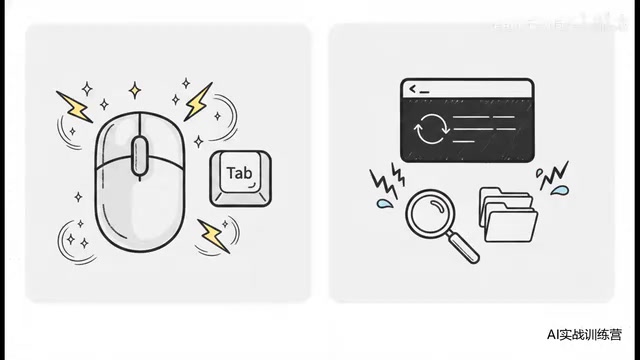
Developers who are used to clicking mice and tapping Tab suddenly face a cold, impersonal terminal window. That contrast is genuinely enough to make someone lose it.
The Essential Difference Between CLI Tools and IDE Integration
To understand the root of this shock, we need to see the two fundamentally different human-computer interaction philosophies that CLI and IDE represent. IDEs reduce developers' cognitive load through graphical interfaces, real-time feedback, and context-aware completion (like the semantic analysis provided by the LSP protocol)—you type a single letter, and the language server behind the scenes has already completed type inference, symbol resolution, and candidate ranking in milliseconds. CLI tools follow the Unix philosophy—do one thing and do it well, achieving complex functionality through pipe composition. Claude Code chose the CLI route fundamentally because an autonomous agent needs greater operational freedom: it needs to freely read and write files, execute shell commands, and manage git operations—things that are often strictly limited in sandboxed IDE plugin environments. In other words, Cursor sacrifices operational depth for silky smoothness, while Claude Code sacrifices immediate smoothness for operational depth.
The Fix: Use the VS Code Plugin as an Environment Bridge
Here's an expert-level hidden technique—use the official Claude Code for VS Code plugin directly.
Its core logic is quite clever: on the surface, you're still using your most familiar keyboard shortcuts and file management system, while under the hood it's secretly running Claude's powerful agent engine. This way you don't have to painfully bounce back and forth between a graphical interface and the command line—adaptation costs drop to near zero. This is the most important "lifeline" during the transition period.
Context Understanding: The Gap Between a Library and a Floor Directory Map
Once the interface issue is solved, the even more critical difference is in context understanding mechanisms.
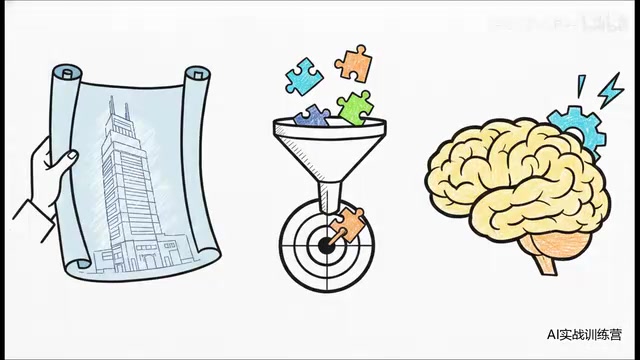
Here's a particularly fitting analogy: if Cursor is like a modern library with perfectly indexed card catalogs where you mention a concept and it instantly pulls out the exact book, then Claude Code initially only has a tattered floor directory map—it only knows rough things like "third floor is business and economics, second floor is literature."
Technical Principles Behind Context Windows and RAG Retrieval
The reason Cursor works like a "perfectly indexed library" is that it combines code indexing (typically semantic search based on vector embeddings) with AST (Abstract Syntax Tree) parsing. When you input a requirement in Cursor, it uses RAG (Retrieval-Augmented Generation) technology to precisely recall the most relevant code snippets from your codebase, then injects them into the LLM's context window. Simply put, the moment you open a project in Cursor, it has already sliced all code files, encoded them into high-dimensional vectors, and built an index. When you ask a question, the system calculates the semantic similarity between your question and all code snippets, concatenating the most relevant Top-K results into the prompt. Claude Code adopts a strategy closer to "global scan + on-demand reading"—it first builds a macro-level understanding through directory structure and filenames, then acquires details through active file reading. This approach is more flexible when handling large monorepos, but also more dependent on initial configuration.
In this case, if you give it a vague requirement, it's likely to wander through your codebase like a headless chicken and eventually throw back a pile of unusable code.
Manually Building a "Card Index" for Claude Code
Since it only has a floor map, we need to manually build its card catalog. Three techniques are crucial:
- Establish global architecture: First use the
/initcommand with aCLAUDE.mdfile to set up the repository's global architecture, telling it "how this building was constructed." - Dynamically feed precise context: Don't get lazy when coding—use the
@symbol to precisely feed it relevant files. - Accumulate dedicated memory: Use the
/memorycommand frequently to teach it your personal standards and skills.
Design Logic of CLAUDE.md and the Project Memory System
The CLAUDE.md file is essentially "engineering management of system prompts." In traditional ChatGPT conversations, system prompts are hidden and temporary; in Claude Code, CLAUDE.md makes them explicit and version-controlled—it can be tracked by git, shared across teams, and continuously iterated. This design borrows from the Infrastructure as Code philosophy: rather than having every developer pass project conventions by word of mouth, codify them into machine-readable configuration. You can declare the project's tech stack, directory conventions, naming standards, prohibited operations, and other critical information within it. The /memory command further introduces the concept of "long-term memory," similar to a persistence layer in AI systems, allowing the agent to accumulate understanding of your work habits and project characteristics across sessions. As usage time grows, Claude Code becomes increasingly "in tune" with you—this is also its fundamental difference from one-off conversational tools.
With these three steps done well, Claude Code's task success rate improves significantly.
Risk Control: An Execution Machine with the Safety Net Removed
This is the deep water zone that requires the most vigilance.
If Cursor is a gentle, considerate mentor that patiently guesses and fills in the blanks even when your requirements are all over the place, then Claude Code is a cold, ruthless execution machine. Its interpretation is extremely strict, heavily dependent on the clarity of your initial requirement. If you toss it a vague prompt, it won't stop to ask "is this what you mean?"—it goes straight to execution.
Confirmation Mechanisms and Safety Boundaries of Autonomous Agents
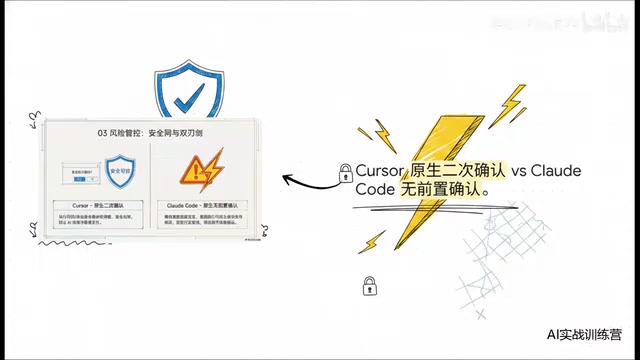
In the AI safety field, this problem is called the "Alignment Tax"—the efficiency cost paid to ensure AI behavior aligns with human intent. Cursor chose a high alignment tax strategy (frequent confirmations), while Claude Code chose a low alignment tax strategy (minimized interruptions). Behind this is a classic engineering tradeoff: more confirmations mean lower risk of misoperations, but also worse workflow continuity. For prototyping and exploratory programming, low interruption means faster creative iteration; but for critical code changes in production environments, lack of confirmation mechanisms can lead to catastrophic consequences. This is also why the Claude Code community has gradually developed "permission layering" as a best practice—specifying through configuration files which operations (like reading files, running tests) can execute automatically, and which operations (like writing files, deleting code) require human confirmation, finding the optimal balance between efficiency and safety.
The root of the risk lies in confirmation mechanisms. Cursor comes with a built-in "safety shield"—it usually pops up a confirmation dialog before executing code, greatly reducing the probability of accidental actions. Claude Code, in pursuit of ultimate continuity and speed, natively has no pre-execution confirmation—its selling point is efficient flow. It's exhilarating when prototyping, but this double-edged sword has an extremely high probability of cutting yourself.
The Ultimate Nightmare: The 50-File Catastrophe
Imagine this: in Claude Code, if you don't clearly define your requirement boundaries, it might—due to a single misinterpreted assumption—corrupt dozens of core files within seconds, causing your entire project to "die" on the spot, unable to even run. The worst part is that contamination sources are everywhere—you don't even know where to start looking for bugs, and rolling back code is heartbreaking enough to take your breath away.
The Emergency Three-Step Method: Plan → Check → Apply
To save your career, you must deploy this survival protocol:
- Plan: First have the AI think through the logic and list out a plan, but absolutely forbid it from writing code.
- Check: Have it output a Diff comparison preview of before and after changes.
- Apply: Only after you, as a human, confirm that the Diff is flawless should you let it modify files.
The core principle boils down to one sentence: Before AI touches your core code, you must maintain an iron grip on the logic verification checkpoint.
Debugging: From Visualization to Black-Box Tracking
Even with the three-step method, bugs are inevitable when writing code. And the difference between the two tools in debugging is equally painful.
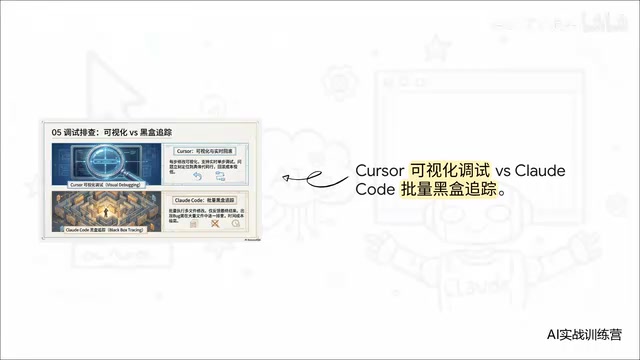
With Cursor, debugging is completely visual: you clearly see what every step did—step-through debugging, real-time observation, and bug location are practically one-click affairs. With Claude Code, it turns into batch black-box tracking—it whips through modifying a bunch of files and tosses you a result at the end. When a bug actually surfaces, you're like you've entered a maze, manually inspecting file after modified file, with extremely high time costs.
This is precisely why the three-step method was emphasized earlier—it's actually a defensive strategy "forced" into existence by the cruel realities of debugging. If every change is controlled within a reviewable scope, then when something goes wrong, your investigation scope is naturally bounded—you won't face dozens of file changes feeling helpless. Combined with a granular git commit strategy (committing after each small step), you can quickly locate the point where a problem was introduced using git diff and git bisect. This is an essential survival technique in the Claude Code ecosystem.
Three Landing Principles: The Cognitive Upgrade Pyramid
Distilling the above practices into a pyramid gives us the three golden rules for switching:
- Foundation Layer—Environment Bridging: Use VS Code with the plugin to transition, bringing down the most painful adaptation costs.
- Middle Layer—Process Restructuring: Implement the Plan / Check / Apply three-step method to control risk at its source.
- Apex Layer—Capability Advancement: Deep-dive into MCP and custom Skill capabilities to build your own automated business flows—this is what truly unlocks the agent's advanced potential.
MCP Protocol and the Future Landscape of AI Tool Ecosystems
The MCP (Model Context Protocol) mentioned at the apex layer is an open standard released by Anthropic, designed to provide AI models with a unified interface for interacting with external tools and data sources. It's similar to what USB protocol is for hardware devices—defining a standard "plug-and-play" specification that lets any developer write custom tool plugins for Claude Code. Through MCP, Claude Code can connect to databases to query production data, call internal APIs to execute deployments, operate cloud services to manage infrastructure, and even drive browsers for end-to-end testing—evolving from a code-writing tool into a truly full-stack automation agent. Skills are an even higher-level abstraction—you can encapsulate frequently-used multi-step workflows into a reusable "skill," such as "create a new microservice module" or "execute a complete code review process," letting Claude Code invoke them with a single command. This is also why "capability advancement" sits at the pyramid's apex—mastering MCP and Skills means you can have AI handle complex business processes far beyond the scope of code writing, truly achieving the leap from "a tool that writes code" to "an automated work partner."
Switching tools is only the surface; upgrading your way of thinking is what truly matters.
Conclusion: From Coder to AI System Project Manager
Jumping from Cursor to Claude Code really isn't about installing one more piece of software on your computer—it's a paradigm leap from "code assistant" to "autonomous agent." Since the tool is more autonomous now, you must govern it with more rigorous engineering thinking.
Put another way, in this new era, you're no longer someone who buries their head in writing code—you're evolving into someone who manages code systems. This leads to one final question: Are you ready to transform from a pure coder into a "project manager" who commands AI systems?
This is no longer a tool upgrade—it's a metamorphosis of your career.
Related articles

Chain of Thought Isn't Just for AI: How Humans Can Use CoT to Improve Thinking Quality
Chain of Thought isn't just a prompt trick for large models. Starting from a Hacker News discussion, this article analyzes why CoT works for human thinking too, breaks down actionable ways to transfer it, and highlights the key differences between human CoT and machine CoT.
Cloudflare Teams Up with OpenAI: Closi…
Cloudflare Teams Up with OpenAI: Closing the Loop from Vulnerability Discovery to Defense with AI
Cloudflare uses OpenAI Daybreak to investigate security vulnerabilities and generate reviewable remediation plans, while developers use Codex to boost coding efficiency and quality.

Orca Multi-Agent Orchestration in Practice: A Guide to Parallel Collaboration with Claude and Codex
Orca is Stable AI's free open-source agent workbench supporting 34 agents like Claude Code and Codex in parallel. Learn its Git worktree isolation, multi-model orchestration, and mobile management.