Advanced Claude Code Workflows: A Three-Tier System of Commands, Sub-Agents, and Skills

Turn Claude Code from a Q&A bot into a structured dev team with commands, agents, and a pitfall database.
This publicly shared Claude Code workflow organizes AI programming into three tiers: 17 slash commands as manual flow-control checkpoints that enforce plan-before-code discipline; 14 sub-agents working in independent contexts across planning, review, and fix phases; and 105 on-demand skills covering everything from engineering workflows to video production. The three tiers chain into a full pipeline, with lessons stored in a PostgreSQL pitfall database — 83 root causes and fixes accumulated so far, ensuring the same mistake is never made twice.
From Chat Box to Automated Team: Rethinking Claude Code
Most people use Claude Code like a chat box — ask a question, get an answer, copy the code. But to truly squeeze out its capabilities, you need a structured workflow. This system, shared by a Bilibili creator from their own daily use, organizes 17 slash commands, 14 sub-agents, and 105 skills into a three-tier division of labor, backed by global conventions and a pitfall database at the foundation.
The core idea comes down to one sentence: organize AI into a team with clear roles that can reflect and improve — not a lone-wolf Q&A bot. The command layer is triggered manually by humans, the agent layer handles task delegation, and the skills library stores specialized knowledge loaded on demand. Each tier has its own responsibility, forming a reusable development pipeline.
Tier One: 17 Slash Commands — Manually Triggered Entry Points
Slash commands are the manual trigger points of the entire workflow, grouped into six categories: development flow, experience capture, environment conventions, skill management, image generation, and notification toggles. Just type a slash followed by the name to invoke one.
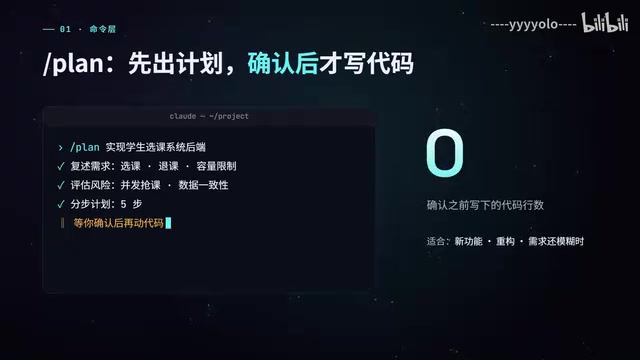
The most frequently used is /plan. It restates the requirements, assesses risks, breaks down a step-by-step plan, and then stops to wait for confirmation — not a single line of code is written before that confirmation. This "plan first, act second" constraint is precisely what most people skip when using AI to write code.
Once the code is written, three checkpoints follow: /build-fix fixes critical errors with minimal changes, /quality-gate applies a per-file quality gate, and /test-coverage identifies coverage gaps and fills them with tests. These three gates transform "done writing" into "writing is just the beginning."
Tier Two: 14 Sub-Agents — Working in Independent Contexts
The biggest value of sub-agents is that they work in independent contexts, without crowding the main conversation. Usage is straightforward — just say "use Code Reviewer to review this change," or let the main conversation automatically delegate tasks based on the work at hand.
The 14 agents are divided into three groups. In the planning and development group: Planner breaks down requirements, Architect handles architecture decisions, TDD Guide walks you through test-first development, Docs Lookup retrieves the latest official documentation, and Front-end Scout specifically verifies frontend library licenses and bundle sizes — a detail that reflects solid engineering awareness, since licenses and package sizes are exactly where front-end selection goes wrong most often.
The review group acts as a quality gate: Code Reviewer is used every time code changes are made, Security Reviewer specifically checks for injection vulnerabilities and secret leaks, Database Reviewer handles SQL and schema, and there are dedicated reviewers for both C++ and Java. The fix group handles emergencies — Build Error Resolver tackles compilation errors, and Reflector Cleaner removes dead code while making only minimal improvements without touching architecture.

The logic behind the agent groupings is clear: planning, review, and fix correspond to distinct phases of software development, letting specialized agents handle specialized work — far more reliable than one general-purpose assistant doing everything.
The "independent context" concept means each sub-agent starts with a fresh conversation window, carrying none of the main conversation's history. Large language models have a context window limit (Claude's current maximum is around 200,000 tokens). Once the main conversation accumulates large amounts of code, discussion, and intermediate results, appending more content pushes early critical information out of the window — the model starts forgetting details and producing contradictions. Delegating review and fix tasks to independent sub-agents is like giving each specialized task a blank sheet of paper: the main conversation retains its full context, while sub-agents tackle local problems with maximum clarity. This is why "Code Reviewer is used every time code changes are made" — it always examines changes with a fresh perspective, undistracted by the heavy background context of the main conversation.
Tier Three: 105 Skills — On-Demand Knowledge Packages
Skills are the most numerous part of this system. They don't occupy context by default — they trigger automatically when a keyword is mentioned, or can be invoked by name. They're organized into several series by origin:
- Baoyu Series (14 skills): Focused on Chinese-language content, covering AI image generation, article illustrations, cover images, infographics, translation at three precision levels, converting web pages and YouTube captions to Markdown, and even summarizing WeChat group chats.
- Superpower Hours Series (11 skills): A set of development disciplines — brainstorm first, write a plan, execute the plan, request a review, and finally run verification to produce evidence before calling something "done."
- Engineering Workflow Series (18 skills): Many sourced from Mapacock. Grillme interrogates a proposal with relentless questions, Handoff compresses long conversations into a handoff document, Prototype validates designs with throwaway prototypes, and Setup Precommit configures pre-commit checks with one command.

- UI Design Series (12 skills): UI UX Pro Max is a style and color palette database, Frontend Design sets the visual direction for pages, and Fixing Accessibility patches accessibility gaps.
- Motion & Video Series (26 skills): The largest group, centered on Hyperframes — writing videos, promotional content, explainer videos, and subtitles in HTML. According to the creator, the video introducing this workflow was itself made with it.
- Docs & Diagrams Series: Handles PDF, PPT, and Excel files; Archify generates interactive architecture diagrams from a single sentence.
There's also a self-written toolchain: Toolchain remembers the local path for every tool on the machine, Trap and Retrospect manage the pitfall database, and 7 local private skills round things out — including Conventions, which mandates that all comments be written in Chinese.

The "on-demand loading" mechanism for skills is engineering-wise similar to dynamic link libraries (DLLs) or lazy-loaded modules: they don't consume memory (context) by default, and are only loaded when referenced. This contrasts with the approach of writing all conventions and knowledge directly into the System Prompt — which burns a large portion of the token budget from the very start of every conversation, with most of it unused for any given task. By triggering via keywords or explicit invocation, the skills library achieves fine-grained context management: load only what you need. For a knowledge system at the scale of 105 skills, this mechanism is practically the only viable organizational approach — otherwise, just the skill descriptions themselves would exhaust the available context.
How the Three Tiers Work Together: A Reusable Pipeline
Looking at each tier in isolation isn't enough — the real value lies in how they chain into a pipeline. A complete workflow for building a feature looks like this:
/plan generates the plan → TDD Guide writes tests first → Code Reviewer reviews → Verification gathers evidence → /retrospect for a retrospective.
The retrospective step is especially critical. Every lesson from a retrospective gets written into a PostgreSQL pitfall database, which has now accumulated 83 entries. The next time a similar error appears, use /trap with a keyword to immediately find the root cause and solution from last time — the same pit, never fallen into twice. This mechanism transforms personal experience into queryable, structured knowledge, and is the highest-compound-value part of the entire workflow.
The skills themselves also need maintenance: updated every two to three months, backed up first, then refreshed with SkillsAd pulling the new version, and finally /help is run to auto-refresh the documentation.
PostgreSQL serves as the persistent external memory in this system. Large language models have no cross-session memory — when a conversation ends, all the experience and lessons generated within it disappear. Storing the pitfall database in a relational database means this knowledge survives independently of any single conversation, can be searched, updated, and version-controlled. Choosing PostgreSQL over plain text files or a vector database also means you can use structured queries to precisely match fields like error type and root cause category, rather than relying on fuzzy semantic similarity search. 83 records might not sound like many, but each one corresponds to a real root cause and solution from an actual failure — far denser than generic documentation. This mechanism of "monetizing failure" is the key to the compound returns the entire workflow generates.
What This Workflow Teaches Us
Setting aside the specific command and skill names, the real takeaway from this system is its organizational philosophy: decompose AI capabilities into roles with clear responsibilities, use manual commands to control critical checkpoints, use independent contexts to avoid polluting the main conversation, and use a pitfall database to continuously accumulate experience.
Tools go out of date. Division of labor doesn't. When AI shifts from "one omnipotent assistant" to "a team with clear roles that reviews and reflects," its reliability and reusability genuinely level up. For developers who use AI for programming heavily every day, the time investment in building a workflow like this pays clear dividends.
Related articles

Chain of Thought Isn't Just for AI: How Humans Can Use CoT to Improve Thinking Quality
Chain of Thought isn't just a prompt trick for large models. Starting from a Hacker News discussion, this article analyzes why CoT works for human thinking too, breaks down actionable ways to transfer it, and highlights the key differences between human CoT and machine CoT.
Cloudflare Teams Up with OpenAI: Closi…
Cloudflare Teams Up with OpenAI: Closing the Loop from Vulnerability Discovery to Defense with AI
Cloudflare uses OpenAI Daybreak to investigate security vulnerabilities and generate reviewable remediation plans, while developers use Codex to boost coding efficiency and quality.

Orca Multi-Agent Orchestration in Practice: A Guide to Parallel Collaboration with Claude and Codex
Orca is Stable AI's free open-source agent workbench supporting 34 agents like Claude Code and Codex in parallel. Learn its Git worktree isolation, multi-model orchestration, and mobile management.