After Fixing an Nginx 413 Error, What Should Agent Memory Store?

An Nginx 413 upload failure case shows what agent memory should and should not contain.
Starting from a real case of an 18 MiB JPEG upload failure, the article points out that the culprit was Nginx's default 1m limit on client_max_body_size, with the request rejected with a 413 before reaching the app. The fix raises the Nginx limit to 32m while keeping the application-layer 20 MiB limit, because Nginx counts the entire multipart request body while the application only looks at the file itself. The author then discusses seven items to write into coding agent memory after the fix, emphasizing that unverified guesses like "maybe a memory problem" should not be written into memory.
Starting from an Upload Failure
A fictional but typical scenario: you maintain a sample-photo app for a photography studio, and a user fails to upload an 18 MiB JPEG. Your initial handwritten note might say "maybe a memory problem," but the real culprit is Nginx—the upload route has client_max_body_size 1m; configured, so the request is rejected with a 413 before it ever reaches the app, even though the app itself allows files up to 20 MiB.
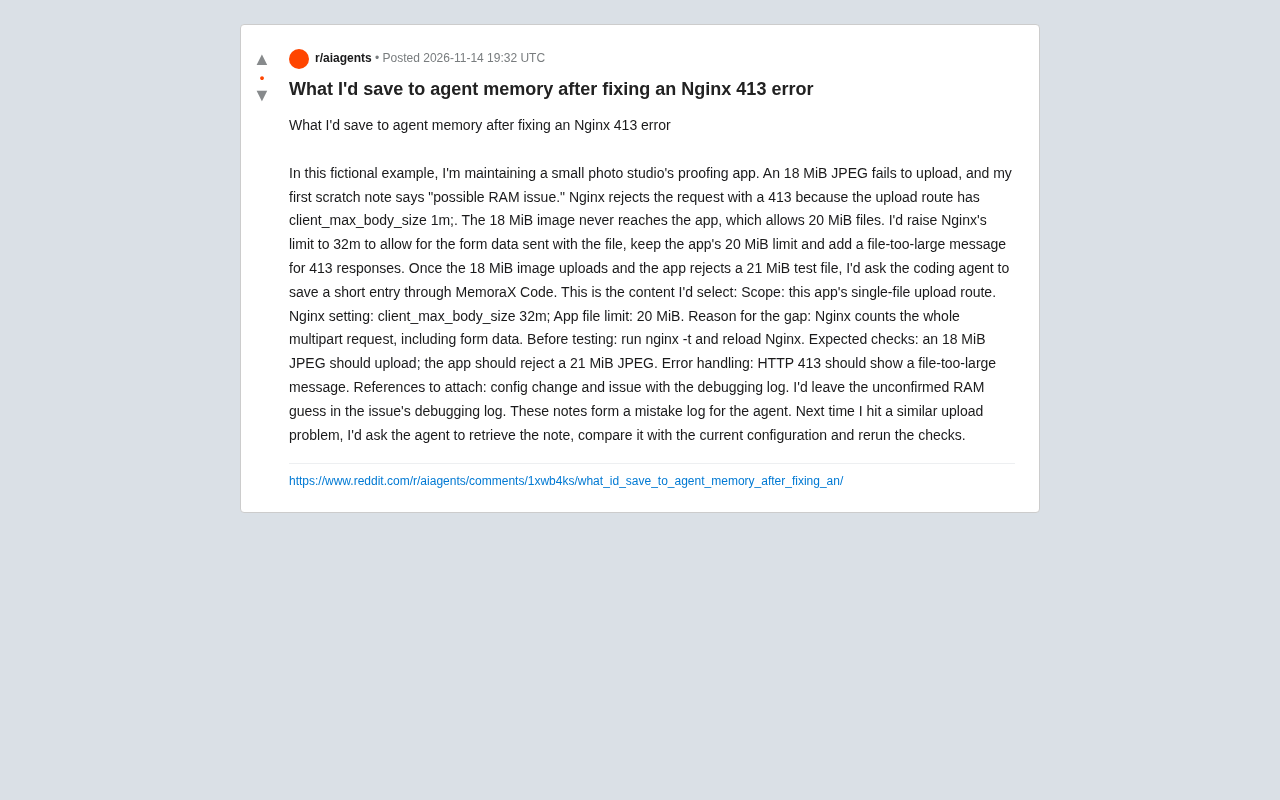
This case comes from a share on Reddit, where the author uses it to discuss a more general question: when a coding agent helps you fix a bug, what should be written into its memory afterward so that next time a similar problem arises, it actually saves effort?
Nginx's client_max_body_size directive is defined in the http, server, or location block and limits the maximum byte size of a client request body; units can use suffixes like k and m. When the request body exceeds that value, Nginx returns 413 Request Entity Too Large directly and does not forward the request to the backend application, so the application layer's logs and error-handling logic never see the request. This explains why in the case the app itself allows 20 MiB, yet an 18 MiB upload still fails: the request is stopped at the Nginx layer. By default the directive's value is 1m, and many frameworks or deployment templates don't proactively raise it, so in large-file upload scenarios it is the most common "invisible ceiling." When troubleshooting, first check the Nginx error log for 413 records, then confirm whether the request reached the application.
The Fix: A Number Game Between Two Limits
The fix the author gives is not complicated: set Nginx's client_max_body_size to 32m, but keep the application-layer 20 MiB limit unchanged, and add a "file too large" message for 413 responses.
Why should the Nginx limit be higher than the application limit? Because the two measure different things: Nginx counts the entire multipart request body, including form data sent along with the file; the application only cares about the size of the file itself. Leaving headroom allows an 18 MiB image to pass smoothly while still letting the application reject a 21 MiB test file as expected.
The verification steps are equally clear: after changes, first run nginx -t to check the configuration, then reload Nginx; then uploading an 18 MiB JPEG should succeed, uploading a 21 MiB JPEG should be rejected by the application, and the 413 response should show a friendly message.
multipart/form-data is the encoding format used when HTML forms upload files; it splits the request body into multiple parts, each with its own Content-Disposition header. Besides the file's binary data, the request body also contains metadata such as boundary separators, form field names, filenames, and Content-Type; if the form has other text fields, they are counted toward the request body size as well. This is the fundamental reason a gap is needed between the Nginx and application limits: Nginx calculates by the byte count of the entire request body, while the application typically validates size only on the parsed file object. The larger the file and the more form fields there are, the more obvious the difference between the two. A common practice is to set the Nginx limit a few MiB higher than the application limit, or leave a 10%–20% margin proportionally, rather than setting both to the same number.
Seven Items to Write into Agent Memory
After the fix was complete, the author had the coding agent save a short record via MemoraX Code. The record's content was carefully chosen and includes seven parts:
- Scope: limited to "the single-file upload route of this app," to prevent the memory from generalizing to unrelated scenarios.
- Nginx setting:
client_max_body_size 32m; - App file limit: 20 MiB
- Reason for the gap: Nginx counts the entire multipart request (including form data), so the two limits are intentionally different.
- Before testing: first run
nginx -tand reload. - Expected checks: an 18 MiB JPEG should upload successfully; a 21 MiB JPEG should be rejected by the application.
- Error handling: HTTP 413 should show a "file too large" message.
In addition, include references: the configuration change and the issue with debug logs. This record is essentially an "error log" for the agent to retrieve next time.
Why Not Write the "Memory Guess" into Memory
Interestingly, the author deliberately did not write the initial "maybe a memory problem" guess into agent memory, but left it in the issue's debug log.
This trade-off is crucial: agent memory should store verified conclusions and reproducible check steps, not intermediate wrong assumptions. If unconfirmed guesses are written in, the agent may be misled the next time it retrieves them, wasting a round of troubleshooting. The debug log preserves the complete exploration process, suitable for humans to review, but not suitable as a basis for agent actions.
Coding agent memory is usually stored as retrievable entries, and retrieval relies on semantic similarity or keyword matching. If unverified assumptions are mixed into the memory store, such as "upload failures may be a memory problem," then the next time an upload-related problem occurs, this record is likely to be recalled and enter the agent's context, causing it to reason in the wrong direction. Even more troublesome, agents often lack metadata to distinguish "verified conclusions" from "historical guesses," unless the memory entries themselves carry confidence or status markers. Therefore, the practice gradually forming in the industry is: memory includes only tested, verified, reproducible facts and operation steps; assumptions, dead ends, and temporary reasoning during exploration stay in issues, debug logs, or conversation history for humans to trace back, but do not enter the agent's long-term memory. This layering is essentially managing the signal-to-noise ratio of memory.
Three Insights for Agent Memory Design
Small as this case is, it reflects several principles of agent memory management.
First, memory should carry scope. Clearly stating "only applies to the single-file upload route of this app" prevents the agent from applying a specific configuration as a general rule elsewhere.
Second, memory should be executable. Besides conclusions, also record verification commands (nginx -t), expected results (18 MiB passes, 21 MiB is rejected), and error-handling methods, so the agent can directly rerun the checks next time instead of reasoning from scratch.
Third, memory should distinguish "facts" from "assumptions." Confirmed configurations go into memory; unverified guesses stay in logs. This layering keeps the agent's memory at a high signal-to-noise ratio.
How to Use It Next Time a Similar Problem Occurs
As the author envisions, the next time an upload-related problem occurs, the process is: have the agent retrieve this note, compare it with the current configuration, and then rerun the check items. If the configuration has changed (for example, the limit was adjusted), the agent can immediately spot the difference; if the check items fail, it means the problem may not be in the same place.
This "retrieve—compare—rerun" loop transforms one-time debugging experience into a reusable asset. For developers who often collaborate with agents, spending a few minutes organizing memory entries may save more time than troubleshooting again next time.
One-line Summary
An Nginx 413 upload failure case shows what agent memory should and should not contain.
Paragraph Summary
Starting from a real case of an 18 MiB JPEG upload failure, the article points out that the culprit was Nginx's default 1m limit on client_max_body_size, with the request rejected with a 413 before reaching the app. The fix is to raise the Nginx limit to 32m while keeping the application-layer 20 MiB limit, because Nginx counts the entire multipart request body while the application only looks at the file itself. The author then discusses seven items to write into coding agent memory after the fix: scope, the Nginx configuration value, the application limit, the reason for the limit gap, verification commands, expected check items, and error handling, emphasizing that unverified guesses like "maybe a memory problem" should not be written into memory. The article concludes with three principles: memory should carry scope, be executable, and distinguish facts from assumptions.
Related articles

Gemini 4 Neon Hands-On: Value King or Confident Catastrophe?
Gemini 4 Neon review: 1M-token context, four thinking levels, 201 files in one KingBench4 pass at one-tenth Fable 5.2's cost—but it hallucinates fake data, leaves 7 symlink escapes, and bricks keyboards.

Google Gemini 4 Neon Hands-On: 6 3D Works That Impress and Fail
Hands-on with Google Gemini 4 Neon on a 3060 laptop: 6 3D works tested. Sunshower Fishing Harbor and mechanical keyboard impress; soft-body physics and faces fall short.

Gemini 4 Neo Web Novel Writing Test: Faint AI Flavor, Textured Dialogue
Bilibili creator's first-look review of Gemini 4 Neo for Chinese web novel writing: testing a Three Kingdoms transmigration opening with faint AI flavor, emotionally textured dialogue, and strong crisis building, plus comparison of 4A/4H/4C models and full workflow demos.