Agent Cowork Setup Guide: A Zero-Cost AI Desktop Assistant Walkthrough

Agent Cowork: a free local-file AI workspace powered by Nvidia's API
Agent Cowork is an AI desktop assistant forked from the open-source Claude-Cowork project by Bilibili creator 一万AI分享. By integrating Nvidia's free API, it lets AI directly access local folders to analyze code, organize documents, and handle errors. Key improvements include an in-app API settings UI, Nvidia API integration, a local protocol conversion proxy for compatibility, and optimized Windows packaging — delivering a zero-cost local AI collaboration experience.
Introduction: More Than a Chatbot — A True AI Desktop Workspace
Most people use AI at the level of a "chat window" — you ask a question, it gives an answer. But what if AI could directly access your local folders, read code, analyze documents, organize files, and even edit them or run commands?
That's exactly what Agent Cowork does. Developed by Bilibili creator "一万AI分享" as a fork of the open-source project Claude-Cowork, it integrates Nvidia's free API to create a zero-cost, local-file AI workspace. You point it at a local folder, and the AI works like a real colleague — reviewing materials, reading code, organizing documents, and diagnosing errors.
What is an AI Agent? An Agent is one of the most important paradigm shifts in AI today. Traditional chat AI (like the web version of ChatGPT) is essentially a "stateless Q&A machine" — it has no idea what's on your computer, can't proactively fetch information, and can't take any action. An AI Agent, by contrast, operates in a full "perceive–decide–act" loop: it can call tools (like reading files, executing code, or searching the web), dynamically adjust its next steps based on results, and work through complex tasks end to end. Agent Cowork is a prime example of bringing this Agent capability down to the local file system — turning AI from a "responder" into a true "collaborator."
This Agent paradigm has solid theoretical foundations. Its core architecture typically consists of four modules: a Perception Layer (reading files, web pages, databases, and other external data), a Planning Layer (decomposing complex tasks into executable steps), a Memory Layer (short-term context window + long-term vector database), and an Action Layer (calling tool APIs to perform specific operations). This architecture is known as the ReAct framework (Reasoning + Acting), jointly proposed by Google and Princeton University in 2022, and has since become the theoretical backbone of most mainstream Agent systems. Agent Cowork is a lightweight implementation of ReAct in practice: the AI first "reasons" about the contents of a folder, then "acts" by reading, analyzing, and organizing — completing the full task loop.
Project Background and Key Changes
What's New in Agent Cowork vs. Claude-Cowork
A developer previously built a project called Claude-Cowork based on Claude-related open-source work. 一万 forked that project and made five key improvements:
- Added an in-app API settings page — no more manually editing config files
- Integrated Nvidia API Key support — enabling completely free usage
- Added a local protocol conversion proxy — resolving interface compatibility issues
- Improved Windows packaging and distribution — lowering the barrier to entry
- Added more practical features suited for everyday use
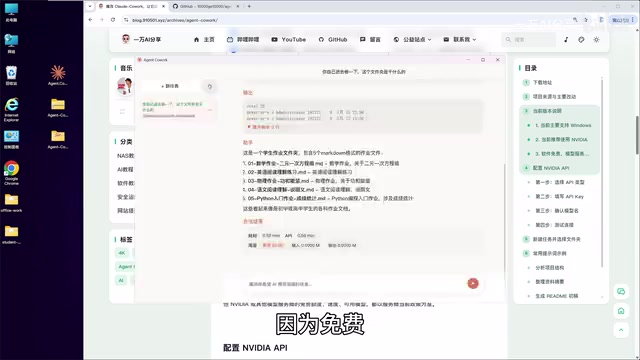
About the "local protocol conversion proxy": Claude is a large language model developed by Anthropic, and its API protocol (including message formats, tool-calling specs, and streaming output formats) differs from OpenAI's API. The original Claude-Cowork project was built on the Claude protocol, meaning its core features — tool calls, file read/write, etc. — all depend on Claude-specific interface conventions. Agent Cowork introduces a "local protocol conversion proxy" (a Proxy layer) that translates Nvidia API responses in real time into the Claude protocol format, allowing the entire workspace to seamlessly use Nvidia's free models without touching the core logic. This "protocol adapter layer" design is extremely common in AI engineering and is the standard approach for multi-model compatibility.
From an engineering perspective, this local proxy is essentially a lightweight HTTP reverse proxy service running on a local port (e.g., localhost:8080). It intercepts Claude-format requests from the app, converts them into the OpenAI-compatible format accepted by Nvidia NIM API, then reverse-converts the responses before returning them to the main program. The differences between Claude and OpenAI API protocols mainly come down to three dimensions: tool-calling format (Tool Use vs. Function Calling), SSE event naming conventions for streaming output, and how system prompts are passed. This "Adapter Pattern" is a classic software engineering design pattern — projects like LiteLLM and One-API use the same approach to achieve "one codebase, multiple model compatibility."
Before You Start
A few limitations to be aware of before installing:
- Windows only — Mac and Linux support may be added later based on user feedback
- Nvidia API is recommended — it's free and has the highest success rate; while the app supports custom API endpoints, they must be Claude-protocol-compatible, and the Nvidia route is currently the most stable
- Users who find GitHub downloads slow can get the package via a cloud storage link
Installation and Configuration: Up and Running in Three Steps
The setup process is straightforward. Just follow these three steps.
Step 1: Download the Installer
Two download options: the GitHub Releases page or a cloud storage link. The program comes as either a direct-run EXE or a ZIP archive. The ZIP version is recommended — it tends to run more reliably after extraction.
Step 2: Configure Your Nvidia Free API Key
Open the app and go to the settings page. Fill in the following:
- API Type: Select Nvidia
- Endpoint URL: Pre-filled by default — no changes needed in most cases
- API Key: Enter the API Key you created on the Nvidia platform (usually starts with
NVAPI) - Model Name: Defaults to
minimax-m2.7
Once filled in, click "Test." After a successful test, save your settings. For instructions on registering a free Nvidia API Key, refer to the creator's previous video tutorial.
Why Nvidia's free API? Nvidia isn't just a GPU manufacturer — in recent years it has aggressively expanded into AI inference services through its NGC (Nvidia GPU Cloud) platform. Its free API program (Nvidia NIM API) lets developers call a variety of mainstream large models for free, including Meta Llama, MiniMax, Mistral, and others, as part of Nvidia's push to grow its AI infrastructure ecosystem. The default model, MiniMax-M2.7, is a Mixture-of-Experts (MoE) architecture model from MiniMax with trillion-scale parameters. It excels at long-context understanding and instruction following — making it well-suited for multi-document analysis across a folder. By calling it through Nvidia's platform, users get enterprise-grade inference at zero cost, with no need to run their own servers.
It's worth understanding the Mixture-of-Experts (MoE) architecture that MiniMax-M2.7 uses. The core idea behind MoE is that while the model has hundreds of billions of parameters, only a small subset of "expert networks" (typically 10–20% of total parameters) is activated during each inference pass, with a "router
Related articles
 Tutorials
ChatGPT Plus Subscription Guide: Are GPT-5.5, image-2, and Codex Worth the Upgrade?
A detailed look at ChatGPT Plus features — GPT-5.5, image-2, and Codex — with a Plus vs Pro comparison and a complete step-by-step subscription guide for users outside the US.
 Tutorials
Harness AI Engineering in Practice: Using Claude Code to Master Enterprise-Level E-Commerce Development
Deep dive into Harness AI Engineering: master enterprise e-commerce development with Claude Code using the Rules, Skills, Wiki, and Changes framework.
 Tutorials
Cursor + Codex Dual-IDE Collaboration: A Practical Methodology for Open-Source Project Customization
A complete methodology for open-source project customization based on real-world experience, detailing the Cursor+Codex dual-IDE workflow, seven-stage process, MVP validation, and AI source code reading techniques.