Agent Engineering in Practice: 10 Key Steps to Building an Intelligent Agent from Scratch

10 engineering steps to bridge the gap between an Agent Demo and a production-ready product.
This article addresses the core pain point of "Demos work but products don't ship" in AI Agent development, presenting a complete engineering methodology across 10 steps. The first three steps emphasize thinking before coding: defining the five elements of requirements, establishing project conventions (including an AGENTS file and secrets management), and designing a workflow-Agent separated architecture. Steps four through six focus on building blocks: Agent definitions with specific roles and output structures, a "one tool, one job" tool design principle, and the distinction between Tools (capabilities) and Skills (reusable, validated method flows). Steps seven and eight cover memory and prompts: managing Context and Memory separately, and splitting prompts into versioned modules. The final two steps address post-launch work: testing (can it run?) and evaluation (does it run well?) are separate concerns, and deployment requires four types of logs for continuous monitoring.
Why do some people end up with nothing more than a back-and-forth chatbot, while others build Agents that can research topics on their own, browse web pages, compile reports, and even invoke tools to complete complex tasks? The gap isn't the model or the API — it's engineering capability.
Following a tutorial to call a framework, write a Prompt, and wire up a few tools is enough to get a Demo running. But when it's time to build a complete project from scratch, problems surface immediately: How do you define requirements? How do you organize the code? How do you break down tools? How do you debug issues? How do you ensure nothing breaks after a feature update? The distance between a working Demo and a shippable product is precisely a complete engineering methodology. This article distills the entire journey of taking an Agent project from 0 to 1 into 10 steps, walking through what to do at each stage, why it matters, and where the common pitfalls lie.
Steps 1–3: Think It Through Before You Start
The biggest mistake beginners make is opening their editor and writing code immediately, aiming straight for a "universal Agent" — one that can chat, search, write code, generate images, and create slide decks. Two months later, it does a little of everything and nothing well.
Defining requirements is the correct first step. You need to write down five things in a document: the goal (what core task must be accomplished — it must be specific and concrete), inputs (what information the user provides and in what format), outputs (whether the final deliverable is an article, an answer, or code), the autonomy boundary (what the Agent can decide on its own versus what requires human confirmation, such as high-risk operations like deleting files), and success criteria (what "done" looks like — for example, accuracy reaching 90%).
A bad example is "build an AI assistant to help me do various things" — that's not a requirement, it's a wish. A good example is: "The user inputs a technical term; the Agent searches the official website and GitHub, and outputs a research report containing core conclusions, key facts, and source links; information must be factual, and anything uncertain must be flagged." Once the goal is vague, you'll keep adding tools, skills, and memory layers, and the system will eventually become an unrecognizable mess.
Step two is establishing project conventions. The smaller the project, the more important it is to set rules early — because a Demo can become a production product within a month, and retrofitting standards later means going into debt. Three things to do: basic configuration (what the project does, how to run it, what the dependencies are, and setting up a Git repository), writing an AGENTS file (a project guide written for AI developers, covering directory structure, coding standards, commit rules, and testing requirements — AI-assisted development tools will read this before touching anything), and secrets management.

Secrets management has caused real pain: one developer committed an API Key directly into the code and pushed it to GitHub. By that night, it had been scraped by a scanner; someone used the key to make a flood of API calls, racking up over ¥800 in a single night. The correct approach is to store real credentials in a .env file and add it to .gitignore — it must never be committed to the repository.
Step three is designing the project architecture. Many people like to dump all logic into one big Agent and hand it a pile of tools to "figure out on its own." That works at the Demo stage, but things inevitably spiral out of control as complexity grows — because LLMs are fundamentally non-deterministic programs. The same task might be handled search-first this time, summarize-first next time, and hallucinated entirely the time after that.
The core idea is to separate deterministic workflows from parts that require judgment. A typical directory structure includes: agents (Agent definitions and roles), tools (tool functions), skills (validated task methodology flows), workflow (deterministic flows and orchestration logic), prompt templates, context and long-term memory, and unit tests with evaluation. The most important principle in one sentence: workflow owns the process, agents own the judgment. It's like a restaurant — the procurement staff buys ingredients, the chef cooks, the server delivers, the cashier collects payment. Each role only does what it's good at. Fixed workflows prevent chaos.
Steps 4–6: Defining Agents, Tools, and Skills
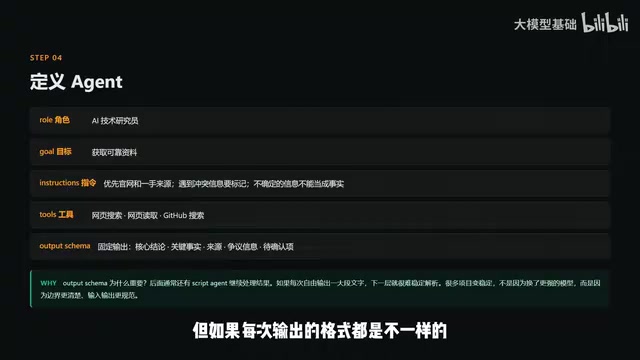
When defining an Agent, writing "you are a helpful assistant" is not enough — that's like a job posting that just says "we need a talented person." You need to spell out at least five things: role (the more specific, the more consistent the behavior), goal, instructions (concrete behavioral rules, such as always prioritizing primary sources and flagging conflicting information), tools (more is not better — too many tools increases the chance of selecting the wrong one), and output structure.
Output structure is especially important because an Agent's output often isn't meant for a human — it's for the next stage of the pipeline. A research Agent's report might be handed to a writing Agent for polish, or stored in a database. If the format varies every time, the next stage cannot parse it reliably. It's like food service: if the dish arrives on a plate this time, in a bucket next time, and poured directly on the table the time after that, the downstream process simply cannot function.
The core principle for designing Tools is one sentence: a single tool should do one clearly defined thing. A search tool only searches and returns titles, summaries, and URLs. A web-reading tool only reads the body text. A file-saving tool only saves to a specified path. This has three benefits: simpler tools have a lower error rate when called, problems are easier to diagnose, and each tool can be tested independently.
Early on, the author built an "all-in-one" web processing tool: you'd give it a URL and it would automatically search, fetch, extract, and save. The result was that the Agent would sometimes trigger a save when it meant to search, and sometimes reading a page only returned a summary. After hours of debugging, the culprit was a tool so complex it was being misunderstood. Splitting it into three independent tools fixed everything immediately. Tools aren't better for being more powerful — they're better for being clearer.
The distinction between Skills and Tools is something many people muddle: Tools are capabilities (what you can do — the hands and feet); Skills are methods (how you actually get things done — the recipe). For example, "research a new AI product" is a Skill: search the official website, check official documentation and GitHub, read news and community discussions, reconcile conflicting information, merge duplicate information, and compile a structured report. It calls on various tools, but it is itself the method for combining those tools to accomplish the task.
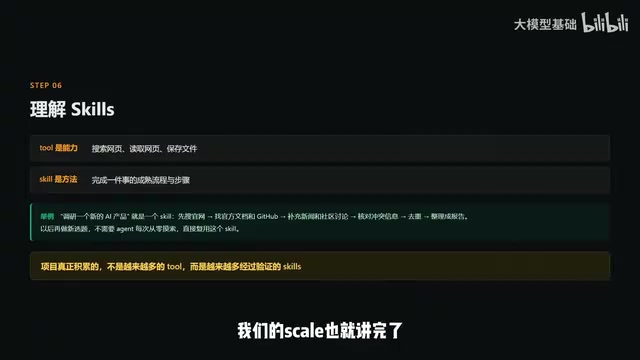
Once a proven flow is written as a Skill, the next research task doesn't require starting from scratch — it's faster and more reliable. An important insight here: what a project truly accumulates over time isn't more and more tools (tools are everywhere online), but more and more validated Skills. That's the real competitive edge.
Steps 7–8: Memory Management and Prompt Organization
Context and Memory need to be managed separately. Context is all the information relevant to the current task: the user's input, resources already found, tool return values, and where the process currently stands. It's discarded once the task ends. Memory is information retained across tasks: user preferences, past topics covered, and standing rules.
A cautionary tale: a writing Agent that stored all historical conversations in its context had to re-read everything every time a new article was written — slow, expensive, and worse, errors from old articles would contaminate new ones. More memory doesn't mean smarter — remembering the wrong things makes future tasks harder to course-correct. Long-term memory must be managed conservatively; only store information that is genuinely valuable and confirmed accurate. A JSON file or SQLite is more than sufficient early on; only move to a vector database if you genuinely have heavy retrieval demands. Don't over-engineer from the start.
Context is like the files currently open on your desk — cleared away at the end of the day. Memory is like the bookshelf holding books that are actually worth referencing.
Organizing Prompts isn't about dumping everything together. The right approach is to break them into separate managed sections: the system prompt (role and long-term rules — fixed), task description (what specifically needs to happen right now — changes each time), constraints (what's allowed and what isn't), examples (one or two positive examples showing the model what a good result looks like), and output structure (the fixed final format).
The benefit of this separation is that you know exactly what you changed when you make a modification. If an Agent keeps stating uncertain information as fact, you only need to add one rule to the constraints section — "uncertain information must be flagged" — without rewriting the entire prompt. Prompts should also be version-controlled, with a log of every change: what was changed, why, and what the effect was. Some teams change prompts by feel, then discover after a month that results are worse than the original — with no way to get back.
Steps 9–10: Testing, Evaluation, Deployment, and Monitoring
Testing and evaluation are two different things. Testing checks whether things run: do interfaces throw errors, are tool return formats correct — the same as testing any ordinary software. Evaluation checks whether things are done well: factual accuracy, hallucinations, whether the right tools were chosen, task completion rate.

For example: a research Agent outputs a 2,000-word report. From a testing perspective, the function ran, the format is correct — test passed. But from an evaluation perspective, the information might be entirely outdated, source links might be fabricated, and key facts might be wrong — technically successful, but a business failure. Many teams only test and never evaluate, then discover after launch that the output is poor — by which point it's too late.
The core of evaluation is a fixed evaluation set and data-driven iteration: prepare a batch of test cases (say, 20 research tasks), each with a reference answer or scoring rubric. Every time you change a prompt, tool, or workflow, run through them all and see whether the score went up or down. A higher score means the change helped; a lower score means roll back immediately. No more going by intuition.
Deployment and monitoring — launch is where the real work begins. Agents aren't deterministic programs; the same task may yield different results today versus tomorrow. Models are updating, tools are changing, and user inputs are endlessly varied. Once live, you must be able to see what the Agent is doing internally. Four types of logs must be recorded: task logs (what task the user submitted, where the workflow currently stands), decision logs (what choices the Agent made and why it chose a particular tool — critical for debugging), tool logs (what was called, inputs and outputs, and latency), and cost metrics (token usage, latency, error rate, task success rate).
With complete logs, when a user reports a wrong answer you can trace the chain: check the task log to see the workflow reached step three, check the decision log to see the Agent chose a search tool but with the wrong keywords, check the tool log to see the first result was already outdated — the problem is pinpointed immediately. Without traces and logs, you're always just guessing when things go wrong.
Conclusion: Using Deterministic Engineering to Constrain Non-Deterministic AI
From requirements to launch, these 10 steps form a complete methodology bridging "knows how to write a Demo" and "can actually ship a product." The author's closing remark cuts to the heart of it: the essence of Agent engineering is figuring out how to make a non-deterministic AI reliably and consistently complete deterministic business tasks over the long term.
LLMs can behave erratically, hallucinate, and make foolish mistakes — but the business is deterministic. If a user asks a question, they need an accurate answer; if they ask for research, they need a reliable report. From defining requirements to monitoring logs, all engineering work is fundamentally about using deterministic engineering methods to constrain and guide a non-deterministic AI. Understand this, and you understand the essence of Agent engineering.
Background and Further Context
The "separation of deterministic flow from judgment," described above, corresponds in engineering terms to the concept of Orchestration. The orchestration layer dictates the overall direction of a task: what happens in step one, what conditions must be met before moving to step two, and how to roll back on error — all of this is hardcoded logic that does not depend on model output. The Agent layer only intervenes when semantic understanding or strategic decisions are required, such as "is this sentence asking about product pricing or technical specifications?" This layered design borrows from the traditional software engineering principle of "separating policy from mechanism" — handing stable procedural mechanisms to program control and variable strategic judgment to AI, thereby containing the system's non-determinism within manageable boundaries. Tools like LangGraph, Prefect, and Temporal are built precisely for these stateful orchestration scenarios. But even without any framework, clearly distinguishing "flow control code" from "Agent invocation code" at the code level is an equally important architectural principle.
Skills are typically implemented as a fixed Python function or script that calls multiple Tools in sequence and includes error handling and result-merging logic. Their key value lies in reproducibility: when the same Skill is invoked across different tasks, the execution path is consistent — rather than the Agent improvising each time, deciding "which source do I search first?" This is fundamentally different from Chain-of-Thought prompting in Prompt Engineering — CoT lets the model decide its own steps during reasoning, whereas a Skill codifies the optimal, human-validated steps into code. As a project matures, the quality of the Skills library directly determines the system's stability ceiling, because it accumulates the team's domain expertise for specific task types. That knowledge is crystallized in executable code: it won't be lost when the model is upgraded, and it won't break when the prompt changes.
Evaluating AI systems is commonly referred to in the industry as Evals, a specialized subfield within LLM application engineering. Three common evaluation approaches exist: human annotation (most accurate, but expensive), rule-based automated checks (e.g., verifying that output includes source links or conforms to a Schema), and using another LLM as a judge (LLM-as-Judge — fast, but requires first validating the reliability of the judge model itself). In practice, a mix is typically used: rule-based checks for format and field completeness, LLM-as-Judge for content quality, and sampled human review for critical business metrics. The quality of an evaluation set matters more than its size — 20 high-quality test cases covering typical scenarios and edge cases will often reveal more genuine system weaknesses than 200 random cases. Tools like OpenAI Evals, Braintrust, and LangSmith are designed specifically for this, but a simple CSV plus a scoring script is equally effective in the early stages.
Related articles

Chain of Thought Isn't Just for AI: How Humans Can Use CoT to Improve Thinking Quality
Chain of Thought isn't just a prompt trick for large models. Starting from a Hacker News discussion, this article analyzes why CoT works for human thinking too, breaks down actionable ways to transfer it, and highlights the key differences between human CoT and machine CoT.
Cloudflare Teams Up with OpenAI: Closi…
Cloudflare Teams Up with OpenAI: Closing the Loop from Vulnerability Discovery to Defense with AI
Cloudflare uses OpenAI Daybreak to investigate security vulnerabilities and generate reviewable remediation plans, while developers use Codex to boost coding efficiency and quality.

Orca Multi-Agent Orchestration in Practice: A Guide to Parallel Collaboration with Claude and Codex
Orca is Stable AI's free open-source agent workbench supporting 34 agents like Claude Code and Codex in parallel. Learn its Git worktree isolation, multi-model orchestration, and mobile management.