Agent Loop Core Mechanism Explained: Building a ReAct Loop from Scratch (With Debugging War Stories)

Deep dive into the Agent Loop's principles, implementation, and common pitfalls in AI Agents
As the fourth installment of the "Build your own Claude Code" series, this article explains the core operating mechanism of AI Agents — the Agent Loop based on the ReAct architecture. It covers the Reasoning-Acting-Observing loop flow, analyzes the role of Tool Call IDs and context management strategies, and reveals a critical bug through real debugging experience: assistant messages must be fed back verbatim to the context, or the Agent will fall into an infinite loop.
What is an Agent Loop
In today's LLM-based AI Agent tools, the Agent Loop is the most fundamental operating mechanism. Whether it's Claude Code, Cursor, or other Coding Agents, they all follow the same underlying architectural pattern — ReAct (Reasoning + Acting), a loop model that combines reasoning with action.
The ReAct architecture was first proposed by Yao et al. in their 2022 paper "ReAct: Synergizing Reasoning and Acting in Language Models." Before this, academic research on large language models primarily followed two separate tracks: one focused on Chain-of-Thought reasoning, enabling models to solve complex problems through step-by-step reasoning; the other on Action-based methods, letting models interact directly with external environments. ReAct's core contribution was unifying these two approaches into a single alternating framework — the model first reasons (Reasoning) to generate an action plan, then executes the action (Acting), observes the result, and enters the next round of reasoning. This design significantly reduces hallucination rates because the model can verify its reasoning through actual tool calls rather than generating answers from thin air. Today, virtually all mainstream AI Agent frameworks — from LangChain to AutoGPT — use ReAct as their default reasoning paradigm.
This article is the fourth installment in the "Build your own Claude Code" series. We'll dive deep into implementing an Agent Loop that automatically executes tasks, understand how it works, and deepen our understanding of context management through real debugging experiences.
ReAct Architecture: The Reasoning-Action Loop
Basic Workflow of an Agent Loop
The core idea behind an Agent Loop isn't complicated: the user inputs a task in natural language, the LLM reasons about it, calls tools when needed to gather information, and the tool output becomes input for the next iteration — looping until the task is complete.
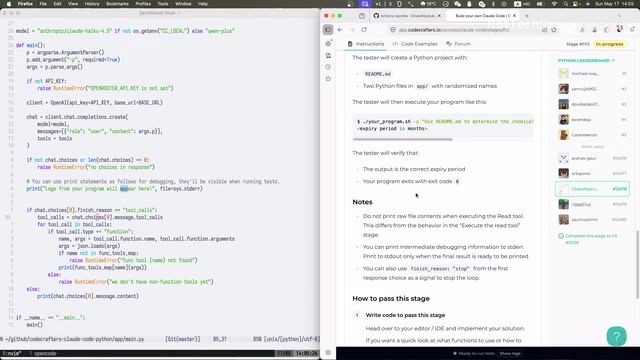
The specific flow is as follows:
- User Input: Describe the task in natural language
- LLM Reasoning: Reason based on the System Prompt and context
- Tool Call Decision: The model decides whether to call a tool (e.g., read files, fetch web content, etc.)
- Tool Execution: Execute the corresponding tool operation and obtain results
- Result Feedback: Feed the tool output back as input for the next iteration
- Task Completion: When the model determines the task is done, output the final result and exit the loop
These tools can include web content fetching, file read/write operations, obtaining code documentation via LSP, and more. LSP (Language Server Protocol) is a standardized protocol developed and open-sourced by Microsoft in 2016 for VS Code, providing a unified communication interface between editors and language analysis tools. It supports code completion, go-to-definition, find references, hover documentation, and other features. In the context of Coding Agents, when LSP is invoked as a tool, it can provide the LLM with precise code structure information — such as a function's complete signature, parameter types, file location, etc. — without requiring the model to "guess" or scan the entire codebase. This structured code comprehension capability is one of the key technical foundations enabling products like Cursor to achieve precise code editing.
The core purpose of all these tools is to reduce the probability of LLM hallucinations and maximize the accuracy of automated task completion by the Agent.
From Single-Turn to Multi-Turn Loops: The Critical Leap
In previous installments, we implemented single-turn conversations — send a prompt, get one response, execute a tool call if there is one. But a real AI Agent needs continuous looping: the output of one round becomes the input for the next, until the task is fully complete.
Tool calling (Function Calling / Tool Use) as a standard LLM API capability has evolved rapidly. OpenAI first introduced the function_calling parameter in the GPT-3.5 and GPT-4 APIs in June 2023, then upgraded it to the more general tools parameter in November of the same year, supporting parallel calling of multiple tools. Anthropic introduced similar tool_use capabilities for Claude models in 2024. The two providers differ slightly in design philosophy: OpenAI uses JSON Schema to define tool parameters with the model returning structured function calls; Anthropic embeds tool calls within content blocks. But the core pattern is consistent — the model uses a special stop_reason (such as tool_calls or tool_use) to indicate it wants to call a tool rather than directly reply to the user. This signal is the key condition for determining whether to continue looping in the Agent Loop.
The pseudocode logic looks roughly like this:
initialize messages = [system_prompt, user_input]
while True:
    response = call_llm(messages)
    messages.append(response)  # Critical: append model output as-is
    if response contains tool_call:
        result = execute_tool(tool_call)
        messages.append({tool_call_id, result})  # Include the ID
    else:
        print(response.content)
        break
Critical Implementation Details
Tool Call ID: The Bridge Between Tool Results and Semantic Requests
Each time the model returns a tool call, it includes a unique Tool Call ID. When feeding tool results back to the model in the next iteration, you must include this ID.
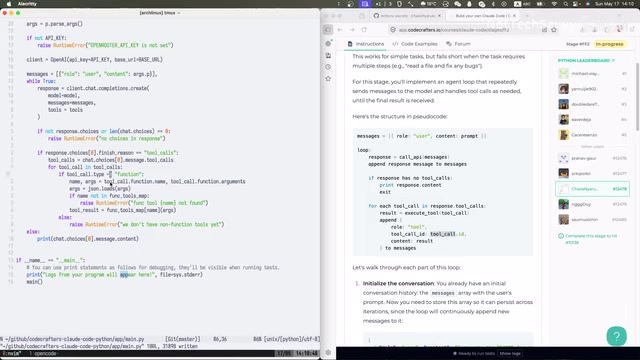
This is because the model's attention mechanism needs this ID to precisely map tool results to previous semantic requests. Technically speaking, the attention mechanism in Transformer architecture uses Query, Key, and Value matrix operations to determine which other tokens each token in the sequence should "attend to." When there are multiple tool calls in the conversation history, the Tool Call ID essentially serves as an explicit alignment signal — it helps the attention mechanism quickly locate "which tool result corresponds to which call request" in long sequences, rather than requiring the model to infer this correspondence solely through semantic similarity. This is similar to foreign key constraints in databases, providing a structured association mechanism that enables the model to maintain accurate context tracking even in complex multi-tool parallel calling scenarios.
In principle, things could theoretically work without IDs, but mainstream LLM APIs (such as OpenAI and Anthropic) typically mandate including this ID — otherwise the model may consider the output unreliable, leading to degraded reasoning quality.
Context Management: Simple but Crucial
In mature AI Agent products, there's usually a dedicated context management module with strategies like compression and summarization. But in our prototype, context management is simply messages.append() — while simple, it must be done correctly.
It's worth noting that while current mainstream LLM context windows continue to expand (e.g., Claude's 200K tokens, GPT-4 Turbo's 128K tokens), in actual Agent Loop scenarios, context consumption far exceeds normal conversations. Each loop iteration accumulates model responses and tool outputs, with operations like file reading potentially injecting thousands of tokens at once. Production-grade Agents typically employ multi-layered context management strategies: sliding window methods that retain the most recent N turns of conversation; summary compression methods that use another model to compress conversation history into brief summaries; and importance scoring methods that prioritize historical messages based on relevance to the current task. Claude Code's actual implementation includes a context compression mechanism that automatically triggers compression when conversation history approaches the window limit, while preserving key tool call results and decision points. For our prototype, understanding that these strategies exist helps with future engineering evolution.
Debugging War Stories: Assistant Messages Must Be Fed Back Verbatim
The Symptom: Agent Trapped in an Infinite Loop
During actual coding, I encountered a very typical bug when building the Agent Loop: the Agent got trapped in an infinite loop, with the model continuously calling tools but never completing the task.
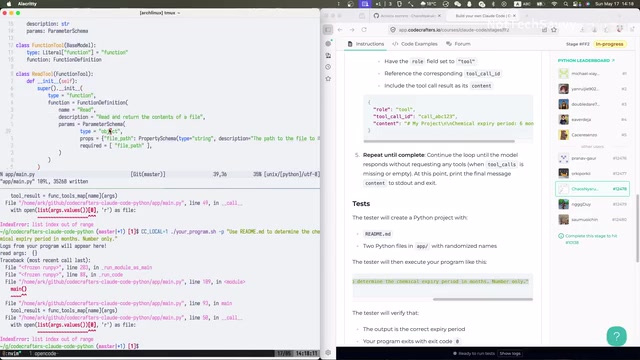
The specific symptoms were:
- Tools called repeatedly with empty parameters
- The model seemed to "forget" it had already called tools
- The loop couldn't terminate normally
Root Cause: Broken Context Chain
After investigation, the problem turned out to be in context construction: the model's Assistant response wasn't being fed back verbatim into the messages list.
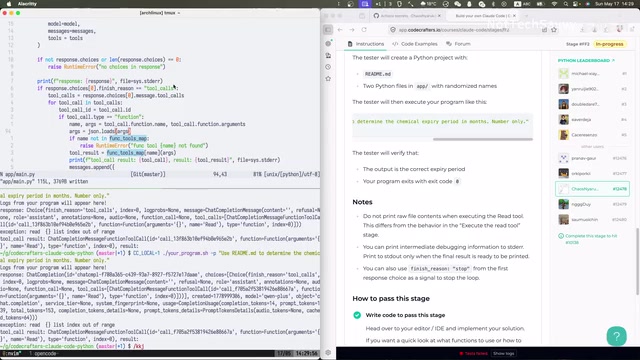
The correct approach is to append two records to messages in each Agent Loop iteration:
- The model's complete response (the assistant message containing tool_call information) — telling the model "you previously decided to call a tool"
- The tool execution result (a tool message with the corresponding tool_call_id) — telling the model "here's what the tool returned"
If you only include the tool result but omit the assistant message, the model cannot establish a complete reasoning chain, causing it to repeatedly call tools or produce incorrect reasoning. This is one of the most common and insidious bugs when building Agent Loops.
From the perspective of how LLMs work, the essence of this problem is that LLMs are stateless. Every API call is a completely fresh reasoning process for the model — it relies entirely on the messages list to "recall" what happened before. If the assistant message is missing from messages, the context the model sees is "the user asked a question, then a tool result suddenly appeared." It can't understand who initiated that tool call or why it appeared, and naturally can't continue reasoning correctly from that point. This is analogous to human conversation — if you only tell someone an answer without telling them what question was asked, they'll struggle to understand the significance of that answer.
The Fixed Core Code
while True:
    response = client.chat.completions.create(
        model=model,
        messages=messages,
        tools=tools
    )
    choice = response.choices[0]

    # Critical: append the model's complete response verbatim to messages
    messages.append(choice.message)

    if choice.finish_reason == "tool_calls":
        for tool_call in choice.message.tool_calls:
            result = execute_tool(tool_call.function.name, tool_call.function.arguments)
            messages.append({
                "role": "tool",
                "tool_call_id": tool_call.id,
                "content": result
            })
    else:
        print(choice.message.content)
        break
Engineering Considerations: From Prototype to Product
Current Prototype Limitations
Our Agent Loop implementation is very concise, but that also means it lacks many production-grade features:
- Context Management: Only uses simple append without compression or summarization strategies; long conversations will quickly exceed token limits
- Error Handling: Lacks comprehensive exception handling and retry mechanisms
- Loop Protection: No maximum iteration count set; theoretically could fall into infinite loops
- Tool Variety: Currently only has a read_file tool; real Agents need a much richer toolset
In production environments, these issues all need systematic solutions. For example, products like Claude Code and Cursor typically implement multi-layered safeguards for loop protection: maximum iteration count limits, per-task token budget caps, and time-based timeout mechanisms. For error handling, considerations include exponential backoff retries for API call failures, graceful degradation when tool execution fails (e.g., returning a clear error message when a file doesn't exist rather than crashing the entire loop), and checkpoint-resume capabilities during network fluctuations. These engineering details don't affect understanding of the core principles, but they represent the biggest gap between a "working demo" and a "reliable product."
The Core Value of Agent Loop
Despite its simplicity, this prototype already demonstrates the four most essential concepts of an Agent Loop:
- Loop-Driven: A while loop runs continuously until the task is complete
- Context Accumulation: Input and output from each conversation round are appended to the message list
- Tool Collaboration: The model decides when to call tools; tool results are fed back to the model
- Natural Termination: When the model considers the task complete, it returns the final result and exits the loop
With this Agent Loop mechanism and tool calling framework in place, extending with new tools like write_file becomes very easy — you just need to register new tool definitions and implement the corresponding execution functions.
Summary
The Agent Loop is the core engine of all AI Agent tools. Through this implementation and debugging experience, we can distill three key lessons:
- Model responses must be fed back verbatim to maintain the complete reasoning chain
- Tool Call ID is the bridge between tool results and semantic requests — it cannot be omitted
- Context completeness directly determines whether an Agent can correctly terminate a task
Once you've mastered how the Agent Loop operates under the ReAct architecture, you've mastered the core capability for building AI Agent tools like Claude Code. In the next installment, we'll implement a Write tool, enabling the Agent to not only read information but actually "take action" to complete tasks.
Related articles
Deep Dive into AI Agent Skill Design: …
Deep Dive into AI Agent Skill Design: Engineering Practices from Anthropic and Perplexity
A deep dive into Skill design philosophy from Anthropic's Claude Code team and Perplexity's Agent team, covering the Tax Test, Gotchas Flywheel, progressive disclosure, and Eval-First practices for building high-quality AI Agent skill systems.
Deep Dive into OpenAI's Official GPT-5…
Deep Dive into OpenAI's Official GPT-5.6 Prompting Guide: The Shift from Manual to Automatic
A deep dive into OpenAI's official GPT-5.6 Sol prompting guide: conciseness-first, outcome-oriented design, autonomy boundaries, tool routing, and reasoning intensity tuning.
 Deep Dives
Deep Dive into How OpenClaw (Open-Source Crayfish) AI Agent Works
Deep analysis of OpenClaw AI Agent internals: System Prompt, tool calling, SubAgents, Skill system, memory, and Context Engineering explained.