AI Agent Automates Siemens 200SMART PLC Programming End-to-End: Hardware Configuration Without an API

Siemens 200SMART has no official API, but with .awl text import and reverse engineering, AI Agents can automate everything from process analysis to program import.
This article breaks down a Bilibili creator's practical approach to automating Siemens 200SMART programming with AI Agents. Since 200SMART software has no public API and cannot be directly driven by Agents like TIA Portal, the author broke through via two paths: first, leveraging the mechanism where program blocks can be exported as .awl text (STL language), letting the Agent generate STL programs for import and bypassing the limitation that graphical ladder diagrams cannot be directly edited; second, using GitHub reverse-engineering tools to parse the software's internal functions, enabling Agents to control menus and toolbars. Combined with automatic generation and import of the three core tables — Variable Table 1, FB Instance Table, and IO Table — Agents can complete variable management. In a four-axis pick-and-place machine project, the Agent, given only a single process flow description, independently analyzed axis count and IO points, completing hardware configuration, network topology, four-drive addition, axis parameter setup, analog module addition, and program import. This approach suits projects with heavy upfront workloads, but requires engineers to read STL, and the reverse-engineering tools carry version-failure risks.
Siemens 200SMART software has no open API, but through community reverse-engineering tools and program import/export mechanisms, AI Agents can still automate the full workflow from process analysis to hardware configuration, variable table generation, and program import. This article breaks down a recent practice by a Bilibili creator, fully reconstructing the technical path of this approach.
Why What Works for TIA Portal Can Work for 200SMART Too
Recently, many engineers have been trying to connect Agents to the TIA Portal API, letting AI automatically handle programming and screen design within the software. According to a Bilibili creator, this approach can indeed save significant upfront effort, so a natural question arises: can Siemens 200SMART do the same?
Initially, the creator checked the official website and found that 200SMART software has no publicly available API. This means Agents cannot directly drive the software through official interfaces the way they can with TIA Portal. But the project couldn't wait — coincidentally, there was an actual 200SMART project on hand, so the creator decided to explore two directions simultaneously.
The Essential Difference Between TIA Portal API and 200SMART
TIA Portal is Siemens' integrated engineering platform for mid-to-high-end PLCs (S7-1200/1500). Since V13, Siemens has gradually opened up the Openness interface, allowing external programs to call the engineering object model via .NET for project creation, block import/export, variable table read/write, and more. This is the underlying basis for Agents being able to "drive" TIA Portal. 200SMART, however, is positioned as an entry-level small PLC replacing the S7-200. Its programming software, STEP 7-Micro/WIN SMART, is built on an older Windows framework, and Siemens has never provided any official automation interface or public object model like Openness. Therefore, to have an Agent operate 200SMART, one can only rely on the software's existing user-level features such as "file import/export," or call its internal functions through reverse engineering. This is the fundamental technical difference between this approach and the TIA Portal approach.
The .awl File: A Bridge Between AI and PLC
The first discovery came from the program block's own import/export mechanism. The creator noticed that 200SMART program blocks can be exported as .awl files.
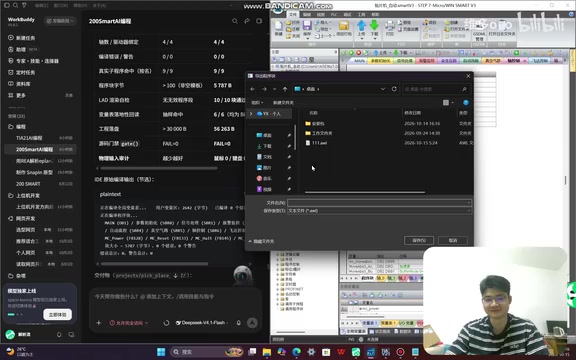
This file is essentially a text file written in STL language. Agents have no problem handling text-format STL, but ladder diagrams (LAD) are a different story. So the entire workflow can be split into two steps: first, have the Agent generate the program in .awl format, then import it into 200SMART software. After import, although it displays in STL language, it can be switched to ladder diagram view within the software at any time.
This bypasses the problem of Agents being unable to directly edit graphical programs, and the program-writing aspect is solved.
The Relationship Between STL and Ladder Diagrams, and What the .awl Format Means
STL (Statement List) is a text-based programming language in the IEC 61131-3 standard, describing logic instruction by instruction, and is naturally plain text. Ladder diagram (LAD) is a graphical language, essentially structured data composed of contacts, coils, and other graphical elements along with their coordinates and connection relationships — directly editing it requires a graphical editor. .awl is a text export format in the "ASCII Worksheet Language" style inherited from early Siemens tools, with content organized as STL instructions by network. This means it can be read and written by programs as ordinary text. It should be noted that ladder diagrams and STL cannot always be losslessly converted between each other: some complex logic, after being exported from LAD to STL, may not be restorable to the original ladder diagram when read back. This is why after an Agent generates .awl, engineers still need the ability to read STL to verify logic correctness.
Variable Tables: Three Tables Determine Success or Failure
Being able to import a program is only the first step — the variable tables are what truly make the program usable. Variable management in 200SMART mainly involves three tables:
Variable Table 1 stores all variables used in the program — this is the most critical table. FB Instance Table is used to store instantiation variables for function blocks. The creator mentioned that newer versions now all require instantiation, and a variable must be declared in advance.
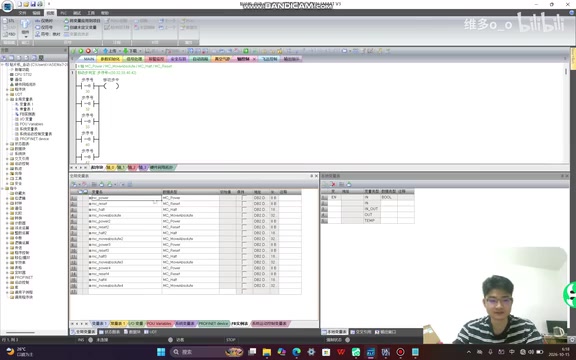
IO Table comes from the Agent's analysis results or the IO list provided by the user. The Agent uses this table for variable naming.
As long as these three tables can be automatically generated and imported correctly, having an Agent handle program writing is no longer just talk.
What FB Instantiation Is, and the Role Boundaries of Each Table
FB (Function Block) is a functional unit with background data. Its biggest difference from FC (Function) is that it needs to preserve internal state. So-called "instantiation" means allocating a separate background data area for each FB call (in 200SMART this is typically represented as a variable — timers, counters, PID, etc. all need instance variables declared before being called). The FB Instance Table is precisely where these background data variables are centrally registered; without it, the program will error out after import because instances cannot be found. The division of labor among the three tables can be understood as follows: Variable Table 1 is the mapping list of global symbols to addresses, determining which physical address each symbol in the program points to; the FB Instance Table manages background data for stateful function blocks; the IO Table describes the actual hardware point assignments and serves as both the source for variable naming and the reference basis for hardware configuration. Only when all three are complete will the program avoid undefined symbols or address conflicts after import.
Reverse Engineering Lets Agents Directly Control Menus and Toolbars
After solving the variable and program issues, the creator pushed the thinking one step further: if programs can be imported, can the software's menu bar and toolbar also be directly controlled by Agents?
Although there's no official API, reverse-engineering tools targeting IEA have appeared on GitHub before. The creator used them to analyze 200SMART software and found that a large number of internal functions can be called. Combining reverse-engineering capabilities with the .awl import mechanism, having an Agent operate 200SMART is no longer a major problem.
Real-World Validation: From a Single Process Requirement to a Complete Program
The creator recorded the full operation process (the original thought process was lost, but the screen recording preserved the key steps). The task background was a pick-and-place machine project involving four-axis motion control.
Step one: only a single process flow description was sent to the Agent. Initially, not even the number of axes or IO points was told to it — the Agent analyzed the required number of axes and IO points on its own, then entered the programming phase.
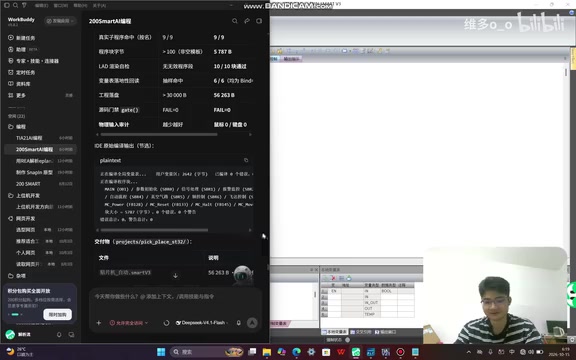
The Agent first broke down the process flow into each action step, then did IO point planning. The creator mentioned that normally a project would have a BOM table and IO table available upfront to feed directly to the Agent, but this time deliberately gave nothing, wanting to see how far it could go.
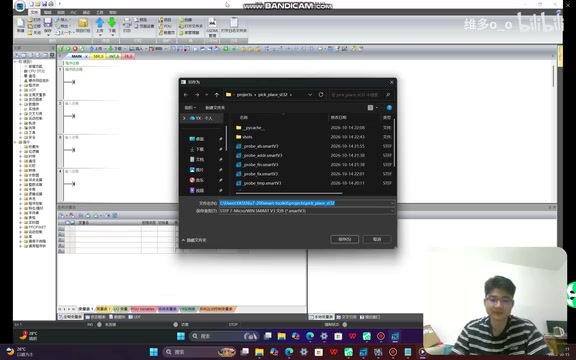
The results exceeded expectations. After analyzing the hardware point requirements, the Agent automatically opened the software and began configuration. It first created and saved the project, then performed network topology, adding four drives — because there were four axes. During the addition process, the program was already written. The creator mentioned the speed benefited from the model used; with Hunyuan 3, which was tried earlier, it would have taken about half an hour.
After axis parameters were configured, since pressure gauge data needed to be collected during the pick-and-place process, the Agent added a four-channel analog input module. Then it began importing the variable tables — the three tables mentioned earlier.
Going through the entire workflow, the Agent completed hardware configuration, axis parameter setup, analog module addition, variable table import, and program writing. The engineer only needed to send the project process requirements and ultimately accept the complete program.
What This Approach Means for Engineers
From a technical perspective, the core idea of this path is "bypass official interfaces, leverage file formats and reverse engineering." The .awl file provides a program interface that Agents can read and write, reverse engineering provides software control capabilities, and variable tables provide a data channel. Combined, automated programming for 200SMART becomes feasible.
Of course, this approach has prerequisites: .awl can only write STL, so the programs generated by Agents require engineers to have the ability to read STL to verify them; the stability of reverse-engineering tools depends on the software version, and they may fail after 200SMART version updates. But for projects with heavy upfront workloads, Agents can at least complete framework building and a large amount of repetitive work, allowing engineers to focus their energy on process logic verification and on-site debugging — the efficiency gains are real.
Stability and Compliance Risks of This Unofficial Automation Approach
Relying on reverse engineering to call internal software functions essentially treats engineering software as a "host" driven by external programs. This type of approach has several practical constraints: first, version sensitivity — software upgrades change internal function signatures or memory layouts, and existing call methods may directly fail, requiring re-reverse-engineering; second, fragile runtime environment — simulated mouse/keyboard or injection-based calls are easily disrupted by window focus, resolution, and pop-ups; third, compliance boundaries — reverse engineering may touch clauses in software license agreements prohibiting reverse engineering, and its use in commercial projects requires careful evaluation. In contrast, approaches based on .awl file import/export and variable table import only use the software's public user features. Although limited in capability, they offer better stability and compliance, making them more suitable as the mainstay of the approach, with reverse-engineering control as an optional enhancement.
Related articles

Chain of Thought Isn't Just for AI: How Humans Can Use CoT to Improve Thinking Quality
Chain of Thought isn't just a prompt trick for large models. Starting from a Hacker News discussion, this article analyzes why CoT works for human thinking too, breaks down actionable ways to transfer it, and highlights the key differences between human CoT and machine CoT.
Cloudflare Teams Up with OpenAI: Closi…
Cloudflare Teams Up with OpenAI: Closing the Loop from Vulnerability Discovery to Defense with AI
Cloudflare uses OpenAI Daybreak to investigate security vulnerabilities and generate reviewable remediation plans, while developers use Codex to boost coding efficiency and quality.

Orca Multi-Agent Orchestration in Practice: A Guide to Parallel Collaboration with Claude and Codex
Orca is Stable AI's free open-source agent workbench supporting 34 agents like Claude Code and Codex in parallel. Learn its Git worktree isolation, multi-model orchestration, and mobile management.