AI Agent Development for Beginners: A Practical Breakdown from Brain to Skills to Business Workflows

Four-module framework for building AI Agents: connect an LLM, attach APIs, define a role with a knowledge base, and design a workflow.
This article breaks down AI Agent development into four composable modules: connecting an LLM (the brain), attaching external APIs (skills), defining a role with a private knowledge base (decision logic), and designing a sequential business workflow. It argues that the most valuable asset in AI-plus-industry deployments is your proprietary knowledge base, not the LLM itself. Real-world examples — novel copy automation, interior design rendering, and WeChat content publishing — illustrate the full pipeline, including private deployment.
The Essential Difference Between LLMs, AI Tools, and Agents
Before diving into AI Agents, it's worth clarifying three concepts that are easy to confuse. A large language model (LLM) is like a powerful brain — ask it a question and it'll answer, but it can't actually do things on your behalf. Want it to send an email, fire off a text, or pull up navigation in a maps app? A standalone LLM simply can't.
An Agent works differently. It doesn't just have an LLM as its brain — more importantly, it's an executor. It can invoke software installed on your machine, follow a workflow you've designed, and use tools in sequence to actually complete an end-to-end task.
So how does that differ from off-the-shelf AI tools? The answer is personalization. No existing tool is tailored to your specific business, your data, or your exact needs. That's where Agents shine — at the small scale, you're building a custom tool for yourself; at the larger scale, you're delivering AI-plus-industry projects for enterprise clients. The word "Agent" itself means "proxy" — something that acts on your behalf.
The Four Core Modules of Agent Development
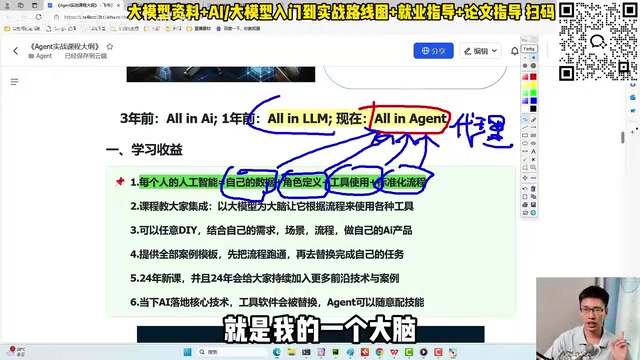
The emphasis here is on technology, not tools — the goal is to teach you how to build an Agent from scratch. The entire development process can be broken down into four composable modules, like building with blocks. Each step has ready-made components; your job is integration, not writing code from scratch.
Module 1 — The Brain: Choosing an LLM Is Just Multiple Choice
The first step is giving your Agent a "brain" by connecting it to an LLM. You can plug in overseas models like GPT, domestic Chinese models like Alibaba's Qwen, run a locally deployed instance, set up a private deployment, or even fine-tune a model on your own data.
One point worth emphasizing: you don't need deep theoretical knowledge of LLMs to do this. Configuring a model is essentially a multiple-choice question — pick whichever one you want. This approach skips AIGC theory entirely, because theory builds awareness but doesn't help much with actually shipping something. The focus is on getting a working application out the door.
Module 2 — Skills: Loading External Interfaces into the Skill Set
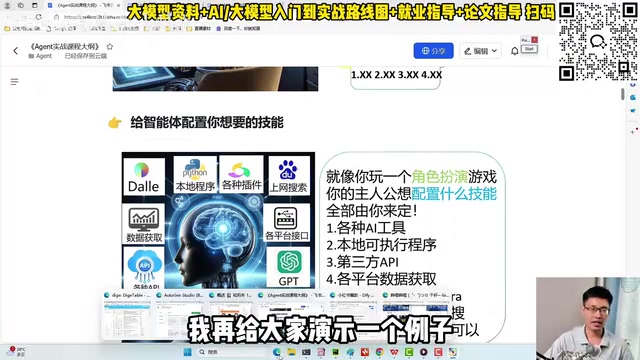
The second step is equipping the Agent with skills — attaching various external interfaces and tools. The key insight here is that the Agent itself doesn't know how to generate digital avatars or draw images, but it can call services built by others.
The mechanics are often as simple as copy-and-paste — take an existing API endpoint and drop it into the Agent's skill list. Checking news, tracking packages, posting to a WeChat Official Account, scraping comment sections, connecting to Amap, writing Excel files, building PowerPoints, or even invoking a locally installed Stable Diffusion instance for image generation — any software or service on the market can be configured as an Agent "skill." Tasks that used to require a human to manually write prompts and tune parameters can now be delegated entirely to the Agent.
A note on APIs: API (Application Programming Interface) is the standard channel through which different software systems communicate. When we say "paste an API endpoint into the Agent's skill list," the underlying logic is this: providers like Amap, weather services, and package trackers have packaged their functionality into standardized network request formats. Any caller simply sends a request in the right format and reads the response — no knowledge of internal implementation required. During task execution, the LLM decides which API to call at any given moment, automatically assembles the parameters, and fires the request — all transparently to the user. This design pattern is technically known as "Tool Use" or "Function Calling," and it's natively supported by major models including OpenAI and Alibaba Qwen. This is the underlying reason why "copy-paste" onboarding is genuinely possible.
Decision Definition and Knowledge Base: Making the Agent a True Expert
The third module is "decision definition" — giving the Agent a role. The AI-plus-industry space is vast: Microsoft has built an AI programmer and AI designer; Tsinghua has produced an AI financial analyst and AI trader. Every professional role has its own definition.
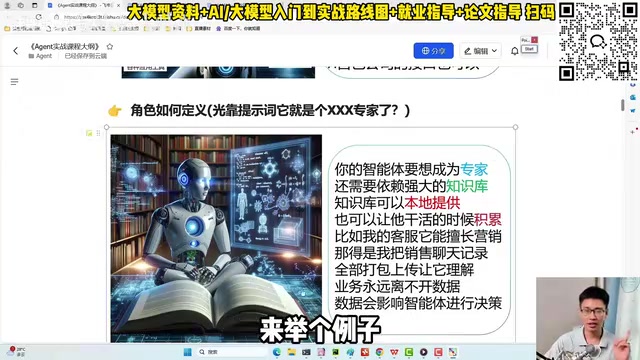
Take a DIY customer service Agent as an example. A single prompt like "You are an AI learning expert" is nowhere near enough. You also need to supply a knowledge base — which means uploading business-specific data like PDFs and Word documents. For instance, an LLM has no idea who a particular instructor is by default, but once you upload local documents, the Agent can answer accurately.
This leads to arguably the most valuable insight in this whole discussion: in AI-plus-industry deployments, the most valuable asset is your private knowledge base — your business experience, work logs, and problem-solving approaches. For a customer service Agent, feed it your top salesperson's chat history and it will learn to mimic their tone, logic, and style.
A note on knowledge bases: In technical terms, knowledge bases are typically implemented via RAG (Retrieval-Augmented Generation). The process works like this: uploaded PDFs and Word files are split into small chunks and converted into vectors stored in a database. When a user asks a question, the system retrieves the most relevant chunks from the database and passes them — along with the question — to the LLM, which then answers based on actual source material rather than generating from memory. This addresses two critical LLM weaknesses: knowledge cutoff dates, and ignorance of private business data (the instructor example above). RAG requires no model retraining, keeps costs very low, and is currently one of the most widely used technical approaches for enterprise AI-plus-industry deployments.
Business Workflow Design: Making the Agent Work Your Way
The fourth module is the business workflow. An Agent can't just wander aimlessly — it needs to follow a structured sequence you've designed: step one, step two, step three, with a clear execution order.
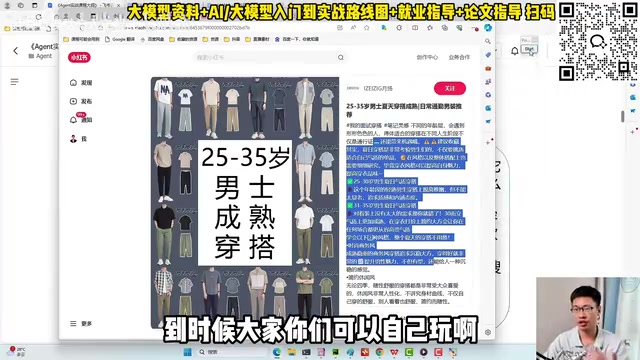
A particularly vivid example is novel content automation. A student managing 20+ accounts for a novel operation business was manually writing copy for each account every day, mimicking reference influencers' styles — an enormous workload. After converting this into an Agent workflow, the process looks like this:
- Configure an HTTP request so the Agent automatically crawls and analyzes the writing style of target reference accounts;
- Pass in a reference account ID; the Agent locates the account and analyzes its copywriting patterns;
- Execute the workflow in sequence — write the title first, then fill in the body (the title step alone uses a 800+ word prompt to constrain the style);
- Call an image generation tool (like Stable Diffusion) to automatically produce matching images for Xiaohongshu posts;
- Combine image and text, then auto-publish — no human involvement needed end to end.
The resulting titles — things like "Summer outfits test your taste, are you ready?" complete with emoji and age-specific styling tips — hold up against paid software. This is where "business understanding" comes in: the human is the master, the Agent is the apprentice, and the apprentice's performance ceiling is set by how well the master understands the business.
Agents can also collaborate with each other, forming multi-agent systems — like a product manager and a developer debating and iterating on a problem together.
A note on workflows: The "execute multi-step tasks in sequence" behavior described here corresponds technically to Workflow Orchestration or Agent Frameworks. Common open-source options include LangChain, AutoGen, and Dify, which offer visual or code-based ways to define nodes (what each step does), conditional branches (which path to take under which conditions), and loop logic. In the novel copy example, "write the title first, then fill in the body" is a classic sequential node design, while "analyze the target account's writing style" is a tool-call node with a network request. Multi-agent systems extend this further: Agents playing different roles (e.g., a Product Manager Agent and a Developer Agent) each hold their own prompt sets and tool collections, and collaborate through message passing to handle more complex tasks — a pattern fully implemented in the AutoGen framework.
Private Deployment and Real-World Use Cases
Once an Agent is built, how do you make it accessible to teammates, managers, and clients? Private deployment is part of the picture. Here are a few already-deployed scenarios:
- Social media operations: Give the Agent a video link; it automatically watches the video, summarizes it, writes a WeChat Official Account article, and publishes it — replacing manual content repurposing;
- Design delivery: Have the Agent log into Feishu, call Stable Diffusion, and automatically populate a bare-shell room rendering with sofas, TVs, coffee tables, and rugs based on client requirements, then deliver the finished image;
- Data analysis and customer service: Fully migrate a human's existing workflow to the Agent for execution.
What This Course Actually Teaches
The positioning is clear: no software tutorials, no tool walkthroughs — only technology. The argument is that courses teaching AI tools and AI software are too shallow. This approach prioritizes hands-on, DIY execution — learners build alongside the instructor and come away with integration skills: how to connect an LLM, define a role, configure external tools, design a standardized workflow, and deploy and launch — the complete technical picture.
From a resume standpoint, this is positioned not as "knows how to use AI tools" but as "capable of delivering AI-plus-industry projects." All materials and templates are provided so learners can reproduce every demonstrated scenario.
One caveat worth noting: this content is promotional in nature. Actual teaching depth, code-level detail, and the specific platforms or frameworks used to build Agents are not covered in this overview. Treat it as an introductory mental model for AI Agent development rather than a technical specification.
Related articles

WorkBuddy Full Guide: How an AI Coworker Takes Over Workplace Automation
What is WorkBuddy? This article analyzes the core capabilities of this full-scenario AI agent: autonomous execution with deliverable results, local file processing, multi-agent parallelism, and workplace automation workflows, helping you judge its essential difference from ordinary AI chat tools.

The Truth About AI Agents: A Hundred Lines of Code + an LLM, Deconstructing the Agent's Underlying Logic
AI agents aren't a new AI species—just a language model plus tools, a loop, and a goal. Here's the underlying logic: how 100 lines of Python hit a 75% fix rate, why the harness beats the model, and Gartner's "agent washing."

AI Agent Deployment: Three Things Developers Should Do
AI Agent deployment doesn't require rushing into multi-agent systems. This article outlines an actionable deployment path and engineering acceptance thresholds for developers, covering human baselines, bounded single-agent scope, and a controlled code-modification loop.