AI Agent for Automated WordPress SEO: A Complete Guide from Diagnosis to Execution

Use an AI Agent to automate WordPress SEO optimization from diagnosis to execution with a single URL.
This guide demonstrates how to build an AI Agent that automatically handles WordPress SEO tasks — including image Alt tags, SEO titles, and meta descriptions. It covers connecting the Agent to WordPress via REST API, writing effective prompts, and solving real-world issues like RankMath's missing API endpoints by having the Agent generate a custom plugin.
For anyone running a website, SEO optimization is as important as it is tedious. Image Alt tags, SEO titles, meta descriptions, internal/external link structure — each item requires manual inspection and editing, and the workload multiplies as your article count grows. Bilibili creator Bai Xiaojun recently demonstrated a system for automating WordPress SEO using an AI Agent: just hand the Agent an article URL, and it handles the entire optimization workflow automatically. This article breaks down the approach and its key implementation details.
Background: The Core Technical Dimensions of SEO SEO (Search Engine Optimization) involves multiple interrelated technical layers. Alt tags are attributes on HTML image elements (e.g.,
<img alt="descriptive text">). Since search engine crawlers can't "see" images, they rely entirely on Alt text to understand image semantics — missing Alt tags make images invisible to search engines. Meta descriptions are HTML tags that appear as snippet summaries in Google/Baidu search results. While they don't directly affect rankings, they significantly influence click-through rates (CTR), which indirectly impacts SEO performance. Internal/external link structure affects how PageRank flows through your site and how efficiently crawlers index your content. Each of these dimensions is tedious to handle individually; optimizing them across an entire site is extremely time-consuming — making them ideal targets for AI automation.
Core Concept: Let the Agent Handle Repetitive SEO Work
The logic here is straightforward — take the SEO tasks that would normally require manual, item-by-item edits, and delegate them to a configured AI Agent. To use it, you simply paste the target article's URL (or its ID or title) to the Agent along with a preset prompt, and the Agent begins diagnosing the article and generating optimization suggestions.
Background: How AI Agents Differ from Ordinary Conversational AI An AI Agent is an AI system capable of autonomous planning and tool invocation. It can decompose complex tasks into sequential steps and dynamically adjust subsequent actions based on execution results. Unlike ordinary conversational AI (which can only output text suggestions), an Agent can actively call external APIs, execute code, and read/write databases — forming a complete "perceive → decide → act → feedback" loop. Current mainstream Agent frameworks (such as OpenAI's Function Calling and Anthropic's Tool Use) are all built on this paradigm. It represents the core technical leap from AI as a "chat tool" to AI as an "automated executor." In this solution, the Agent exercises that execution capability through the WordPress REST API in a concrete content management context.
You may notice the author uses a "diagnose first, confirm, then modify" workflow. The Agent first lists all SEO issues found in the article along with recommended fixes; the user confirms before issuing the execution command. If you prefer maximum efficiency, you can configure the Agent to execute automatically upon receiving a URL, skipping the manual review step.
In the live demo, the Agent's diagnosis of a single article was quite thorough: it identified 11 images with missing Alt and title attributes, flagged the SEO title for appending the site name (wasting character budget), noted issues with the meta description, and surfaced improvement points across article structure, internal/external links, and technical SEO parameters.
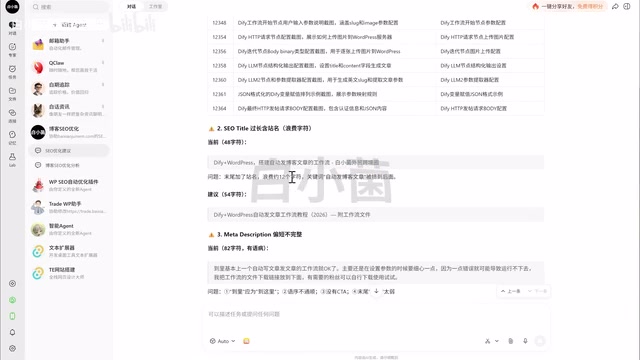
Image SEO: The Most Overlooked Problem Area
The author places particular emphasis on image optimization. Many bloggers insert screenshots directly from their screenshot tool, leaving Alt and title attributes as system-generated defaults like "partial screenshot" — completely valueless for SEO and a clear ranking liability in search engine indexing.
For this reason, the author's prompt specifically flags image issues as a priority. For each image, the Agent uses the image content to generate Alt text and title suggestions that comply with SEO best practices, replacing meaningless default filenames with descriptive text. This is especially valuable for content-heavy blogs with lots of images.
Further Reading: The Multiple Benefits of Image SEO Optimizing image Alt text affects not only rankings in Google Image Search (which drives non-trivial traffic in certain verticals), but is also a core requirement for web accessibility — screen readers rely on Alt text to describe images to visually impaired users. Additionally, while Google's multimodal crawlers now have some image understanding capability, Alt text remains the authoritative semantic signal for images. For tutorial and review blogs in particular, every screenshot is a potential long-tail keyword opportunity. The SEO return on fixing Alt tags in bulk is substantial.
Building the Automated SEO Agent in Four Steps
The entire setup can be broken into four steps with a clean, replicable logic.
Step 1: Create the AI Agent
The author uses CodeBuddy, a Tencent tool powered by Claude. Download and install it from the official website, log in with WeChat, then click "New Agent" in the top-left corner and select "Custom Create." A brief text description of the Agent's purpose is enough for the tool to initialize it automatically.
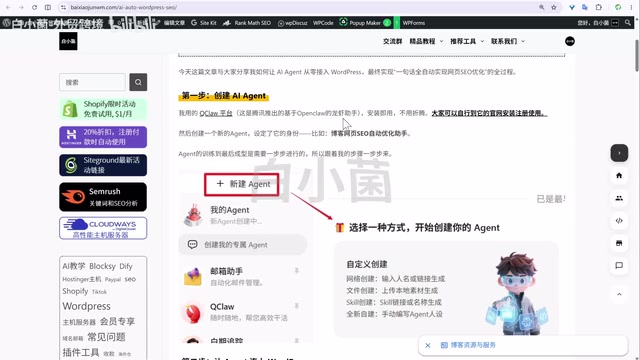
Step 2: Connect to WordPress
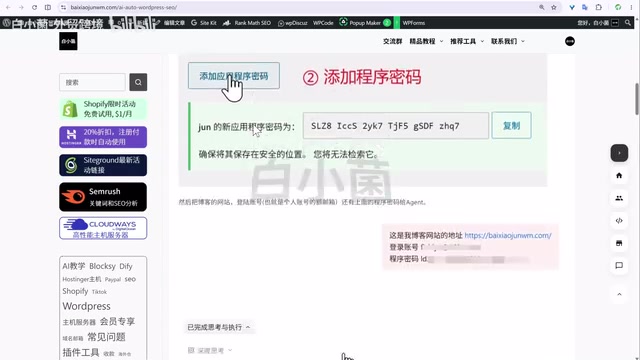
This is the technical crux of the entire solution. Since SEO optimization involves creating, reading, updating, and deleting articles, pages, and products, you need to grant the Agent access to WordPress. To do this, go to Users → Profile in your WordPress dashboard, find the Application Passwords feature, and create a dedicated password.
Background: WordPress REST API and the Application Password Mechanism The WordPress REST API has been built into WordPress since version 4.7 (2016). Following RESTful architecture, it allows any external program to perform full CRUD operations on site content via standard HTTP requests (GET/POST/PUT/DELETE) — no need to log into the WordPress admin interface. Application Passwords were introduced in WordPress 5.6 (2020) specifically to provide independent access credentials for third-party programs and API integrations. Unlike your main account password, application passwords: ① can be revoked individually at any time without affecting the main account; ② have their own access logs for auditing; ③ do not expose admin login access even if compromised. This is WordPress's officially recommended approach for automation integrations, and a key security feature of this solution.
The author specifically warns: make sure you create the password under "Application Passwords" — don't confuse it with other fields. Save the generated password carefully and don't expose it. Then provide the password, site URL, and login username to the Agent so it can automate content operations via the WordPress REST API. Once the connection test succeeds and data is returned correctly, Step 2 is complete.
Step 3: Configure the Agent and Prompt
Creating an Agent is easy; making it truly understand your intent requires iteration. The author admits spending one to two hours configuring this SEO Agent alone, running into various unexpected issues along the way.
The core of configuration is the prompt. The author's prompt covers all key SEO dimensions: SEO title, meta description, image Alt/title attributes, article structure, URL slugs, internal/external links, and technical SEO parameters. The author emphasizes repeatedly: "What ultimately determines the optimization quality is essentially the prompt you give it, and the model you're using. The more specific the prompt, the better the Agent executes."
Further Reading: Prompt Engineering in Agent Contexts In an Agent context, the system prompt must not only define the task objective — it also needs to specify behavioral constraints, tool-calling priorities, and error-handling strategies. For tasks like SEO that have well-established industry standards, high-quality prompts typically need to include: specific character limits (e.g., titles at 55–60 characters, descriptions at 150–160 characters), keyword density guidelines, prohibited behaviors (e.g., no keyword stuffing), and output format specifications. This is essentially the process of making an expert's tacit knowledge explicit and injecting it into the AI system in a structured way — the quality ceiling of your prompt is the capability ceiling of your Agent.
Solving the RankMath Plugin Technical Challenge
During configuration, the author hit a classic obstacle: the Agent couldn't modify the SEO title and description fields directly.
The reason: WordPress doesn't natively provide SEO title and description fields — they're managed by specialized SEO plugins like RankMath or Yoast. The RankMath plugin in use didn't register REST API endpoints for these fields, so the Agent had no way to write SEO data through the API.
Background: RankMath, Yoast, and the WordPress SEO Plugin Ecosystem RankMath and Yoast SEO are the two most widely installed SEO plugins in the WordPress ecosystem (Yoast has over 10 million active installs globally). Their core function is managing SEO-specific fields that WordPress doesn't natively support: the SEO title (
<title>tag, distinct from the post title), meta description (<meta name="description">), structured data (Schema.org markup for rich results), Open Graph tags (social sharing previews), and XML Sitemap generation. This data is stored as WordPress custom post metadata (fields like_rank_math_titleand_rank_math_descriptionin thewp_postmetatable). RankMath's choice not to expose these fields as writable REST API endpoints is an architectural design decision — not a fundamental technical limitation. The capability can be added by registering a custom REST route viaregister_rest_route, which is exactly the path the author took.
When facing this kind of issue, the author's methodology is worth adopting: don't panic — just ask the Agent in the chat to list multiple solutions for you to choose from. The Agent offered three options:
- Option 1: Return SEO titles and descriptions to the chat window for manual user edits — defeats the automation purpose, rejected immediately.
- Option 2: Provide FTP credentials and let the Agent create temporary scripts to execute — requires creating and deleting scripts every time, too cumbersome.
- Option 3: Write a dedicated WordPress plugin that provides write endpoints for RankMath's SEO data.

The author chose Option 3. The Agent quickly generated a lightweight plugin just a few KB in size. Installing it opened up the write channel for SEO titles and descriptions, cleanly resolving the bottleneck.
The author shares a key lesson here: every time you solve a problem, make the Agent write the error cause and solution into its own memory/skills. That way, when the same issue comes up again, the Agent can handle it automatically without wasting time repeating the process.
Background: Agent Memory Mechanisms and Capability Iteration Modern AI Agent frameworks generally support a multi-layer memory architecture: short-term memory (current conversation context), long-term memory (persistent knowledge bases or vector databases), and procedural memory (hardcoded operational skills). Writing successful solutions into the Agent's long-term memory or system prompt is a form of Human-in-the-Loop progressive optimization — human confirmation of the best solution locks it in, preventing the Agent from repeatedly "trial-and-erroring" the same problem on future tasks. This closely mirrors the logic of reinforcement learning: human confirmation = positive reward signal, memory consolidation = policy update. For automation systems that require long-term maintenance, this battle-tested, iterative approach to Agent capability building is often more sustainable than trying to configure everything perfectly upfront.
In effect, this process is continuously "training" and expanding the Agent's capability boundary through real-world use.
Bonus Capability: Auto-Write and Publish Articles
Beyond SEO optimization, since the Agent already has write access to the site via Application Password, it can also draft and publish articles directly.
The author demonstrated asking the Agent to write an article on "how the rise of Agents is transforming office work," with SEO best practices applied. Generation took one to several minutes. One thing that surprised the author: when publishing, the Agent automatically categorized the article under existing directories and tags — a notably smart touch.
The author notes, however, that for richer, image-enriched content, you'll need to provide the Agent with detailed, original source material in your instructions — the quality of AI-generated articles is highly dependent on the quality of information you feed it.
Further Reading: AI Content Generation and the SEO Boundary It's worth noting that in 2023, Google clarified its stance: its policies target low-quality content "created primarily to manipulate search rankings," not AI-generated content per se — high-quality, user-valuable AI-assisted content can still rank well. That said, purely AI-generated "hollow" articles produced at scale still risk being downranked by Google's Helpful Content algorithm. The author's advice to "provide original source material" is precisely how to mitigate this risk — positioning AI as an "efficient executor" rather than a "content creator," using human insight and raw material to drive AI's structured expression. This is currently the best-practice path for balancing efficiency and quality.
Conclusion
The value of this solution isn't in technical complexity — it's in transforming a highly repetitive, labor-intensive operational task into an automated workflow that completes with a single URL. The implementation path is also broadly generalizable: create an Agent → connect to the target system via API → define the task with a prompt → refine through real-world use.
For site owners and content operators, the key takeaway is this: for any repetitive task, consider whether an Agent + API approach could take it over. And the challenges encountered along the way (like RankMath's API limitations) are exactly the kind of problems the Agent itself can help you solve — ask it to list options, pick the best one, and save it to memory. This human-AI collaborative debugging methodology may ultimately be more valuable than the solution itself.
Related articles

A New Paradigm for Text Editing in Compose: TextFieldState Replaces the Old API
Jetpack Compose introduces the TextFieldState API to fix dropped characters and cursor jumps from async input. The old value/onValueChange callbacks will be deprecated in 1.13. This article covers InputTransformation, OutputTransformation, four state hoisting patterns, and new formatted text editing capabilities.

Remote Compose: A New Document-Driven Paradigm for Cross-Platform UI on Android
Remote Compose transmits compact binary documents instead of screen pixels, enabling efficient UI rendering on remote surfaces like Wear OS and widgets. This article covers its document creation API, expression animations, size optimization techniques, and Wear OS progress.

How Crashlytics Eliminates Android Memory and Responsiveness Issues
Through the Chroma Clip case study, this article explains how Firebase Crashlytics uses Application Exit Info, Profiling Manager, GWP ASAN, and ARM MTE to pinpoint ANRs, OOMs, memory limit terminations, and native memory corruption—solving the challenge of stack traces that don't point to the real culprit.