AI Agent in Action: Building a RealSense Vision App on Jetson in 77 Minutes

AI coding agent builds 3 RealSense vision apps on Jetson Orin NX in 77 minutes, revealing capability limits and human-agent collaboration principles.
This article documents a veteran developer's hands-on test of an AI coding agent building three progressively complex vision applications on a Jetson Orin NX from scratch — a side-by-side video stream display, a point cloud viewer, and DeepStream+YOLO real-time object detection — completing the entire process in roughly 77 minutes. The experiment demonstrates the agent's core value in tedious, error-prone tasks like GStreamer pipeline configuration and ONNX-to-TensorRT model conversion, while also exposing its limits: a USB hardware misidentification required developer intuition to resolve, outdated repository documentation was nearly followed blindly, and the final output looked complete but wasn't truly production-ready. The conclusion is clear — agents are efficient executors, but hardware intuition, documentation vetting, and output validation remain non-delegable responsibilities for human engineers.
As edge computing and embodied AI continue to gain momentum, can AI coding agents handle hardcore embedded vision development? One seasoned developer ran a comprehensive real-world test to find out: starting from scratch, he handed a Jetson Orin NX and a RealSense depth camera over to an AI agent, tasking it with building three progressively complex vision applications — all in roughly 77 minutes.
The experiment not only revealed the agent's capability boundaries, but also highlighted a key truth: AI can do the work, but the developer keeps their hands on the wheel.
Experimental Setup and Overall Approach
The hardware consisted of a 16GB Jetson Orin NX installed on a ConnectTech Boson carrier board, paired with a RealSense D435i depth camera. On the software side, the developer installed Jetson device skills for the agent and granted it access to the Jetson system.
The workflow followed a clear progressive structure: build three applications, each more complex than the last. The first was a side-by-side display window for the camera's color and depth streams. The second was a 3D point cloud viewer. The third was a real-time object detection application combining the DeepStream framework with a YOLO model.
One thing worth noting was the developer's engineering discipline. He had the agent set up a Python UV virtual environment first, then baked that convention into an agent instruction file so subsequent agents would follow the same rule. He also deliberately created a generic AgentMD instruction file so the repository wouldn't be tied to any specific agent vendor — a forward-thinking design choice that marks an experienced engineer.
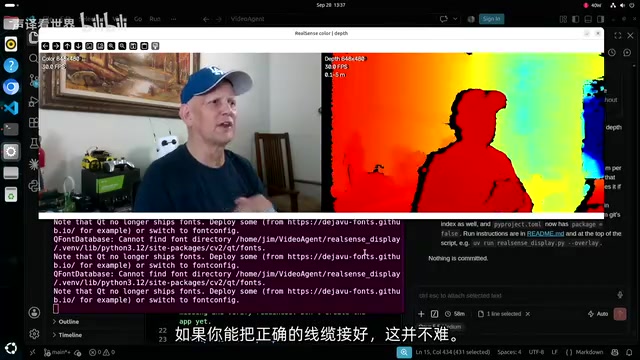
The First App: How the Agent Tripped Over a USB Cable
The first task seemed straightforward — display the camera's color and depth streams side by side. The agent independently identified the need for V4L2 (Video for Linux) tools and requested to install them. About 6 minutes in, it found three video streams — color, depth, and infrared — along with their respective device addresses.
The agent recognized it could use OpenCV with Linux pipes to handle these streams, and adopted the native depth format Z16. But problems quickly surfaced: the native depth resolution of 840×480 appeared unable to run simultaneously with the color stream.
The real bottleneck was that the compressed video streams had vanished. The developer, who has used RealSense cameras for ten years and this specific D435i model for seven, sensed the issue by instinct: the camera was being recognized as USB 2.0 instead of USB 3.0. Interestingly, the agent spent a few minutes investigating on its own but couldn't locate the root cause. Only after the developer explicitly prompted it to check the USB connection speed did the agent correctly determine that the camera was plugged into the wrong USB port on the Boson Z carrier board.
"In many cases, the agent might find the solution, but the developer is responsible for providing direction."
This observation cuts to the heart of human-agent collaboration: agents excel at execution and exploration, but when it comes to tacit hardware knowledge and experiential intuition, they still need humans to steer. Once the camera was moved to a USB 3.0 port, all expected formats immediately became available, and the first app ran successfully.
The RealSense D435i is an Intel consumer-grade RGB-D camera integrating dual-infrared stereo depth sensors and an IMU. It relies on USB 3.0 (SuperSpeed, 5Gbps) bandwidth to simultaneously transmit color, depth, and infrared streams. Once degraded to USB 2.0 (480Mbps), the bandwidth bottleneck forces certain streams to shut down or drop to severely reduced resolutions. This is why the subtle difference in which port the camera is plugged into can produce dramatically different behavior — not all USB Type-A ports on the Boson Z carrier board route through a USB 3.0 controller. This "same connector, different speed" trap is extremely common on embedded carrier boards, and represents a hardware knowledge blind spot that an agent relying purely on logical reasoning would struggle to detect on its own.
GStreamer Pipelines: Where the Agent Truly Earns Its Keep
The second application moved into building a point cloud viewer, with the tech stack upgraded to Python 3.12, PyRealSense, NumPy, and Open3D. In this section, the author inserted a deep dive on GStreamer — and explained one of the most compelling use cases for coding agents.
GStreamer is the core multimedia framework for handling audio and video on Jetson. It constructs directed graphs from three types of elements — sources, processors, and sinks — with media flowing from source to sink. Each element declares the codecs, frame sizes, frame rates, and other attributes it supports through capability sets (CAPS). Format conversion (e.g., YUYV to RGB), scaling, resampling, network encoding and streaming — the system is feature-rich but syntactically tedious and error-prone.
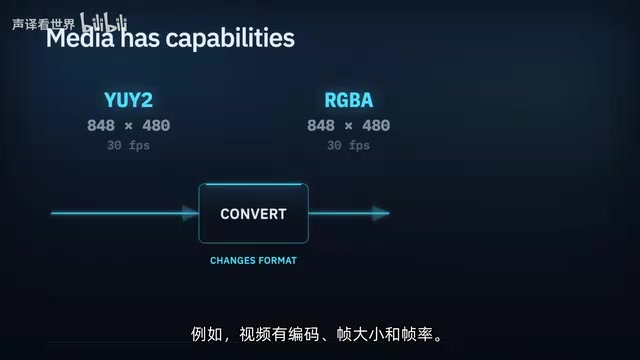
The author's take was direct: "If you only use the video skills of agents to build GStreamer pipelines, they pay for themselves." What comes naturally to a senior developer is a rabbit hole of repeated errors and frustration for someone with less experience. Agents eliminate typos and syntax oversights, automating the tedious-but-error-prone work — and that's exactly where they deliver their value.
NVIDIA's DeepStream on Jetson works precisely by injecting GPU-accelerated custom elements through the GStreamer plugin mechanism — which sets the stage for the object detection application coming next.
GStreamer pipeline syntax describes the entire media processing chain as a string — for example, v4l2src device=/dev/video0 ! video/x-raw,format=YUY2,width=1280,height=720 ! videoconvert ! autovideosink — where each ! connects adjacent elements and the capability sets (CAPS) on either side of each ! must match precisely, otherwise the pipeline fails at runtime with cryptic error messages. NVIDIA's Jetson-specific plugins such as nvv4l2decoder, nvvidconv, and nvinfer plug into the same ! syntax to offload decoding, format conversion, and inference to the GPU. But this means developers must simultaneously navigate both standard GStreamer elements and NVIDIA's proprietary plugin namespace with its own parameter system. A small typo or incorrect parameter value will cause the entire pipeline to fail to start. This is precisely the scenario where an agent's autocomplete and syntax-checking abilities can eliminate the most frustration.
The Point Cloud App and the Trap of Outdated Documentation
During the point cloud application build, the author flagged a classic risk in using agents: outdated documentation. The RealSense repository contains a section of Jetson-specific installation instructions — but the relevant kernel support has since been built in natively. An agent will "happily" follow those outdated instructions, which could easily break the entire system.
This reinforces the principle once again: "This is your agent, you own the outcomes." Developers must stay critical of the information their agents consume, especially when system-level installation operations are involved.
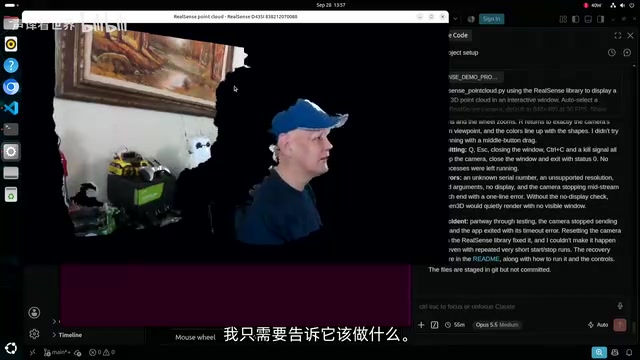
One detail that spoke to the agent's engineering quality: during development and testing, the agent proactively filtered and timed the depth stream and optimized the code to maintain the correct frame rate within an acceptable error margin. The point cloud viewer ran successfully on the first reset, with the author freely navigating viewpoints in 3D space and even seeing the "shadow" region cast by his own head beyond the 2-meter clipping distance he had configured.
The Final App: Object Detection with DeepStream + YOLO
The third and most complex application used the DeepStream framework with a YOLO model for real-time object detection, with the depth stream used to set a detection clipping plane.
The agent's level of automation was impressive. An initial reconnaissance took 9.5 minutes, after which it independently completed the entire pipeline: installing the DeepStream framework, fetching the YOLO11 model, exporting it to the portable ONNX format, and then having TensorRT build a Jetson-optimized execution engine — the engine build alone took roughly 10 minutes, but the entire process required no human intervention.
One transitional real-world issue: NVIDIA's newly released DeepStream agent skills weren't yet widely available. The author had the agent search for and install these skills itself, while noting that agent skills can conflict with one another and cause problems — a point to be especially careful about during this period when the skills ecosystem hasn't yet fully standardized.
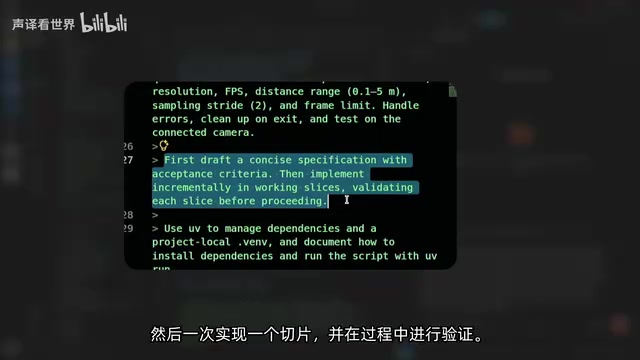
On development methodology, the author used a "spec + slices" strategy: first have the agent create a specification, then break the development cycle into independently verifiable slices, implementing and validating each one. While this was done informally here, it mirrors the built-in planning capabilities now common in many modern agent frameworks. The agent completed the application within 24 minutes, and despite experiments that broke things along the way, it was able to recover on its own.
The results were mixed: detection was broadly functional, but also produced some amusing errors — misidentifying a clock as a microwave. After adjusting the clipping distance, objects like chairs beyond two meters were cleanly filtered out, validating the practical value of depth-based clipping for scenarios where you only want to focus on a specific region of a scene.
ONNX (Open Neural Network Exchange) is a framework-agnostic neural network model interchange format that allows models to be exported from training frameworks like PyTorch or Ultralytics, then consumed by inference engines like TensorRT or ONNXRuntime. When TensorRT receives an ONNX model, it performs layer fusion, operator selection, and other optimizations based on the target GPU's compute capability and precision configuration (FP32/FP16/INT8), generating a serialized "execution engine" (.engine/.trt file) specific to that device — maximizing utilization of the Ampere GPU and DLA on Jetson. This build process is computationally intensive (roughly 10 minutes in this case), but the resulting engine can deliver inference latency several times lower than the original model. The engine file is tightly bound to the device, and must be rebuilt when switching hardware or changing batch sizes.
Conclusion: A Polished "Done" Isn't Always Production-Ready
The entire experiment wrapped up in about 77 minutes. The author's closing assessment was measured and insightful: "Something that looks finished isn't necessarily something you can build on directly, unless you examine it carefully."
He admitted that he had barely looked at the code throughout the process, letting the agent work largely unsupervised — and the result "has some of the characteristics of an application, but isn't truly finished work." As these tools become more widespread, many projects will acquire a veneer of polish — whether or not it's warranted. The tools themselves are neutral; the difference lies in the user: some will genuinely learn to wield them well, while others will be fooled by appearances.
The practical takeaway for embedded and edge AI developers is clear: AI agents can dramatically accelerate the tedious, error-prone steps like GStreamer configuration, model conversion, and toolchain installation. But hardware intuition, documentation vetting, and final output validation remain responsibilities that human engineers cannot delegate away.
Summary
A developer used an AI coding agent to build three progressively complex embedded vision applications on a Jetson Orin NX from scratch in 77 minutes, validating the agent's efficiency boundaries and the division of responsibilities in human-agent collaboration.
Related articles

Hands-On with the Gemini 4 Argon API: Thinking Levels and Background Mode Explained
A Free Code Camp crash course on the Gemini 4 Argon API: from getting a key and sending your first request to controlling reasoning costs with thinking levels, enabling multi-turn chat with previous_interaction_id, and generating a Breakout game in background mode—plus a Google engineer's take on the model's capabilities.

Reinforcement Learning Takes On Getting Over It: Distributed Training Strategies Behind 63% Progress
A developer uses deep reinforcement learning to tackle Getting Over It. The agent climbs from the bottom to 63% progress but gets stuck at the anvil. The project is open-sourced, using divide-and-conquer training and CPU-only training, seeking community collaboration to break the bottleneck.

Sigma FP2 Released: The World's Smallest Full-Frame Camera Gets Sensor and Screen Upgrades
Sigma launches the FP2 full-frame camera, retaining its smallest-and-lightest design with three key upgrades: improved sensor, articulating LCD screen, and longer battery life—built for portable video creators.