AI Agent in Embedded Development: A Complete Guide to Porting the EdgeOS Desktop System from Scratch
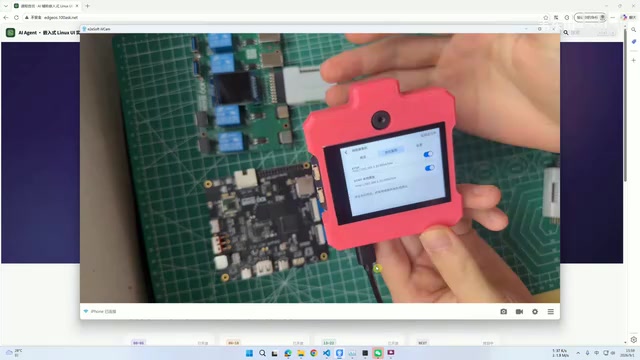
A complete guide to porting an embedded desktop system using AI Agents for the full development lifecycle.
This article details how AI Agents including Claude Code, Codex, and DeepSeek can be leveraged throughout the embedded Linux development workflow to port the EdgeOS Desktop system onto the Allwinner V853 platform. Covering environment setup, SDK compilation, LVGL v9 graphics porting, and hardware debugging with LYNX Power for automated reset loops, it demonstrates a paradigm shift from knowledge-intensive to judgment-intensive embedded engineering.
Project Background: How AI Agents Are Changing the Embedded Development Workflow
Embedded Linux development has long been a high-barrier technical field. SDK compilation, firmware flashing, driver adaptation, UI porting—each step is tightly interconnected, and any single mistake can consume enormous amounts of debugging time. The course launched by the Wei Dongshan team takes a completely new approach to address these pain points—leveraging AI Agents like Claude Code, Codex, and DeepSeekAd to build a cross-platform embedded AI desktop system called EdgeOS Desktop from scratch.
The three AI Agents mentioned here each have their strengths: Claude Code is Anthropic's terminal-oriented programming agent, excelling at directly reading and writing project files, executing Shell commands, and iteratively fixing errors within command-line environments—making it particularly suited for embedded scenarios requiring deep interaction with local development environments. OpenAI's Codex is renowned for its powerful code generation and completion capabilities, quickly generating driver code frameworks or Makefile configurations from natural language descriptions. DeepSeek, as a representative of Chinese-developed large language models, demonstrates unique advantages in understanding Chinese technical documentation and adapting to domestic chip ecosystems (such as Allwinner and Rockchip) SDKs. Using all three in concert allows each to play to its strengths at different stages of the workflow.
The course's core positioning is crystal clear: it's not just about "getting the system to work," but ensuring learners "understand why it works." This is critically important because, as AI-assisted development becomes increasingly prevalent, the greatest risk is developers blindly trusting generated results. The project documents the entire porting process in full detail, with particular emphasis on where human intervention is needed to catch errors that AI may introduce.
EdgeOS Desktop System: Feature Overview
As the reference target for porting, EdgeOS Desktop is a fully-featured embedded desktop system. From the demonstration, it includes a home screen, camera (with dual-camera support), photo gallery, universal drawing board, and other basic applications, along with a series of AI-powered feature applications.
On the networking application front, the system supports WiFi streaming, features network camera functionality, and is compatible with mainstream streaming protocols including RTSP and RTMP. RTSP (Real Time Streaming Protocol) is a session-layer protocol based on TCP/UDP, commonly used in security surveillance and IP camera scenarios. Its advantages lie in low latency and fine-grained control over real-time video streams, supporting operations like play, pause, and fast-forward. RTMP (Real-Time Messaging Protocol) was originally designed by Adobe for Flash. Although Flash has exited the stage, RTMP remains the de facto standard for live streaming ingestion thanks to its mature streaming ecosystem. In embedded network camera scenarios, the two protocols are typically used together—RTSP for low-latency monitoring preview within local networks, and RTMP for pushing video streams to cloud platforms or live streaming services.
The settings module covers system-level functions including network configuration, multi-language support, date settings, power management, and OTA upgrades. This highly complete desktop system provides an ideal target template for the porting exercise.
The course team specifically noted that the initial porting phase focuses on applications already available in the SDK, while AI-powered feature applications will be gradually adapted and integrated later based on the board's hardware characteristics. This incremental strategy aligns with the engineering principle of "get the basics running first, then layer on features."
Learning Path: From Environment Setup to Multi-Platform Porting
The course's roadmap follows a clear logical progression, broken down into four advancing stages:
Stage 1: Development Environment Setup
The course starts from scratch, guiding students through setting up the Ubuntu development environment and the AI Agent workspace. This step is the foundation for everything that follows—only by correctly integrating AI Agents into the development workflow can they serve their assistive role during actual porting.
Stage 2: System-Level Development and Verification
In the system-level development phase, AI Agents assist in completing three core tasks: SDK compilation, firmware flashing, and display verification. These are precisely the stages where embedded development beginners most often get stuck—compilation errors and flashing failures typically require extensive experience to accurately diagnose.
To appreciate the difficulty of this phase, you need to understand what makes embedded SDK compilation unique. Unlike desktop application development, embedded development requires a Cross Compilation Toolchain—compiling binary programs on an x86-architecture PC that will run on ARM-architecture chips. A typical embedded Linux SDK contains multiple components including the Bootloader (such as U-Boot), Linux kernel, root filesystem (rootfs), and userspace applications, all with complex version dependencies and configuration relationships. Kernel compilation alone involves dozens of parameters including Device Tree configuration, kernel trimming, and driver module selection. Error messages during compilation are often cryptic—missing header files, library version conflicts, undefined linker symbols—and inexperienced developers may spend hours or even days pinpointing the root cause. This is precisely where AI Agents deliver value: they can rapidly parse these error messages and provide targeted fix recommendations based on SDK documentation and community knowledge.
Stage 3: LVGL Graphics Library Porting
Next comes porting the LVGL v9 graphics library, focusing on three core elements: display drivers, touch input adaptation, and font rendering. Once complete, LVGL is integrated into the SDK to generate firmware, which is flashed to the development board for on-device verification.
LVGL (Light and Versatile Graphics Library) is one of the most active open-source graphics libraries in the embedded GUI space. Designed specifically for resource-constrained embedded devices, it can run basic functionality with as little as 64KB Flash and 8KB RAM. LVGL's core architecture employs a "framebuffer + dirty region refresh" mechanism, redrawing only the areas of the screen that have changed, thereby achieving smooth UI animations even on low-clock-speed processors. Version 9 underwent a major refactoring compared to the widely-used v8: it introduced an entirely new rendering pipeline architecture with support for multi-threaded parallel rendering, redesigned the style system for more flexible theme customization, and improved the memory management mechanism to reduce fragmentation risk. These improvements significantly boost performance, but also mean that upgrading from v8 to v9 requires adaptation of the display driver interface and input device driver interface—which is precisely the core challenge of the porting work.
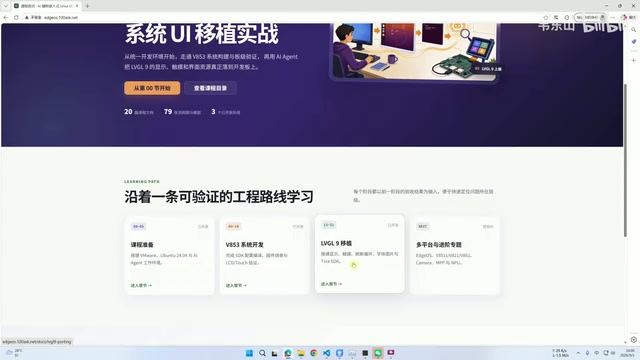
Stage 4: Multi-Platform Advancement and Feature Integration
The final stage enters multi-platform advancement, porting the EdgeOS desktop system and its feature applications to other hardware platforms and completing verification. This stage demonstrates the course's cross-platform value—once porting experience is mastered, it can be reapplied to different hardware.
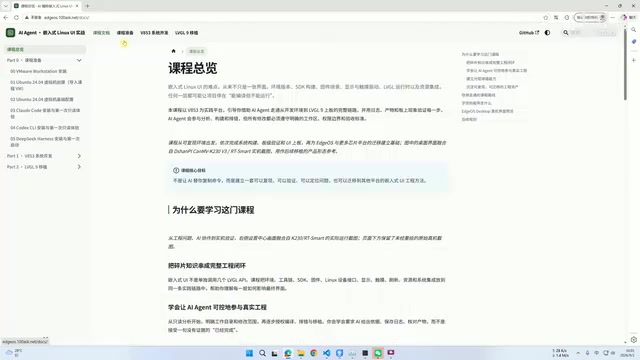
Hardware and Software Toolchain Breakdown
The initial phase of the project is primarily based on the Allwinner V853 platform, with supporting hardware including a development board, display screen, and a critical debugging tool—LYNX Power.
The Allwinner V853 is an AIoT processor from Zhuhai Allwinner Technology, designed for intelligent vision applications. It features a single-core Cortex-A7 clocked up to 1GHz, along with a dedicated built-in NPU (Neural Processing Unit) delivering 0.5 TOPS of computing power, capable of running lightweight AI inference tasks such as face detection and object recognition at the edge. The V853 also integrates an ISP (Image Signal Processor) engine with native support for dual-camera input, which explains the hardware basis for EdgeOS Desktop's dual-camera functionality. In the embedded AI space, the Allwinner V853 is widely used in smart door locks, smart doorbells, desktop AI terminals, and similar products, thanks to its low power consumption, high integration, and mature Tina Linux SDK ecosystem. It's one of the representative products among domestic embedded AI chips.
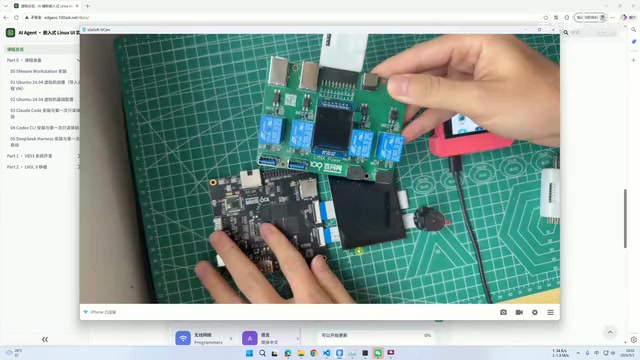
LYNX Power's role deserves special mention. It can not only regulate the board's power supply but also enables the AI Engine (Air Engine) to reach and control actual hardware. During debugging, if the system freezes or crashes, it can perform forced resets and power control.
This design is remarkably clever—it essentially gives the AI Agent a "hand reaching into the physical world," allowing AI to not only modify code but also autonomously restart devices when the system hangs, forming a complete automated debugging loop. To understand the significance of this innovation, you need to appreciate a fundamental dilemma in embedded debugging: unlike Web or desktop application development, once an embedded system freezes due to a Kernel Panic, driver anomaly, or boot configuration error, the entire system becomes completely unresponsive. Developers can only recover by physically pressing a reset button or power-cycling the device. This means the traditional software-only debugging chain breaks at this point—even if an AI Agent diagnoses the problem and generates fix code, it cannot execute any operations while the system is hung. LYNX Power bridges this gap by providing a programmable power control interface, enabling the complete cycle of "analyze logs → locate issue → modify code → recompile → flash firmware → power on and verify → system crash → power-cycle reset → analyze again" to run automatically without human attendance, dramatically improving debugging efficiency.
On the software side, apart from the LYNX companion software for connecting the development environment to the development board, everything else relies on a standard Ubuntu base environment.
The Real Significance of AI Agents Deeply Participating in Embedded Development
The most noteworthy aspect of this course isn't which specific system it ports, but rather that it validates a methodology—having AI Agents deeply participate in the full embedded development lifecycle.
The steep learning curve of traditional embedded development is largely due to complex toolchains and cryptic error messages. AI Agents like Claude Code, Codex, and DeepSeek happen to excel at parsing compilation errors, providing fix suggestions, and automatically executing debug commands. When paired with hardware control capabilities like LYNX Power, they can achieve a "sense—decide—execute—reset" automated debugging loop.
From a broader perspective, this "AI Agent + hardware control" model is catalyzing an important paradigm shift in embedded development. In the past, an embedded engineer's core competitive advantage lay in deep memorization and experiential accumulation of chip manuals, register configurations, and low-level protocols—knowledge that is highly fragmented and frequently updated, creating an extremely high barrier to entry. The introduction of AI Agents doesn't eliminate the necessity of this knowledge, but changes how knowledge is acquired and applied: engineers no longer need to store every detail in their heads, but instead need sufficient foundational understanding to judge whether the AI's proposed solution is correct and optimal. This is essentially a shift from being "knowledge-intensive" to being "judgment-intensive."
That said, the course team's clear-eyed attitude is equally commendable: they repeatedly emphasize that AI Agents still require human error checking, and they explain in detail "why things are done this way." This reminds us that AI is a powerful efficiency accelerator, but an engineer's understanding of underlying principles remains irreplaceable. The truly efficient development model is one where humans maintain judgment and architectural decision-making capabilities while AI handles the heavy lifting of execution and trial-and-error—this is perhaps the future normal for embedded development.
Key Takeaways
Related articles

RAG Getting Started in Practice: From Principles to Building an Enterprise Knowledge Base
Bilibili RAG course highlights: from retrieval-augmented generation principles, document chunking and vectorization, to five accuracy factors and enterprise knowledge base boundaries, with fine-tuning vs RAG selection advice.

AI Model Selection Guide: DeepSeek vs. Qwen3 in Practice
How should AI developers choose models? Based on a Bilibili tutorial, this article breaks down the Function Calling differences between DeepSeek V3 and R1, Qwen3's programmatic thinking mode switching and agent capabilities, and outlines a multi-model learning path and practical selection logic.

Anchoring, Loss Aversion, and Nudges: 5 Psychological Tactics Retailers Use to Make You Spend
Behavioral economics reveals how retailers use anchoring, framing, loss aversion, and nudge theory to manipulate your spending decisions. This article breaks down 5 common psychological tactics and offers counterstrategies like slowing down decisions and setting your own anchors to see through the pricing design behind discounts.