AI Agent in Practice: Building an Automated Interior Design Rendering Workflow with Coze

Build a no-code AI workflow on Coze to auto-generate interior design renderings from floor plans.
This article walks through building an automated interior design rendering workflow using Coze, a low-code AI Agent platform. By chaining LLM prompt generation, image creation, and video generation nodes with fault-tolerance mechanisms, users can upload a floor plan and instantly produce high-quality design renderings and videos—no coding required. The piece also explores the emerging "AI Agent Builder" career and commercialization strategies.
AI Agent Builder: Creating AI Products Without Writing Code
When "AI Agent" keeps popping up in tech discussions, many people instinctively assume it's exclusive territory for programmers and tech experts. But in reality, with the maturation of low-code workflow platforms like Coze, even people who can't write code can build commercially viable products using Agents.
An AI Agent refers to an AI system capable of perceiving its environment, making autonomous decisions, and executing tasks. Unlike traditional chatbots, Agents possess capabilities for task planning, tool invocation, and multi-step execution. Low-code/no-code platforms (such as Coze, Dify, FastGPT, etc.) provide visual drag-and-drop orchestration interfaces that abstract complex programming logic—API calls, data routing, conditional branching—into graphical nodes, enabling non-technical users to build complete automated workflows. This combination of "Model-as-a-Service (MaaS) + workflow orchestration" is rapidly becoming the mainstream paradigm for deploying AI applications.
An emerging career path is the "AI Agent Builder"—no large team required, and individuals can run the business solo. The core logic isn't about training large models, but rather helping small and medium businesses package their repetitive internal tasks into an AI Agent that's "deployable, accessible, and autonomously functional." This represents a typical pathway for converting foundational LLM capabilities into specific industry solutions. The AI Agent Builder is essentially a "technology intermediary" role, similar to website development service providers in the early internet era. Their business models typically include: per-project development fees (one-time delivery), SaaS subscription services (ongoing operations and maintenance), or commission based on API call volume. The market opportunity for this profession stems from a structural mismatch—a large number of SMEs need AI to boost efficiency, but they lack both technical teams and knowledge of how to integrate general AI capabilities into their business processes. AI Agent Builders bridge precisely the application gap between "general-purpose LLM capabilities" and "vertical industry needs."
This article uses a real-world case from the interior design industry to break down how to build a complete workflow from scratch—one where uploading a floor plan automatically generates interior design renderings and showcase videos.
Pain Points in the Interior Design Industry & AI Solutions
In the traditional interior design process, designers need to manually create renderings based on floor plans—a time-consuming and costly endeavor. A full set of renderings for an average residential home typically takes a professional designer 3-7 business days using specialized modeling software like 3ds Max or SketchUp, with fees ranging from several thousand to tens of thousands of yuan per project. With an AI Agent workflow, users simply upload a floor plan, customize the design style, and generate high-definition renderings with one click—even complete with accompanying showcase videos.
Here are a few real test cases:
- Cream Style Case: After uploading a floor plan and setting the style to the popular "cream style" (an interior design aesthetic featuring warm tones like off-white, light apricot, and milk coffee, emphasizing soft textures and cozy atmospheres), the entire process took about one minute to generate a high-definition rendering with clear layouts—no manual fine-tuning needed for a complete home visualization.
- Trendy Art Style Case: With a different floor plan, the output featured complete details and clear zoning, with furniture layouts, decorative elements, and spatial structures clearly presented for each room.
This type of workflow is adaptable for interior design professionals, designers, and even individual users. The core value lies in dramatically reducing the time and labor costs of producing renderings.
Complete Workflow Building Process Breakdown
The entire workflow is built on the Coze platform. The logic involves chaining multiple functional modules between a "Start Node" and an "End Node," with nodes collaborating to complete image and video generation. This workflow orchestration model based on Directed Acyclic Graphs (DAG) shares a conceptual kinship with ETL pipelines in data engineering (like Apache Airflow)—the core idea is to decompose complex tasks into minimal units that can be independently executed and sequentially combined.
Step 1: Configure the Start Node
On the Coze website, click "Resources" → "Workflows" in the upper right corner to enter the creation interface. Note that workflow names only support English or Chinese Pinyin, though descriptions can be written in Chinese.
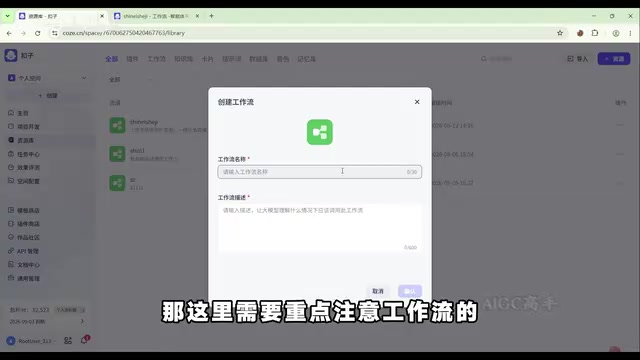
The start node requires three core inputs:
- Design Style: String type, set as required, used to describe the custom style;
- Floor Plan Reference Image: Change the parameter type to file type to support image uploads;
- Bare Room Reference Image: Also change to file type.
In low-code workflows, correctly setting parameter types is crucial. Different types (string, file, array, image, etc.) determine how data is passed and parsed between nodes, and type mismatches are one of the most common errors beginners encounter.
Step 2: Use an LLM to Generate Rendering Prompts
The first core node is the "Prompt Generation Module," which relies on an LLM. After dragging out an LLM node, it's recommended to rename it to "Generate Rendering Prompt" for easier debugging later.
Model options include Doubao, DeepSeekAd, Kimi, and others—the tutorial uses Doubao 2.0 Pro. Input parameters should reference the design style and floor plan image from the start node, allowing the LLM to simultaneously read both core pieces of information.
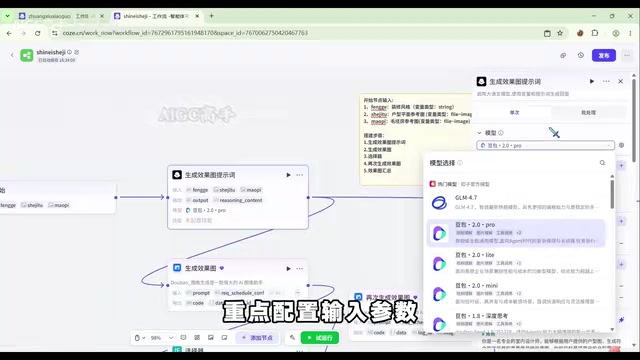
The system prompt is the key to the entire node, directly determining the professionalism of the generated prompt. Prompt Engineering is one of the most critical skills in current LLM applications. Good prompts aren't simply instruction descriptions—they use structured techniques like role setting (Role), task constraints (Constraint), output format (Format), and few-shot examples (Few-shot) to guide the LLM toward producing high-quality, controllable results. The design approach is as follows:
- Assign the LLM a "professional interior designer" role
- Require it to combine the floor plan with the specified style
- Equip it with four core capabilities: precise analysis of floor plan structure, strict adherence to the specified style, standardized visual output, and compliance with creative constraint rules (prohibiting image distortion, structural inconsistencies, etc.)
In this case, setting the "professional interior designer" role and appending creative constraint rules for the LLM is essentially a structured prompt engineering practice that directly determines the quality ceiling of subsequent image generation. The quality of prompts often has a greater impact on final results than the choice of model.
Additionally, it's recommended to adjust the error handling timeout from the default 180 seconds to the platform's maximum of 600 seconds to avoid timeouts being incorrectly flagged as failures. LLMs typically require significantly longer inference times for multimodal inputs containing images compared to pure text tasks, especially in scenarios that require analyzing complex visual information like floor plans and generating detailed descriptive text.
Step 3: Rendering Generation & Fault Tolerance Design
The second core node uses the "Doubao Image Generation" plugin, named "Generate Rendering." The prompt uses the output from the previous node, and you can switch aspect ratios (landscape/portrait) based on the scenario.
To improve workflow stability, a dual-safeguard mechanism needs to be introduced: using a selector node to check whether the image URL returned by the first rendering generation node is empty (i.e., generation failed). If so, a second generation process is triggered. A "Variable Aggregation Node" then consolidates results from both paths—regardless of which attempt succeeds, the final URL is collected together, preventing process breaks from causing lost results.
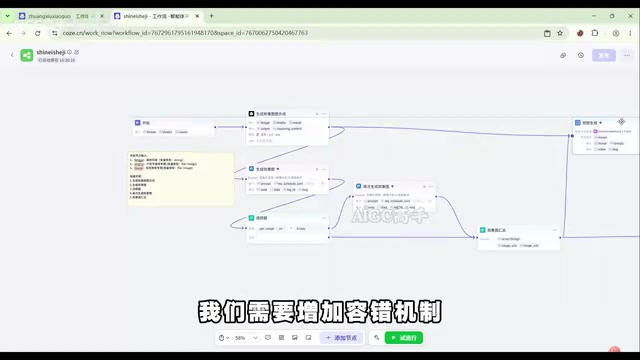
This fault-tolerance design reflects a key mindset when productizing AI capabilities: LLM and plugin outputs are inherently uncertain, and engineering measures must be employed to ensure reliable delivery of results. In production-grade AI applications, outputs from LLMs and AI plugins are probabilistic—the same input won't necessarily return successful results every time. Failures can occur due to model overload, false triggers from content safety reviews, network timeouts, GPU resource queuing, and other reasons. This is fundamentally different from deterministic function calls in traditional software development. Therefore, engineering practices like "retry mechanisms," "fallback strategies," and "result validation" become essential elements for productizing AI applications. The dual-safeguard mechanism built with selector nodes and variable aggregation nodes in this article is essentially a low-code implementation of the "failure retry + result merging" pattern from distributed systems.
Step 4: Generate Interior Design Video
Once the image portion is complete, video generation is relatively straightforward—simply add a "Doubao Generate Video" node. This node includes parameters for model, aspect ratio, resolution, duration, fixed camera, and more.
The "seed value" determines the randomness of generated content—higher values mean more randomness, while entering -1 means zero randomness, generating strictly according to the prompt. In the AI content generation field, the "Seed" is a core parameter for controlling the reproducibility of generated results. AI generative models (including image and video) use random noise as a starting point during inference, and the seed value determines the distribution pattern of this initial noise. The same seed value combined with the same prompt can theoretically produce identical results, which is particularly important for commercial scenarios requiring batch production and standardization. Setting the seed value to -1 means relying entirely on the prompt and reference images to determine output, maximizing the controllability and consistency of generated results.
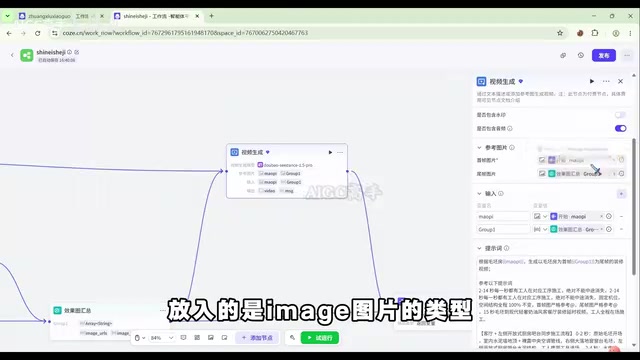
Here's a noteworthy data type matching detail: For the video node, the first frame uploads the bare room reference image, while the last frame is left empty. The reason is that the aggregated rendering output (group1) is an array-string type, while the last frame requires an image type—the two formats are incompatible. Therefore, group1 can only be placed in the "input" field for prompt reference, not in the last frame field. Handling these data type mismatches is a common pitfall in low-code development. In visual orchestration interfaces, while the connections between nodes look simple and intuitive, the underlying data format conversions (such as string URLs vs. file objects, arrays vs. single values, images vs. video frames) still require builders to understand basic data type concepts. Otherwise, you'll frequently encounter situations where "nodes connect successfully but throw errors at runtime."
Real-World Test Results & Commercialization Thoughts
In the final test run, after entering "Chinese style," uploading a floor plan and bare room photo, the workflow successfully generated complete whole-home renderings and video. The images showed complete details in soft furnishings, hard finishes, and lighting layouts, with a distinctly Chinese style aesthetic.
The Coze platform's workflow center also offers over 300 mature templates covering video creation, social media operations, e-commerce design, AI applications, and more, with frequent updates that serve as excellent learning references.
From this case study, we can see that commercializing AI Agents doesn't necessarily require deep programming skills. Instead, it tests two key capabilities:
- Deep understanding of specific industry needs: Knowing where the customer's real pain points lie. Taking the interior design industry as an example, the true pain point isn't just "slow rendering"—it's a chain of problems including inefficient design communication, clients' inability to intuitively feel the final result leading to decision hesitation, and designers' limited capacity to serve large numbers of small and medium clients. The AI Agent addresses the efficiency bottleneck in the critical conversion from "conceptual description" to "visual presentation."
- Workflow engineering implementation capability: Using node orchestration, fault-tolerance design, and parameter configuration to transform the general capabilities of large models into stable, usable industry tools.
This is precisely where the core value of emerging professions like "AI Agent Builder" lies. Of course, whether profitability can truly be achieved ultimately depends on how well you uncover real customer needs and how polished the final product is. It's worth noting that as low-code platforms and AI capabilities continue to become more accessible, the competitive barrier in this field may drop rapidly, and first-mover advantage combined with deep vertical industry expertise will be key to building long-term moats.
Key Takeaways
Related articles
AWS AgentCore Gateway: Connecting AI A…
AWS AgentCore Gateway: Connecting AI Agents to Enterprise Backends with MCP
How AWS AgentCore Gateway acts as a primary MCP server to aggregate REST APIs, Lambda, and existing MCP services? Analyzing its AST real-time mapping, zero cold start, semantic search for tool overload, session isolation, and key injection security design, plus the architectural approach to decoupling enterprise AI agents from backends.

One Link Gives Figma AI a New Skill: Hands-On with MCP Connectors
Paste one MCP server link and the AI Agent in Figma gains new tool capabilities. We break down the setup flow, 20+ one-click apps, read/write permissions and execution policies, and the public HTTPS requirement.

Cognition SWE-2 in Practice: One Prompt to Handle the Whole Product Launch Process
Analyzing a YouTube creator's prompt for using Cognition SWE-2 to launch a product: a landing page, seven-email sequence, and non-buyer follow-up tool, plus how the 'test and report' constraint changes AI delivery quality.