AI Agent Parallel Workflows in Practice: Branch Conversations and Git Worktree Explained

Run multiple AI agents in parallel using TMUX branches, Side Chat, and Git Worktree to eliminate wasted wait time.
This article covers three core mechanisms for running multiple AI agents in parallel. TMUX branching (via PiHarness) forks a full session with inherited context, ideal for handling tasks during wait time. Side Chat in tools like Codex and Claude Code opens new conversation windows but has limitations such as no sub-agent support, making it best for lightweight queries. Git Worktree uses native Git capabilities to mount multiple independent working directories from the same repo, enabling true code-level isolation for scenarios like parallel frontend/backend development or multi-approach testing. Each method targets a different isolation level and should be chosen based on task complexity.
When working with AI coding assistants, a common pain point is this: once you hand off a task to an agent, you're often stuck waiting for it to finish before you can move on. That waiting time goes to waste. But through mechanisms like Side Chat, Branch Conversations, and Git Worktree, you can have multiple AI agents working truly in parallel — dramatically boosting your development productivity.
This article is based on a practical walkthrough by a Bilibili creator, summarizing the core ideas behind this parallel workflow and the specific steps for implementing it in popular agent tools like Codex and Claude Code.
Why Run Agents in Parallel
The core logic is straightforward: AI agents take time to execute tasks, especially for time-consuming operations like code refactoring, testing, and search. Rather than staring at a progress bar, you can open a second workstream during that wait and have another agent handle a different task.
The demo makes this concrete — on the left, you tell an agent to "temporarily remove a feature module"; on the right, you open a new conversation to "update review skills and remove specified content." Both tasks run simultaneously without interfering with each other. That's the time value of parallel work.
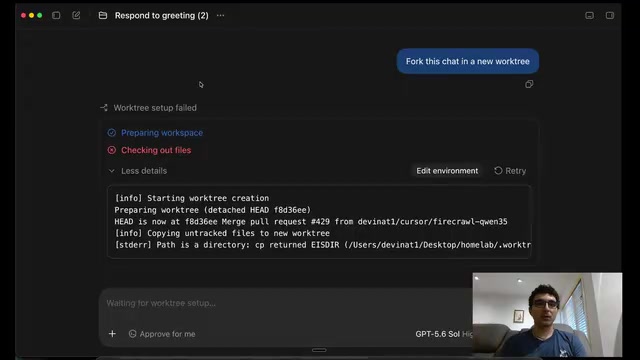
However, there's one critical distinction to clarify: not all "branches" are the same thing. The walkthrough covers three distinct mechanisms, each operating at a different level and suited to different scenarios. Confusing them leads to failed operations or conflicts.
Method 1: TMUX Branch — Forking an Entire Session
The first approach uses the TMUX branch extension provided by PiHarness. Its essence is forking a new session from your current session (pane), with the new session fully inheriting the context of the previous one.
After running tmux branch, a new session splits off to the right. This right-side session carries the same context as the original — it's a fork of the previous session. You can continue working in the new branch just as you would in the original, while handling more tasks during the wait.
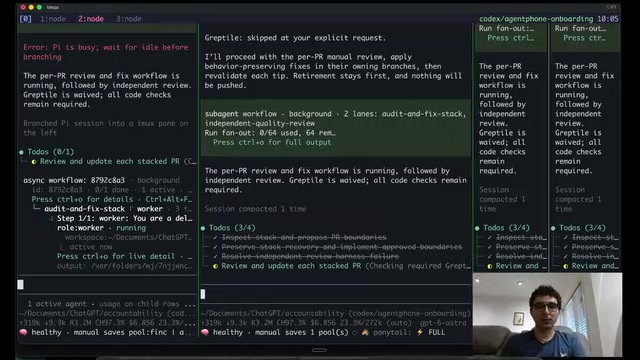
The creator specifically recommends tools like PiHarness because they provide convenient keyboard shortcuts that make session splitting effortless, with flexible extensibility. For developers already comfortable with TMUX workflows, this is a low-overhead parallel solution.
TMUX (Terminal Multiplexer) is a terminal multiplexing tool that lets you create and manage multiple independent sessions and panes within a single terminal window. Even if you disconnect from an SSH session, processes running inside TMUX keep going — and you can resume right where you left off. PiHarness builds on top of TMUX with a "branch" extension that enables session-level context snapshots and forking — similar to how Git branches code, but applied to terminal session state and AI conversation history. This is especially useful when you want to explore different operation paths from the same starting context, opening new execution threads without losing your original progress.
Method 2: Side Chat and Branch Conversations — Know the Limitations
Coding agent apps like Codex and Claude Code have built-in features that are similar — but not identical. By clicking the "three dots" menu and selecting New Side Chat, you can open a parallel conversation view.
Here's a commonly overlooked key point: Side Chat is not the same as a session branch (pane branch). A Side Chat does not create a new session — it simply opens a new chat window within the current environment.
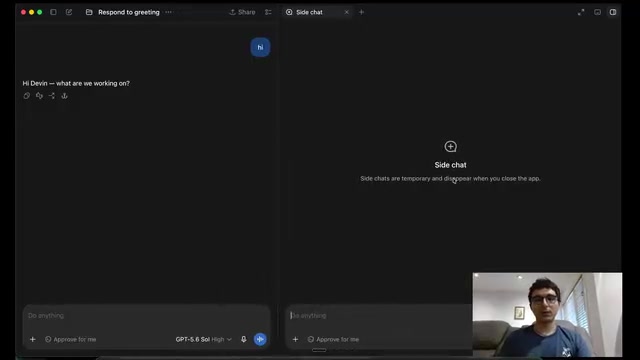
Based on the creator's experience, Side Chat in Codex may come with certain limitations — for example, it may not allow creating sub-agents, among other constraints. In other words, Side Chat is better suited for lightweight parallel queries rather than complex tasks that require independent agent collaboration. The creator himself acknowledged he "might be wrong" on some of these specifics, so check the actual version of your tool.
Method 3: Git Worktree — True Code-Level Isolation
When you need to make two parallel modifications to the same codebase, the first two methods fall short — they share the same working directory and are prone to conflicts. This is where Branch in new worktree becomes the right choice.
After clicking the "Branch in new chat" button, the tool asks you: fork within the same workspace, or fork into a new worktree?
What Is Git Worktree
Worktree is a native Git capability. Its essence is creating a copy of your repository checked out to a new branch. This gives you multiple independent working directories for the same codebase, each corresponding to a different branch.
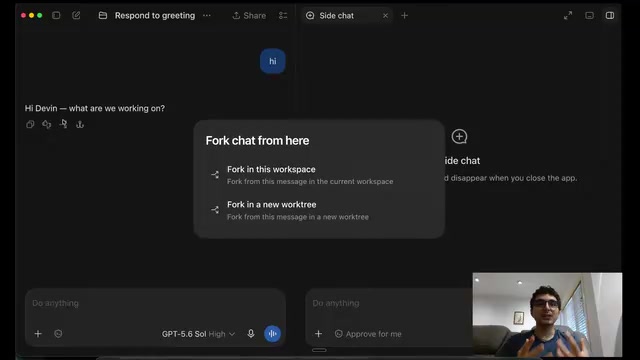
The practical benefits of this isolation are significant:
- Frontend and backend in parallel: One agent modifies the frontend UI in Worktree A, while another tests backend optimizations in Worktree B — completely isolated changes.
- Comparing multiple approaches: When you want to test several different implementation ideas and see which optimization works best, you can try them in parallel across different worktrees without polluting each other.
- Avoiding agent conflicts: When multiple agents operate on code simultaneously, they won't create change conflicts on the same files.
More precisely, Git Worktree is not a full "clone" — it mounts multiple working directories under the same Git repository (.git directory). Unlike git clone, all worktrees share the same commit history and object database, each simply checked out to a different branch. This means disk usage is far smaller than a full clone. To create one: git worktree add ../my-feature-branch feature-branch — this generates an independent working directory at the specified path where you can edit and commit without affecting the main working directory. When done, clean up with git worktree remove. This feature has been built into Git since version 2.5 (2015) with no plugins required, and mainstream IDEs and AI coding tools can recognize and leverage it directly for parallel agent isolation.
Choosing the Right Parallel Approach
These three mechanisms aren't interchangeable substitutes — they correspond to different levels of need:
| Method | Isolation Level | Best For |
|---|---|---|
| TMUX Branch | Session-level | Inheriting context, handling extra tasks while waiting |
| Side Chat | Conversation-level | Lightweight parallel queries, limited sub-agent support |
| Git Worktree | Code-level | Independent parallel modifications to the same codebase |
Whether you're using PiHarness's TMUX extension or built-in tools from Codex or Claude Code, the core idea stays the same: use forked sessions and worktrees to turn waiting time into productive time.
For developers who collaborate frequently with AI agents, mastering this parallel workflow means accomplishing more in the same amount of time — and exploring different technical approaches with far less friction.
Related articles

Felix Rieseberg Personal Homepage
Felix Rieseberg's personal homepage sparks attention on Hacker News. This article covers the Slack engineer's technical background, the rise and fall of nativefier, and the value of a developer homepage as a tech calling card.

@ai-sdk/vue 3.0.306 Patch Release Syncs with [email protected] Update
@ai-sdk/vue 3.0.306 released, synced with [email protected]. A routine patch release for the Vercel AI SDK ecosystem with no public API changes; the Vue adapter layer stays version-aligned with the core package.

Gemini 4 Argon API Launches: The Era of Million-Token Output Begins
Google launches Gemini 4 Argon with sparse MoE architecture, up to 1M output tokens, and a 68.90% Vals Index score, available across API, AI Studio, and the Gemini app.