AI Agent Project Launch Guide: Build a Universal Workflow Framework in Four Steps
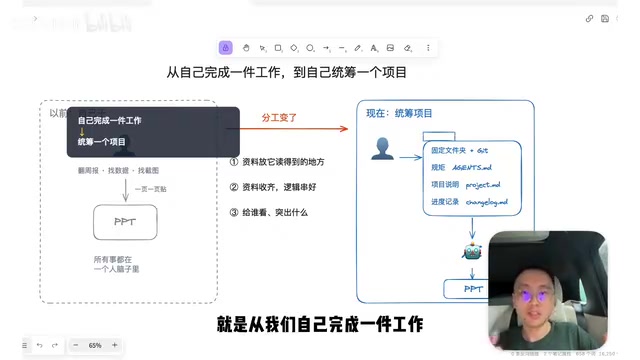
A four-step framework to launch any AI Agent project: rules, context, materials, and progress tracking.
This guide teaches a reusable methodology for starting any AI Agent project. Borrowing from software engineering practices, it walks through four steps: creating a project folder with Git version control, writing execution rules in an agents.md System Prompt, documenting project context in project.md, and organizing materials with progress tracking via CHANGELOG.md. The core idea is shifting from doing everything yourself to managing AI as a delegator.
Many people have picked up plenty of AI Agent tricks — they know how to use Git, how to configure MCP, and how large language models relate to their daily tools. But when it comes to actually getting AI to help with a specific task, they get stuck at step one: not knowing where to begin. This is essentially a "breaking the ice" problem. In this article, we'll use a task that virtually every working professional faces — the year-end performance review PPT — as our example. Starting from an empty folder, we'll walk through the complete process of integrating an AI Agent into your workflow.
A note before we begin: this article doesn't teach you how to create a year-end review PPT specifically. Instead, it teaches you "how to get started on any task like this" — a reusable launch methodology applicable to any project.
The Core Shift: From "Doer" to "Delegator"
The starting point of this entire methodology is a fundamental shift in roles.
In the past, when we made PPTs or documents, we did everything ourselves: planning, researching, digging through daily/weekly/monthly reports, finding data and screenshots, pasting things page by page, running all the logic through our own heads. Now with AI doing the work, things have changed — we handle gathering materials and coordination, while AI handles the actual execution.
This shift brings three things that must change accordingly:
-
Materials are no longer just for your eyes — they need to be placed where AI can access them. Some materials are restricted by tools and environments (like emails in your inbox or chat histories) that AI can't read. We need to find ways to export and organize them into a folder that AI can access. This is where MCP (Model Context Protocol) comes in — MCP is a standardized protocol that enables AI models to securely and structurally access external data sources and tools. It defines standard interfaces for how AI Agents connect to file systems, databases, APIs, and other resources. Through MCP, we can let AI read local files, access cloud services, or call third-party tools without manually copying and pasting content every time. The core value of this protocol lies in standardization — just as the USB interface unified device connections, MCP lets different AI tools access various resources in a uniform way, greatly reducing configuration complexity.
-
Materials must be comprehensive and logically coherent. When you do things yourself, you can always "add something you just remembered." But when you hand it off to AI, if the materials are incomplete, it will either skip things or "fabricate" data — and these fabrications are often hard to catch during final review.
-
You must explicitly tell AI who the final output is for and what to emphasize. These used to be implicit knowledge stored in our heads. Now that another entity is producing the output, this knowledge must be written down explicitly.
In summary: we've shifted from "completing work ourselves" to "managing a project." Our role has changed from executor to manager.
Borrowing from Developers: Four Things You Need to Launch a Project
Since we're managing a project, it should look like one. And when AI handles specific tasks for us, it's essentially "writing code" — so the most valuable reference is a developer's standard workflow for building a feature.
This workflow isn't complicated. At its core, you only need to prepare four things:
- A dedicated project folder (project path)
- A System Prompt (rules that define how AI should execute tasks)
- A project description document (like a
project.mdthat explains context and requirements) - A progress log (partly for AI to read, partly for yourself)
The demo tool of choice is VS Code, the most popular free editor among developers. VS Code (Visual Studio Code) is an open-source code editor developed by Microsoft, but its value has long transcended pure programming scenarios. Its "file tree + editor + terminal" three-panel layout naturally fits the AI Agent workflow: the left file tree gives you a bird's-eye view of the project structure, the center editor lets you view and modify file contents, and the bottom terminal serves as the command-line interface for interacting with AI Agents. More importantly, VS Code supports a rich extension ecosystem — you can install Markdown preview, PDF viewers, or even integrate AI chat windows directly. Its design philosophy is "everything is a file, everything is editable," which perfectly matches how AI Agents process tasks: read files, analyze content, generate output, write back to files.
Here's an interesting observation: although VS Code has been around for a long time, when we use Codex and various Agent desktop tools today, we find their structures and requirements are largely similar — once you're familiar with VS Code's classic interface, picking up other Agent tools becomes much easier.
In the interface, the left side shows the file list, the upper right displays file contents, and the lower right is a terminal — all Agent commands are entered here.
Step 1: Create the Project Folder and Initialize a Git Repository
First, create a project folder — for example, "Work Summary Report." Here's a critical reminder: once the folder is created, avoid renaming or moving it yourself.
The reason is that large language models rely on text records to "find their memory." If you change a path or filename without telling AI, it won't be able to locate its previous records about that file, creating an information gap. So even if you need to make changes, let AI handle the renaming, moving, or path changes so the action gets recorded in its history.
After the folder is set up, bring in the AI Agent. The demo uses a lightweight, open-source Agent tool running with a Qwen open-source model deployed locally on a Mac Studio. Qwen is a large language model series from Alibaba Cloud, and its open-source version can be deployed and run on local devices without internet access or uploading data to the cloud. Compared to closed-source commercial models like GPT-4 and Claude, locally deployed open-source models offer three major advantages: first, data privacy — all processing happens locally, so company secrets and personal files never leave your device; second, cost control — no per-token fees, making it ideal for large-scale document processing tasks; third, response speed — on high-performance hardware (like a Mac Studio), local model inference speed can match or even exceed cloud APIs. Using a local open-source model for handling private files provides stronger privacy protection.
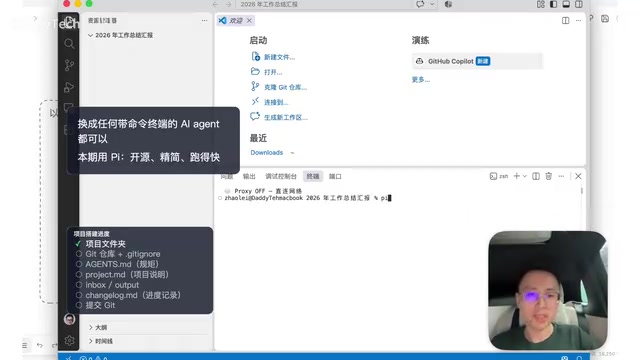
After launching the Agent, the first thing to do is initialize a Git repository. Git is a distributed version control system originally designed for software development, but its core value — "tracking the complete history of every change" — is equally critical for AI collaboration. In AI Agent scenarios, Git solves three pain points: first, it records "who changed what and when," so when AI produces incorrect output, you can precisely roll back to the last correct version; second, it lets AI "see" the project's evolution trajectory and understand how the current state was built step by step; third, when multiple AI Agents or human-AI teams collaborate, Git's branching mechanism allows different approaches to be tested in parallel without interfering with each other. A commit operation is like a save point in a game — you should commit at every milestone to ensure a clear rollback path. This is essentially giving your entire project folder a "Save As with a timeline."
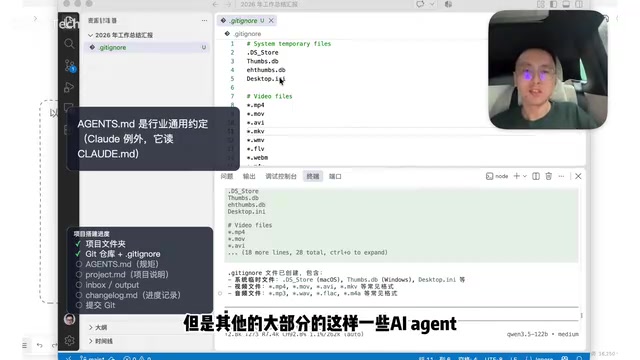
Next, have AI create a .gitignore file. .gitignore is a Git configuration file that specifies which files or folders should not be tracked by version control. Why do we need it? Because not all files in a project are worth tracking: temporary files (like .DS_Store, Thumbs.db), build artifacts, large media assets, sensitive information (passwords, keys), etc. — they take up repository space and clutter the version history. In this project, we tell AI to ignore MP4, AVI, and other audio/video assets along with system temp files — otherwise, committing a bunch of irrelevant files could make the Git repository unusable. Properly configuring .gitignore keeps the Git repository lightweight and focused on the text and configuration files that truly matter, while preventing repository corruption or sluggish operations caused by oversized files.
The benefit of setting up the repository before doing anything else is: from the moment the first file is created, the entire project already has a complete execution history, and this record takes effect before AI deletes or modifies anything.
Step 2: Write the Execution Rules (agents.md)
Don't rush into making the PPT — write the rules first.
Place a file with a fixed name, agents.md, in the project folder. This is an industry-standard convention (Claude specifically reads CLAUDE.md, but most Agents default to reading agents.md). Before starting work, AI reads this System Prompt to understand how it should operate within this project — what's allowed and what's not.
A System Prompt is a "system-level instruction" that an AI model receives before executing tasks. It defines AI's behavioral norms, role settings, and execution boundaries. Think of it as setting the AI's "persona" and "workplace code of conduct." A complete System Prompt typically includes: identity positioning (what role you are), capability scope (what you can and cannot do), output format requirements, and handling principles for specific scenarios. Its priority is higher than the user's specific instructions — just like a company charter takes precedence over individual work assignments.
There's an important layering concept here: Agents typically read multiple layers of System Prompts at runtime —
- Global layer: Effective across all projects and all conversations;
- Project layer: Only effective within the current project.
The multi-layer System Prompt mechanism allows us to set universal global rules (like "always reply in Chinese") while customizing project-specific rules (like "all code in this project must include detailed comments"). The agents.md we create belongs to the project layer and only applies to the current project. For a different project with different rules, you'd create a separate one under that project. What AI ultimately reads is the combination of global rules plus each project's own rules.
Everyone and every industry has different approaches to making PPTs. You can absolutely fill this document with your specific requirements and have AI follow them.
Step 3: Write the Project Description Document (project.md)
Next comes the project background description, best housed in project.md.
The approach to writing this document is like handing off work to a colleague — they need to know: the project background, current status, and final delivery standards. Using the year-end review as an example, you might include:
- Current role and project background
- Audience: Direct supervisor is the department director
- Presentation context: Presenting to the entire team
- Tone requirements: Confident
- Focus: Highlight the two or three projects you spent the most time on this year
- Delivery standards: What the final PPT should look like
This deserves special emphasis: you must have a very clear vision of what a satisfactory deliverable looks like. You need to think through this yourself — what would the PPT need to look like for you to be satisfied? This standard must be defined upfront; otherwise, AI has no way to evaluate whether it's done a good job.
Step 4: Organize Materials and Track Progress
Finally, materials and progress management, organized across several folders:
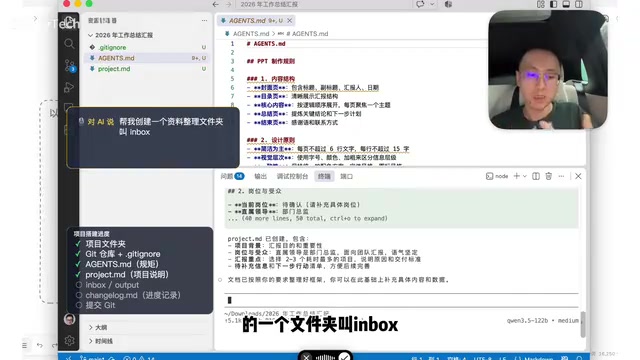
- inbox folder: Store all raw materials AI needs — data, images, records, emails, etc. Anything AI can read that could improve the report quality goes here.
- output folder: Store the final deliverables from each phase and version.
For long tasks spanning multiple days, how do you help AI (and yourself) remember "where we left off last time"? Two approaches:
- Check the Git log: Git already records every file addition, deletion, and change;
- Create a CHANGELOG.md: A more intuitive record of "what changed on what date, what version was output," making periodic reviews easy.
A CHANGELOG (change log) is a standard document in software engineering for recording a project's evolution history, typically written in Markdown format. Its core function is to record "what changes each version brought" in human-readable language, in reverse chronological order. Compared to the technical details in Git commit records ("changed 3 files, +127 -45 lines"), a CHANGELOG focuses on business-level changes: "what feature was added," "what issue was fixed," "what experience was improved." In AI Agent projects, the CHANGELOG serves a dual role: it helps AI understand the project's progress narrative ("last week we finished data cleaning, this week we need to do visualization"), and it lets humans quickly review key milestones ("the PPT structure from three days ago was better, let's roll back to that version").
There's one more habit you must develop: after every milestone edit, delivery, or review, commit to Git. Only after committing can you clearly know where the project stands. The operation is simple — just tell AI "commit the current changes and add a corresponding entry in the CHANGELOG," and AI will automatically complete the Git commit and log update. Making it a habit to update the CHANGELOG at every milestone delivery is like building a clear memory thread for your project.
Summary: A Reusable AI Agent Project Launch Template
Boiling down the entire launch phase, it's really just four things:
- Define rules: Write execution requirements into
agents.md - Explain context: Put project background, audience, and delivery criteria into
project.md - Organize materials: Gather all materials AI needs into
inbox - Track progress: Use Git +
CHANGELOG.mdto track versions, iterate deliverables inoutput
The value of this method isn't in "making a year-end review" — it provides a universal ice-breaking framework: when facing any complex task you want to hand off to AI, you can start with the "delegator" mindset by preparing these four elements — rules, context, materials, and progress tracking — before letting the Agent run.
At its core, this is about migrating the mature engineering collaboration methods of software developers into everyone's daily work. Learning to "manage a project" rather than "do everything yourself" may well be the real first step for everyday people to use AI Agents effectively.
Related articles

Chain of Thought Isn't Just for AI: How Humans Can Use CoT to Improve Thinking Quality
Chain of Thought isn't just a prompt trick for large models. Starting from a Hacker News discussion, this article analyzes why CoT works for human thinking too, breaks down actionable ways to transfer it, and highlights the key differences between human CoT and machine CoT.
Cloudflare Teams Up with OpenAI: Closi…
Cloudflare Teams Up with OpenAI: Closing the Loop from Vulnerability Discovery to Defense with AI
Cloudflare uses OpenAI Daybreak to investigate security vulnerabilities and generate reviewable remediation plans, while developers use Codex to boost coding efficiency and quality.

Orca Multi-Agent Orchestration in Practice: A Guide to Parallel Collaboration with Claude and Codex
Orca is Stable AI's free open-source agent workbench supporting 34 agents like Claude Code and Codex in parallel. Learn its Git worktree isolation, multi-model orchestration, and mobile management.