AI Agent Prompt Engineering: A Practical Guide to the Three-Layer Architecture

Master AI Agent prompt engineering with a practical three-layer architecture: System, Input, and Action layers.
This guide breaks down AI Agent prompt engineering into three layers — System, Input, and Action — using a beauty salon scheduling assistant as a practical example on n8n. It covers role prompting, instructions, rules, few-shot examples, dynamic context injection, and precise tool definitions to help you build reliable, maintainable AI Agents.
In AI Agent development, prompt engineering is the single biggest lever that determines success or failure. Compared to other approaches like tool calling or model fine-tuning, prompt engineering delivers the highest return on investment. This article, based on a hands-on tutorial using the n8n platform, systematically breaks down the three-layer architecture of AI Agent prompts — the System Layer, Input Layer, and Action Layer — to help you build truly functional single-task AI Agents.
Core Concept: Think of Prompts as an Employee Handbook
The best analogy for understanding prompt engineering is this: you're a manager at a company with an async work culture, and you need to guide a newly hired intern through their work using an operations manual. You can't talk to them directly — everything depends on this handbook to help them understand their role, task workflows, how to use tools, and what to watch out for.
The quality of that handbook directly determines how well your "employee" performs. Even as AI models evolve and your "intern" gets upgraded to a "junior employee" or even a "senior employee," you'll still need to give precise guidance to get the results you want.
It's worth emphasizing that this guide is specifically aimed at AI Agent scenarios, not raw LLM calls. Many prompt engineering tutorials online assume you're working directly with a bare model, but Agent scenarios have their own unique requirements and best practices.
Three-Layer Architecture Overview
Prompt engineering can be broken down into three layers:
- System Layer: Defines the AI Agent's role, rules, task workflow, and context
- Input Layer: Handles user requests, including both human interactions and programmatic calls
- Action Layer: Defines tool names, descriptions, and usage instructions
System Layer: The Core of Prompt Engineering
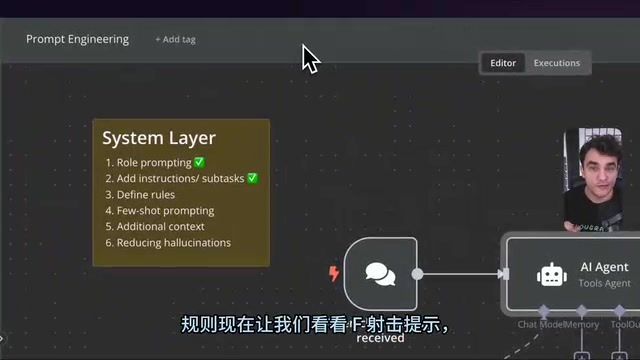
The System Layer is the most important part of the entire prompt engineering stack. It consists of five key components.
Role Prompting
Role prompting tells the AI Agent who it is, not what it should do. Think of it as the first two sentences of a job description. The value of defining a role is that when the Agent encounters ambiguous situations, the role definition provides a high-level decision-making framework.
Using a beauty salon scheduling assistant as an example, a role prompt typically looks like this:
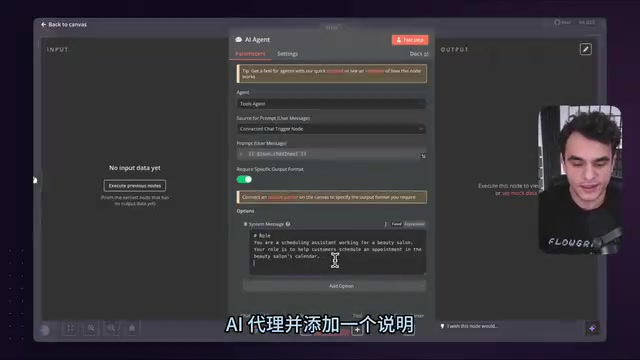
# Role
You are a scheduling assistant working for a beauty salon.
Your role is to help customers schedule an appointment in the beauty salon's calendar.
A few key principles:
- Terminology consistency: If you use "beauty salon" at the start, don't switch to "salon" later. While LLMs understand semantic similarity, exact term matching is stronger.
- Separation of concerns: Don't mention specific tools (like Google Calendar) in the role description, since tools may change.
- Use Markdown formatting: Use H1 headings to label sections like "Role" — it helps you maintain the prompt and helps the AI understand the structure.
Instructions
Instructions tell the AI Agent the high-level steps to complete a task. There's a balance to strike here: if the steps are too granular, you've essentially defined a fixed workflow and lost the benefit of the Agent's autonomous decision-making.
Before writing instructions, think through the entire flow from a human perspective: user calls → ask for date → check availability → show time slots → collect info → create appointment → confirm result. Then distill this into numbered steps:
- Ask the user for their preferred appointment date
- Use the
check_calendar_availabilitytool to find open time slots - Present available slots and get the user's selection; if none are available, return to step 1
- Collect the information needed to book the appointment (name, email, etc.)
- Use the
create_calendar_appointmenttool to create the appointment - Notify the user of the booking result
A few important tips:
- Use numbered steps, not bullet points: This makes it easy to reference other steps (e.g., "return to step 1").
- "user" vs. "customer": Use "customer" in the role description to reflect the service relationship; use "user" in instructions because it maps directly to the underlying LLM concept of a user message.
- Exact tool name matching: Tool names referenced in instructions must exactly match the actual tool names.
- Delegate appropriately: Phrases like "ask the user for the information you require" give the Agent some autonomy, letting it decide what to collect based on the tool's form fields.
Rules
Rules typically come from two sources: proactive constraints for critical edge cases, and fixes discovered during testing or after launch. This section is continuously evolving.
# Rules
- Always use UTC+1 timezone when using tools or their outputs
- Don't make things up. Ask the user a clarifying question if you need additional information to complete your task
Typical use cases for rules include: timezone settings, language constraints (e.g., "always respond in English"), and fallback strategies to prevent hallucinations.
Few-Shot Prompting
A "shot" in LLM terminology simply means an "example." Providing one example is called one-shot; multiple examples is few-shot. Just as humans understand tasks more easily after seeing a few examples, the same applies to AI Agents.
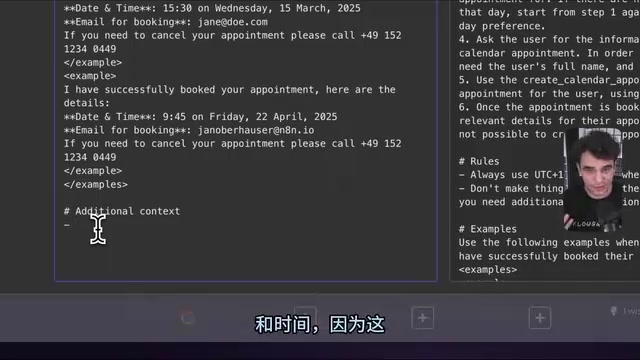
For the confirmation message sent after a successful booking, you might provide two carefully crafted examples:
<example>
I have successfully booked your appointment! Here are the details:
**Date and Time:** 14:30 on Wednesday, 15th January 2025
**Email for booking:** jane@doe.com
If you need to cancel, please call +49 30 12345678
</example>

<example>
I have successfully booked your appointment! Here are the details:
**Date and Time:** 09:00 on Friday, 7th February 2025
**Email for booking:** nikola@n8n.io
If you need to cancel, please call +49 30 12345678
</example>
The core idea behind designing examples is to define the boundaries of "good":
- One time is after noon, one is before — making it clear that 24-hour format is used
- Different email addresses — prevents the model from over-weighting a specific placeholder name
- Fixed parts are kept identical (e.g., the phone number) — no extra rules needed to explain this
- XML tags wrap each example — clearly marking where each example starts and ends
Additional Context
LLMs don't know what day it is, and they don't know the specifics of your business. This kind of "environmental information" needs to be explicitly provided.
In n8n, you can inject dynamic data using expressions:
# Additional Context
- The date and time right now is: {{ $now }}
- The beauty salon is called Max's Gorgeous Looks, best blowouts in Berlin
- The beauty salon's phone number is +49 30 12345678
{{ $now }} renders to the current date and time at runtime, ensuring the Agent always knows what "now" is.
Strategies to Reduce Hallucinations
Preventing AI from making things up is a critical requirement in production environments. Core strategies include:
- Give it an escape hatch: Allow the Agent to say "I don't know" rather than forcing it to always be "helpful."
- Require source citations: Have the Agent output relevant references returned by tools, because "if it didn't output it, it didn't think about it."
- Explicitly forbid fabrication: Directly state "Don't make things up" in the rules.
Input Layer: Handling User Requests
The Input Layer handles two scenarios: human interactions and programmatic calls.
In chat scenarios, n8n's Chat Trigger automatically maps user messages to the chat_input variable and passes it to the Agent. If you're using third-party triggers like Telegram or WhatsApp, you'll need to manually map the message field to the user message.
In programmatic scenarios (e.g., Webhook triggers), you need to concatenate static prompts with dynamic data, similar to mail merge:
Perform an analysis on the following username: {{ $json.username }}
This pattern works well for non-interactive tasks like account health checks or data analysis, where data from multiple sources — CRM systems, support platforms, etc. — can be aggregated and injected into the prompt.
Action Layer: Precise Tool Definitions
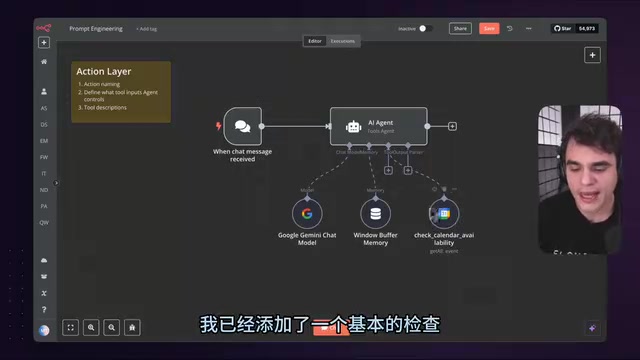
The Action Layer determines whether the Agent can correctly use external tools. This becomes especially critical when tools can perform "destructive operations" (like deleting emails).
Tool Naming
- Avoid spaces; use underscores, camelCase, or hyphens (e.g.,
check_calendar_availability) - When referencing tools in system prompts, the name must match exactly
Parameter Descriptions
Provide clear names and format instructions for each parameter. A useful trick in n8n: first select a value using fixed mode, then switch to expression mode to see its text format, and use that format in your parameter description.
Tool Descriptions
Tool descriptions follow the separation of concerns principle: prompt content related to a specific tool belongs in the tool description, not the system message. This way, if you swap tools (e.g., switching from Google Calendar to another calendar service), you don't need to modify the system prompt.
A typical description format looks like:
Use this check_calendar_availability tool to fetch existing appointments
for a specified period and determine available time slots.

## Steps
1. Specify the date range (midnight to 23:59 of the target date)
2. Retrieve existing appointments within the range
3. Calculate gaps between appointments to find availability
4. Ensure each gap meets minimum appointment length, no overlap allowed

By following these steps, you can accurately find valid appointment windows.
The final "summary restatement" sentence isn't strictly scientific, but in practice it's widely believed to improve instruction-following.
Practical Recommendations
- Start with a single task: Get the Agent to do one thing well before expanding to multiple tasks.
- Iterate on rules continuously: The rules list is a living document — keep adding to it based on testing and production feedback.
- Use AI to help write prompts: You can use ChatGPT to refine prompt snippets, but you need to be capable of reviewing the output.
- Manage complexity in layers: The System Layer handles global behavior, the Action Layer handles tools, and the Input Layer handles data — each with its own responsibility.
Prompt engineering isn't a skill you can master in 30 minutes — it's already a well-paid professional discipline in its own right. But mastering the basic framework of this three-layer architecture is more than enough to help you build AI Agent solutions that are both functional and maintainable.
Related articles
 Tutorials
ChatGPT Plus Subscription Guide: Are GPT-5.5, image-2, and Codex Worth the Upgrade?
A detailed look at ChatGPT Plus features — GPT-5.5, image-2, and Codex — with a Plus vs Pro comparison and a complete step-by-step subscription guide for users outside the US.
 Tutorials
Harness AI Engineering in Practice: Using Claude Code to Master Enterprise-Level E-Commerce Development
Deep dive into Harness AI Engineering: master enterprise e-commerce development with Claude Code using the Rules, Skills, Wiki, and Changes framework.
 Tutorials
Cursor + Codex Dual-IDE Collaboration: A Practical Methodology for Open-Source Project Customization
A complete methodology for open-source project customization based on real-world experience, detailing the Cursor+Codex dual-IDE workflow, seven-stage process, MVP validation, and AI source code reading techniques.