AI Agents Automating Windows Apps: A Hands-On Calculator Automation Test
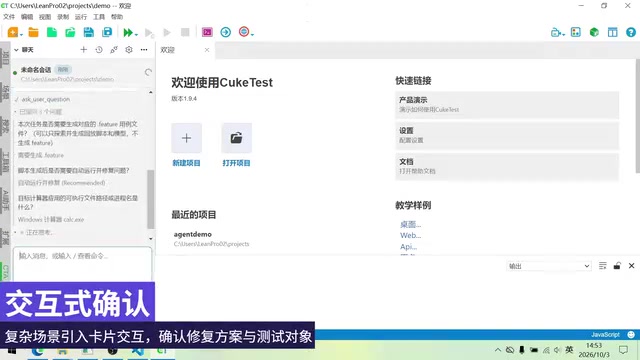
Q-Test agent uses natural language to control Windows apps and automatically generate, verify, and self-heal UI test scripts.
Through a Bilibili demo, the article shows how Q-Test's built-in agent operates Windows Calculator from a single natural language instruction, covering task understanding, interface exploration, control recognition, and script generation. The agent analyzes the task, creates a feature file framework, scans the interface, performs calculations, asserts results, and turns the operation sequence into reusable automated test scripts. Its self-healing ability stands out when the script fails to close the window. The article argues this lowers UI automation's barrier from coding to describing requirements, though complex enterprise software and performance overhead remain obstacles.
When AI Agents Learn to "Get Hands-On" with Desktop Apps
AI coding assistants are evolving from "writing code" to "operating software." A hands-on demo on Bilibili shows that, using the built-in agent in Q-Test, users only need to enter a single natural language instruction, and the AI can autonomously open the Windows Calculator, identify interface elements, perform calculations, and generate a reusable automated test script. No line of code needs to be written throughout the process, and the AI will even automatically troubleshoot and fix the script when errors occur.
This is no longer within the scope of "AI-assisted programming," but a practice where AI acts as an independent executor directly controlling the graphical interface to complete tasks.
From a One-Sentence Instruction to a Complete Testing Workflow
How the Agent Understands Tasks
At the start of the demo, the user creates a project and opens the agent module in Q-Test. The key is that before entering the instruction, the "Desktop UI Automation" command must be activated, and then the task objective is described in natural language—having the Windows Calculator switch to Standard mode and complete a calculation. [Image]
After receiving the instruction, the agent does not act directly. Instead, it first performs analysis: breaking down task steps, planning the execution path, and determining the required interface interaction methods. According to the video demo, the AI automatically creates a task directory and a feature file framework, structuring the vague natural language instruction into an executable test plan.
Feature files are a core concept in behavior-driven development (BDD), originating from the Cucumber framework. They are written in Gherkin syntax, which is close to natural language, and use keywords such as Feature, Scenario, Given, When, and Then to describe the expected behavior of software, enabling business stakeholders and developers to communicate requirements in the same language. A feature file itself does not contain implementation code; rather, it serves as a "scenario definition," binding each natural language step to specific code through step definitions. In automated testing, the value of feature files lies in decoupling "testing intent" from "technical implementation": when requirements change, only the scenario description needs to be adjusted, while implementation details can be maintained independently. In this article, the agent ultimately generates a feature file, precisely precipitating the recorded and verified operation sequence into readable, reusable test scenarios.
Autonomous Exploration and Element Recognition
After the plan is generated, the agent automatically launches the Windows Calculator. At this point, it faces a completely unfamiliar interface—no one has told it in advance where the buttons are or what the controls are named. The AI needs to act like a human tester: scan the entire application interface, identify all interactive UI controls, and establish a mapping relationship between interface elements and task objectives.
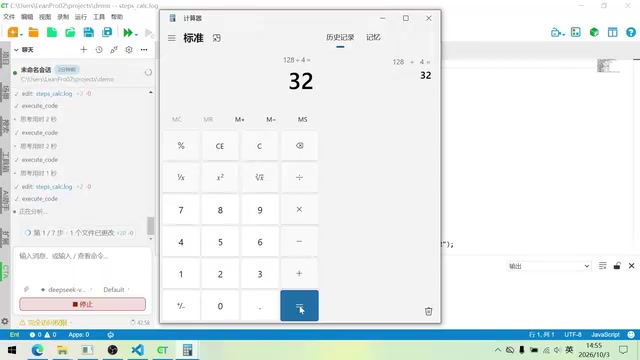
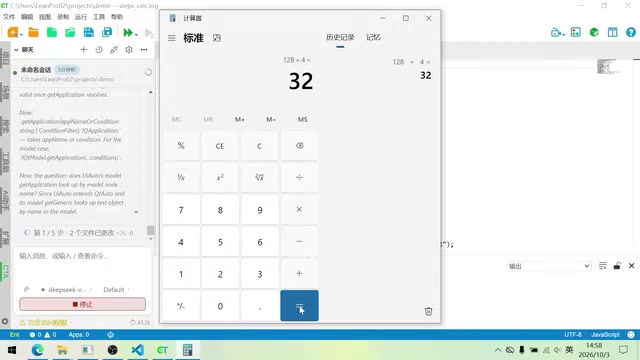
In the video, after completing a comprehensive scan of the Calculator interface, the agent performs the following in sequence: opening the navigation bar, switching to Standard mode, entering "128," performing a division operation, and reading the calculation result. Each step is precisely recorded, forming an operation log. [Image]
In the field of UI automation, control recognition and locators are key to determining script stability. Traditional tools (such as Selenium, Appium, and Windows UI Automation) rely on developers to pre-specify how elements are located, such as by ID, class name, XPath, Accessibility ID, or control tree path. Once an interface redesign changes attributes, the locator fails and the script is interrupted. The AI agent takes a different approach: it does not rely on hard-coded locators, but instead dynamically establishes a mapping between interface elements and task objectives by scanning the accessibility tree, visual features, and structural hierarchy of controls. This method is closer to the process by which human testers "look at the interface and find buttons," and is theoretically more robust to minor interface adjustments, but recognition accuracy and reasoning speed are its main challenges.
Automatic Assertions and Script Generation
Completing the task does not mean the workflow is over. The agent performs assertion verification on the calculation result—confirming whether the result returned by the Calculator is correct. At the same time, throughout the operation process, the agent continuously generates log files, recording each interaction action.
These recorded operation sequences are then converted into an automated test script. The agent does not just "record"; it re-executes the script to verify whether the generated code can reproduce the operation flow just performed.
Self-Healing: A Key Capability of the Agent
Automatic Troubleshooting After Script Errors
The most highlight-worthy part of the demo appears during the script verification stage. The script generated by the agent encounters a problem when closing the Calculator window—it cannot find the exit button. This is a very typical fragility issue in UI automation testing: failure to locate an interface element causes the script to be interrupted.
Traditional solutions require test engineers to manually troubleshoot, modify element locators, and rerun. In the demo, however, the agent autonomously discovers the anomaly, rescans the interface, re-identifies the control object, corrects the locating logic in the script, and then executes verification again. This time, the script successfully closes the application window. [Image]
This closed loop of "identify problem → analyze cause → fix script → verify again" means that the AI agent can not only generate test code, but also has the ability to debug and maintain test scripts.
Self-healing testing has been an important evolution direction for automated testing tools in recent years. Its basic idea is: when locating an element fails, the tool does not immediately report an error and terminate, but instead attempts to find the target element again through alternative attributes, similarity matching, historical locating records, or machine learning models. Mainstream commercial tools such as Testim, Mabl, and Functionize have already made self-healing a selling point. The difference in this article's demo is that the repair process is completed by an agent with reasoning capabilities—it not only replaces locators, but also rescans the interface, analyzes the cause of failure, corrects the logic, and proactively verifies again. This shifts maintenance from "manual troubleshooting" to an "AI closed loop," but the correctness of repair actions still requires a human review mechanism as a safeguard, to prevent the AI from "bypassing" real defects in an incorrect way.
From Scripts to Scenario Definitions
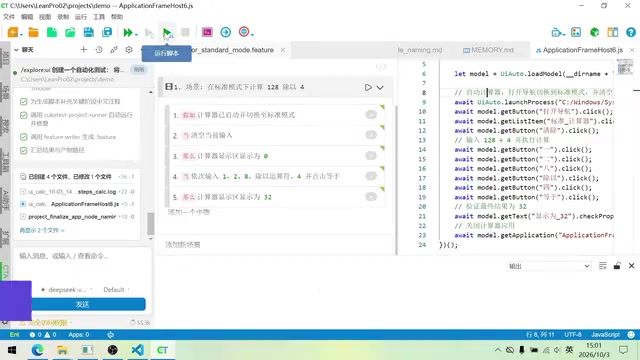
After script verification passes, the agent returns to the original task plan and completes the final step: generating a feature file. This file contains a natural language description of the test scenario and the corresponding operation steps.
At this point, each step in the scenario is not yet bound to a specific code implementation. Users can associate the previously recorded and verified script with the corresponding steps, so that each operation definition has executable code support. After association is complete, the entire scenario can be run with one click, automatically completing the full process of opening the application, performing calculations, verifying results, and closing the window.
The Industry Significance of AI-Driven UI Automation
Lowering the Barrier to Automated Testing
UI automation testing has long faced a contradiction: high benefits but also high maintenance costs. Frameworks such as Selenium and Appium require testers to have programming skills, while frequent interface changes cause locators to fail, making script maintenance a heavy burden.
This is precisely the pain point that AI agents address. Natural language task description, automatic recognition of interface elements, and self-healing when scripts fail—the combination of these three capabilities lowers the threshold for using automated testing from "knowing how to write code" to "knowing how to describe requirements."
New Possibilities for Exploratory Testing
You may not have noticed that the "exploration" capability demonstrated by the agent differs from traditional record-and-playback tools. It does not mechanically record mouse and keyboard events, but instead understands the interface structure, recognizes control semantics, and independently decides the operation path based on task objectives.
If this approach matures, it will enable AI to cope with interface changes—control position adjustments, button renaming, and layout refactoring—by re-recognizing them to adapt to changes, rather than crashing outright.
Current Limitations
From the demo, the agent operates on applications with simple structures such as the Windows Calculator. In the face of complex enterprise software—multi-level nested menus, dynamically loaded content, and custom controls—whether the AI's interface understanding and task planning capabilities remain reliable still needs verification. In addition, whether the execution speed overhead caused by element recognition and AI reasoning is acceptable in large test suites is also an issue that needs to be considered for practical implementation.
Conclusion
The Q-Test agent demonstrates a new path: AI does not just help testers write scripts, but opens applications itself, explores interfaces, performs operations, generates scripts, and fixes errors. For Windows desktop applications that require frequent regression testing, if this "AI tester" model continues to improve in stability and scope of application, it may redefine the way automated testing work is done.
One-line Summary
Q-Test agent controls Windows applications using natural language, automatically completing the generation, verification, and self-healing of UI test scripts.
Paragraph Summary
Through a hands-on demo on Bilibili, the article introduces how the built-in agent in Q-Test operates the Windows Calculator with a single natural language instruction, completing the full workflow from task understanding and interface exploration to control recognition and script generation. The agent first analyzes the task and generates a feature file framework, then autonomously scans the interface, performs calculations, asserts results, and converts the operation sequence into a reusable automated test script. The biggest highlight of the demo is its self-healing capability: when the script fails to close the window, the agent can re-identify controls, correct the locating logic, and verify again. The article argues that this solution lowers the threshold for UI automation from "knowing how to write code" to "knowing how to describe requirements," moving AI from assisted programming to independent execution. However, it has currently only been verified on native applications with simple structures, and complex enterprise software and performance overhead remain obstacles to adoption.
Related articles

How Big Can Stars Really Get? The Physical Limits of the Largest Stars
Red supergiants are the largest stars by volume, with radii up to 2,000 times the Sun, engulfing the inner solar system. But there is no precise upper limit on stellar size—models predict up to 15,000 solar radii. The most massive blue stars are far smaller than red supergiants—biggest and heaviest are two different things.

Apple HomeView Smart Display Full Feature Breakdown: Wall-Mount or Desktop, $299
Apple launches HomeView, a $299 smart display with wall-mount and desktop options, 12MP camera for facial recognition, smart home control, music playback, and recipe step-by-step cooking. Full breakdown of watch faces, apps, privacy, and cooking integration.

Where Did the Promised New Studio Go? Craft Computing Answers After Five Years
Craft Computing's host responds to viewer questions: the new studio promised five years ago was shelved as construction costs soared from $30,000 to $75,000, and was replaced by a 168-square-foot garage conversion.