AI App Design Tools Compared: Stitch, Banani, Flowstep, and Sleek — Which Comes Out on Top?

Four AI design tools compared: export capability, not generation quality, determines whether they fit real workflows.
This article compares four AI app design tools — Google Stitch, Banani, Flowstep, and Sleek — with the core argument "look at export first, then look at quality": a beautiful interface that can't be exported is essentially just a screenshot. Banani targets Figma-centric teams with editable prototypes and Figma/HTML export; Flowstep unifies design and code via MCP integration with tools like Cursor; Sleek focuses on mobile screens with React + Tailwind export; Stitch's export options remain unconfirmed. The article recommends choosing by workflow and testing export to target formats.
AI app design tools are moving from "generating good-looking interfaces" to "generating deliverable code." Google Stitch, Banani, Flowstep, and Sleek can all generate screen designs from prompts, but export capabilities are what determine whether they can enter real workflows. Based on public demos and product descriptions, this article compares the four tools' core positioning, export paths, and suitable use cases to help you avoid the "screenshot-style delivery" trap when choosing a tool.
Why Export Capabilities Matter More Than Generation Quality
Given the same prompt, the four tools produce noticeably different results. The most intuitive takeaway from the demos is: look at export first, then look at quality. A beautiful screen that can't be exported is essentially just a screenshot — it can't enter the development pipeline.
This difference stems from different product positioning. Some tools position themselves as design accelerators, outputting editable Figma files; others aim directly at code generation, trying to merge design and implementation. For teams, which route to choose depends on whether you want to optimize the design process or compress the handoff cost between design and development.
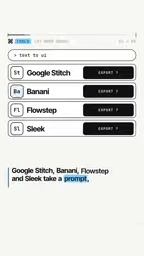
Core Positioning and Export Paths of the Four Tools
Banani: The Figma Route, Emphasizing Editable Prototypes
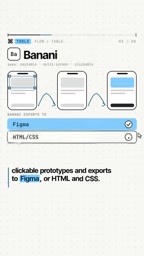
Banani's selling point is building editable, clickable prototypes, with support for exporting to Figma or HTML/CSS. This means it's better suited to design teams already centered on Figma — generated results can be further refined in Figma rather than being locked into a closed tool.
From a workflow perspective, Banani's Figma export path lowers migration costs. Designers can incorporate AI-generated parts into their existing design system without abandoning their current habits. HTML/CSS export provides a lightweight code delivery option, suitable for quick validation or simple pages.
Figma is a cloud-based collaborative interface design tool whose files use a layered, vectorized structure and support design system capabilities such as components, style variables, and auto layout. So-called "export to Figma" usually means converting generated results into Figma-recognizable layers or components, rather than a flat image. Editability is key here: only when the layer structure is complete can designers continue to adjust spacing, swap components, and apply design tokens. Figma files exported by different tools vary greatly in layer naming, grouping logic, and degree of componentization, which directly affects the cost of subsequent refinement. When evaluating, you should actually open the exported file and check the structural quality, rather than just looking at the claim of "supports export."
Flowstep: Integrated Design and Code, with MCP Integration as a Highlight
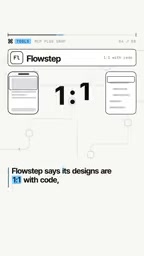
Flowstep claims its design is "unified with code" and supports connecting to tools like Cursor via MCP. The demo mentions "Plugging in a cursor and clawed code over MCP," which points to the ability to connect AI coding assistants directly to design artifacts.
The value of this direction lies in reducing information loss between design and implementation. If the design itself is code, or can be consumed directly by coding tools, the link from design to development will be significantly shortened. However, this integration also means teams need to accept a new collaboration paradigm, rather than simply cramming generated results into old processes.
MCP (Model Context Protocol) is a standard protocol proposed and open-sourced by Anthropic, designed to let AI coding assistants (such as Cursor, Claude Desktop, etc.) connect to external tools, data sources, and services in a unified way. It's essentially a "plug" for large models, enabling them to read local files, call APIs, access design resources, or execute code operations. In Flowstep's scenario, connecting to Cursor via MCP means design artifacts can be consumed directly by coding assistants — design files are no longer static images but structured input that coding tools can understand, thereby reducing manual translation steps. The MCP ecosystem is still evolving rapidly, and different tools vary in their degree of protocol support; when choosing, you need to confirm the specific depth of integration.
Sleek: Mobile-First, Exporting React and Tailwind
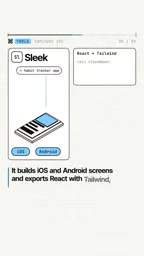
Sleek focuses on iOS and Android screen design, with export options including React with Tailwind, pure HTML, or Figma layers. For mobile app teams, this combination covers the main path from design files to front-end code.
React plus Tailwind export is especially suited to modern front-end stacks, and generated results can go directly into component-based development. Figma layer export preserves room for continued adjustment on the design side. By comparison, pure HTML export leans more toward quick prototypes or static displays.
Tailwind CSS is a utility-first CSS framework that builds interfaces by combining a large number of fine-grained utility classes (such as flex, px-4, text-center) rather than writing traditional semantic CSS classes. It fits well with React component-based development because styles are written directly in JSX, making it easy to reuse per component and trim as needed. Sleek's "React with Tailwind" export means the generated result is not just static markup but component code that can be placed into a modern front-end project and compiled by build tools. However, the organization of generated Tailwind class names may not match a team's existing conventions, so integration usually requires a code review and standardization pass.
Google Stitch: Clear Entry Point, but Export Options Need to Be Verified
Stitch is Google's entry into this space. The demo explicitly notes that its export options have not yet been confirmed and recommends users verify them themselves before committing. This caveat itself says something: generation capabilities can be demoed, but export capabilities are the real promise.
For teams considering Stitch, it's advisable to first verify where it can take results — Figma, code, or platform-only use. Until the export path is clear, it shouldn't be a core part of a production workflow.
Selection Advice: Choose by Team Workflow, Not by Generation Quality
None of the four tools is absolutely better or worse; the key is matching your existing process. Figma-centric teams can prioritize Banani; teams hoping to shorten the design-to-code chain should pay attention to Flowstep's MCP integration; for mobile projects with a React/Tailwind stack, Sleek's export combination is more direct; Stitch suits exploratory users willing to verify export capabilities first.
A practical approach: generate once in each candidate tool with the same prompt, then immediately try exporting to your target format. The tool that can smoothly move into the next step of work is the one that suits you. Generation quality can be compared, but delivery capability cannot be assumed.
One-line Summary
Comparison of four AI design tools: export capability matters more than generation quality in determining whether a tool can enter real workflows.
Paragraph Summary
The article compares four AI app design tools — Google Stitch, Banani, Flowstep, and Sleek — with the core argument "look at export first, then look at quality": a beautiful interface that can't be exported is essentially just a screenshot and can't enter the development pipeline. Banani positions itself as a design accelerator, supporting editable clickable prototypes and export to Figma or HTML/CSS, suitable for Figma-centric teams; Flowstep emphasizes unified design and code, connecting to coding tools like Cursor via MCP to shorten the design-to-implementation chain; Sleek focuses on iOS/Android screens and exports React with Tailwind, pure HTML, or Figma layers, fitting modern front-end stacks; Google Stitch's export options are unconfirmed and need verification before committing. The article recommends choosing by team workflow rather than generation quality, and testing export to target formats with the same prompt.
Related articles

Prospero: A Lightweight Native AI Coding Tool Built with ImGui
Prospero is a bloat-free native AI coding tool built with ImGui, emphasizing lightweight design, high performance, and low dependencies. This article analyzes its design philosophy, technical choices, and the divergence between platformization and toolization in AI coding tools.

WebRTC Abused: New Variant of Credit Card Skimming Scripts on Shopping Sites
Security researchers found skimming scripts on popular shopping sites using WebRTC data channels to exfiltrate credit card data. This article analyzes the technical原理, differences from traditional Magecart attacks, and defense strategies for e-commerce platforms in third-party script governance and CSP policies.

Single GB10 Card Hits 101 tok/s: Inkling 2 Mini Performance Tested on vLLM
A developer shared on Hacker News running Inkling 2 Mini with vLLM on a single GB10 at 101 tok/s. This article analyzes the technical context, the significance of vLLM with small models on single cards, and caveats for interpreting tok/s metrics.