AI Assistant Always Forgets? One Rules File Lets Your Agent Remember Everything
Use a short rules file in the repo instead of long prompts to fix AI coding assistant cross-session amnesia.
The article notes that AI coding assistants lose project context each new session, and stuffing rules into the system prompt isn't sustainable: longer prompts dilute attention, and they expire when the session ends. The fix is placing an agents.md or claude.md rules file in the repo, auto-loaded at session start. Keep it short—only effective commands, key paths, past mistakes, and self-growth habits—no pasted docs. Promote repeated corrections to rules and prune outdated entries regularly.
Every time you start a new session, your AI coding assistant seems to have amnesia: you have to re-explain the tech stack, repeat project rules, and stress once again the command that absolutely must never be run. The problem isn't that your prompt is too short—it's that you're missing a rules file that can be loaded automatically.
Why Long Prompts Can't Save Your Agent
Cramming rules into the system prompt is what most people instinctively do, but this path quickly runs out. The longer the prompt, the more the model's attention to each individual item is diluted, and the truly critical constraints get buried. More fundamentally, prompts are tied to a single conversation and vanish once the session ends—next time you have to start all over again.
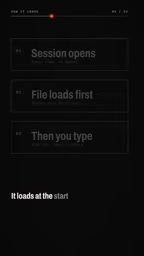
According to the author of this YouTube video, the right approach is to place a rules file in your code repository named agents.md or claude.md. It gets read automatically at the start of every session, before you type a single word. This means you don't need to manually paste background information each time—the Agent arrives already carrying the project's "previously on."
The core shift in this approach is: move memory out of the conversation and into the repository. Conversations are temporary; repositories are persistent.
System Prompt is the hidden instruction an AI coding assistant receives before a conversation begins, usually preset by the tool or user to define role, behavioral boundaries, and output style. Unlike the prompt the user enters each turn, it's a session-level context injection. Cramming project rules into the system prompt seems convenient but is limited by the model's context window and attention mechanism: the more information there is, the more dispersed the model's weight allocation to any single item becomes. Moreover, system prompts are typically bound to a single session configuration and aren't automatically inherited when switching sessions or tools, so they can't form persistent cross-session memory. This is exactly the problem that an in-repository rules file solves—migrating rules from volatile session context to a version-controllable file system.
What to Write in the Rules File—and What Not To
The rules file is not project documentation, nor a knowledge base. The author emphasizes that it should stay short and contain only four types of content:
- Effective commands: which commands work, and how to run them
- Key paths: which directories and files matter most
- Mistakes already made: record the pitfalls the Agent has hit to avoid repeating them
- The habit of self-growth: every time the Agent does something wrong, add a line to correct it
That last point is the soul of the whole mechanism. The author's practical principle is: if you've typed the same correction twice, promote it to a rule and write it into the file. This way the file becomes increasingly tailored to your project through use, rather than trying to exhaustively enumerate everything upfront.
The anti-pattern list is equally clear: don't paste documentation into it. In the author's exact words, "It's rules, not reading material." Mixing rules with reference docs makes it hard for the model to distinguish which are hard constraints that must be followed and which are merely background information.

There's also a maintenance discipline that's easy to overlook: delete content that no longer holds. Projects evolve, and yesterday's effective command may be deprecated today. The author warns that without cleanup, the file becomes "the thing the model uses to guess about your project"—the misdirection from a stale rule can be worse than having no rule at all.
AGENTS.md / CLAUDE.md is a de facto convention the community has gradually settled on: place a plain-text Markdown file in the repository root, and AI coding tools automatically read and inject it into context at startup. Different tools use different filenames, but the design intent is the same—make rules version-controlled, reviewable, and collaborative alongside the code repository. Compared with .cursorrules or IDE config files, these files emphasize short, human-readable rules rather than machine configuration. Because it lives in the repository, team members who clone the code get the same set of Agent behavioral constraints, avoiding the fragmentation of "everyone maintaining their own prompts."
Two Direct Benefits of One File
Once this practice is in place, the benefits go both ways.
For the project, it gains genuine memory. New sessions no longer start from zero—the Agent knows your tech stack, your conventions, your minefields. For the user, prompts get shorter. You no longer need to write a long block of background explanation at the start of each conversation; daily interactions can get straight to the point.
The author ends the video with an interactive question: which rule does your AI keep violating? This actually points to how the rules file should be iterated—distilling rules from recurring mistakes rather than designing a perfect specification in advance.

Practical Advice
If you want to start today, begin with a minimum viable version: write down the three most important effective commands, two key paths, and one lesson from the last time the Agent tripped you up. After that, every time you repeat a correction, add a line. Spend a few minutes each week deleting outdated entries. Keep the file to a length readable in one screen—its value lies in precision, not comprehensiveness.
The Agent's memory problem is fundamentally not a model capability problem but an engineering habits problem. A short file in the repository is more durable than any carefully crafted long prompt.
Context Window refers to the token limit a model can receive in a single inference, including the system prompt, conversation history, file contents, and user input. A larger window doesn't necessarily mean better results: research shows that when key information is surrounded by large amounts of irrelevant content, the model's accuracy in retrieving and following key instructions drops—a phenomenon often called "lost in the middle." Keeping the rules file to one readable screen is essentially context budget management—reserving the limited attention quota for hard constraints rather than background material. This is also the technical basis for the principle "It's rules, not reading material."
One-line Summary
Replace long prompts with a short rules file in the repository to solve the AI coding assistant's cross-session amnesia.
Paragraph Summary
The article points out that AI coding assistants lose project context with every new session, and cramming rules into the system prompt isn't a lasting solution: the longer the prompt, the more dispersed the model's attention, and it expires the moment the session ends. The right approach is to place an agents.md or claude.md rules file in the code repository, auto-loaded at session start. The file should stay short, containing only effective commands, key paths, mistakes already made, and self-growth habits—no pasted documentation. Promote the same correction to a rule after typing it twice, and regularly delete outdated entries. This practice gives the project persistent memory while shortening everyday prompts—fundamentally an engineering habits problem, not a model capability problem.
Related articles
Persistent Memory for AI Coding Agents: Reverse-Engineering the Understand Anything Plugin
Reverse-engineering the Understand Anything plugin: how it builds a local persistent knowledge base for Claude Code, Codex, and Cursor AI coding agents through code maps, business logic connections, and incremental updates—achieving project-level memory without relying on a larger context window.

5 Free GitHub Repositories Every AI Agent Developer Should Know
Explore 5 free GitHub repositories every AI agent developer should know, covering agent project templates, code generation, and integration with large models like Claude to help you build AI agents faster.

Fable 5.2 vs. Opus 5.5: One-Prompt MOBA Prototype Showdown — Who Wins?
Same-prompt MOBA prototype test: Opus 5.5, Deep Seek, and Fable 5.2 compared on features, animation, and smoothness — Fable 5.2 rated the best result yet.