AI Auto-Extracts PDF Invoice Data to Excel and Emails Results: A Full Workflow Breakdown

AI tool batch-processes PDF invoices in parallel, extracts structured data to Excel, and delivers results by email automatically.
This article breaks down an AI-powered demo for batch PDF invoice processing: users simply drag and drop multiple mismatched invoices, issue a natural language command, and the tool extracts all relevant fields in parallel, compiles them into an Excel file, and emails the results automatically — no waiting required. The author frames this as Document AI, highlighting its advantage over traditional template-based OCR in tolerating layout variation and supporting async batch delivery. Practical caveats around extraction accuracy, human review workflows, and financial data security are also addressed.
The Age-Old Problem with Invoice Data Entry
For many people in finance and operations, one painfully time-consuming task never seems to go away: manually copying fields like amounts, dates, vendor names, and tax figures from PDF invoices into an Excel spreadsheet — one row at a time. When you're dealing with dozens or even hundreds of invoices, this mechanical work is not only inefficient but also prone to errors.
A YouTube demo recently showcased a more modern approach: using an AI tool to batch-process PDF invoices, automatically consolidating structured data into Excel, and delivering the results directly to your inbox. The entire workflow requires almost no human intervention. As the presenter put it — "Stop manual entry."

Breaking Down the Demo Workflow
Based on the demo, the entire process is stripped down to its simplest form:
Step 1: Issue a Command
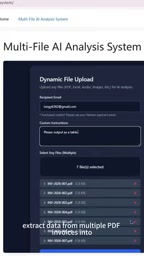
The presenter issues a natural language instruction directly to their custom-built tool: "Extract data from multiple PDF invoices into Excel and send the file to my email." This means the tool supports triggering tasks conversationally, rather than requiring users to navigate complex menus and configure options one by one.
Step 2: Drag and Drop
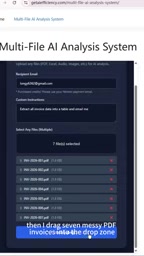
Next, the presenter drags 7 "messy" PDF invoices into a drop zone all at once. The word "messy" is telling — it implies the invoices don't follow a uniform format. Different vendors, different layouts: exactly what you encounter in real-world business operations.
Step 3: Submit and Walk Away
After clicking submit, the presenter simply closes the browser tab. This reveals a key design decision: the task runs asynchronously in the background, and users don't need to sit and wait at their screen.
The Parallel Processing Happening Behind the Scenes
What's really worth paying attention to is what happens "behind the scenes." According to the demo, the AI processes every file in parallel rather than handling them one by one in a queue. For batch tasks, parallel processing directly determines total turnaround time — 7 invoices processed sequentially might take several minutes, while parallel processing compresses that to roughly the time it takes to handle a single invoice.
Once processing is complete, the system delivers a structured report directly to the user's inbox, ready to view and download.
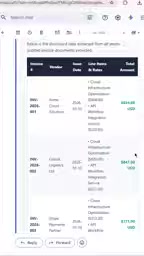
This "submit and go, results in your inbox" interaction model essentially transforms a one-time manual task into an automated pipeline: Input (PDF) → Processing (AI extraction + structuring) → Output (Excel + email).
The parallel processing here typically relies on cloud functions or task queue architectures at the engineering level. Each uploaded PDF is split into an independent processing task and distributed across multiple compute nodes to run simultaneously, rather than queuing up on a single server. Common implementations include serverless compute like AWS Lambda or Azure Functions, or message queue systems like Celery or BullMQ. The reason tasks continue running after you close the browser tab is that the processing logic has been fully offloaded from the frontend browser to backend services. Delivering results via email also eliminates the need for users to keep the page open and poll for status. For enterprise users, this architecture means the wait time difference between processing 100 invoices versus 7 is relatively small — the system scales fairly linearly.
The Value and Use Cases for This Type of Tool
From a finance automation perspective, this demo represents a maturing category of applications: Document AI (document intelligence extraction). Its core value shows up in several ways:
- Eliminating repetitive work: Handing off zero-value tasks like copy-pasting to machines.
- Tolerating format variation: Extracting key fields from messy invoices across different vendors — something traditional template-based OCR solutions struggle to do.
- Async and parallel: Batch tasks don't require anyone to wait, making it well-suited for high-frequency, high-volume invoice workflows.
- End-to-end delivery: Results are delivered directly as Excel files via email, slotting seamlessly into existing workflows.
Applicable use cases include accounts payable (AP) team invoice entry, expense reimbursement review, vendor reconciliation, and any role that needs to convert unstructured documents into structured spreadsheets.
Document AI is a technical domain that has evolved rapidly alongside the maturation of large language models and multimodal vision models. Unlike traditional OCR (Optical Character Recognition) — which essentially converts text in images into editable characters and relies on preset templates to locate field positions (making it brittle when invoice layouts change) — Document AI combines layout analysis with semantic understanding to actually "read" document structure. Even when different vendors use completely different invoice layouts, the model can use contextual semantics to determine which number is the tax amount and which string is the vendor name. Representative underlying technologies include Microsoft's LayoutLM model series, the Google Document AI platform, and the visual understanding capabilities integrated into multimodal models like GPT-4o. The tool's ability to handle "messy" invoices in the demo is a direct result of this semantic awareness — not fixed coordinate templates.
Real-World Considerations Worth Keeping in Mind
The demo is inherently a marketing-style product showcase, and several questions need to be answered before real-world deployment:
Extraction accuracy is critical. If invoice fields are misidentified — say, a wrong amount or tax ID — the impact on financial data is direct and sensitive. It's important to know whether there's a human review step and whether the tool provides confidence indicators. Additionally, since invoices are sensitive financial documents, enterprises must verify where the data is being uploaded, whether it's encrypted, and whether it meets relevant compliance requirements. The demo doesn't address error handling or data security in any detail.
That said, the demo clearly communicates an undeniable trend: standardized document processing tasks like invoice data entry are being rapidly automated by AI tools. For teams still doing this by hand, evaluating and adopting tools like this may be the most direct path to meaningful efficiency gains.
Related articles

Chain of Thought Isn't Just for AI: How Humans Can Use CoT to Improve Thinking Quality
Chain of Thought isn't just a prompt trick for large models. Starting from a Hacker News discussion, this article analyzes why CoT works for human thinking too, breaks down actionable ways to transfer it, and highlights the key differences between human CoT and machine CoT.
Cloudflare Teams Up with OpenAI: Closi…
Cloudflare Teams Up with OpenAI: Closing the Loop from Vulnerability Discovery to Defense with AI
Cloudflare uses OpenAI Daybreak to investigate security vulnerabilities and generate reviewable remediation plans, while developers use Codex to boost coding efficiency and quality.

Orca Multi-Agent Orchestration in Practice: A Guide to Parallel Collaboration with Claude and Codex
Orca is Stable AI's free open-source agent workbench supporting 34 agents like Claude Code and Codex in parallel. Learn its Git worktree isolation, multi-model orchestration, and mobile management.