AI Automation from Scratch: A Hands-On Beginner's Guide to n8n

AI automation expert Kazumi Nagata shares his path to learning n8n from scratch and three practical tips.
Based on Kazumi Nagata's video, this article maps out a complete path to learning AI automation from scratch. Kazumi started in data analytics and felt lost when he first encountered n8n's many nodes and terms, but by returning to basic concepts, building simple workflows, and debugging repeatedly, he mastered practical skills and built the SaaS platform TumiFlow. The article uses a customer service scenario to illustrate AI automation's value: handing repetitive tasks like form processing, saving customer info, and email replies to workflows frees people to focus on high-value decisions. n8n is the tool of choice thanks to its visual interface and extensibility, offering a smooth growth curve from simple workflows to complex operations. It closes with three tips: master basic concepts like triggers and nodes; start with a minimum viable workflow; and face errors head-on while building a portfolio.
AI Automation from Scratch: A Hands-On Beginner's Guide to n8n
Does the daily grind of copy-pasting, replying to emails, and updating spreadsheets leave you exhausted? AI automation specialist and TumiFlow founder Kazumi Nagata shared his complete path to learning AI automation from scratch in a recent video, with a focus on his experience using n8n. Based on that video, this article lays out a replicable beginner's roadmap for you.
From Data Analytics to Automation: An Atypical Starting Point
Kazumi didn't dive into AI automation right away. He started out in data analytics and stumbled onto the field of automation while exploring various tools. He recalls that when he first encountered n8n, he was completely overwhelmed by the sheer number of nodes, settings, and terminology.
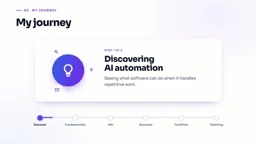
His strategy was to go back to basics: first understand the core concepts, then try building simple workflows. He ran into errors repeatedly along the way, but through constant debugging and retrying, he gradually developed automation skills he could apply to real business needs. Eventually, he built his own SaaS platform, TumiFlow, and began teaching beginners. His experience shows that AI automation isn't out of reach—the key is finding the right learning path.
What Exactly Is AI Automation? One Customer Service Scenario Makes It Click
Many beginners find "AI automation" abstract. Kazumi explains it intuitively with a customer inquiry scenario: suppose a customer submits an inquiry form on your website. The traditional process requires someone to read the message, determine the type of issue, save the customer's information, and then reply by email—cumbersome and time-consuming.
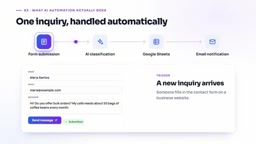
With an automated workflow, however, the information flows into the process automatically once the form is submitted. AI can read the inquiry content and determine intent, then save the customer details to Google Sheets while notifying the team. Humans only need to step in at points that require judgment. Kazumi emphasizes that the core value of automation is freeing up time from repetitive tasks so you can focus on more important decisions and creative work.
Why Choose n8n? Visualization and Scalability Are Key
There are plenty of automation tools on the market, but Kazumi is particularly fond of n8n. The primary reason is its visual workflow design—the connections between each step are clear at a glance, with triggers, AI agents, conditional logic, and action nodes each playing their part.
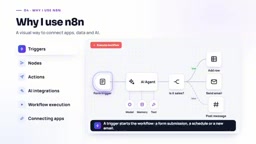
Second, n8n doesn't restrict users to basic automation. Beginners can start with simple workflows and gradually unlock more complex operations as their skills grow. Kazumi says it was through n8n that he gained a deep understanding of APIs, webhooks, expressions, and debugging—concepts that remain core tools in his projects to this day. For learners who want to grow for the long haul, n8n offers a smooth learning curve.
API and webhook are the two foundational concepts for understanding n8n's extensibility. An API (Application Programming Interface) is an agreement between different software systems for exchanging data, and many of n8n's nodes are essentially calling the APIs of various services. A webhook is a kind of "reverse API": it lets external services push data to n8n when an event occurs, rather than having n8n pull it on a schedule. For example, when a user submits a form on your website, the form service can trigger an n8n workflow immediately via webhook, enabling a near-real-time response. Once you master these two, you can connect n8n to almost any system that supports APIs, not just the built-in nodes.
Three Practical Tips for Beginners
Drawing on his own experience, Kazumi lays out a clear learning path for beginners. He repeatedly reminds them: don't try to tackle complex AI agents right out of the gate—that will only add to the frustration.
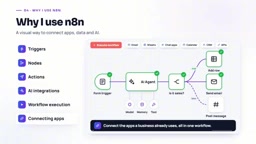
Step one: master the basic concepts. Understand what triggers, nodes, and actions mean—this is the prerequisite for building any workflow.
Step two: start with a minimum viable workflow. For example, build a simple automation that writes form submissions to Google Sheets. Once it works, you'll understand how data flows between nodes. After that, gradually try scenarios like email notifications and lead management.
Step three: face errors head-on and save your work. Debugging is an inseparable part of the learning process, and every troubleshooting session deepens your understanding. At the same time, organize your completed projects into a portfolio to build up material for future job hunting or freelance work. Kazumi's advice is plain but practical: take it one step at a time and don't rush.
Minimum viable workflow (MVP) borrows a concept from product development, referring to running a complete loop with the fewest nodes and the simplest logic. Its value is that it lets you first see the big picture of "input—processing—output" and build an intuition for data flow, rather than getting bogged down in complex branching and error handling from the start. For example, "write form submissions to Google Sheets" is a typical MVP: the trigger is the form submission, the action is writing to the spreadsheet, and there's no conditional logic in between. Once it works, gradually add elements like email notifications and lead scoring, introducing only one variable at a time so it's easier to pinpoint problems when something goes wrong.
FAQ
Q: Can I learn n8n with no programming background at all? A: Yes. n8n's visual interface lowers the barrier to entry, but understanding concepts like APIs and webhooks will help you go further.
Q: Do I need to learn data analytics first to learn AI automation? A: Not necessarily, but a data analytics mindset helps with understanding data flows and business logic.
Q: What's the difference between n8n and tools like Zapier? A: n8n is open source and supports self-hosting, offering greater extensibility—ideal for users who want deep customization.
This article is based on Kazumi Nagata's YouTube video and aims to provide a practical starting-point map for your AI automation journey.
Self-hosting means installing n8n on a server or local machine you control, rather than using the official cloud service. The benefits include: your data stays entirely in your hands, which is ideal for handling sensitive information; you're not subject to the cloud version's execution limits or feature restrictions; and you can freely install community nodes and custom code. The trade-off is that you're responsible for server maintenance, backups, and upgrades. For beginners who want to learn deeply, you can start with n8n's cloud trial, and once you're familiar with it, try deploying locally with Docker to experience the flexibility of self-hosting.
Related articles

Chain of Thought Isn't Just for AI: How Humans Can Use CoT to Improve Thinking Quality
Chain of Thought isn't just a prompt trick for large models. Starting from a Hacker News discussion, this article analyzes why CoT works for human thinking too, breaks down actionable ways to transfer it, and highlights the key differences between human CoT and machine CoT.
Cloudflare Teams Up with OpenAI: Closi…
Cloudflare Teams Up with OpenAI: Closing the Loop from Vulnerability Discovery to Defense with AI
Cloudflare uses OpenAI Daybreak to investigate security vulnerabilities and generate reviewable remediation plans, while developers use Codex to boost coding efficiency and quality.

Orca Multi-Agent Orchestration in Practice: A Guide to Parallel Collaboration with Claude and Codex
Orca is Stable AI's free open-source agent workbench supporting 34 agents like Claude Code and Codex in parallel. Learn its Git worktree isolation, multi-model orchestration, and mobile management.