AI Beginner's Guide: Three Stages to Building Your Own Personal AI Assistant from Scratch
A practical 3-stage roadmap for AI beginners to build a personal AI assistant without technical expertise.
This guide helps AI beginners cut through information overload with a clear three-stage learning path: mastering prompt engineering with conversational AI tools, building automated workflows using no-code platforms like Zapier and Dify, and eventually calling LLM APIs with simple Python scripts. It debunks the myth that you need supercomputers or deep technical knowledge to get started with AI.
A Business Student's Real Struggle
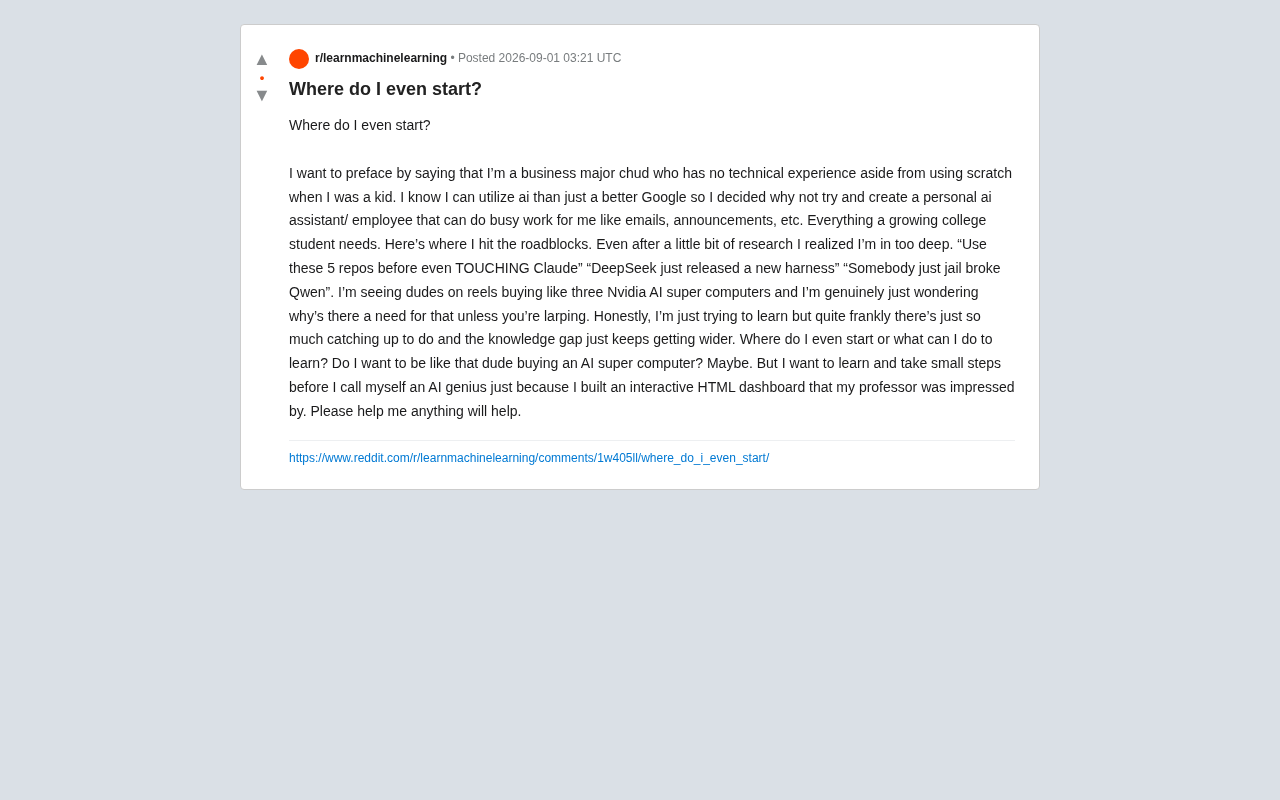
Recently on Reddit, a business major posted something that struck a chord with many. He admitted that apart from playing with Scratch as a kid, he had zero technical background — but he'd realized AI's potential goes far beyond being "a better search engine." He wanted to build a "personal AI assistant" to handle mundane tasks like emails and announcements.
Scratch is a visual programming language launched by the MIT Media Lab in 2007, designed specifically for young learners. Users drag and drop colorful blocks to assemble program logic, creating animations and interactive stories without writing a single line of code. With over 100 million registered users worldwide, Scratch represents a significant skill gap from actual software development and AI applications — but the fundamental logical thinking it cultivates is genuinely helpful for learning AI applications later on.
However, when he started researching, he drowned in information overload: "Use these 5 repos before touching Claude," "DeepSeekAd just dropped a new harness," "Someone jailbroke Qwen"… A few terms worth explaining here: DeepSeek is a large language model series developed by the Chinese AI startup of the same name, known for its exceptional cost-efficiency and MoE (Mixture of Experts) architecture; "harness" in the AI context typically refers to an evaluation framework or toolchain used to benchmark model performance in a standardized way; Qwen (Tongyi Qianwen) is Alibaba's large model series, and "jailbreak" means using specially crafted prompts to bypass a model's safety restrictions. While these topics generate a lot of buzz in technical communities, they're really not a priority for everyday users who just want AI to solve practical problems.
What confused him even more was seeing people on social media casually buying three NVIDIA AI supercomputers. He voiced the question shared by countless AI beginners: Where do I even start?
The question seems simple, but it reveals a core pain point in today's AI learning ecosystem: Technology iterates so fast and the knowledge gap appears to widen so quickly that beginners get scared off before they ever get their hands dirty.
Busting the Myth: You Don't Need a Supercomputer to Build an AI Assistant
Let's clear up the biggest misconception first. Those "buying three NVIDIA supercomputers" scenarios the student saw fall overwhelmingly into two categories: content creators putting on a show (as he himself astutely noted — "larping," or role-playing for clout), or professional researchers who need to train or fine-tune large models locally.
NVIDIA's DGX series AI supercomputers range from hundreds of thousands to millions of dollars per unit, equipped with top-tier GPU chips like the H100 or B200, designed specifically for large-scale model training and inference. In 2025, NVIDIA also launched Project DIGITS, a desktop-class AI supercomputer aimed at individual developers, priced at around $3,000 with a GB10 Grace Blackwell chip. But even these more "accessible" products primarily target professionals who need to run very large models locally or fine-tune models.
For everyday needs like "help me write emails and draft announcements," the computing power you need is close to zero. The reason is simple:
- Major LLMs are cloud-based services. When using tools like ChatGPT, Claude, or Gemini, all computation happens in the provider's data centers — all you need is a regular laptop with an internet connection. When a user sends a message, the request travels over the internet to data centers equipped with thousands of high-performance GPUs, where all inference computation happens server-side before results are sent back to the user. This "Model-as-a-Service" (MaaS) model means your device only handles input and display — it bears zero AI computation load. Users typically access services through free tiers or monthly subscriptions (e.g., ChatGPT Plus and Claude Pro at $20/month each), while the millions of dollars in computing costs are absorbed by the provider.
- Local deployment has become accessible too. Even if you want to run open-source models on your own machine, tools like Ollama let you run 7B to 14B parameter models on a regular computer with 16GB of RAM — more than enough for everyday tasks. Ollama is an open-source tool released in 2023 for running large language models locally. It wraps complex steps like model downloading, quantization, and inference into simple command-line operations — users just type something like
ollama run llama3to get started. The "7B to 14B" refers to billions of parameters (B = Billion); a 7B model takes roughly 4GB of VRAM (after 4-bit quantization), while a 14B model needs about 8GB. Models at this scale already perform impressively on everyday tasks like text generation, summarization, and translation. Similar tools include LM Studio (with a graphical interface) and llama.cpp (the underlying inference engine), together forming an accessible ecosystem for local AI deployment.
Those supercomputers are for training models from scratch, running large-scale inference services, or conducting cutting-edge research. AI computing demands have a clear hierarchy: cloud API calls require virtually no local computing power, running small open-source models locally needs a mid-range computer, and training or fine-tuning large models from scratch is what requires professional-grade GPU clusters. As an application-layer user, you have no inherent connection to those supercomputers.
Distinguishing the "User" Path from the "Researcher" Path
The topics mentioned in the post — "DeepSeek's new harness" and "jailbreaking Qwen" — belong to the research and development layer. What the student wants to do belongs to the application layer. These are two entirely different learning paths:
- Application layer: Learn to solve real problems using existing AI tools and APIs — requires almost no deep technical background.
- Research layer: Involves model architecture, training techniques, alignment and safety — requires solid foundations in math and programming.
For a business student or any AI beginner starting from zero, entering through the application layer is not only lower-barrier but also the fastest path to tangible results.
Three-Stage Learning Roadmap for Building a Personal AI Assistant from Scratch
Stage One: Use AI as a "Conversational Assistant"
Don't rush into code. The first step is to deeply engage with existing conversational AI. Pick a mainstream tool (ChatGPT or Claude both work), and try handing it the tasks you want done — writing emails, drafting announcements, organizing notes.
The core skill at this stage is Prompt Engineering: learning how to clearly describe tasks, provide context, and give examples. Prompt engineering isn't simply "asking questions" — it's a systematic communication technique. Key skills include: setting clear roles (e.g., "You are a professional business email writer"), specifying output format requirements, providing a few examples (Few-shot Learning — giving several input-output samples so the model understands your expectations), breaking complex tasks into steps (Chain-of-Thought reasoning), and setting constraints (such as word count, tone, and target audience). Research shows that structured prompts can improve model output quality by 40%-60%.
You'll find that with the same model, different prompting approaches produce dramatically different output quality. This step requires zero programming knowledge, yet it forms the foundation for everything that follows. Google, OpenAI, Anthropic, and other companies have published official prompt engineering guides — excellent free learning resources.
Stage Two: Build AI-Powered Automated Workflows with No-Code Tools
Once you're comfortable with conversational interaction, you can level up to "making AI work automatically." Start with workflow automation tools like Zapier, Make, or more AI-native platforms such as n8n, Dify, and Coze.
Each platform has its niche: Zapier and Make (formerly Integromat) are mature general-purpose automation platforms supporting thousands of app integrations, ideal for incorporating AI as one node in a workflow; n8n is an open-source, self-hosted automation tool offering greater flexibility and full data sovereignty; Dify is an open-source LLM application development platform focused on letting users orchestrate AI capabilities through a visual interface, supporting advanced features like RAG (Retrieval-Augmented Generation — having AI retrieve relevant information from a knowledge base you specify before generating answers) and Agent workflows; Coze is developed by ByteDance, offering a Chinese-friendly AI Bot building environment with plugin support and multi-turn conversation design.
With these no-code tools, you can build workflows like: New email received → AI automatically classifies it and drafts a reply → Sends it to your to-do list. The entire process is built by dragging and dropping nodes, with virtually no code — yet it achieves exactly the "personal AI employee" effect the post author was looking for.
Stage Three: Explore APIs and Simple Python Scripts
If you're willing to go one step further, you can learn to call LLM APIs. An API (Application Programming Interface) is a standardized way for software to communicate. In the AI context, calling an LLM API means writing a few lines of code to send your request to a cloud-based AI model and receive the result.
This is where you actually need a tiny bit of programming — Python is the friendliest choice. You don't need to become a professional programmer; you just need to understand and modify example code. Taking OpenAI's API as an example, the core process has only three steps: sign up to get an API key, install the Python package (pip install openai), and write the calling code (usually no more than 10 lines). API billing is typically based on token count — a token is the basic unit the model uses to process text. In English, each word corresponds to roughly 1-2 tokens; in Chinese, each character is about 1-2 tokens. For GPT-4o, the cost is approximately $2.50 per million input tokens, meaning processing a typical email might cost less than $0.01.
The student mentioned he'd "built an interactive dashboard with HTML that impressed his professor" — that's actually a great starting point. Connecting an AI API to a dashboard like that lets you create a truly personalized intelligent application. Once you master API calls, you can embed AI capabilities into any custom application for highly personalized smart features.
Mindset Advice for All AI Beginners
The post author's anxiety essentially boils down to "knowledge gap fear" — the constant feeling that everyone else is miles ahead and you'll never catch up. But here's a counterintuitive truth:
Nobody in AI can truly "keep up with everything" — including the people who seem really advanced. Technology iterates too fast; everyone can only master a small piece of it. You don't need to know how Qwen got jailbroken, just like you don't need to understand combustion engine thermodynamics to drive a car.
A few practical mindset shifts:
- Anchor to your goal; ignore the noise. Your goal is "help me handle mundane tasks," so all the information about model training, jailbreaking, and supercomputers can be skipped entirely.
- Building beats understanding. Instead of reading a hundred tutorials, build one small tool that actually works. That dashboard that impressed your professor is worth far more than those "5 must-read repos" gathering dust in your bookmarks.
- Take small, fast steps; accept imperfection. Start with a rough assistant that can only write emails, then gradually add features. Learning in the AI era is a spiral ascent, not a linear race to catch up.
Conclusion: Start Today by Writing Your First AI-Assisted Email
This business student's confusion represents millions of ordinary people who want to get into AI but feel overwhelmed by the flood of information. The answer is surprisingly simple: Start by solving your own real problems, use the simplest tools available, and build the first thing that actually works.
You don't need an NVIDIA supercomputer, you don't need to understand every paper, and you certainly don't need to "catch up" with the entire industry before getting started. True AI literacy isn't about how many buzzwords you know — it's about whether you can use AI to make your life and work better. Start today by writing one AI-assisted email, and you're already on your way.
Related articles

Vibe Coding Full-Stack in Practice: AI Programming from Beginner to Enterprise Deployment
From Cursor to Claude Code, this Bilibili AI programming course uses four progressive projects to cover full-stack development, open-source secondary development, and team collaboration. The article analyzes the shock to frontend roles, the efficiency shift from 50 people to 5, and the methodology required for enterprise-grade projects.

David Blaine's Global Quest for Real Magic: From South Africa to Japan and India
David Blaine travels to South Africa, Japan, and India in his Do Not Attempt special, documenting Spinning drivers, black mamba rescuers, iaijutsu masters, and ascetics—exploring the boundary between magic and real human极限 challenges.

Is a Touchscreen MacBook Coming? Vergecast Reveals Apple Executive's Response
Vergecast podcast reveals a conversation between a reporter and Apple executive John Ternus about a touchscreen MacBook and Apple Pencil support. Ternus says iPad is the best device for a stylus, while the reporter bets MacBook will eventually support Apple Pencil.