AI Bug Hunting in Practice: Building a Hermes Automated Pentesting Workbench from Scratch
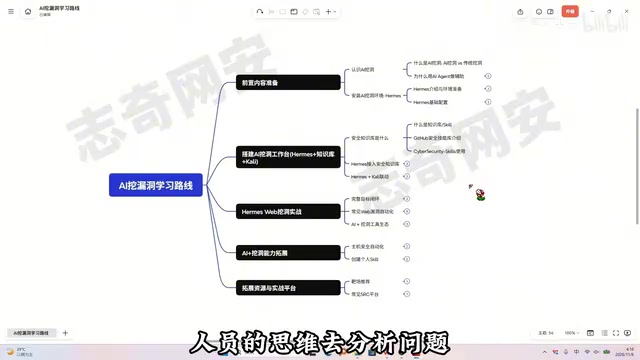
Build an AI bug hunting workbench with Hermes + security knowledge base + Kali, five stages from zero to SRC practice.
The article distills a zero-prerequisite AI bug hunting learning path based on a Bilibili tutorial. The core is distinguishing chat AI from AI Agent: the latter can autonomously plan, call tools, and continuously execute, suitable for loop tasks like vulnerability hunting (information gathering → analysis → verification). The path has five stages: install Hermes and get the first conversation running; connect the CyberSecret Skills security knowledge base and use SSH to link Kali, forming the three-piece workbench; run the complete loop of asset collection, vulnerability verification, and report generation, plus specialized training in SQL injection, XSS, business logic, JS reverse engineering, and code auditing; integrate OneForAll, Burp, and Nuclei, expand to host scenarios, and package personal Skills; finally practice on HTB, VulnHub labs, and Butian/Vulbox SRC. The article emphasizes legal authorization as an uncrossable bottom line and that human-machine collaboration will become the norm in security testing.
AI Bug Hunting in Practice: Building a Hermes Automated Pentesting Workbench from Scratch
Vulnerability hunting is moving from purely manual work toward human-machine collaboration. This zero-prerequisite tutorial from a Bilibili creator brings AI Agents into the entire penetration testing workflow. This article distills an executable learning path based on the video content and adds understanding of the key stages.
Why an AI Agent Instead of a Chat AI
Many people's first reaction to AI bug hunting is "let ChatGPT check whether this code has vulnerabilities." That's the typical use of web-based AI—one question, one answer, solving a single point problem. The tutorial clearly distinguishes AI chat from AI Agent: the former is a consumer chat mode where it answers whatever you ask; the latter, given a goal, autonomously plans steps, calls tools, and keeps pushing forward until the task is complete.
Vulnerability hunting itself is a loop of "information gathering → vulnerability analysis → tool invocation → vulnerability verification," which falls squarely within what an Agent excels at. The traditional approach is manual hunting for entry points, manual judgment, manual report writing; AI bug hunting hands these repetitive steps to AI while humans retain key decision-making authority. This division of labor isn't about AI replacing security engineers—it's about freeing human energy from mechanical labor.
From multiple sources, AI Agents landing in the security field is a clear trend. The tutorial author emphasizes in the Bilibili video that Agents are "being used more and more widely" in security scenarios, consistent with industry discussions on automated security testing—the core logic is the same: let machines handle repeatable processes, and humans handle judgment and decision-making.
AI Agent and Function Calling
The reason an Agent can "autonomously plan steps and call tools" fundamentally relies on the Function Calling (Tool Use) capability provided by large models: developers describe available tools (such as executing shell commands, making HTTP requests, reading files) to the model via structured schemas. During inference, the model decides "which tool to call and what parameters to pass," and at runtime the results are fed back to the model for continued reasoning. Open-source Agent frameworks like Hermes typically also include Planning, Memory, and an execution loop (ReAct-style Thought-Action-Observation iteration), which is the fundamental difference between being able to continuously advance multi-step tasks versus a web-based chat model that can only do one question and one answer.
MCP (Model Context Protocol)
To let Agents securely and standardly connect to external tools and data sources, the currently more common industry approach is MCP—a protocol proposed and open-sourced by Anthropic that exposes tools, resources, and prompt templates to model clients through a unified interface. Understanding MCP helps you grasp how Hermes connects to external tools and even the mechanism behind "creating personal Skills" later: essentially, both define a discoverable and invocable capability list for the model.
Breaking Down the Five-Stage Learning Path
The entire path is divided into five interlocking stages: foundational awareness and environment preparation; building the AI bug hunting workbench (Hermes + security library + Kali); Hermes Web bug hunting in practice; expanding AI bug hunting capabilities; and lab and SRC practice. The order cannot be reversed—first build awareness, then start building, and finally keep practicing.
Stage One: Install Hermes and Get the First Conversation Running
The tutorial recommends Hermes as the entry-level Agent because of its low barrier to entry, and once you've mastered it, the tool logic and working principles of other similar Agents are largely the same. This stage accomplishes two things: completing the Hermes installation on a Windows environment, configuring the API Key and understanding the model invocation principles, and finally getting the first AI conversation running. Only when the environment runs can subsequent practice have a foundation.
Stage Two: Build a Complete Workbench with the Three-Piece Kit
Hermes alone isn't enough. For AI to actually execute security testing, two more things are missing: security domain expertise and a test environment capable of executing commands. The former is solved through an open-source knowledge base—the tutorial recommends CyberSecret Skills, a free and systematic security skill library. The essence of a knowledge base is to crystallize the testing approaches and analysis accumulated by predecessors, so that AI can analyze problems close to how security professionals think, rather than staying at the level of casual chat.
Connecting the knowledge base to Hermes takes just three steps: pull the repository locally, install the security skills into Hermes, and learn to invoke professional skills. After that, Hermes has its first batch of security practical experience packs, and all subsequent practical lessons run on this foundation.
On the other side is Kali—the tool environment every security practitioner has, containing directory scanning, information gathering, and penetration testing tools. The tutorial uses SSH to open up the link for Hermes to call Kali, letting AI directly execute commands and tools within Kali. At this point the "Hermes + knowledge base + Kali" three-piece kit is complete, and AI transforms from a chat model into a handy security testing assistant.
Why Kali Is Essential Instead of Windows
Hermes is installed on Windows to lower the entry barrier (graphical interface, simple installation), but a large number of penetration testing toolchains (nmap, sqlmap, dirsearch, metasploit, etc.) natively run in a Linux environment; under Windows they either lack dependencies or have poor compatibility. Therefore the tutorial uses SSH to connect Hermes with Kali: the Windows-side Agent executes commands on Kali through an SSH session and retrieves output, effectively giving AI a "remote terminal." The key here for SSH is passwordless login (key authentication) and stable parsing of command echoes; otherwise the output the Agent receives will be incomplete and affect subsequent reasoning.
The Difference Between Skills and RAG
A security skill library like CyberSecret Skills is not vector-retrieval-style RAG, but closer to "loadable prompt and process templates": each Skill encapsulates the testing approach, checklist, common commands, and analysis points for a certain type of vulnerability, and is injected into the model as context when invoked. It solves the problem of "the model doesn't understand security methodology," not "the model doesn't know the latest material"—which is why the tutorial emphasizes "learning to invoke professional skills" and later "creating personal Skills."
Stage Three: Run the Complete Target Loop
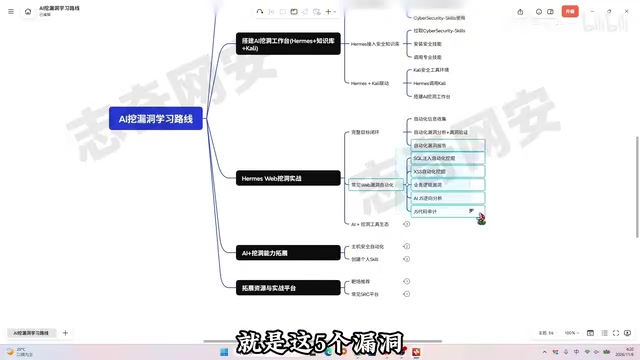
This is the most core part of the entire chain. The complete loop includes three segments: using Hermes to automatically collect assets and target information; automatically performing vulnerability analysis and verification to determine which locations may have vulnerabilities, which are high-risk points, and verifying the authenticity of vulnerabilities; and automatically generating standardized vulnerability reports.
After the loop runs, it moves into specialized training. The tutorial selects five high-frequency vulnerability types: SQL injection, XSS, business logic vulnerabilities, JS reverse engineering, and JS code auditing. Each type uses AI to organize testing approaches and improve analysis efficiency. Among them, SQL injection and XSS are veteran Web security topics, business logic vulnerabilities test understanding of business, and JS reverse engineering and code auditing lean toward analysis of the frontend and source code.
The Difference Between JS Reverse Engineering and JS Code Auditing
These two are often conflated, but they actually point in opposite directions. JS reverse engineering targets the "black box": given obfuscated/compressed frontend code (such as webpack build artifacts or encrypted parameters in the console), you restore the encryption logic and interface signature rules through formatting, breakpoint debugging, hooking encryption functions, and other means. The goal is to figure out "how request parameters are generated" so you can construct legitimate requests for testing. JS code auditing is "white box": with source code in hand, you statically inspect dangerous patterns such as innerHTML, eval, missing origin validation in postMessage, and source-sink chains in DOM-based XSS. AI's value differs in each—during reverse engineering it helps identify obfuscation features and infer function purposes; during auditing it helps batch scan data flows and taint propagation, but final risk judgment still requires human confirmation.
Stage Four: Connect AI to the Tool Ecosystem
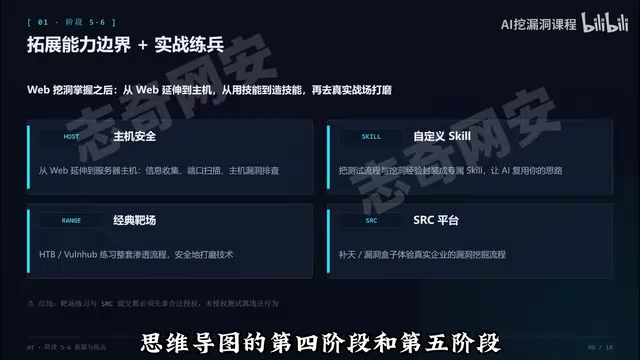
AI alone isn't enough—you also need to let the Agent interoperate with traditional security tools. The tutorial gives three directions: integrating with OneForAll for subdomain collection, integrating with Burp Suite for packet capture testing, and integrating with Nuclei for vulnerability scanning. Tools are responsible for outputting results, AI is responsible for analyzing results, confirming vulnerabilities, and determining the next testing direction, and humans make the final decision. This division of "tools scan results, AI analyzes, humans decide" essentially amplifies the value of traditional tools rather than replacing them.
Another direction for capability expansion is extending from Web to hosts: using Hermes to assist with host information gathering, port scanning, and host vulnerability investigation, translating the approaches proven on Web to server scenarios. The tutorial also mentions creating personal Skills—packaging your own testing processes and bug hunting experience into exclusive skills, letting AI reuse your approach and building a personal "AI external brain."
The Respective Roles of OneForAll / Burp Suite / Nuclei
- OneForAll: An aggregation framework for subdomain collection that integrates certificate transparency logs, search engines, DNS brute-forcing, and multiple other data sources with deduplication and liveness verification. It solves the question of "how large is the attack surface."
- Burp Suite: A proxy tool for packet capture and modification, the main battleground for manual Web testing; when integrated with AI, requests are typically handed to the model for analysis via its REST API (Burp Extender) or proxy logs.
- Nuclei: A YAML template-based vulnerability scanner whose community templates cover a large number of known CVEs and configuration flaws. Its advantages are speed, customizability, and relatively controllable false positives.
The three cover the chain of "asset discovery → traffic analysis → batch verification," but they all only provide results, not judgment. This is the technical basis for what the tutorial says: "tools produce results, AI analyzes, humans decide." What scanners output are candidate hits; whether it's a real vulnerability, how severe it is, and how to exploit it require contextual reasoning—which is exactly what Agents are relatively good at and what most needs human review.
Stage Five: Lab Practice and SRC Practice
With the method in hand, you need real practice to hone it. The tutorial recommends two classic lab types, Hack The Box and VulnHub, which have comprehensive machine types and clear difficulty tiers, suitable for practicing the complete penetration process. Once proficient, you can enter the real battlefield—SRC platforms. The tutorial recommends Butian and Vulbox, where you can experience the vulnerability hunting process and acceptance rules of real enterprises.
A Bottom Line That Must Not Be Crossed
The tutorial repeatedly emphasizes: whether it's lab practice or SRC submission, all testing must have legal authorization; unauthorized testing is illegal. This is the bottom line for every security learner.
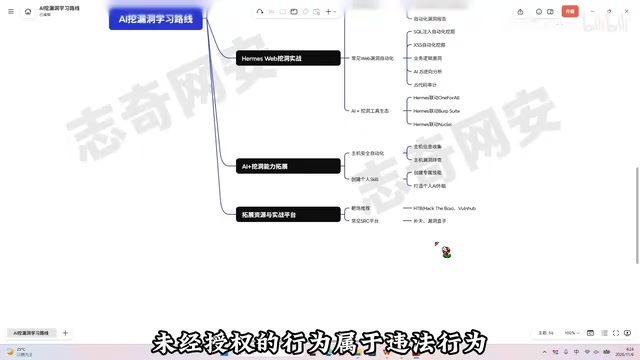
This reminder is not a formality. AI Agents have the ability to autonomously call tools and continuously execute tasks; once the target is out of bounds, the actual impact is greater than manual operation. Authorization first is the prerequisite for using such tools.
Human-Machine Collaboration Will Become the Norm
The direction of security testing in the AI era is changing: information gathering, vulnerability analysis, tool invocation, and result output can all involve AI collaboration. The tutorial's final judgment is that in the future, security engineers working with AI to hunt bugs will become the norm. For zero-prerequisite learners, the value of this path lies in breaking "awareness—building—practice" into executable steps rather than piling up a tool list. What truly requires time investment is understanding what AI handles at each stage and what humans retain—this determines whether the workbench ultimately reflects "your style" or is a casually assembled toy.
Related articles
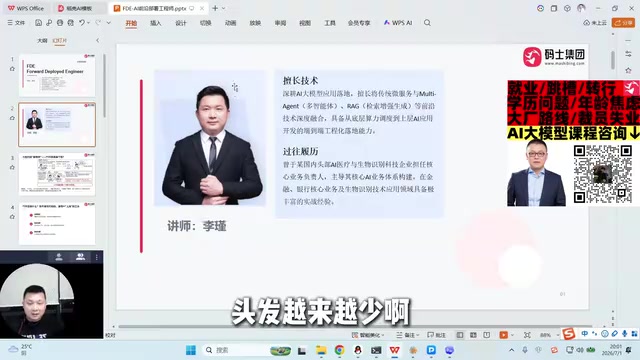
AI's New Species FDE in Practice: Core Responsibilities and Career Guide
An in-depth look at the three core responsibilities of the AI-era FDE (Forward Deployed Engineer), role boundaries with algorithm, backend, and product teams, and an interview and career preparation guide, illustrated with a real-world learning platform agent transformation case to help developers understand this key role in the last mile of AI deployment.
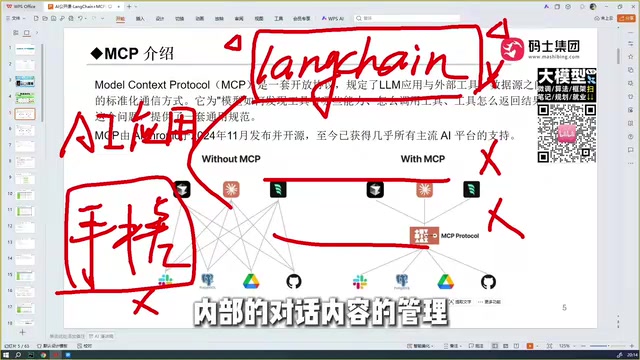
LangChain + MCP in Practice: Architecture Protocol and Agent Tool Integration
Starting from LangChain and Agent encapsulation, this article explains how the MCP protocol solves cross-model, cross-framework tool reuse, compares MCP with Function Calling, and outlines the LangChain stack and Agent development.
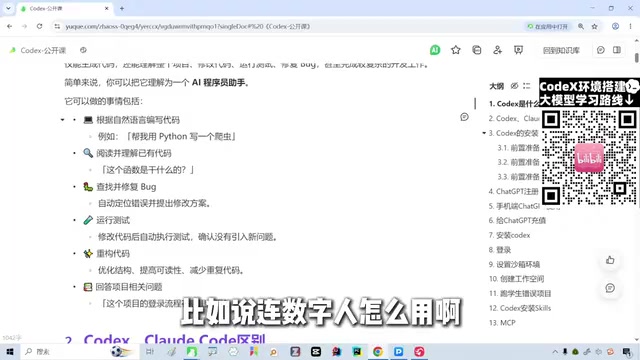
Codex in Practice: From Environment Setup to Skills and MCP Calls
Codex is OpenAI's AI coding assistant. This guide covers its positioning, how it compares to Claude Code, model configuration pitfalls, and practical Skills and MCP usage for beginners.