AI Canvas Agent Is Here: How to Use Node-Based Creative Workflows

AI canvas tools bring node-based visual workflows to content creation, enabling scalable, process-driven AI production.
AI content creation is shifting from single-turn chat interactions to visual canvas-based workflows. Using the AI1505 platform as an example, users can chain AI image generation (multiple models, up to 4K) and video generation (Cdance 2.0 at 1080P, Kling 3.0 at 4K) nodes to build complete text-to-image-to-video pipelines. The node-based design transforms AI creation from guesswork into structured production, with Agent-driven autonomous decision-making on the horizon.
AI Content Creation Enters the "Canvas Agent" Era
AI generation technology is evolving faster than ever. Simply typing prompts into a chat box and waiting for results is no longer enough to handle complex creative scenarios. As a result, more and more platforms are introducing the concept of a "Canvas" — using visual node connections to let users build complete AI creative workflows themselves. The free canvas feature recently launched on the AI1505 platform is a prime example of this trend.
This article uses the AI1505 platform as a case study to break down the core features and practical usage of AI canvas tools, and to explore what this node-based creative model actually changes.
What Is an AI Canvas? Here's the Short Version
At its core, an AI canvas is a visual workflow orchestration tool. On a two-dimensional canvas, you drag and connect different AI function nodes to build a complete creative pipeline — from input to output.
Visual workflow orchestration isn't a brand-new invention in the AI space. The design philosophy traces back to the DAG (Directed Acyclic Graph) concept from data engineering and software development. Early audio/video post-production tools like Nuke and Houdini, as well as data processing tools like Apache Airflow, all used node-based connections to organize complex pipelines. In recent years, ComfyUI's explosive popularity in the Stable Diffusion community brought node-based AI image generation workflows to mainstream awareness. The AI canvas is essentially taking this proven interaction paradigm and making it accessible to everyday content creators — lowering the barrier to building multi-step AI pipelines.
The benefits are straightforward:
- Visual clarity: The entire creative process is laid out at a glance — no need to mentally track each step
- Flexible composition: Different AI models and functions can be freely chained in series or parallel
- Reusability: Save a workflow once, reuse it anytime
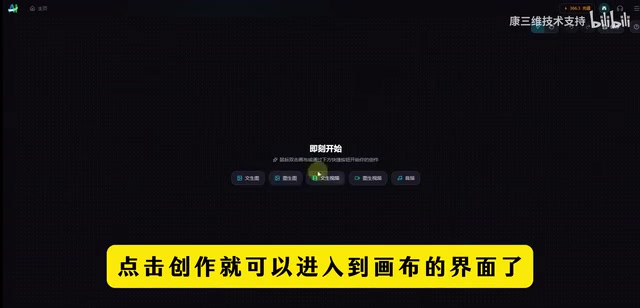
On the AI1505 platform, find the "Free Canvas" entry point, click "Create," and you'll enter the canvas interface where you can start building your own AI creative workflow.
AI Image Generation: Multiple Models, Up to 4K Resolution
The AI image generation feature in the canvas integrates today's mainstream image generation models, giving users plenty of options.
Most current AI image generation models are built on the Diffusion Model architecture. The core principle: progressively add noise to an image until it becomes pure noise, then train a neural network to learn the reverse denoising process — enabling high-quality image generation from random noise. From Stable Diffusion's open-source release igniting the industry in 2022, to DALL·E 3 and Midjourney V6 continuously pushing image quality limits, to domestic Chinese models catching up and even surpassing in specific scenarios, the competitive landscape in image generation is shifting rapidly. 4K resolution output means the model must maintain detail consistency at the 4096×4096 pixel level — a demanding requirement for both model parameter scale and inference compute.
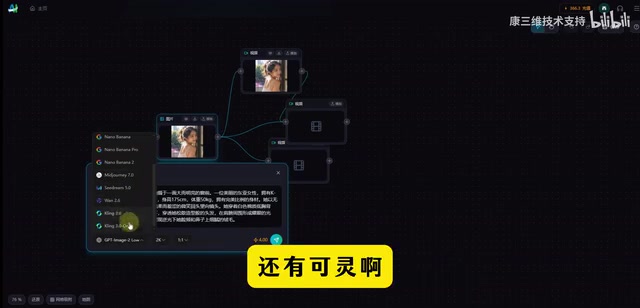
Currently Supported Image Generation Models
- Qianzhen GPG Silver Edition 2: High-quality general-purpose image generation
- LALA BLALA: A widely used image generation model
- Jimon Cdream: Distinctive style image generation
- Kling (可灵): A leading domestic AI image model
These models support output up to 4K resolution. Users can generate AI images through text descriptions (text-to-image), covering everything from social media visuals to professional design assets.
AI Video Generation: Photorealistic Quality Is Within Reach
Beyond image generation, the canvas also supports AI video generation — currently one of the hottest directions in AI creative tools.
AI video generation is considered an order of magnitude harder than image generation. Beyond ensuring per-frame quality, it must solve the temporal consistency problem — ensuring continuity of character appearance, scene lighting, and object motion trajectories across consecutive frames. Early video generation models frequently produced distorted faces and twisted limbs. After OpenAI's release of Sora sent shockwaves through the industry in 2024, vendors accelerated their iterations, and models like Kling, Runway Gen-3, and Pika have made significant progress in motion naturalness and visual stability. Realistic human video generation is especially challenging because the human visual system is extremely sensitive to abnormalities in faces and body movements — even subtle unnaturalness triggers the uncanny valley effect.
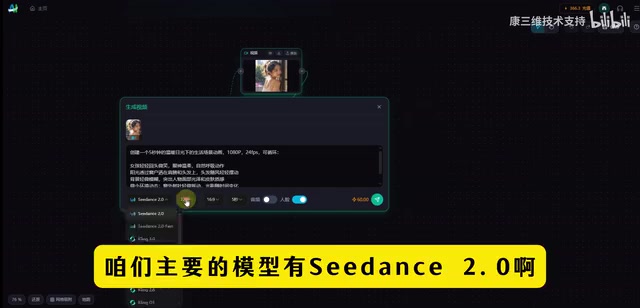
Supported Video Generation Models
| Model | Features | Max Resolution |
|---|---|---|
| Cdance 2.0 | Realistic human video generation | 1080P |
| Kling 3.0 (可灵3.0) | High-quality video | 4K |
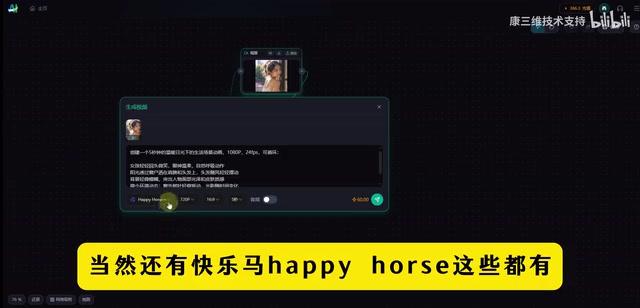
| Kuaile Ma (快乐马) | Multi-style support | — |
Cdance 2.0 specializes in realistic human video generation at up to 1080P; Kling 3.0 pushes video resolution to 4K, opening up more possibilities for professional-grade video creation.
Node-Based Workflows: The Core of AI Canvas
The biggest highlight of the canvas feature is its node-based workflow design.
Traditional AI creative interaction is linear: enter a prompt → wait for generation → review the result → re-enter if unsatisfied. In this model, each step is isolated, with no structured connection between stages. Node-based workflows introduce the concept of Dataflow Programming — each node is an independent processing unit, and nodes pass data to each other through connections. This means the output of an upstream node automatically becomes the input of a downstream node, and parameter adjustments at any point in the chain propagate automatically. More importantly, parallel branches let users explore multiple creative directions simultaneously rather than waiting in sequence — especially efficient when A/B testing different styles or model outputs.
You can keep connecting nodes to accomplish complex creative tasks. Here are a few typical scenarios:
- Text node → Image generation node → Video generation node: From text to video in a single pipeline
- Image node → Style transfer node → Upscaling node: Multi-step image processing with progressive refinement
- Multiple generation nodes running in parallel: Generate multiple versions simultaneously and compare
This modular design philosophy upgrades AI creation from "single-conversation guesswork" to "process-driven batch production" — raising both efficiency and controllability to a new level.
What's Next for AI Canvas Agents?
The AI canvas feature is still iterating rapidly, and the AI1505 platform has made clear it will continue to optimize.
It's worth noting that the word "Agent" in the title carries deeper meaning. In AI, an Agent refers to an AI system capable of autonomously perceiving its environment, forming plans, and executing actions — distinct from traditional tools that passively respond to instructions. Bringing the Agent concept into the canvas means future AI creative tools won't just passively execute user-built workflows; they may also have autonomous decision-making capabilities — for example, automatically selecting the most suitable model based on the user's creative goals, auto-adjusting parameters, or even iterating independently when generated results fall short. This aligns with the direction of frameworks like LangChain and AutoGPT, representing a shift in AI tools from "tool" to "collaborator."
Looking at the broader industry trajectory, the direction that canvas-based AI creative tools represent is already clear:
- More model integrations: As new models emerge, the canvas will incorporate more options
- Smarter orchestration: AI automatically recommends optimal node combinations, lowering the learning curve
- Multi-user collaboration: Teams co-creating on the same canvas
- Template marketplace: Useful workflows can be shared, reused, and even traded
For content creators, getting familiar with the logic of canvas-based AI tools early is a high-value investment. The tools will keep changing, but those who develop a workflow-oriented mindset sooner will adapt faster.
Key Takeaways
- An AI canvas is a visual node-based workflow tool that supports drag-and-drop connection of different AI function modules
- Image generation supports multiple models including Qianzhen GPG and Kling, with output up to 4K resolution
- Video generation supports models like Cdance 2.0 (realistic human video at 1080P) and Kling 3.0 (4K)
- Node-based design upgrades AI creation from single-conversation attempts to process-driven production, improving both efficiency and control
- Canvas Agents represent the future of AI content creation — worth getting ahead of as a creator
Related articles
 Tutorials
ChatGPT Plus Subscription Guide: Are GPT-5.5, image-2, and Codex Worth the Upgrade?
A detailed look at ChatGPT Plus features — GPT-5.5, image-2, and Codex — with a Plus vs Pro comparison and a complete step-by-step subscription guide for users outside the US.
 Tutorials
Harness AI Engineering in Practice: Using Claude Code to Master Enterprise-Level E-Commerce Development
Deep dive into Harness AI Engineering: master enterprise e-commerce development with Claude Code using the Rules, Skills, Wiki, and Changes framework.
 Tutorials
Cursor + Codex Dual-IDE Collaboration: A Practical Methodology for Open-Source Project Customization
A complete methodology for open-source project customization based on real-world experience, detailing the Cursor+Codex dual-IDE workflow, seven-stage process, MVP validation, and AI source code reading techniques.