AI Coding for Beginners: A Complete Guide to Cursor and Its Alternatives
A beginner's guide comparing AI code editors Cursor, Trae, and Windsurf on features and cost.
Based on the VibeCoding course on Bilibili, this article introduces the AI code editor ecosystem centered on Cursor, helping beginners find the right starting tool. Cursor stands out with natural language programming, codebase context-aware Q&A, and smart Tab completion — letting non-technical users build projects without learning syntax first. New users get a two-week Pro trial ($20/month after). For tighter budgets, ByteDance's international Trae (trae.ai) is the top free alternative — the international version is essential for accessing Claude and other top-tier models. Windsurf at $15/month offers multi-file editing and live preview. All three share similar interaction logic, but Cursor remains the course's primary tool for its best-in-class AI support.
As AI-powered programming continues to lower the technical barrier to entry, a great code editor has become the critical first step for beginners. Based on the VibeCoding programming course on Bilibili, this article breaks down the core capabilities and installation of the AI code editor Cursor, along with two worthy alternatives — helping readers without a technical background quickly find the right tool to get started.
What Is Cursor: An AI Code Editor Built for Productivity
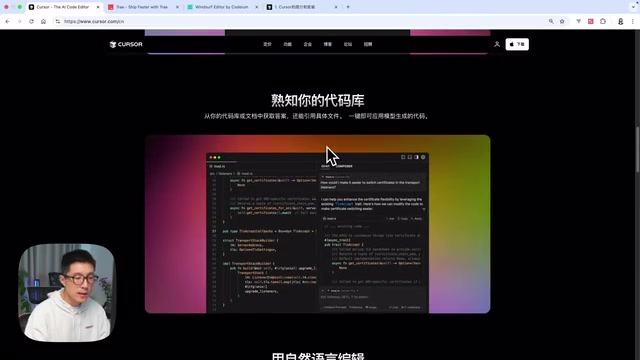
Head to the Cursor website and its positioning is immediately clear — it's an AI code editor designed specifically to boost programming efficiency. Its value extends beyond professional developers; it's equally approachable for learners with no technical background whatsoever, allowing them to build their own projects from day one.
Cursor's appeal to beginners comes down to three core capabilities:
Natural language programming is the most intuitive of these. You can describe the functionality you want in plain English, and the AI will generate the corresponding code. This means learners don't have to grind through a syntax textbook before they can start building things.
Context-aware, in-editor Q&A addresses the most common pain point for newcomers. When you hit a bug or can't make sense of a piece of code, you can ask questions directly inside the editor — no need to constantly switch over to ChatGPT or another chat window. Because Cursor can read the full context of your codebase, its answers are far more relevant to your actual situation than a generic AI operating without project context.
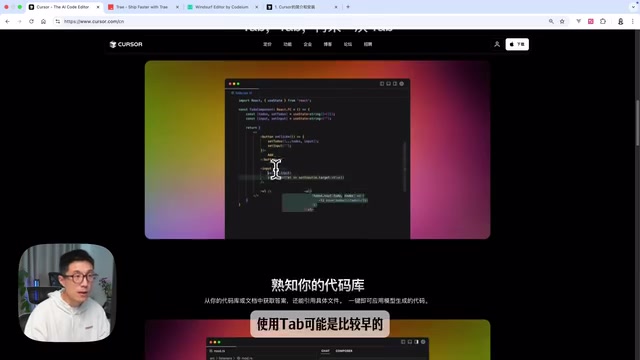
Smart autocomplete (Tab) lets beginners focus on the logic of what they're building rather than getting tripped up by syntax details. That said, the course is candid: for truly zero-experience users, Tab completion may not see heavy use at first — it's more of a feature that pays off as your proficiency grows.
On the technical side, Cursor is a deeply customized fork of Microsoft's VS Code. This means it inherits VS Code's massive plugin ecosystem and familiar interface, making the switch virtually seamless for anyone who's used VS Code before. Compared to writing code directly in ChatGPT or Claude's web interface, Cursor's key differentiator is native tool integration — the AI model is directly connected to your code files, terminal, version control, and other development tools, rather than relying on copy-pasting back and forth. This integration allows the AI to read your entire project's file structure, dependencies, and code context — not just what's in the current chat window — enabling more targeted suggestions and more precise debugging. For beginners, this reduces the cognitive overhead of "describing your problem" — you don't need to manually explain the project background, because the editor has already done that for you.
Installing Cursor and Tips on the Pro Trial
Installing Cursor is straightforward. Visit the official website, click the download button in the top right corner, and the site will automatically detect your OS. Download the file and follow the prompts — there's virtually no configuration required.
For pricing, the course teaches using Cursor Pro. Cursor offers new users a two-week free Pro trial. The recommendation for beginners is: make the most of those two free weeks first, and only decide whether to upgrade to a paid plan once you've confirmed it genuinely helps you.

At $20/month, the Pro plan may feel steep for some learners. If budget is a concern, here are two cost-effective alternatives worth considering.
Alternative 1: Trae by ByteDance (International Version)
The first alternative is Trae, built by ByteDance. An important note here: this refers specifically to the international version of Trae, which is currently completely free and offers functionality comparable to Cursor.
In terms of feature mapping: Trae's Builder mode roughly corresponds to Cursor's Agent mode (automated task execution), while Chat mode corresponds to Cursor's Ask mode (conversational Q&A). For anyone familiar with Cursor's interaction model, the learning curve is minimal.
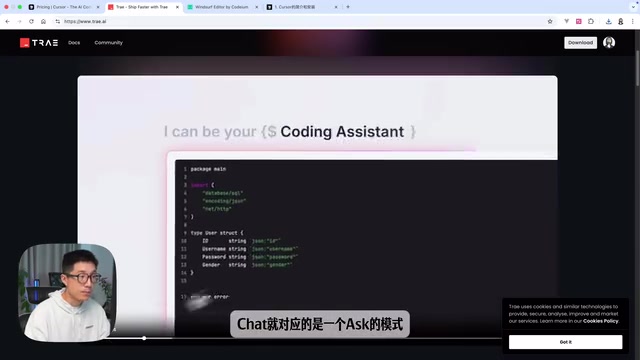
One critical detail: you must access the international version at trae.ai to use high-quality models like Claude. The overall experience is significantly better than the domestic Chinese version. This seemingly small detail has a major impact on the actual user experience and is easy to overlook when choosing Trae.
The core difference between Trae's international and domestic versions comes down to the underlying models available. The domestic version is subject to regulatory restrictions and primarily uses Chinese domestic models, while the international version (trae.ai) supports Anthropic's Claude series and OpenAI's GPT series. Claude has a strong reputation for code understanding and generation — particularly for handling longer code contexts — which is the fundamental reason the article emphasizes using the international version. It's also worth explaining Builder mode (Cursor's equivalent of Agent mode) separately: it isn't a simple Q&A interaction. Instead, it lets the AI autonomously plan and execute multiple steps in sequence — creating files, writing code, running commands, and automatically fixing errors based on output — all without requiring step-by-step user confirmation. It's closer to "handing a task to the AI and letting it run," and represents one of the highest levels of automation available in AI coding tools today.
Alternative 2: Windsurf
The second alternative is Windsurf, priced at $15/month for its Pro plan — $5 cheaper than Cursor.
Windsurf stands out for beginners in two key ways: multi-file editing and a built-in website-like preview. The latter is especially practical — it lets you see the real-world effect of your code changes in a very visual, immediate way. For newcomers still building an intuitive sense of cause and effect between code and output, this kind of instant feedback is genuinely valuable.
Windsurf is developed by Codeium, an AI code intelligence company. Its "website-like preview" typically refers to a built-in live rendering preview that displays changes to HTML/CSS/JavaScript as a visual page in real time — similar to browser developer tools, but without ever leaving the editor. This is especially useful for beginners targeting web pages or app interfaces: change a button color or adjust a layout, and you see the result immediately without switching to a browser and refreshing. The multi-file editing capability means the AI can make consistent changes across multiple related files simultaneously, rather than being limited to the single file currently open — a feature that significantly boosts efficiency as your project grows in complexity.
Why the Course Still Focuses on Cursor
Despite Trae being free and Windsurf being cheaper, the course still uses Cursor as its primary tool. The reason: the author believes Cursor offers the best onboarding experience for beginners and currently has the most capable and polished AI support features of any editor on the market.
A practical recommendation for readers: use Cursor's two-week free trial to establish a learning baseline. If the paid plan feels worth it, upgrade. If budget is tight, the international version of Trae is the top free alternative; Windsurf offers a comparable experience at a lower cost. All three tools share a highly similar core interaction model — once you've learned one, switching to another isn't difficult.
Summary
AI code editors are shifting the entry barrier for programming from "mastering syntax" to "clearly describing what you want." Cursor, with its natural language programming, codebase context awareness, and smart autocomplete, makes an excellent starting point for beginners. Trae and Windsurf offer flexible, lower-cost alternatives. For anyone just getting started, the most pragmatic approach is: try the free options first, then decide whether to pay based on your real experience.
Related articles

Cerebras CS-4 Stuns with Launch: The 4-Trillion-Transistor Wafer Monster That Crushes GPUs in Inference Speed
Cerebras CS-4 wafer-scale engine launched: 4 trillion transistors, 900,000 AI cores, inference an order of magnitude faster than GPUs. Modular power rack plus compute backpack design, 3D vertical stacking, and half-millimeter power delivery—online in minutes.

Apple's M6 Chip Lands in iMac: A Week in Review of Performance Upgrades and AI Controversy
Apple launches new iMac and MacBook Pro with M6 chip, N1 wireless chip brings speed gains; OpenAI claims three major discoveries but faces academic skepticism; data centers become a U.S. midterm election issue; Anduril teams up with Qualcomm for all-American laptops.

AI Cracks the Quasi-Riemann Hypothesis? A Mathematician's Account of a Stunning Moment
Number theorist Alex recounts on Lex Fridman's podcast the shocking experience of AI proving the quasi-Riemann hypothesis, plus Fermat's Last Theorem formalization and Navier-Stokes within a month, explaining the signal-processing intuition behind the Riemann hypothesis and the boundaries of AI breakthroughs in mathematics.