AI Coding Free Tiers Tested: Trae Gives 500 Credits/Month, Copilot 2000 Completions/Month

Checked seven AI coding tools' official free tiers one by one, noting units differ and can't be compared; what really matters is whether there's a fixed number, how often it refreshes, and what happens when used up.
The article surfaces the official free tiers of seven AI coding tools — Trae, Tongyi Lingma/CodeBuddy, Tencent Cloud CodeBuddy, Google AntiGravity, GitHub Copilot, Cursor, and Codex. The core takeaway: quotas use different units and can't be compared directly — Trae counts credits monthly, Copilot counts completions monthly, AntiGravity uses a weekly rate limit. What's comparable is whether there's a fixed number, how often it refreshes, and the path after use. It also corrects an outdated rumor: Gemini CLI's free personal edition stopped processing requests on June 18, replaced by AntiGravity CLI. Ends with use-case-based combinations and a reminder to mark all numbers with query dates.
How many AI coding tools can you use at once without spending a cent? Someone went through seven companies' official pricing pages line by line and put together a "free ledger." How much can you get for free, how long does it last, and what happens when it runs out — once you ask these three questions, the outdated claims in many tutorials fall apart.
Why You Can't Just Sort by the Numbers
Put seven companies' free tiers side by side, and your first instinct is usually to compare sizes. But Trae's "500 credits," Copilot's "2000 completions," and AntiGravity's "weekly refresh quota" are fundamentally three different units of measurement — they can't be compared directly.
Credits are deducted based on actual usage — which model you use, how complex the task is, how much context you bring all affect consumption. So how many things 500 credits can do is something even the official docs don't give a fixed number for. The only three things that can truly be compared across tools are: whether there's a fixed number, how often it refreshes, and what path you take once it's used up.
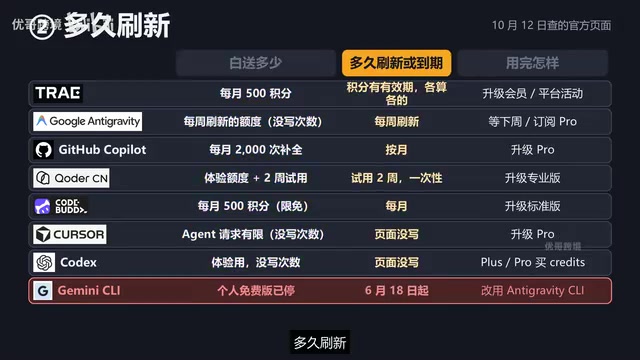
This also explains why the same "free strategy" guide lasts someone a month with room to spare, while someone else burns through it in three days — different units mean different comparability.
"Credits" and "积分" mentioned repeatedly throughout are essentially a usage-based credit unit, not the "number of times" or "seats" of a traditional subscription. The design logic is: the platform converts the calling costs of different models into the same virtual unit, and users are deducted based on actual consumption. This has two consequences — first, the same credit has different purchasing power across different models: calling a flagship model might deduct dozens of credits in one task, while using a small model can stretch much further; second, credits usually have expiry dates, and different sources (subscription gifts, promotional issuance, new-user packages) each have their own independent validity period, clearing to zero upon expiry. So when evaluating free tiers, just looking at "how many credits" is meaningless — you also need to see which models they apply to, whether they share a quota pool, and what the expiry rules are. This is the fundamental reason why some users find their quota "very durable" while others "hit bottom in three days."
Another easily overlooked concept is each platform's rate limit. Copilot's "2000 completions per month" is a total-volume limit, while AntiGravity's "weekly rate limit" is a frequency limit — the former governs how much you can use within a period, the latter governs how fast you can send requests per unit time. When the two stack, it's often not the total that runs out first but the frequency that hits the ceiling — which is also why official docs often decline to give a single number.
The Three Chinese-Interface Tools: Trae, CodeBuddy, Tongyi Lingma
Trae: 500 Credits/Month, Plus 4500 More for New Users
ByteDance's Trae merged the previously separate Trae Code and Trae Work into a single entry point. The free tier is $0, gives 500 credits per month, doesn't cripple features, and allows two cloud tasks to run simultaneously.
Credits are Trae's unit of measurement, and the actual deduction depends on the model, task complexity, and context length. Besides the 500 per month, new users who register get a one-time 4500 credits. The official FAQ explicitly states that credits' validity periods are calculated separately by source, cleared upon expiry, and the usage management panel shows the expiry time of each batch. Once used up, there are two paths: upgrade to a membership, or participate in platform activities to earn credits. The cheapest Lite membership starts at 39 yuan for the first month (originally 49), giving 2000 credits per month — the free tier's 500 is only a quarter of that.
Tongyi Lingma → CodeBuddy: Trial Quota + Two-Week Trial
The Tongyi Lingma official site now states at the top that it has been upgraded to CodeBuddy, and the homepage still retains the phrase "free for personal use," but the actual quota needs to be checked on the pricing page. The free tier is called the Trial Edition, $0, and the official description lists two things: a limited trial quota, plus a one-time two-week Professional Edition trial. During the trial period, the price page targets 10 yuan / 300 credits.
How much "limited" actually is, the page doesn't say. What's certain is that the two-week trial is one-time only — once it's used up, only that trial quota remains. To add more, you need to first upgrade to Professional (59 yuan/month, 4000 credits, new customers get an extra 2000 on first subscription) — the 1000 credits / 40 yuan resource pack tier is explicitly marked as available only to Professional and above, so Trial Edition users can't use it.
Tencent Cloud CodeBuddy: Limited-Time Free, Numbers Were Loosened
Tencent Cloud's free tier is also called the Trial Edition, marked as limited-time free, with 500 credits per month, Auto mode automatically selecting models, and all models available during the limited-free period. Real-time code completion is normally 5000 times per month, but during the limited-free period it says unlimited; automated tasks are normally 3, but during the limited-free period it's 99.

The key lies in the words "limited-time" — the page doesn't say when these loosened items end. So what you're seeing now is the loosened version, and it's entirely normal for them to revert to the small numbers in parentheses someday. After using it up, the Standard version's continuous monthly subscription is 70 yuan/month after a 30% discount, with 2000 credits plus another 2000 bonus; the page also has a credits pack promotion from October 10 to 23, starting at 200 credits.
The Four Overseas Tools: AntiGravity, Copilot, Cursor, Codex
Google AntiGravity: Weekly Refresh, Exact Count Not Disclosed
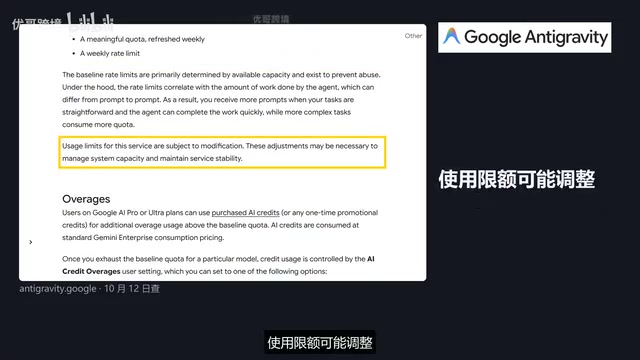
Personal edition is $0, and the page is quite direct: multiple Agent models available, unlimited Tab completion, unlimited command requests, and finally adds "basic weekly rate limit." The documentation is a bit more detailed — those who haven't subscribed to Google AI Pro or Ultra get a quota that refreshes weekly plus a weekly rate limit; those who have subscribed to Pro get a refresh every 5 hours. Available models include Gemini 3.1 Pro and Gemini 3.8 Flash.
How many times exactly, the official docs don't say — only that the quota is tied to how much work the Agent does: simple tasks allow more prompts, complex tasks drain the quota faster. What to do when used up? The free tier just waits for next week's refresh; if you don't want to wait, you need to subscribe to Pro/Ultra and use AI Credits to add more.
Gemini CLI is an open-source command-line AI coding tool from Google that lets users call Gemini models directly in the terminal to complete code generation, file operations, and other tasks. It was widely circulated in the developer community early on for "1000 free requests per day for personal accounts." AntiGravity is Google's subsequently launched, more complete AI coding product (including IDE and CLI forms), positioned as the unified entry point for terminal and editor scenarios. Google's May 19 announcement means product line consolidation: terminal requests from free personal users and Pro/Ultra subscribers are now handled by AntiGravity CLI, and the original Gemini CLI only continues to serve Google's paid corporate versions and developers using paid API keys. This kind of "tool renaming + entry migration" is not uncommon in AI coding, and it's precisely why a large number of old tutorials quickly go stale — the tutorial copied the entry name from a certain point in time, and the entry itself may be replaced within a few months.
The Misrepresented Gemini CLI
Many tutorials still teach "Gemini CLI gives 1000 free requests per day." The GitHub description page does still say this, but Google issued an announcement on May 19: starting June 18, Gemini CLI will no longer process requests for personal-account free users and Pro/Ultra subscribers, and its place in the terminal has been taken by AntiGravity CLI; only the corporate paid version and paid API key paths are retained. So the claim "Gemini CLI gives 1000 free per day" has been outdated since June. If you want to keep using it in the terminal, install AntiGravity CLI — the docs state that CLI is also within the scope of the free version's features.
GitHub Copilot: 2000 Completions/Month, Plus Separate Plans for Students and Teachers
Free tier is $0, no credit card required. The official docs state entry-level models get 2000 code completions per month, chat and Agent quotas are described as "limited" with no specific counts; the command line and Agent mode are also supported in the free tier. Completions are counted monthly, while chat and Agent portions have no official numbers — not going to make them up.
When used up, upgrade to Pro at $10/month, which includes 1500 premium AI credits worth $15, and can also connect to third-party Claude Code and Codex. Another thing many overlook: verified students have a separate student plan, and for verified teachers and popular open-source project maintainers, Pro itself is free.
Copilot's "premium requests" are a type of measurement unit distinct from basic completions. Basic code completion is usually handled by lightweight models with low calling costs, so it's counted by "times"; while chat, Agent mode, and requests calling stronger reasoning models cost much more, so they're uniformly converted into "premium requests" with a separate cap. The 1500 credits included monthly with the Pro tier refers to the latter. This also explains why the free tier only gives an explicit number for completions while writing "limited" for chat and Agent — the cost differences between different models and task forms are too large for the official docs to give a stable count commitment. The Student Plan (GitHub Student Developer Pack) is another independent channel: after school verification you can get Copilot Pro for free, and teachers and popular open-source project maintainers also have corresponding free or discounted programs. These qualifications often don't share the regular free quota — they're one of the most easily overlooked tiers.
Cursor and Codex: Neither Official Source Gives Numbers
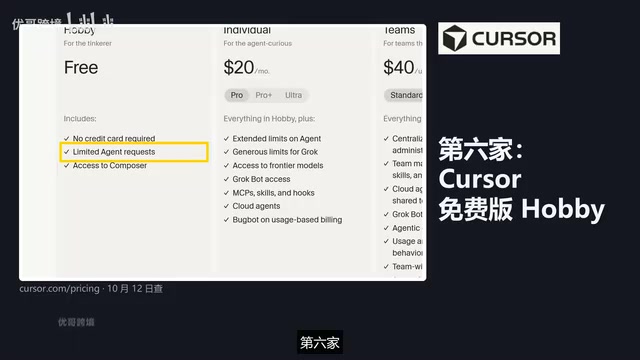
Cursor's free tier is called Hobby, no credit card required, limited Agent requests, can use its own Composer model — how many "limited" is, the page doesn't say. Upgrading to Personal Pro is $20/month, described as a higher Agent quota and access to frontier models.
Codex isn't sold separately — it's included in ChatGPT's various tiers, including free accounts. The official description of the free tier is "for experiencing quick, small coding tasks." The free and Go tiers use GPT-6 Luna at standard speed, available in the desktop app, and the page also says "rolled out by push schedule" — meaning not every account necessarily has it at the same time. As for counts, the official only gives an estimate for Plus (how many local messages can be sent per 5 hours); the free tier doesn't provide one, and it's emphasized to be an estimate, not a fixed ceiling. To continue after using it up, the official says Plus and Pro users can buy extra credits — the free tier path isn't mentioned on the page.
How to Arrange It Based on Your Situation
Looking only at official free tiers, you can combine them like this:
If you want AI to run a small project to completion on its own, start with AntiGravity's one-week quota, then wait for next week's refresh; If you want to write and get completions as you go, use Copilot's 2000 completions/month plus Trae's 500 credits; If you want to try the Chinese interface first, use Trae free tier's 4500 credits for new users — check the expiry time first and use them before they expire; If you already have a ChatGPT account, the Codex free tier is right there to try; If you're a student, teacher, or open-source project maintainer, first go to Copilot and claim the free student plan or Pro.
A Practical Reminder
These numbers were taken from official pages checked on October 12, and not a single number that wasn't on the page was filled in. Free tiers are fundamentally each company's way of inviting you to try, and they may change over time — AntiGravity's own documentation says "limits may be adjusted." So every number should be marked with a date, and you should check the official site again before downloading.
What's truly worth remembering isn't some specific number, but that set of questions: how much is given for free, how long it lasts, what happens when used up. Take these three things to verify any "free strategy" guide, and you won't easily be led astray by outdated tutorials.
To judge whether a "free strategy" guide is still valid, there's a simple self-check order: first see whether the product name it mentions still exists on the official site (Gemini CLI is a classic migrated case), then see whether the specific numbers can be found on the official pricing page or FAQ, and finally see whether the numbers are marked with a query date. If any of these three is missing, it can basically be judged as secondhand retelling. Another practical habit is to distinguish "official text" from "community retelling": many circulating numbers originally came from some blog or screenshot, and after several rounds of reposting they get treated as official statements, while the official page never actually wrote them. When you encounter a claim with only numbers and no source, the safest approach is to open the official site and verify it yourself — this is exactly the practical operation of the "set of questions" mentioned in the original text.
One-line Summary
Checked the official free tiers of seven AI coding tools one by one, noting that units differ and can't be compared; what really matters is whether there's a fixed number, how often it refreshes, and what happens when used up.
Paragraph Summary
The article pulls out the official free tiers of seven AI coding tools one by one — Trae, Tongyi Lingma/CodeBuddy, Tencent Cloud CodeBuddy, Google AntiGravity, GitHub Copilot, Cursor, and Codex. The core conclusion is that these quotas use different units and can't be directly compared by size: Trae counts credits monthly, Copilot counts completions monthly, AntiGravity uses a weekly rate limit — what can be compared is "whether there's a fixed number, how often it refreshes, and the path after use." The article also corrects a widely circulated outdated claim — Gemini CLI's free personal edition stopped processing requests on June 18, and its entry was replaced by AntiGravity CLI. Finally, it gives combination suggestions based on use cases and reminds readers that all numbers should be marked with a query date, and not to make up numbers the official pages don't state.
Related articles

How Big Can Stars Really Get? The Physical Limits of the Largest Stars
Red supergiants are the largest stars by volume, with radii up to 2,000 times the Sun, engulfing the inner solar system. But there is no precise upper limit on stellar size—models predict up to 15,000 solar radii. The most massive blue stars are far smaller than red supergiants—biggest and heaviest are two different things.

Apple HomeView Smart Display Full Feature Breakdown: Wall-Mount or Desktop, $299
Apple launches HomeView, a $299 smart display with wall-mount and desktop options, 12MP camera for facial recognition, smart home control, music playback, and recipe step-by-step cooking. Full breakdown of watch faces, apps, privacy, and cooking integration.

Where Did the Promised New Studio Go? Craft Computing Answers After Five Years
Craft Computing's host responds to viewer questions: the new studio promised five years ago was shelved as construction costs soared from $30,000 to $75,000, and was replaced by a 168-square-foot garage conversion.