AI Coding Tools Compared: Cursor, Claude Code, or Trae — Which One Should You Pick?
A practical comparison of Cursor, Claude Code, Trae, and other leading AI coding tools with selection advice.
This article traces the evolution of AI coding tools from early plugins like GitHub Copilot to standalone IDEs and Agent-mode tools. Cursor leads as the most widely adopted graphical IDE built on VS Code; Windsurf specializes in local model execution for privacy-conscious users; ByteDance's Trae and Qwen Coder offer free domestic alternatives; and Claude Code excels at fully automated, command-line-driven project generation. The article recommends combining Claude Code with Cursor for maximum efficiency, and emphasizes that in a fast-moving space, getting hands-on with one tool matters more than obsessing over which to pick.
AI coding is evolving from "code completion" into a core productivity tool for agentic development. Understanding the strengths, weaknesses, and ideal use cases of today's leading AI coding tools is an essential step for anyone getting started with AI-assisted development. This article breaks down the positioning, pros and cons, and selection advice for the most popular tools on the market — so you can quickly find the right one for your workflow.
From Plugins to Standalone IDEs: How AI Coding Tools Have Evolved
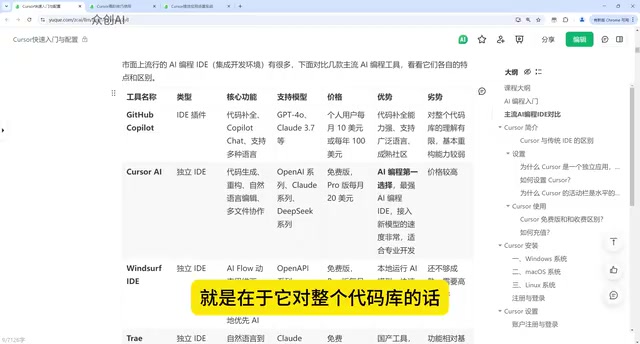
AI coding tools have followed a clear evolutionary path. The first to reach mainstream developers was GitHub's own Copilot, which has been widely used for several years. It integrates as a plugin into popular editors like VS Code, IDEA, and PyCharm, and represents the early generation of AI coding tools.
However, Copilot also exposed the limitations of that early era: its understanding of an entire codebase is limited, its refactoring capabilities are relatively weak, and it's better suited for localized code completion than engineering-level transformation. Add in its relatively high price, and its advantages are increasingly being eclipsed by more capable tools.
The pivotal shift in this evolution was the move from "plugin" to "standalone IDE." When AI stopped being just an assistant inside an editor and instead deeply restructured the entire development environment, AI coding entered a genuinely new phase.
At its core, this evolution is about the expanding scope of context that AI can understand. Early plugin-based tools like Copilot relied primarily on the current file's local context for completions. Standalone IDE tools, by contrast, can index an entire repository — understanding inter-module call relationships, where data structures are defined, and cross-file dependency chains. This leap in capability took AI from "finishing this line of code" to "helping you complete this entire feature module." At the same time, the new generation of tools introduced Agent mode — AI no longer passively waits for instructions, but can proactively decompose tasks, invoke tools, execute multi-step operations, and ultimately deliver a runnable result. This is the key technical leap that moves AI coding from "assisted input" to "autonomous development."
Cursor: The Top-Tier Graphical AI IDE
Cursor is the most talked-about AI coding tool right now, and the primary recommendation in this article. It's a standalone IDE built on top of the open-source VS Code codebase — meaning its interface and interaction patterns are nearly identical to VS Code, with only targeted adjustments for AI features. The learning curve is minimal.
Cursor offers a free tier, but the free version is heavily rate-limited, which noticeably degrades the experience. A paid subscription is generally recommended. It's priced on the higher end, but delivers top-tier performance in the AI coding space.
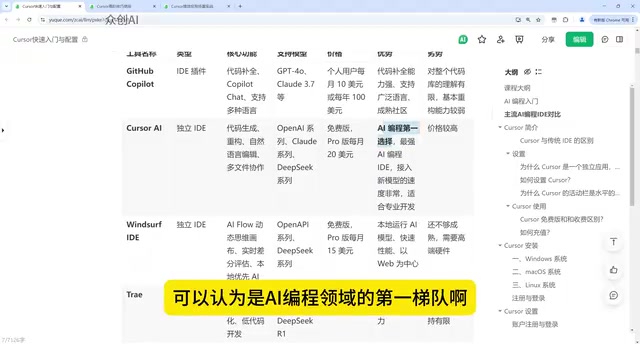
In terms of real-world adoption, Cursor is arguably the most widely used AI coding tool available today. For developers who want a deep AI coding experience, its mature graphical interface and strong code comprehension make it the most reliable choice to start with.
Windsurf: The Local Model Specialist
Windsurf is another capable AI coding tool, though it's slightly less mature than Cursor. Its defining characteristic is running AI models locally, which means it has meaningful hardware requirements — lower-spec machines will see a noticeably degraded experience.
Windsurf includes several distinctive features, such as AI Flow, a dynamic thinking canvas, and real-time diff evaluation. Because it runs models locally, it performs impressively in certain scenarios, but at the cost of being hardware-intensive. Its use case differs from Cursor's — it's better suited for users with local deployment or privacy requirements.
It's worth clarifying the architectural difference here. Most mainstream AI coding tools (like Cursor and Claude Code) use cloud-based API calls, sending code context to remote servers for inference — meaning your code passes through third-party infrastructure. Local model execution, by contrast, keeps all inference on the user's own machine, with code never leaving the local environment. For enterprise projects involving trade secrets or compliance requirements, this distinction carries significant value. That said, local inference demands substantial VRAM — typically 16GB or more of dedicated GPU memory to run mid-sized code models smoothly. This is the specific reason Windsurf is so hardware-intensive.
Domestic and Free Alternatives: Trae by ByteDance and Qwen Coder
If you'd rather not pay, Chinese-developed tools are worth considering first. ByteDance's Trae is also built on top of VS Code, offers solid functionality, and is currently free — making it a great choice for budget-conscious developers.
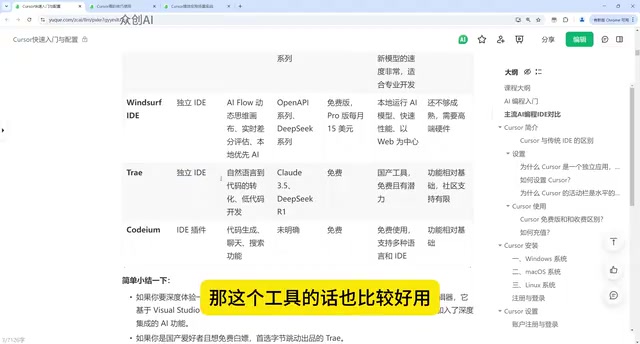
Alibaba's Qwen Coder, part of the Tongyi Qianwen family, is another similar AI coding tool — also free and offering a solid experience. It's clear that major Chinese tech companies are moving fast in the AI coding space, and their free pricing strategies significantly lower the barrier to entry for everyday developers.
Claude Code: The Command-Line Champion for Fully Automated Generation
Among recently emerged tools, Claude Code (CC) deserves special attention. Developed by Anthropic, it excels most in project generation and fully automated development workflows.
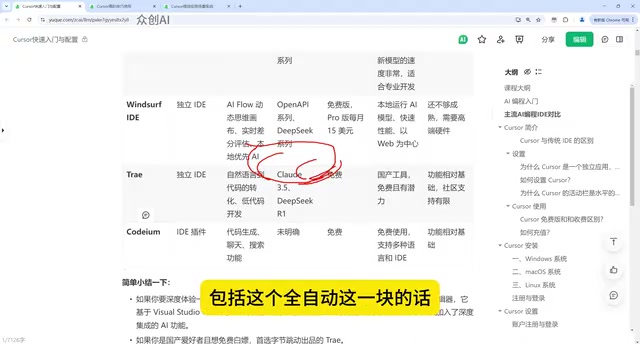
Claude Code takes a fundamentally different interaction approach from Cursor: it's command-line based, whereas Cursor provides a graphical interface. These two approaches each have their strengths — one excels at fully automated project generation, the other at visual, interactive development. The ideal approach is to use both together — leverage Claude Code for fully automated generation, then use Cursor for fine-grained adjustments. The combined workflow significantly boosts efficiency.
OpenAI is also expected to release a comparable coding tool, so competition in this space continues to heat up.
Claude Code's "fully automated project generation" capability is underpinned by Anthropic's ongoing optimization of Claude for long-context processing and multi-step task planning. Running in Agent mode within the command-line environment, it can autonomously execute the complete loop of "read files → understand requirements → generate code → run tests → fix errors" without requiring user intervention at each step. The difference from Cursor fundamentally comes down to a trade-off between automation level and human control: command-line interaction sacrifices the convenience of visual operation in exchange for less manual intervention and higher batch-processing efficiency. This makes it especially well-suited for building a project scaffold from scratch or bulk-generating boilerplate code. The combined workflow (CC for initial generation, Cursor for fine-tuning) is essentially about choosing the right level of human-AI collaboration density at each stage of the task.
Selection Guide: Decide Based on Your Needs and Budget
Overall, tool selection can follow two simple principles:
- Want a deep experience and mature tooling: Start with Cursor — its friendly graphical interface makes it the most widely adopted tool available.
- Don't want to pay: Go with ByteDance's Trae or Qwen Coder — both are free and highly capable.
- Need fully automated project generation: Add Claude Code to your workflow; combining it with Cursor lets each tool shine in its area of strength.
AI coding tools are evolving at a breakneck pace — new tools seem to appear every few months. Rather than agonizing over "which is best," it's more valuable to pick one, start using it, and internalize the logic of AI-assisted development. From there, you can flexibly combine tools based on your actual needs — and that's how you truly unlock their productivity potential.
Related articles

Waymo Restarts San Antonio Operations: Back on the Road Five Months After Flood Incident
Waymo resumes San Antonio Robotaxi service ~5 months after a vehicle was swept away in flooding. A look at what happened, why it took so long, and what it means for AV safety in extreme weather.
What Is AIOps? How AI Is Reshaping IT Operations
AIOps applies AI and machine learning to IT operations for anomaly detection, alert noise reduction, and root cause analysis — shifting teams from reactive to proactive.
CCC Sends Its Invitation: 40C3 Hacker Congress Themed "Model Citizens"
CCC announces its 40th Chaos Communication Congress (40C3) under the theme "Model Citizens," inviting hackers worldwide to examine surveillance and algorithmic governance.