AI Coding Tools Emerge as a New Attack Surface: Fake Claude Extension Steals Developer Information

A fake Claude extension was listed in the Cursor marketplace for 11 hours, infecting 5,000 developers and exposing AI tool supply chain risks.
A malicious plugin disguised as a Claude code extension was listed in the Cursor extension marketplace for about 11 hours, infecting an estimated 5,000 developers. The extension stole hostnames, usernames, Git emails, and public IPs, implanted the attacker's SSH public key into authorized_keys, and set up a persistence mechanism that retries every 60 seconds. Although the reverse tunnel usually failed due to permission requirements, the SSH key and persistence configuration had already landed, and uninstalling the extension could not remove them. The incident reveals that AI coding tools run with the developer's full permissions, and a fake tool is equivalent to a master key delivered through a trusted store. The article provides a three-step self-check method (check authorized_keys, investigate persistence mechanisms, run the cleanup script and rotate credentials) and four defense principles (prioritize official channels, minimize permissions, monitor anomalous outbound connections, and regularly audit persistence configurations).
AI coding assistants are becoming a new launchpad for attackers. A malicious plugin disguised as a Claude code extension appeared in Cursor's extension marketplace, infecting up to 5,000 developers in about 11 hours, stealing hostnames, usernames, Git emails, and public IPs, and implanting the attacker's SSH keys and persistent backdoors. This incident reveals a long-overlooked risk: AI tools run with the developer's full permissions, so once they are faked, they are a master key delivered through a trusted store.
Incident Review: An 11-Hour Supply Chain Attack
According to the YouTube channel "Bots leave logs," on October 29, a tampered Claude code extension appeared in Cursor's extension marketplace. The extension had two versions, neither of which was an official Anthropic build. Cursor estimated that up to 5,000 users were affected, and the malicious version was available for about 11 hours.
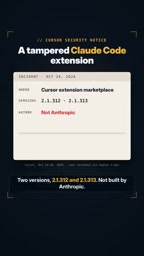
The attacker's operation was not complicated, but it was precise enough: after running, the extension sent the developer's hostname, username, Git email, and public IP to an external server, then added the attacker's SSH public key to the target machine's authorized_keys file and attempted to establish a reverse tunnel. To maintain access, the malicious code also set up a retry mechanism every 60 seconds.
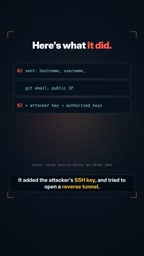
Fortunately, the reverse tunnel usually failed because it required administrator privileges. But the bad news is that the SSH key and persistence configuration had already landed—simply uninstalling the extension cannot remove them. This means that even if victims discover the anomaly and remove the plugin, the attacker may still retain a channel to re-enter.
Why AI Coding Tools Are a "New Attack Surface"
The core lesson of this incident is not a flaw in a particular extension, but the operating model of AI coding tools. Unlike ordinary editor plugins, AI coding assistants need to read your codebase, access the terminal, call cloud service credentials, and even execute commands on your behalf. It inherits the developer's full permissions—your code, your keys, your cloud environment.

This is exactly what attackers are targeting. A fake AI tool does not need to exploit complex vulnerabilities; it only needs to be listed in a trusted store to obtain high privileges actively granted by users as a "legitimate tool." This attack path bypasses traditional perimeter defenses and directly targets the softest part of the developer workflow: the natural trust in efficiency tools.
From a supply chain perspective, the review mechanism of the extension marketplace is facing challenges. The version uploaded by the attacker was not an official build, yet it gained exposure in a short time. Although the 11-hour window was short, for automated malicious scripts it was enough to complete information theft and persistence setup.
A supply chain attack is when an attacker does not directly attack the final target, but instead indirectly achieves the goal by compromising trusted third-party components, tools, or distribution channels. In the software field, typical forms include tampering with open-source dependency packages, hijacking update servers, and submitting fake plugins to official extension marketplaces. Such attacks are dangerous because they exploit users' natural trust in "trusted sources" and bypass traditional perimeter defenses such as firewalls and antivirus software. The incident in this article is a typical software supply chain attack: the malicious extension did not spread through vulnerability exploitation, but was actively installed by users as a "legitimate tool" through Cursor's extension marketplace listing mechanism.
Self-Check Immediately: Three Steps to Confirm Whether You Were Affected
If you installed a Claude-related Cursor extension around October 29, it is recommended that you perform the following checks immediately.
Check the authorized_keys file
Open your SSH authorized keys file (usually located at ~/.ssh/authorized_keys) and look for key entries containing an "SVC telemetry" marker. The keys used by attackers often carry such disguised comments to reduce the probability of discovery.

authorized_keys is the core configuration file used by OpenSSH for passwordless login, usually located at ~/.ssh/authorized_keys in the user's home directory. Each line in the file represents a public key authorized to log in to that account, in the format [options] key-type public-key-content comment. Once the attacker's public key is written into this file, a client holding the corresponding private key can directly log in to the target host via SSH without a password or second-factor verification. Because this file is a user-level configuration that can be modified with ordinary user privileges, it has become one of the preferred targets for malicious scripts to implant persistent backdoors. Attackers often add comments (such as disguising them as "SVC telemetry") to reduce the probability of detection during manual audits.
Investigate persistence mechanisms
Check whether new launch agents or scheduled tasks have appeared on the system. The malicious extension set up persistence logic that retries every 60 seconds, and such configurations usually leave traces. macOS users can check ~/Library/LaunchAgents and /Library/LaunchAgents, while Linux users can check crontab and systemd units.
Persistence mechanisms refer to a series of configurations deployed by attackers after an initial compromise to ensure they can regain access after a system reboot or termination of malicious processes. Common forms include: macOS Launch Agents (plist files located in ~/Library/LaunchAgents or /Library/LaunchAgents), Linux cron jobs and systemd service units, and Windows scheduled tasks and registry autorun entries. The "retry every 60 seconds" logic set by the malicious extension is usually implemented through such mechanisms—even if the initial process is terminated, the system will restart the malicious code within a short time. Auditing these locations is a standard step in incident response, because merely deleting malicious extension files often cannot remove registered persistence configurations.
Run the cleanup script and rotate credentials
Cursor officially provides a cleanup script, and affected users are advised to run it as soon as possible. But a cleanup script alone is not enough—because Git emails, usernames, and public IPs may already have leaked, and SSH keys have already been implanted, be sure to rotate all related credentials, including but not limited to code hosting platform tokens, cloud service access keys, and SSH key pairs.
Credential rotation refers to the process of proactively revoking old credentials and generating new ones after confirming that credentials may have been leaked. For developers, credentials that usually need to be rotated include: personal access tokens and SSH key pairs for code hosting platforms (such as GitHub and GitLab), access keys and temporary session tokens for cloud providers (such as AWS, Azure, and GCP), deployment keys for CI/CD systems, and passwords in database connection strings. The core principle of rotation is "assume compromise"—even if there is no direct evidence that a credential was used, as long as it existed on an affected host, it should be treated as untrusted. Running only the cleanup script without rotating credentials is like locking the door but leaving the key in the attacker's hands.
How Developers Should Defend Against Such Attacks
This incident is a reminder to everyone using AI coding tools: there is a real tension between convenience and security. Here are several actionable defense principles.
Prefer official channels. Third-party builds in extension marketplaces require extra caution. Confirm the publisher's identity before installation, and prioritize versions distributed directly by the tool's official source.
Minimize permission grants. Examine the scope of permissions requested by AI tools. If a code completion plugin asks for access to your cloud credentials or SSH directory, that is itself a red flag.
Monitor anomalous outbound connections. Reverse tunnels and periodic retries produce network traffic patterns. Deploying host-level monitoring and alerting on unusual outbound behavior can detect anomalies before data exfiltration.
Regularly audit persistence configurations. Startup items, scheduled tasks, and authorized_keys are common footholds attackers use to maintain access. Include these locations in routine security checks, rather than only investigating them ad hoc after an incident.
Conclusion
AI coding tools are reshaping development efficiency, but they also expose developers' local environments and cloud assets to a more complex threat model. The fake extension incident is not an isolated case, but a signal: when AI runs as you, the boundaries of trust must be redrawn. Check your machine, rotate credentials, and before you click "Install" next time, ask one more question—does this tool really come from the publisher it claims?
Related articles

DeepSeek Harness in Detail: DIY Your Own Software Like Building with LEGO
What is DeepSeek Harness? Using the metaphor of a car assembly platform, this article explains this equipment system of freely combinable functional modules, analyzes its spatiotemporal composability technical foundation, and shows how ordinary users can DIY exclusive software that does not exist on the market at extremely low cost.

DeepSeek Harness Step-by-Step Tutorial: Master DSH and Its Plugin Ecosystem in 50 Minutes
DeepSeek Harness step-by-step install tutorial: from Node.js environment setup to client installation, covering three plugin install methods — chat, marketplace, and command line — plus practical uses of local file access and plugin extensions.

DeepSeek Open-Sources Super-agent Architecture: A Turning Point for Proactive AI
DeepSeek's open-source Super-agent architecture proposes a new proactive AI paradigm: a central Agent dispatches tasks, sub-Agents execute autonomously, and humans only decide and accept. This article analyzes the watershed between passive and proactive AI, and the implementation logic of proactive Agents in scenarios like short-video lead generation.