AI Comic Series from Zero to Finished Product: A Complete Guide to Script Adaptation and Storyboarding

A beginner's guide to the two core steps of AI comic production: script adaptation and storyboarding.
Based on hands-on creator experience from Bilibili, this article breaks down the two foundational steps of AI comic production. Beginners face two main obstacles: copyright risk and short-form video adaptation. The solution involves sourcing licensed material and using role-specific AI prompts to reconstruct the original novel with a strong hook, cliffhanger endings, and trimmed pacing. Once the script is ready, storyboarding becomes the key to quality — with 15-second segment splits, at least three shots per segment, a locked visual style, and a fixed prompt structure. C-Dance 2.0 is recommended for beginners due to its superior stability.
AI comic series are becoming a lucrative side hustle for content creators. Some creators have shared how they went from zero AI experience to signing contracts and taking orders — spending just an hour or two after work each day — and earning impressive supplemental income within a single month. But behind all the excitement lies a harsh reality: 90% of aspiring creators can't even find the door in, and the reasons almost always come down to two obstacles: copyright risks and the ability to adapt content for short-form video. This article, based on hands-on insights shared by Bilibili creators, breaks down the two most fundamental and critical steps in AI comic production — script adaptation and storyboarding.
The Two Biggest Pitfalls for Beginners
Almost everyone entering the AI comic space will run into two unavoidable obstacles.
The first is finding legitimate source material and managing copyright risks. You might spend days polishing a finished piece, only to have the platform take it down for infringement — all that effort wasted. The solution is to source novel text from platforms that hold official licensed rights. Using this material to create AI comic promotional content is considered compliant use and helps you avoid copyright disputes. When selecting material, the key is to prioritize genres that align with your channel's niche. Once you've chosen a work, simply copy the body text from the first chapter.
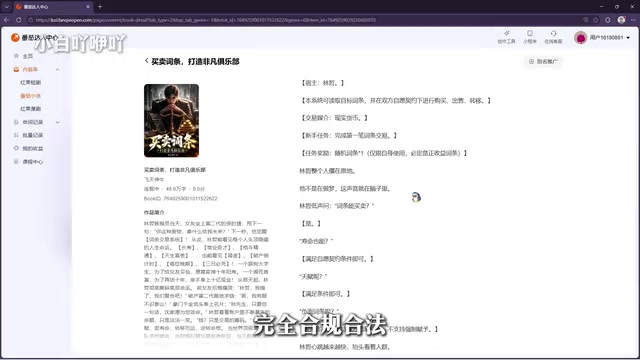
The second pitfall is not knowing how to adapt content for short-form video. Web novels naturally have a slower pace, and directly adapting the original text produces a sluggish, dull comic series that fails to retain viewers. Here's the golden rule: never use the raw original text directly to generate video. It must be adapted and rewritten into a script that matches the fast pace of short-form AI comic content.
Script Adaptation: Giving Your AI a Professional Identity
After pasting the copied novel text into your AI tool, there's one critical mistake beginners make all the time — always switch to Expert Mode, and don't take the easy route with Quick Mode. Quick Mode produces rough, low-quality output. The level of visual detail and narrative pacing simply doesn't meet the standards for short-form video production, and it won't hold viewers' attention.
When writing your adaptation prompt, the key is to assign the AI a specialized, vertical professional identity. The instruction should go something like this: Take on the role of a seasoned viral comic drama screenwriter and reconstruct and optimize the novel content. The overall pacing should be adapted for short-form comic video — create a strong hook at the opening, place a cliffhanger at the end of each episode, cut slow and unnecessary setup, eliminate redundant content that hurts viewer retention, and make reasonable adaptations to scenes that are difficult to visualize.
Many beginners wonder: why does the prompt need to be so detailed just for rewriting? The reason is that without a specialized professional identity, the AI generates generic, flat content that misses the emotional highs that make comic dramas engaging. Once you assign it the persona of a "seasoned comic drama screenwriter," it approaches the material from an industry creator's perspective — refining the plot, controlling the pacing, and producing content that's more aligned with the logic of short-form video traffic.
The Three Logical Pillars Behind the Adaptation Prompt
Strengthen the opening hook: The lifeblood of short-form video is the first three seconds. If you lose viewers at the start, nothing that comes after matters. Front-load the most conflict-driven, attention-grabbing content.
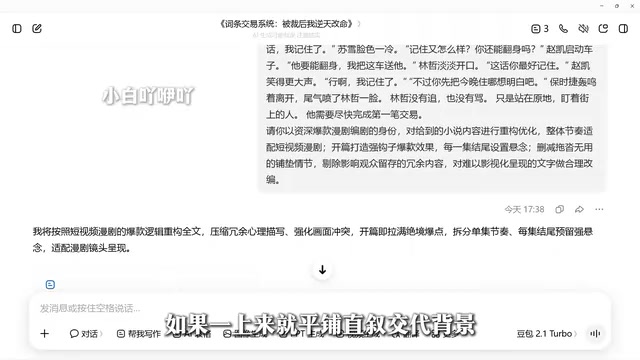
Plant a cliffhanger at the end of each episode: If each episode ends on a flat note, viewers will swipe away and never think to come back for more. Stop the story at its peak moment of conflict — right when viewers are most hooked — to spark curiosity, boost completion rates, and drive return viewership.
Cut redundant plot content: Web novels tend to be long and padded with filler transition scenes. Adapting them directly makes the pacing feel sluggish. Ruthlessly cut ineffective content and tighten the narrative so viewers stay engaged all the way through.
Comparing the original text with the adapted script, you'll clearly see a faster opening pace, more prominent conflict, and a noticeably improved viewing experience overall.
Storyboarding: The Core That Determines Final Quality
Finishing the script doesn't mean you're ready to generate video — that's just the foundational preparation. Storyboard design is the core factor that determines visual consistency and the overall quality of the finished product.
Simply put, a storyboard breaks down and maps out the complete story in detail — camera movements, character actions, visual details, voiceover, and sound effects are all planned in advance. Think of it as the production execution blueprint for your AI comic. A proper storyboard clearly specifies shot duration, shot type, frame content, dialogue/narration, and sound effects. With a complete storyboard script in hand, the subsequent steps — generating images, creating video, editing and assembling clips — can flow in a coherent, unified way, avoiding chaotic shots and disconnected storylines.
Many beginners end up with messy visuals and broken narratives in their finished products. The root cause is almost always skipping this critical storyboarding step.
Model Selection: Beginners Should Start with C-Dance 2.0
For model selection, creators recommend beginners start with C-Dance 2.0. While C-Dance 2.5 supports generating longer video clips, 2.0 offers better overall value — its stability and general performance are strong, effectively reducing the likelihood of visual distortion and character deformation, making it much more beginner-friendly. Explicitly specifying the model name in your prompt means the AI will generate storyboards and prompts that better match that model's generation logic, resulting in more controllable visual output.
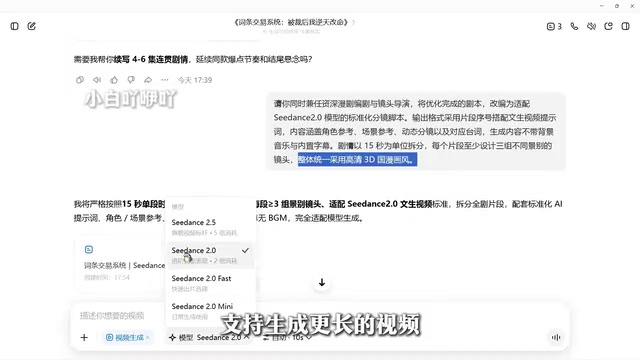
The version differences between text-to-video models essentially come down to trade-offs between generation length, visual stability, and computational cost. Newer versions (like 2.5) typically support longer single-segment video generation, but longer temporal modeling often means lower tolerance for ambiguous prompts — if character descriptions are even slightly vague, faces or limbs may drift and deform mid-generation, commonly known as "visual collapse." Older versions (like 2.0) generate shorter individual clips, but the model has more stable control over shorter time sequences, providing better character consistency. For beginners, the approach of assembling multiple short segments is actually more suitable — each segment can be reviewed independently, and the cost of regenerating a single failed segment is much lower. Specifying the model name in your prompt is so the AI automatically matches that model's parameter preferences and optimal description style when generating the storyboard script and prompts, rather than outputting generic template prompts.
Three Hard Rules for Storyboard Production
Break clips into 15-second segments: This aligns with tool limitations and ensures stable output. If you're using a tool that supports longer durations, you can adjust accordingly.
Design at least three shots per story segment: Without this requirement, the AI tends to output static shots where characters just stand around talking — as lifeless and pacing-free as a PowerPoint presentation, with no dynamic movement or narrative rhythm.
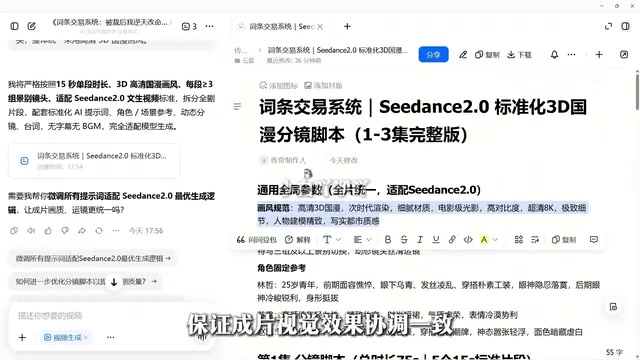
Lock in a consistent visual style throughout: Without specifying this upfront, the AI will randomly mix 3D, 2D, and even live-action aesthetics, causing jarring visual inconsistency across the entire video. The example case uses high-definition 3D Chinese animation style to ensure visual coherence.
The Fixed Structure for Prompts
The storyboard format uses "segment numbers" rather than conventional shot numbers. The reason is that a single 15-second segment contains multiple shots — using segment numbers to categorize them corresponds neatly to each individual video clip, keeping things organized and error-free during batch generation and assembly editing.
The text-to-video prompts the AI outputs should follow a fixed structure: character reference + scene reference + dynamic storyboard script + dialogue + no background music + no embedded subtitles. Character and scene references are used to upload corresponding reference images to lock in character appearance and art style. The dynamic storyboard script specifies shot type, camera technique, character emotion, and action for each shot. The dialogue section is for later voiceover work. Disabling the built-in music and subtitles leaves room for unified post-production packaging and avoids conflicts with later-added assets.
Once you have the storyboard script, go through it item by item and check the details carefully — pay particular attention to camera techniques, character movement and expressions, and dialogue text. If anything doesn't match your expectations, have the AI revise it immediately rather than letting errors compound.
The concept of storyboarding originates from traditional film and animation industries, where directors and storyboard artists used a series of hand-drawn sketches to pre-visualize each shot's composition, camera movement, and editing sequence. In the AI comic production workflow, storyboards serve essentially the same role as in traditional filmmaking — they act as the bridge that transforms a written script into an executable visual plan. Shot type (wide, full, medium, close-up, extreme close-up) determines the amount of visual information and emotional intensity in each frame. Camera technique (push in, pull out, pan, track, static) determines narrative pacing and viewing experience. Character movement and expression determine whether emotions are conveyed accurately. For AI generation tools, a storyboard script is essentially a structured prompt system — the more specific and detailed it is, the closer the AI's "understanding" of the visuals will be to the creator's intent, and the more controllable the output becomes. Skipping the storyboard and feeding the AI raw story text directly is equivalent to letting it make all the visual decisions freely. Shot style, shot type transitions, and character actions will all lack consistency, and a chaotic finished product is almost inevitable.
Summary
Script adaptation and storyboarding are the two foundational pillars of AI comic production. Getting these two steps right dramatically reduces the chance of a failed final product and repeated rework, and significantly improves overall production efficiency. The specifics of image generation and video creation belong to the next stage of advanced work. For beginners looking to break into this space, mastering the chain of compliant sourcing → viral script adaptation → professional storyboarding is the essential first step to making it in this field.
Related articles

Chain of Thought Isn't Just for AI: How Humans Can Use CoT to Improve Thinking Quality
Chain of Thought isn't just a prompt trick for large models. Starting from a Hacker News discussion, this article analyzes why CoT works for human thinking too, breaks down actionable ways to transfer it, and highlights the key differences between human CoT and machine CoT.
Cloudflare Teams Up with OpenAI: Closi…
Cloudflare Teams Up with OpenAI: Closing the Loop from Vulnerability Discovery to Defense with AI
Cloudflare uses OpenAI Daybreak to investigate security vulnerabilities and generate reviewable remediation plans, while developers use Codex to boost coding efficiency and quality.

Orca Multi-Agent Orchestration in Practice: A Guide to Parallel Collaboration with Claude and Codex
Orca is Stable AI's free open-source agent workbench supporting 34 agents like Claude Code and Codex in parallel. Learn its Git worktree isolation, multi-model orchestration, and mobile management.